
1. Introduction
This manual provides instructions for the installation, operation, and maintenance of the AJSWISH DFS602012H Cooling Fan. This fan is designed to provide efficient cooling for various electronic components, particularly within desktop computer systems.
2. Safety Information
- Always disconnect power to the device before installing or removing the cooling fan.
- Handle the fan carefully to avoid damage to the blades or wiring.
- Ensure the correct voltage (12V DC) and wire polarity are observed during connection to prevent damage to the fan or the host device.
- Do not obstruct the fan blades during operation.
3. Package Contents
Verify that all items are present in the package:
- 1 x AJSWISH DFS602012H Cooling Fan
4. Setup and Installation
Follow these steps to properly install your cooling fan:
- Prepare the Installation Area: Ensure the power to the host device is completely off and disconnected. Identify the designated mounting location for the 60x60x20mm fan.
- Mount the Fan: Align the fan with the mounting holes. Secure the fan using appropriate screws (not included) through the corner holes. Ensure the fan is firmly attached and does not vibrate excessively.
- Connect Power: Locate the 2-pin power connector on the fan. Connect it to the corresponding 12V DC power header on your device. Pay close attention to the wire polarity: typically, red is positive (+) and black is negative (-). Incorrect polarity may prevent the fan from operating or cause damage.
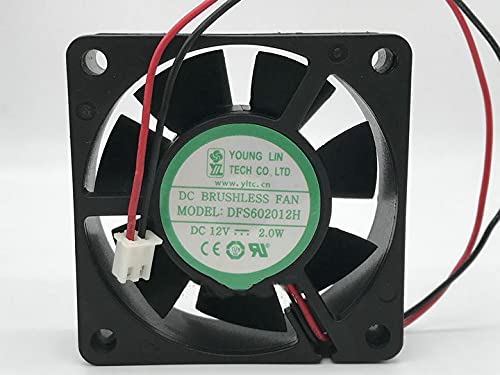
Image: Front view of the AJSWISH DFS602012H cooling fan, displaying its black frame and seven fan blades. The 2-wire connector is visible on the right side.
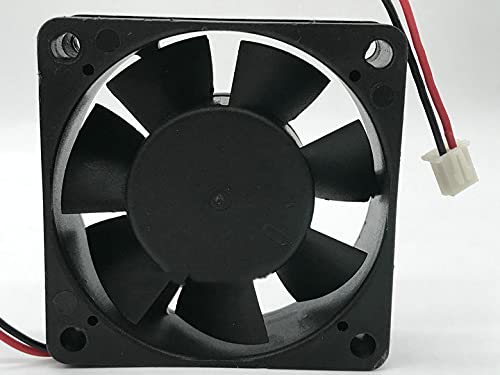
Image: A detailed view of the 2-pin power connector (white housing) with red and black wires extending from the cooling fan, ready for connection.
5. Operating Instructions
Once properly installed and connected, the AJSWISH DFS602012H Cooling Fan will begin operating automatically when power is supplied to the host device. No further user interaction is typically required for its basic function.
- Ensure adequate airflow around the fan for optimal cooling performance.
- Monitor the fan's operation periodically to ensure it is spinning freely and quietly.
6. Maintenance
Regular maintenance helps ensure the longevity and efficiency of your cooling fan:
- Dust Removal: Periodically inspect the fan blades and housing for dust accumulation. Use compressed air or a soft brush to gently remove dust. Ensure the fan is powered off before cleaning.
- Wire Inspection: Check the power wires and connector for any signs of wear, fraying, or loose connections.
- Obstruction Check: Ensure no cables or other components are obstructing the fan blades.
7. Troubleshooting
| Problem | Possible Cause | Solution |
|---|---|---|
| Fan does not spin. |
|
|
| Fan is unusually noisy. |
|
|
8. Specifications
| Brand | AJSWISH |
| Model | DFS602012H |
| Voltage | 12 Volts DC |
| Wattage | 2.0 Watts |
| Power Connector Type | 2-Pin |
| Dimensions (Approx.) | 60mm x 60mm x 20mm (6CM) |
| Cooling Method | Air |
| Compatible Devices | Desktop |
| Material | Metal, Plastic |
9. Warranty and Support
This product has been tested before leaving the factory. If you encounter any issues or require support, please contact the seller directly for assistance. They will provide guidance and discuss potential solutions.