
1. Important Safety Information
Before operating the LOPOM GPS Drone, please read and understand all safety guidelines. Failure to follow these instructions may result in injury, damage to the drone, or property damage.
- Fly in Open Areas: Always operate the drone in open, unobstructed spaces, away from people, buildings, and obstacles.
- Maintain Visual Line of Sight: Keep the drone within your visual line of sight at all times.
- Check Weather Conditions: Do not fly in strong winds (above 7-level wind resistance limit), rain, snow, or fog.
- Respect Local Regulations: Be aware of and comply with all local aviation laws and regulations regarding drone operation.
- Pre-Flight Check: Ensure all components are correctly assembled, batteries are charged, and propellers are securely attached before each flight.
- Battery Safety: Use only approved batteries and chargers. Do not overcharge or damage batteries.
- Avoid Interference: Do not fly near high-voltage power lines, communication towers, or areas with strong electromagnetic interference.
2. Product Overview and Components
The LOPOM GPS Drone is a foldable quadcopter equipped with a 4K camera, brushless motors, and intelligent flight features. This section details the main components included in your package.

Image: LOPOM GPS Drone package contents, including the drone, remote controller, two batteries, and a carrying case.
Package Contents:
- LOPOM GPS Drone
- Remote Control
- 4K Camera (integrated)
- Flight Batteries (2000 mAh Lithium Ion)
- USB Charging Cable
- Spare Propellers
- Screwdriver
- Carrying Case
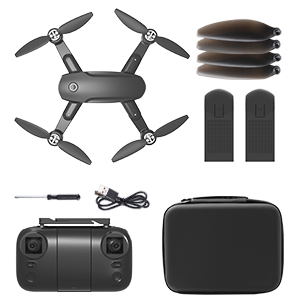
Image: Detailed view of all included accessories: drone, remote controller, batteries, spare propellers, screwdriver, and USB charging cable.
3. Setup Guide
3.1 Charging the Batteries
- Connect the flight battery to the USB charging cable.
- Plug the USB charging cable into a USB power adapter (not included) or a computer USB port.
- The indicator light on the battery will show charging status (refer to battery specific indicators for details).
- Charge the remote control battery using its dedicated charging port and cable, if applicable.
3.2 Installing Propellers
Ensure propellers are installed correctly according to their rotation direction (A and B). Match the propellers to the corresponding motor arms.
3.3 Preparing the Drone
- Unfold the drone arms carefully until they lock into position.
- Insert the charged flight battery into the drone's battery compartment until it clicks securely.
3.4 Remote Control Setup
- Install fresh batteries into the remote control.
- Mount your smartphone onto the remote control holder.
- Download and install the official LOPOM drone application from your smartphone's app store by scanning the QR code provided in the quick start guide.
3.5 Pairing and Calibration
- Power on the drone, then power on the remote control.
- Follow the on-screen instructions in the drone app to pair the drone with your smartphone via Wi-Fi (5G connection recommended for FPV).
- Perform compass calibration as instructed by the app or drone's indicator lights. This is crucial for accurate GPS functionality.
- Perform gyroscope calibration if necessary.
4. Operating Instructions
This section covers basic flight operations and advanced features of your LOPOM GPS Drone.
4.1 Basic Flight Controls
- Take-off/Landing: Use the one-key take-off/landing button on the remote or within the app.
- Throttle (Left Stick Up/Down): Controls altitude.
- Yaw (Left Stick Left/Right): Rotates the drone horizontally.
- Forward/Backward (Right Stick Up/Down): Moves the drone forward or backward.
- Left/Right (Right Stick Left/Right): Moves the drone sideways.
4.2 GPS Features

Image: The drone in flight, demonstrating GPS Intelligent Return to Home and 5G FPV transmission capabilities.
- GPS Auto Return to Home (RTH): The drone will automatically return to its take-off point if the battery is low, connection is lost, or the RTH button is pressed. Ensure a clear landing area.
- Follow Me Mode: The drone will automatically follow the remote controller or smartphone (if GPS is enabled on the device).
- Waypoint Flight: Plan a custom flight path by tapping points on the map within the app. The drone will fly along the designated route.
- Points of Interest (Orbit Mode): Select a central point on the map, and the drone will orbit around it at a specified radius and altitude.

Image: Visual representation of Tap Fly (designing a path) and Points of Interest (orbiting a location) intelligent flight modes.
4.3 Camera Operation

Image: Close-up of the drone's 4K camera, highlighting its gimbal for stable video capture.
- 4K Camera: The integrated camera captures high-resolution photos and videos.
- 5G WiFi FPV: Enjoy real-time video transmission to your smartphone for an immersive flight experience.
- Gesture Control: Use specific hand gestures to trigger photo or video recording (refer to app instructions for gesture details).
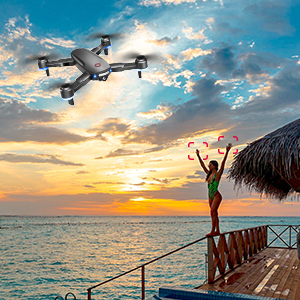
Image: A person demonstrating a gesture for photo or video capture with the drone.
4.4 Wind Resistance

Image: The drone flying against a mountainous backdrop, illustrating its 7-level wind resistance capability.
The drone features brushless motors providing enhanced stability and up to 7-level wind resistance, allowing for more stable flight in moderate wind conditions. However, it is always recommended to fly in calm weather for optimal performance and safety.
5. Maintenance
Proper maintenance ensures the longevity and optimal performance of your drone.
- Clean Regularly: Use a soft, dry cloth to clean the drone body, camera lens, and motors after each flight. Avoid using liquids.
- Inspect Propellers: Check propellers for any cracks, bends, or damage before and after each flight. Replace damaged propellers immediately.
- Battery Care: Store batteries in a cool, dry place. Do not fully discharge batteries for extended periods. Charge them to about 50-60% for long-term storage.
- Motor Inspection: Ensure motors are free from debris and spin smoothly.
- Firmware Updates: Check the official app periodically for any available firmware updates for the drone and remote control.
6. Troubleshooting
If you encounter issues with your LOPOM GPS Drone, refer to the following common problems and solutions.
| Problem | Possible Cause | Solution |
|---|---|---|
| Drone does not power on | Battery not charged or incorrectly installed. | Ensure battery is fully charged and correctly inserted. |
| Drone drifts during flight | Improper calibration or strong wind. | Perform compass and gyroscope calibration. Fly in calmer conditions. |
| No FPV video feed | Wi-Fi not connected or weak signal. | Ensure drone Wi-Fi is connected to your phone. Move closer to the drone or fly in an area with less interference. |
| Drone flies out of range / unresponsive | Exceeded control range or signal interference. | Always fly within the specified control range (approx. 1600ft). Avoid areas with strong interference. The drone should initiate Auto Return to Home if connection is lost. |
| Short flight time | Battery not fully charged, old battery, or aggressive flying. | Ensure batteries are fully charged. Consider replacing old batteries. Fly more conservatively. |
7. Specifications
Detailed technical specifications for the LOPOM GPS Drone with 4K Camera.
- Brand: LOPOM
- Model: GPS Drone with 4K Camera
- Color: Black
- Material: ABS
- Age Range (Recommended): Adult
- Skill Level: Beginner
- Video Capture Resolution: 4K
- Video Output Resolution: 1280x720 Pixels (FPV)
- Connectivity Technology: Wi-Fi, 5G FPV
- Control Type: Remote Control
- Battery Capacity: 2000 Milliamp Hours (Lithium Ion)
- Flight Time: Up to 40 minutes (manufacturer claim; actual flight time may vary based on conditions and usage)
- Control Range: Approximately 1600 feet (487 meters)
- Wind Resistance: 7-level
- Item Weight: Approximately 1.89 pounds (0.86 kg)
- Package Dimensions: 11.73 x 8.74 x 3.03 inches (29.79 x 22.20 x 7.70 cm)
- UPC: 717728449201
- ASIN: B0946ZCBSC