
Swissten Stonebuds (54100200)
SWISSTEN Stonebuds True Wireless Bluetooth Earphones User Manual
Model: Stonebuds (54100200)
1. Introduction
Thank you for choosing the SWISSTEN Stonebuds True Wireless Bluetooth Earphones. These earphones are designed to provide a high-quality audio experience with the convenience of true wireless technology. This manual will guide you through the features, setup, and operation of your new earphones.
Key Features:
- True wireless design with Bluetooth connectivity.
- Over 10 hours of total music playback (2.5 hours from earphones + 7.5 hours from charging case).
- Ergonomic shape for comfortable, all-day wear.
- Elegant design suitable for all users.
- Quick charging time of 2 hours.
2. Package Contents
Please check the package for the following items:
- SWISSTEN Stonebuds True Wireless Earphones (Left and Right)
- Portable Charging Case
- Charging Cable
- User Manual
3. Product Overview
Familiarize yourself with the components of your SWISSTEN Stonebuds earphones and charging case.
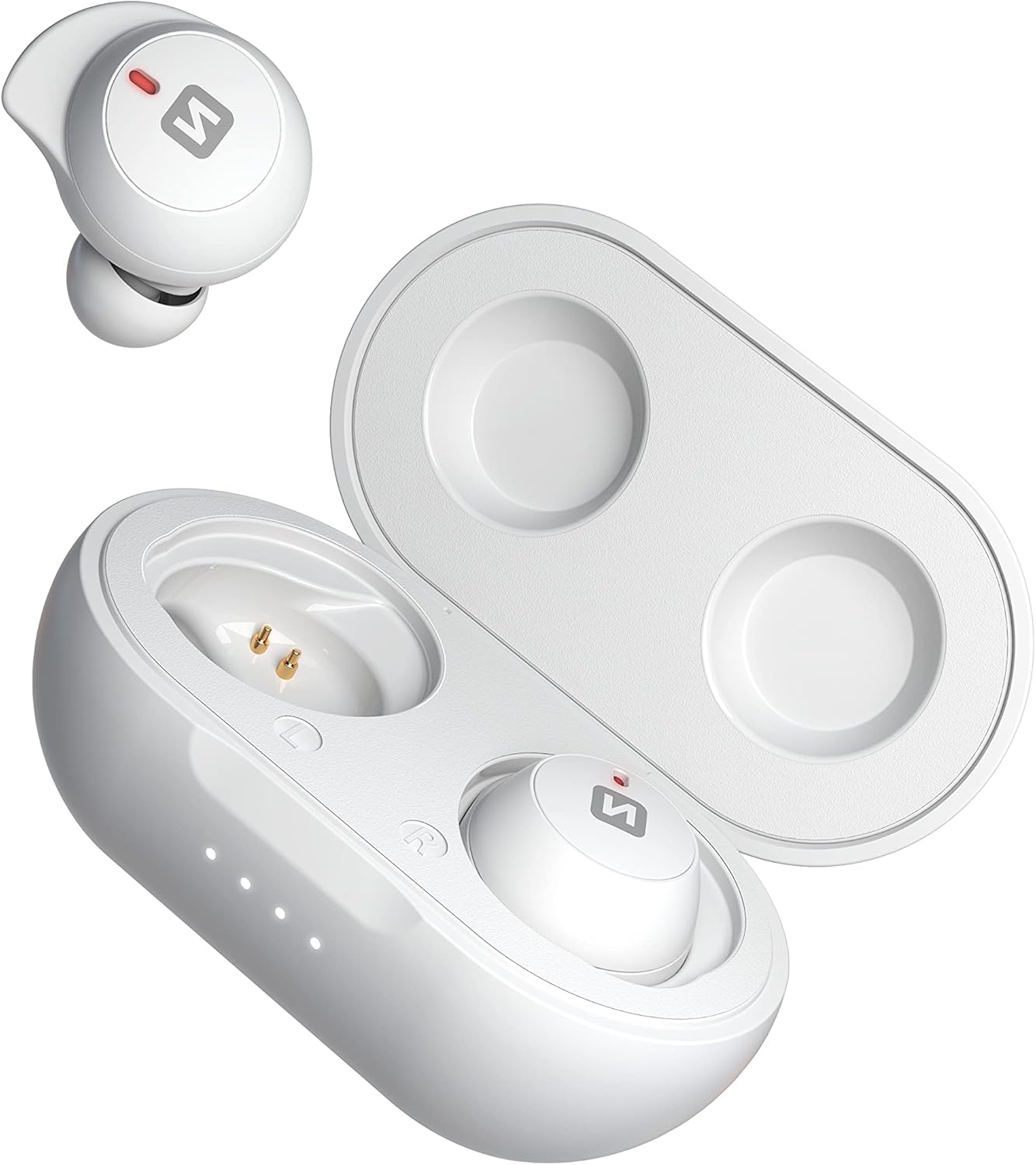
Image: SWISSTEN Stonebuds earphones shown with the charging case open, displaying the earbuds and charging contacts.

Image: A closer view of the SWISSTEN Stonebuds earphones securely placed inside their open charging case.

Image: Detailed view of the left and right SWISSTEN Stonebuds earphones, highlighting their ergonomic shape and charging points.

Image: The compact and sleek SWISSTEN Stonebuds charging case in its closed state, featuring the brand logo.

Image: The SWISSTEN Stonebuds earphones positioned next to their closed charging case, showcasing the complete set.

Image: A stylized view of the SWISSTEN Stonebuds earphones and open charging case against a dark background, with the 'STONEBUDS' branding.
4. Setup and First Use
4.1 Charging the Case and Earphones
- Before first use, fully charge the charging case and earphones.
- Place both earphones into the charging case. Ensure they are correctly seated and the charging indicators light up.
- Connect the charging cable to the charging port on the case and plug the other end into a USB power source (e.g., computer, wall adapter).
- The indicator lights on the case will show the charging status. A full charge takes approximately 2 hours.
4.2 Pairing with a Bluetooth Device
- Open the charging case. The earphones will automatically power on and enter pairing mode.
- On your device (smartphone, tablet, etc.), enable Bluetooth.
- Search for new Bluetooth devices. You should see "SWISSTEN Stonebuds" in the list.
- Select "SWISSTEN Stonebuds" to connect. Once connected, you will hear a confirmation tone, and the earphone indicators will stop flashing.
- If pairing fails, turn off Bluetooth on your device, place the earphones back in the case, close it, and then repeat the steps.
5. Operating Instructions
5.1 Power On/Off
- Power On: Open the charging case, and the earphones will automatically power on. Alternatively, press and hold the touch control area on both earphones for 3 seconds.
- Power Off: Place the earphones back into the charging case and close the lid. Alternatively, press and hold the touch control area on both earphones for 5 seconds.
5.2 Music Playback
- Play/Pause: Tap the touch control area on either earphone once.
- Next Track: Double-tap the touch control area on the right earphone.
- Previous Track: Double-tap the touch control area on the left earphone.
- Volume Up: Triple-tap the touch control area on the right earphone.
- Volume Down: Triple-tap the touch control area on the left earphone.
5.3 Call Management
- Answer/End Call: Tap the touch control area on either earphone once.
- Reject Call: Press and hold the touch control area on either earphone for 2 seconds.
5.4 Voice Assistant
- Activate Voice Assistant: Press and hold the touch control area on either earphone for 2 seconds (when not on a call).
6. Battery and Charging
The SWISSTEN Stonebuds offer extended listening time with their portable charging case.
- Earphone Battery Life: Up to 2.5 hours on a single charge.
- Charging Case Capacity: Provides an additional 7.5 hours of listening time (multiple recharges).
- Total Playback Time: Over 10 hours with the charging case.
- Charging Time: Approximately 2 hours for a full charge of the case and earphones.
Always ensure the charging contacts on the earphones and inside the case are clean and dry before charging.
7. Maintenance and Care
To ensure the longevity and optimal performance of your SWISSTEN Stonebuds, follow these care guidelines:
- Cleaning: Use a soft, dry, lint-free cloth to clean the earphones and charging case. Do not use abrasive cleaners, alcohol, or chemical solvents.
- Storage: When not in use, store the earphones in their charging case to protect them and keep them charged.
- Avoid Water: The earphones are not waterproof. Avoid exposure to water, moisture, or extreme temperatures.
- Handle with Care: Do not drop, disassemble, or attempt to repair the earphones or charging case yourself. This may void the warranty.
8. Troubleshooting
If you encounter issues with your SWISSTEN Stonebuds, try the following solutions:
| Problem | Possible Solution |
|---|---|
| Earphones not pairing/connecting. |
|
| Only one earphone working. |
|
| No sound or low volume. |
|
| Charging case not charging. |
|
9. Specifications
| Feature | Detail |
|---|---|
| Model Name | Stonebuds |
| Item Model Number | 54100200 |
| Brand | Swissten |
| Connectivity Technology | Wireless (Bluetooth) |
| Wireless Communication Technology | Bluetooth |
| Ear Placement | In-Ear |
| Form Factor | In-Ear |
| Color | White |
| Material | Plastic |
| Impedance | 16 ohms |
| Noise Isolation | Acoustic Isolation |
| Sensitivity | 105 dB |
| Earphone Battery Capacity | 2 x 45 mAh |
| Case Battery Capacity | 300 mAh |
| Battery Composition | Lithium-polymer |
| Rechargeable Battery | Yes |
| Charging Time | 2 hours |
| Included Components | Cable |
| Age Range (Description) | Adult |
| Manufacturer | Swissten |
| Date First Available on Amazon.com.be | April 15, 2022 |
10. Warranty and Support
For warranty information and customer support, please refer to the documentation provided with your purchase or visit the official Swissten website. Keep your proof of purchase for any warranty claims.
Spare Parts Availability: Information unavailable on spare parts.
Software Updates Guaranteed Until: Information not available.
Ask a question about this manual
Ask about setup, troubleshooting, compatibility, parts, safety, or missing instructions. Manuals+ will review the question and use this page’s manual context to help answer it.