
1. Introduction and Overview
Thank you for choosing the Budweiser Bud Light Wireless Earbuds. These earbuds offer high-definition stereo sound and a comfortable ergonomic design, all housed within a unique can-shaped charging case. Featuring Bluetooth 5.0 technology, they provide a stable wireless connection for up to 9 hours of playtime on a single charge. This manual will guide you through the setup, operation, and maintenance of your new earbuds.

Image 1.1: Bud Light Wireless Earbuds in their can-shaped charging case.
2. What's in the Box
Your Budweiser Bud Light Wireless Earbuds package includes the following items:
- Two (2) Bud Light Wireless Earbuds
- One (1) Can-Shaped Charging Case
- One (1) USB Charging Cable
- User Manual (this document)
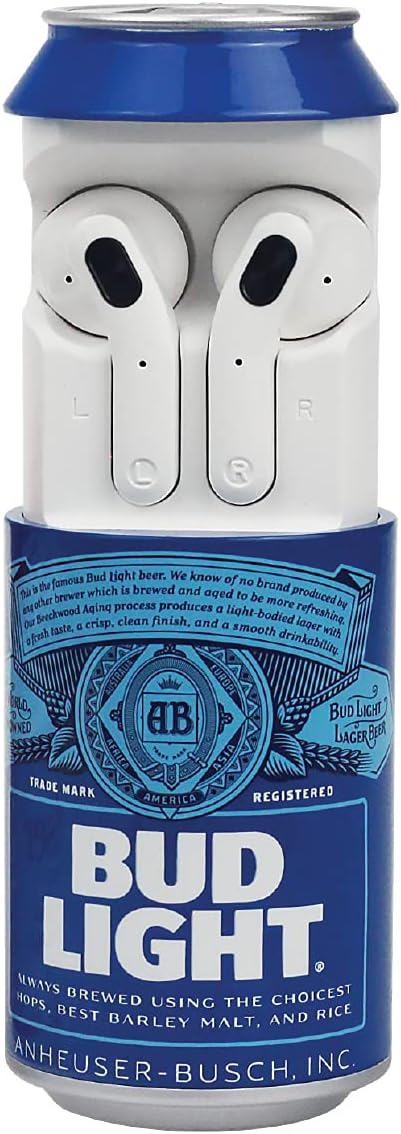
Image 2.1: The Bud Light Wireless Earbuds and their charging case.
3. Setup
3.1 Charging the Earbuds and Case
Before first use, fully charge the earbuds and the can-shaped charging case. The case provides up to 3 full charges for the earbuds, extending your listening time.
- Place the earbuds into their respective slots in the charging case. Ensure they are seated correctly.
- Connect the provided USB charging cable to the charging port on the bottom of the can-shaped case.
- Plug the other end of the USB cable into a compatible USB power source (e.g., computer, wall adapter).
- The indicator lights on the case and/or earbuds will illuminate to show charging status. Refer to the LED indicator section for specific light patterns.
- Once fully charged, disconnect the charging cable.
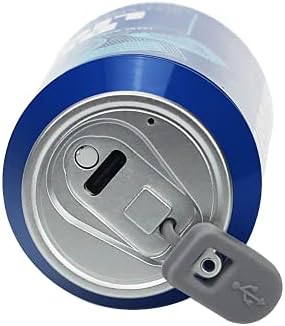
Image 3.1: USB charging port on the can-shaped charging case.
3.2 Bluetooth Pairing
The earbuds utilize Bluetooth 5.0 for a stable and efficient connection. They feature auto-pair functionality for convenience.
- Ensure the earbuds are charged and placed in the charging case.
- Open the lid of the charging case. The earbuds will automatically enter pairing mode.
- On your device (smartphone, tablet, etc.), navigate to the Bluetooth settings.
- Search for available devices and select "Bud Light Earbuds" (or similar name) from the list.
- Once connected, your device will confirm successful pairing. The earbuds will automatically connect to the last paired device when removed from the case.
4. Operating Instructions
4.1 Power On/Off
- Power On: The earbuds automatically power on when removed from the charging case.
- Power Off: The earbuds automatically power off when placed back into the charging case and the lid is closed.
4.2 Touch Controls (Media Control)
The earbuds feature touch-sensitive controls for managing audio playback and calls.
- Play/Pause: Tap either earbud once.
- Next Track: Double-tap the right earbud.
- Previous Track: Double-tap the left earbud.
- Answer/End Call: Tap either earbud once during an incoming call.
- Reject Call: Press and hold either earbud for 2 seconds during an incoming call.
- Activate Voice Assistant: Triple-tap either earbud.
4.3 Audio Quality
Experience immersive, high-definition stereo sound with deep bass and crisp highs. The ergonomic design ensures a comfortable fit for extended listening sessions, whether for music, calls, or other audio content.
5. Maintenance
Proper care will extend the life of your earbuds.
- Cleaning: Gently wipe the earbuds and charging case with a soft, dry, lint-free cloth. Do not use harsh chemicals or abrasive materials.
- Water Resistance: The earbuds are water-resistant. However, they are not waterproof. Avoid submerging them in water or exposing them to heavy rain. Dry them thoroughly if they get wet.
- Storage: When not in use, store the earbuds in their charging case to protect them and keep them charged. Store in a cool, dry place away from extreme temperatures.
6. Troubleshooting
If you encounter issues with your earbuds, try the following solutions:
- Earbuds not pairing: Ensure both earbuds are charged. Place them back in the case, close the lid, wait a few seconds, then open the lid again to re-enter pairing mode. On your device, forget the "Bud Light Earbuds" from your Bluetooth list and attempt to pair again.
- Only one earbud working: This can sometimes occur if the earbuds are not properly synced. Try placing both earbuds back in the charging case, closing the lid, and then removing them simultaneously. If the issue persists, try resetting your device's Bluetooth connection.
- No sound or poor sound quality: Check the volume levels on both your device and the earbuds. Ensure the earbuds are clean and free of debris. Confirm the earbuds are properly connected to your device.
- Connection drops frequently: Ensure your device is within the Bluetooth range (up to 10 meters) and there are no significant obstructions between your device and the earbuds. Avoid placing your device in areas that might block the signal, such as a back pocket.
- Earbuds not charging: Ensure the charging cable is securely connected to both the case and the power source. Verify the power source is active. Check for any debris in the charging port.
If these steps do not resolve the issue, please contact customer support.
7. Specifications
| Model Name | Budweiser True Wireless Earbuds with Can Shaped Charging Case |
| Model Number | 810002175503 |
| Connectivity Technology | Wireless (Bluetooth) |
| Bluetooth Version | 5.0 |
| Bluetooth Range | 10 Meters |
| Battery Life (Playtime) | Up to 9 Hours |
| Charging Case Material | High-quality material |
| Charging Case Weight | 28 Grams |
| Control Type | Touch, Media Control |
| Ear Placement | In Ear |
| Water Resistance Level | Water Resistant |
| Audio Driver Type | Dynamic Driver |
| Built-in Microphone | Yes |
| UPC | 810002175503 |
8. Warranty and Support
For warranty information and customer support, please refer to the documentation included with your purchase or visit the manufacturer's official website. Keep your proof of purchase for any warranty claims.