1. Introduction
This manual provides essential instructions for the safe and efficient operation, installation, and maintenance of your SaNzia 6000W UPS Sine Wave Inverter Solar Converter, Model EPS-600060. This device is designed to convert DC power from batteries or solar panels into stable AC power, suitable for various household, vehicle, solar, and industrial applications. Please read this manual thoroughly before using the product.
2. Safety Instructions
Observe the following safety precautions to prevent injury or damage to the inverter:
- Electrical Safety: Ensure all connections are secure and correctly polarized. Incorrect wiring can cause severe damage to the inverter and connected devices, and poses a risk of electric shock.
- Ventilation: Install the inverter in a well-ventilated area. Do not block the ventilation openings or fans. Overheating can lead to reduced performance or failure.
- Environment: Avoid exposing the inverter to water, moisture, direct sunlight, high temperatures, or flammable materials.
- Grounding: The inverter must be properly grounded to prevent electric shock.
- Servicing: Do not attempt to open or service the inverter yourself. Refer all servicing to qualified personnel.
- Battery Safety: When connecting to batteries, ensure proper battery type and voltage. Wear protective eyewear and clothing. Batteries can produce explosive gases.
- Load Capacity: Do not exceed the inverter's rated output power. Overloading can damage the inverter and connected appliances.
3. Product Overview
The SaNzia 6000W UPS Sine Wave Inverter Solar Converter features a robust design with clear indicators and essential connection points.
Front Panel

Image: Front panel of the SaNzia 6000W Inverter. It features two digital displays, one for 'BATTERY VOLTAGE' and another for 'OUTPUT VOLTAGE'. A 'FAULT' indicator light is located between them. In the center, there is a red 'POWER SWITCH' with 'ON' and 'OFF' positions. On either side of the power switch, there are two 'OUTPUT 220VAC' universal AC outlets.
Rear Panel
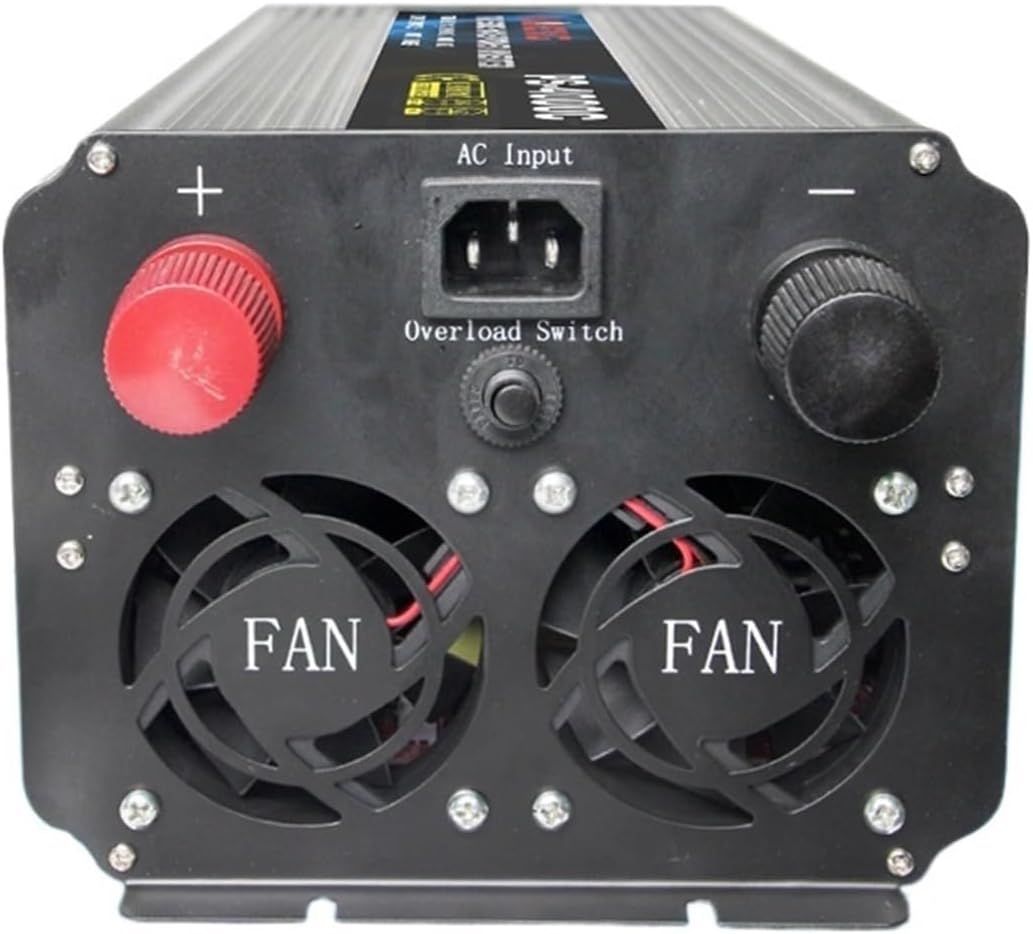
Image: Rear panel of the SaNzia 6000W Inverter. It includes large red and black terminals for battery connection (positive and negative). A standard 'AC Input' port is centrally located, along with an 'Overload Switch'. Two prominent cooling fans are visible at the bottom, labeled 'FAN'.
4. Setup
Follow these steps for proper installation and setup:
- Mounting: Choose a dry, well-ventilated, and cool location for mounting the inverter. Ensure adequate space around the unit for airflow.
- Battery Connection:
- Ensure the inverter's power switch is in the 'OFF' position.
- Connect the positive (+) terminal of your battery bank to the red (+) terminal on the inverter.
- Connect the negative (-) terminal of your battery bank to the black (-) terminal on the inverter.
- Use appropriate gauge cables for the current draw to minimize voltage drop and ensure safety.
- Grounding: Connect the inverter's grounding terminal to a reliable earth ground.
- AC Input (if applicable): If using the UPS function, connect the AC input cable from your utility grid to the 'AC Input' port on the rear panel.
- Load Connection: Plug your AC appliances into the 'OUTPUT 220VAC' outlets on the front panel. Ensure the total power consumption of connected devices does not exceed the inverter's continuous output power.
5. Operating Instructions
To operate your SaNzia inverter:
- Power On: After all connections are secure, switch the 'POWER SWITCH' on the front panel to the 'ON' position.
- Monitor Displays:
- The 'BATTERY VOLTAGE' display will show the current DC voltage of your battery bank.
- The 'OUTPUT VOLTAGE' display will show the AC output voltage (nominally 220V).
- Fault Indicator: If the 'FAULT' indicator light illuminates, refer to the Troubleshooting section.
- Power Off: To turn off the inverter, first disconnect all AC loads, then switch the 'POWER SWITCH' to the 'OFF' position.
- Overload Protection: In case of an overload, the inverter will automatically shut down. Reduce the load and press the 'Overload Switch' on the rear panel to reset the inverter.
6. Maintenance
Regular maintenance ensures optimal performance and longevity of your inverter:
- Cleaning: Periodically clean the exterior of the inverter with a dry, soft cloth. Ensure ventilation openings and cooling fans are free from dust and debris. Do not use liquid cleaners.
- Connection Checks: Regularly inspect all electrical connections (battery, AC input, output) for tightness and corrosion. Loose connections can cause overheating and power loss.
- Battery Health: Monitor your battery bank's health and charge level. Ensure batteries are maintained according to their manufacturer's recommendations.
- Fan Operation: Ensure the cooling fans are operating correctly and quietly. Unusual noises or lack of fan operation may indicate a problem.
7. Troubleshooting
If you encounter issues with your inverter, refer to the following common problems and solutions:
| Problem | Possible Cause | Solution |
|---|---|---|
| Inverter does not power on | Loose battery connections, low battery voltage, faulty power switch. | Check battery connections. Charge or replace batteries. Ensure power switch is fully 'ON'. |
| No AC output | Overload, inverter in fault mode, low battery voltage, AC input issue (if UPS mode). | Reduce load and reset overload switch. Check battery voltage. Verify AC input connection. |
| 'FAULT' indicator illuminated | Overload, short circuit, over-temperature, input over/under voltage. | Turn off inverter, disconnect loads. Check for short circuits. Allow to cool. Verify input voltage is within range (175V-265V AC). Restart inverter. |
| Low output voltage | Low battery voltage, excessive load, poor battery cable connections. | Charge batteries. Reduce load. Check and tighten battery cable connections. |
If the problem persists after attempting these solutions, contact customer support or a qualified technician.
8. Specifications
| Feature | Specification |
|---|---|
| Model | EPS-600060 |
| Type | Household, Vehicle, Solar, Industrial Use |
| Product Certification | CE |
| Circuit Topology | Push-pull |
| Output Voltage Waveform | Pure Sine Wave |
| Input Voltage Range | 175V-265V AC |
| Output Voltage | 220V AC |
| Rated/Continuous Output Power | 5000W |
| Maximum Output Power | 6000W |
| Inverter Efficiency | 85% |
| Voltage Regulation | 5% |
| Load Regulation | 10% |
| Output Frequency | 50Hz |
| Overall Dimensions (L x W x H) | 390mm x 180mm x 140mm |
| Item Weight | 10 kg (22 pounds) |
| Brand | SaNzia |
| ASIN | B093X364PR |
9. Warranty and Support
For specific warranty information, please refer to the documentation provided at the time of purchase or contact your retailer. If you require technical assistance or have questions not covered in this manual, please contact SaNzia customer support through your purchase platform or the manufacturer's official channels.