
1. Introduction
Thank you for choosing the Thermor Malicio 3 Connected Electric Water Heater. This manual provides essential information for the safe and efficient installation, operation, and maintenance of your new appliance. Please read these instructions carefully before installation and keep them for future reference.
The Malicio 3 is a 120-liter vertical wall-mounted electric water heater designed for households of 4 to 5 people, featuring a 2400W heating element and smart connectivity for optimized energy consumption and comfort.
2. Safety Instructions
Always observe the following safety precautions to reduce the risk of fire, electric shock, injury, or damage to the appliance.
- Electrical Safety: Ensure the power supply matches the specifications of the water heater. Installation must be performed by a qualified electrician in accordance with local regulations. Disconnect power before any maintenance or repair.
- Water Pressure: Install a pressure relief valve as required by local codes. Do not block the discharge pipe of the pressure relief valve.
- Temperature: Hot water can cause severe burns. Exercise caution when using hot water. Consider installing thermostatic mixing valves to prevent scalding.
- Installation Location: Install the water heater in a location protected from freezing temperatures and where water leakage would not cause damage to the surrounding area.
- Children and Vulnerable Persons: This appliance can be used by children aged 8 years and above and persons with reduced physical, sensory or mental capabilities or lack of experience and knowledge if they have been given supervision or instruction concerning use of the appliance in a safe way and understand the hazards involved. Children shall not play with the appliance. Cleaning and user maintenance shall not be made by children without supervision.
- Maintenance: Only qualified personnel should perform repairs. Use only genuine replacement parts.
3. Product Overview
The Thermor Malicio 3 is designed for efficient and connected hot water production. Key components include the heating element, anode, tank, and smart control panel.
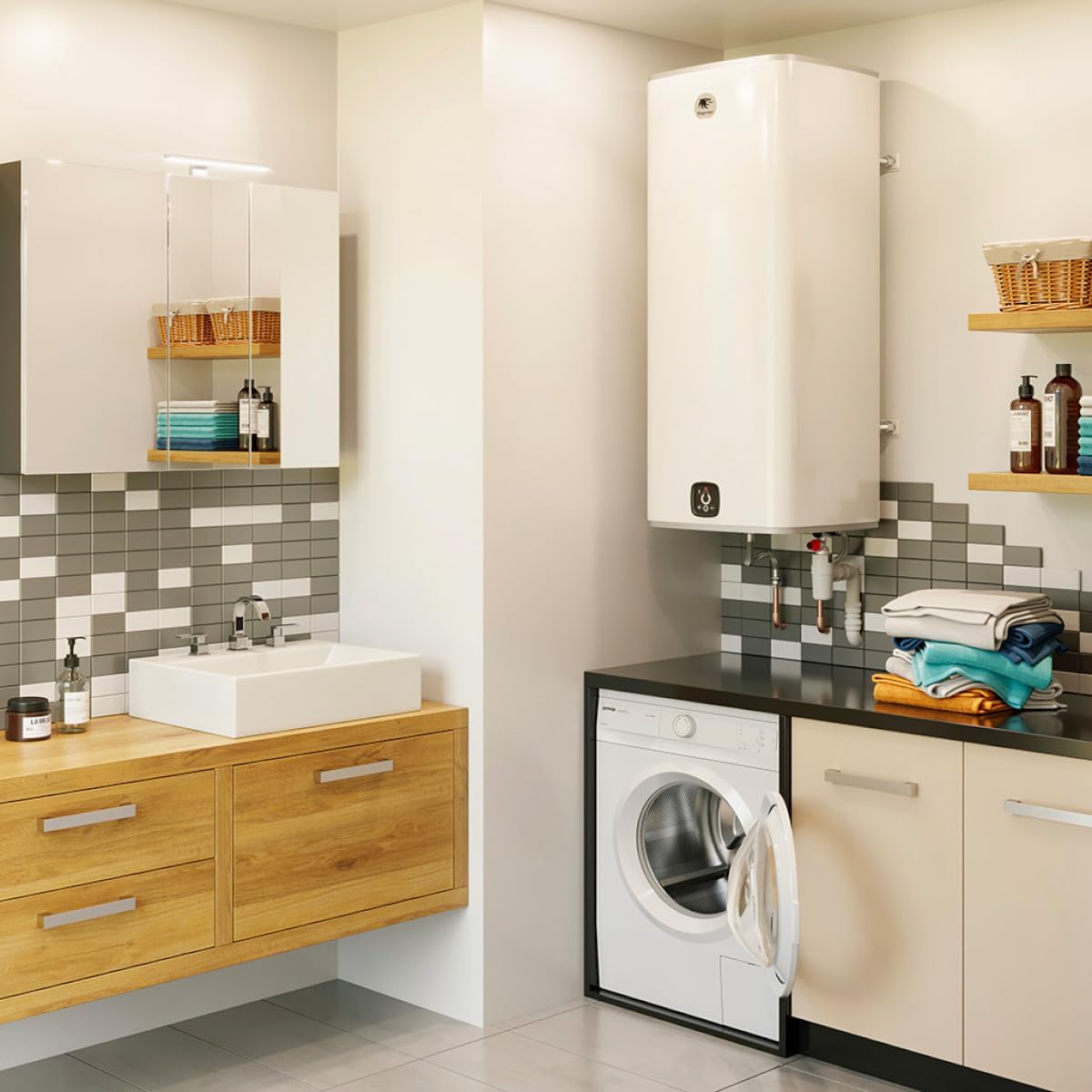
Figure 3.1: The Thermor Malicio 3 water heater mounted vertically on a wall in a utility room, next to a washing machine and sink.

Figure 3.2: Cross-section diagram illustrating the internal components of the water heater, including the tank, heating element, and anode.
3.1 Control Panel
The intuitive control panel allows for easy management of your water heater settings and monitoring of hot water availability.

Figure 3.3: Close-up of the digital control panel, showing a water droplet icon indicating water level, Wi-Fi connectivity icon, temperature adjustment buttons (+/-), and ECO+ mode button.
- Water Level Indicator: Displays the available hot water volume.
- Wi-Fi Indicator: Shows the status of the internet connection for smart features.
- Temperature Adjustment: Buttons to increase or decrease the desired water temperature.
- ECO+ Mode: Activates energy-saving mode.
- Boost Mode: Provides a rapid heating cycle for additional hot water on demand.
4. Installation and Setup
Installation should only be performed by a qualified professional. Refer to the detailed installation guide provided with the product for specific instructions and diagrams.
4.1 Mounting the Water Heater
- Choose a suitable vertical wall location capable of supporting the full weight of the water heater when filled with water (approx. 156 kg for 120L model).
- Mark the drilling points for the wall brackets according to the provided template.
- Drill holes and securely fasten the mounting brackets to the wall.
- Carefully lift and hang the water heater onto the installed brackets. Ensure it is level and securely seated.
4.2 Plumbing Connections
- Connect the cold water inlet to the designated port, typically marked with blue. Install a shut-off valve and a pressure relief valve.
- Connect the hot water outlet to the designated port, typically marked with red.
- Ensure all connections are watertight.
- Fill the tank with water before connecting to power. Open a hot water tap to allow air to escape until water flows steadily.
4.3 Electrical Connection
- Ensure the main power supply is OFF at the circuit breaker.
- Connect the water heater to a dedicated electrical circuit with appropriate overcurrent protection, as specified in the product's technical data.
- Follow the wiring diagram provided in the full installation manual.
- Once all connections are secure and the tank is filled, restore power.
4.4 Smart Connectivity Setup
- Download the Thermor Connect application from your smartphone's app store.
- Follow the in-app instructions to create an account and pair your Malicio 3 water heater with your home Wi-Fi network.
- The Wi-Fi indicator on the control panel will confirm a successful connection.
5. Operating Instructions
Your Thermor Malicio 3 water heater offers various modes and settings for optimal comfort and energy efficiency.
5.1 Initial Start-up
After installation and power connection, the water heater will begin heating water to its default temperature setting. This may take several hours for the first full tank.
5.2 Adjusting Temperature
- Use the + and - buttons on the control panel to set your desired water temperature.
- Alternatively, adjust the temperature remotely via the Thermor Connect app.
5.3 Operating Modes
- Smart/Auto Mode: The water heater learns your hot water consumption patterns and adjusts heating cycles automatically to optimize energy use while ensuring hot water availability. This is the recommended default mode.
- ECO+ Mode: Activates an enhanced energy-saving profile, potentially reducing hot water availability during off-peak times. Press the ECO+ button on the control panel or select via the app.
- Boost Mode: For situations requiring extra hot water quickly (e.g., guests), activate Boost mode. This initiates a rapid heating cycle. Deactivates automatically after a set period or when the tank is fully heated.
- Absence Mode: If you are away for an extended period, activate Absence mode via the app to maintain a minimal temperature, preventing freezing and saving energy.
5.4 Monitoring via App
The Thermor Connect app allows you to:
- View current hot water availability.
- Adjust temperature settings.
- Switch between operating modes.
- Monitor energy consumption.
- Receive notifications and alerts.
6. Maintenance
Regular maintenance ensures the longevity and efficiency of your water heater. Always disconnect power before performing any maintenance.
6.1 Annual Inspection
It is recommended to have your water heater inspected annually by a qualified professional. This inspection should include:
- Checking the pressure relief valve for proper operation.
- Inspecting electrical connections for tightness and corrosion.
- Checking for any signs of leaks around plumbing connections.
- Inspecting the anode rod (if applicable) for depletion and replacing if necessary to prevent tank corrosion.
6.2 Descaling (Hard Water Areas)
In areas with hard water, mineral deposits (limescale) can accumulate on the heating element and inside the tank, reducing efficiency. Descaling should be performed periodically by a professional. The frequency depends on water hardness.
6.3 Cleaning
Clean the exterior of the water heater with a soft, damp cloth. Do not use abrasive cleaners or solvents.
7. Troubleshooting
Before contacting customer support, please refer to the following common issues and solutions.
| Problem | Possible Cause | Solution |
|---|---|---|
| No hot water or insufficient hot water. |
|
|
| Water is too hot. | Thermostat setting too high. | Decrease temperature setting. |
| Leaking from the water heater. |
|
|
| Wi-Fi connection issues. |
|
|
8. Specifications
Technical specifications for the Thermor Malicio 3 Connected Electric Water Heater (Model 231072).
- Model: 231072
- Brand: Thermor
- Type: Electric Water Heater, Connected
- Capacity: 120 Liters
- Power: 2400W
- Installation: Vertical Wall-Mounted
- Dimensions (L x W x H): Approximately 1 x 1 x 1 cm (Note: This dimension from product data appears to be a placeholder. Refer to product packaging or official Thermor documentation for accurate dimensions.)
- Weight (Empty): 36 Kilograms
- Color: White
- Energy Class: B (as per energy label)
- Annual Energy Consumption: 1306 kWh/annum (as per energy label)
- Noise Level: 15 dB (as per energy label)
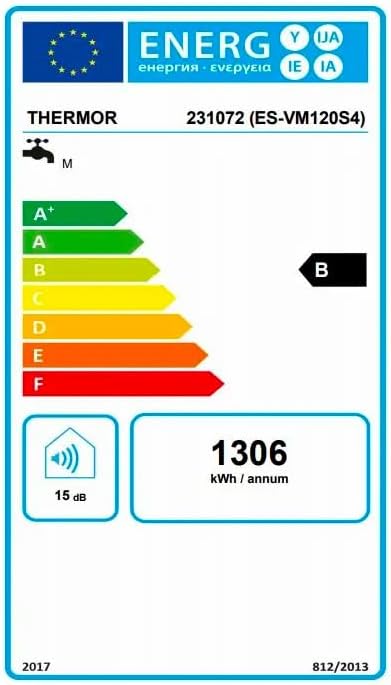
Figure 8.1: Energy efficiency label for the Thermor Malicio 3 (Model 231072), indicating an energy class B and annual energy consumption of 1306 kWh.
9. Warranty and Support
For warranty information, please refer to the warranty card included with your product or visit the official Thermor website. Keep your proof of purchase for warranty claims.
For technical support, spare parts, or service, please contact Thermor customer service or an authorized service center. Contact details can typically be found on the Thermor website or in your product documentation.