
1. Introduction
This manual provides essential information for the safe and efficient installation, operation, and maintenance of your Panasonic FV-25RG Ventilating Fan. Please read these instructions thoroughly before using the product and retain them for future reference.
The Panasonic FV-25RG is a 25 cm ventilating fan designed for effective air extraction. It requires a wall or window opening of 30 x 30 cm for proper installation.
2. Safety Information
WARNING: To reduce the risk of fire, electric shock, or injury to persons, observe the following:
- Read all instructions before installing or operating this fan.
- Ensure the power supply is disconnected before performing any installation, maintenance, or cleaning.
- Installation must be performed by a qualified electrician in accordance with all applicable codes and standards.
- Do not use this fan with any solid-state speed control device unless specifically approved for such use.
- This fan is intended for general ventilating use only. Do not use to exhaust hazardous or explosive materials and vapors.
- Avoid placing fingers or foreign objects into the fan blades or openings.
- Ensure the fan is securely mounted to prevent it from falling.
3. Package Contents
Verify that all components are present in the package:
- Panasonic FV-25RG Ventilating Fan unit
- Power Cord (included components)
- Installation hardware (screws, brackets, etc. - may vary)
- User Manual (this document)
4. Specifications
| Specification | Value |
|---|---|
| Brand | Panasonic |
| Model Number | FV-25RG |
| Item Weight | 3.06 Kilograms |
| Package Dimensions | 40.2 x 38.6 x 16.6 cm |
| Color | White |
| Style | Modern |
| Finish | Painted or Powder Coated |
| Material | Wood (Frame/Housing) |
| Power Source Type | Corded Electric |
| Wattage | 100 Watts |
| Installation Method | Wall-mounted or Window-mounted |
| Item Package Quantity | 1 |
| Blade Length | 15 Inches (approx. 38 cm) |
| Plug Profile | Wall Mount or Window Mount |
| Included Components | Cord |
5. Setup and Installation
The Panasonic FV-25RG Ventilating Fan is designed for wall or window mounting. Proper installation is crucial for optimal performance and safety. A qualified electrician should perform the installation.
5.1 Site Preparation
- Ensure the installation location has a suitable opening. The fan requires a hole size of approximately 30 cm x 30 cm.
- Verify that the mounting surface (wall or window frame) is strong enough to support the fan's weight (3.06 kg) and vibrations during operation.
- Ensure there is access to a suitable power outlet or electrical wiring for connection.
5.2 Mounting the Fan
- Carefully unpack the fan and inspect it for any damage.
- Position the fan unit into the prepared opening. Ensure it fits snugly and is level.
- Secure the fan to the wall or window frame using appropriate screws and mounting brackets (if supplied). Refer to the specific mounting hardware instructions for your installation type.
- Ensure all connections are tight and secure.

Figure 1: Side view of the fan, illustrating its depth and the structure for mounting.

Figure 2: Rear view of the fan, highlighting the motor enclosure and mounting points.
5.3 Electrical Connection
- Connect the fan's power cord to a suitable electrical supply. Ensure the voltage and frequency match the fan's requirements (typically 220-240V, 50/60Hz).
- If direct wiring is required, ensure all wiring is done according to local electrical codes and standards.
- Once installed, ensure the fan operates freely without obstruction.

Figure 3: Front view of the Panasonic FV-25RG Ventilating Fan.
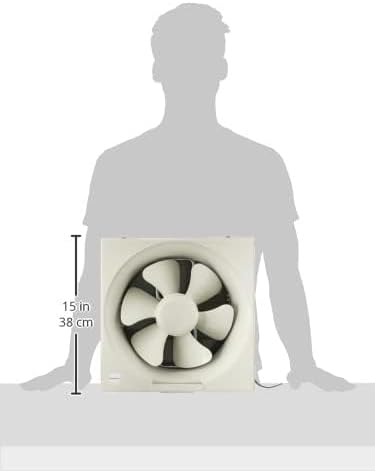
Figure 4: Dimensional view of the fan, indicating its size.
6. Operating Instructions
The Panasonic FV-25RG Ventilating Fan is designed for straightforward operation.
- Power On/Off: Connect the fan to a power source. The fan typically operates via a wall switch or a pull cord mechanism, depending on the specific installation.
- Ventilation: The fan is designed to extract air from the room, improving air quality and reducing humidity.
- Continuous Operation: For continuous ventilation, ensure the fan is powered on.
7. Maintenance
Regular maintenance ensures the longevity and efficient operation of your ventilating fan. Always disconnect power before cleaning or servicing.
7.1 Cleaning
- Exterior: Wipe the exterior surfaces of the fan with a soft, damp cloth. Do not use abrasive cleaners or solvents.
- Fan Blades: Carefully clean the fan blades to remove dust and debris. Accumulated dust can reduce efficiency and cause imbalance.
- Grille: If removable, detach the front grille and wash it with mild soap and water. Ensure it is completely dry before reattaching.
7.2 Inspection
- Periodically check the fan for any unusual noises or vibrations.
- Inspect the power cord for any signs of damage or fraying.
- Ensure all mounting screws remain tight.
8. Troubleshooting
If you encounter issues with your Panasonic FV-25RG Ventilating Fan, refer to the table below for common problems and solutions.
| Problem | Possible Cause | Solution |
|---|---|---|
| Fan does not turn on | No power supply Loose electrical connection Faulty switch | Check power outlet and circuit breaker Ensure all connections are secure (consult electrician) Test or replace the switch |
| Fan runs slowly or with reduced airflow | Accumulated dust on blades/grille Obstruction in exhaust path Motor issue | Clean fan blades and grille Check for and remove any obstructions Contact customer support for motor inspection |
| Excessive noise or vibration | Loose mounting screws Unbalanced blades (due to dirt) Motor bearing wear | Tighten all mounting screws Clean fan blades thoroughly Contact customer support for inspection |
| Fan stops unexpectedly | Overheating (thermal cut-out) Intermittent power supply | Allow fan to cool down; ensure proper ventilation around motor Check power connections and supply stability |
If the problem persists after attempting these solutions, please contact Panasonic customer support.
9. Warranty and Support
Panasonic products are manufactured to high-quality standards and are covered by a limited warranty. Please refer to the warranty card included with your purchase for specific terms and conditions, including the warranty period and coverage details.
For technical assistance, spare parts, or warranty claims, please contact Panasonic customer service through their official website or the contact information provided in your warranty documentation.
Panasonic Customer Service: For support and service inquiries, please visit the official Panasonic website or refer to your product's warranty information.


