1. Introduction & Overview
The Lifepro CryoFrost Compression System is engineered to provide effective cold therapy and compression for various recovery needs. It's designed to speed up recovery, alleviate swelling and pain, and accelerate athletic recovery. This 2-in-1 system offers precise control over your therapy sessions.
Key Features:
- 2-in-1 Cold Therapy & Compression: Combines cold and compression for optimal recovery.
- Targeted Relief: Includes wraps for ankle, calf, and thigh.
- Pain & Swelling Alleviation: Helps reduce post-surgery pain and discomfort.
- Adjustable Pressure: Offers 5 mechanized pressure motion options (20-100 mmHg).
- Portable Design: Compact and includes a travel bag for on-the-go use.
- Reusable Gel Packs: Utilizes non-toxic gel ice packs for mess-free cold therapy.

The Lifepro CryoFrost system in use, demonstrating its application on the knee and ankle.
2. Components
The Lifepro CryoFrost Compression System includes all necessary components for immediate use:
- Cryo Therapy Machine (Control Pump)
- Reusable Gel Ice Packs (for knee, ankle, and thigh wraps)
- AC/DC Adapter
- Carrying Bag
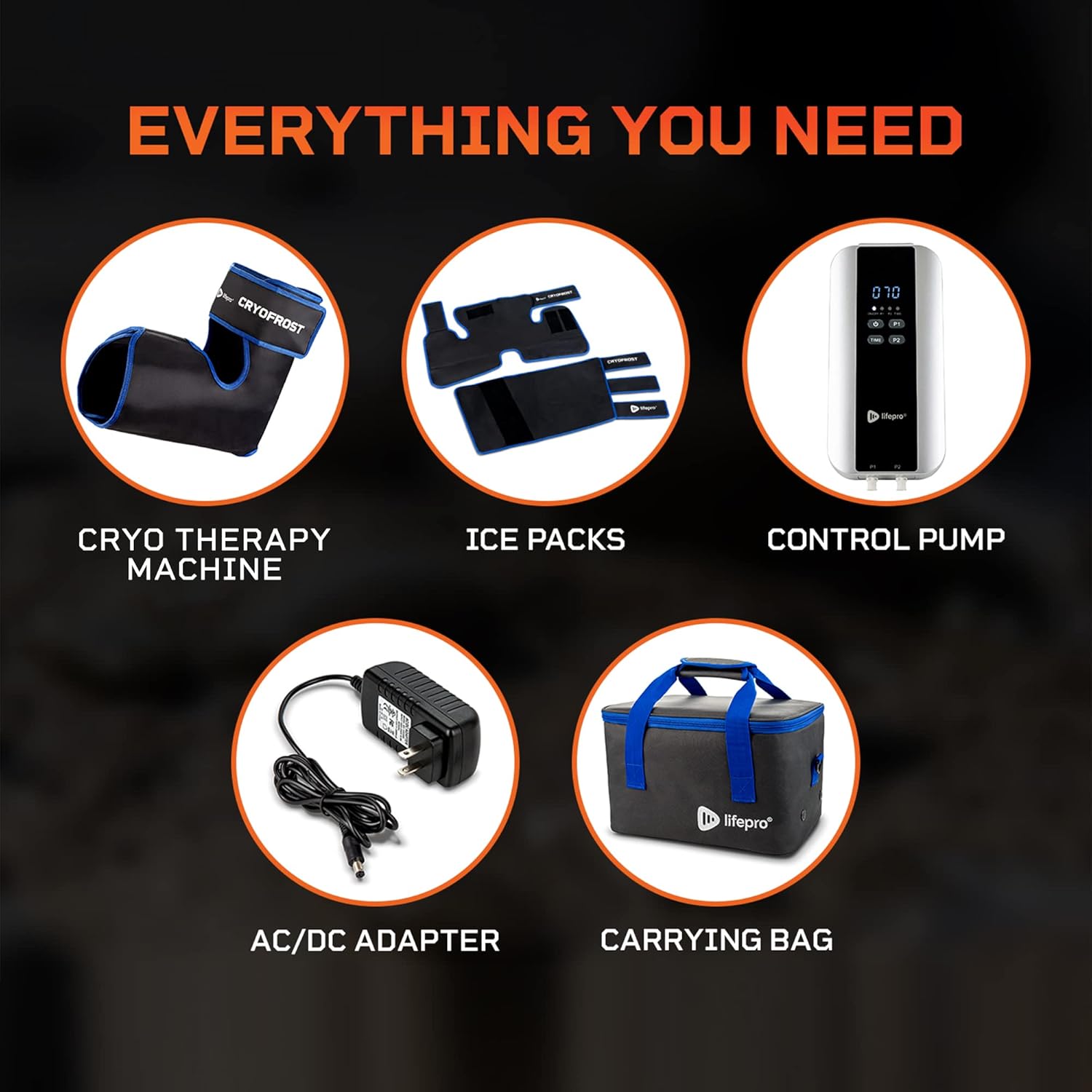
All items included with the CryoFrost system, ready for setup.
3. Setup
Follow these steps to set up your CryoFrost Compression System:
- Prepare Gel Packs: Place the reusable gel ice packs in a freezer for at least 2 hours prior to use to achieve desired coldness.
- Insert Gel Packs: Open the wraps (ankle, calf, or thigh) and securely insert the frozen gel packs into their designated pockets.
- Apply Wraps: Securely attach the desired wrap(s) to the target area (ankle, calf, or thigh) using the Velcro straps, ensuring a snug but comfortable fit.
- Connect Tubing: Connect the tubing from the wraps to the corresponding ports (P1 or P2) on the control pump.
- Power On: Plug the AC/DC adapter into the control pump and a power outlet, or ensure the internal rechargeable batteries are charged. Press and hold the power button to turn on the device.
Watch this video for a detailed guide on unboxing and setting up your CryoFrost Compression System.

The control pump is user-friendly, allowing easy operation of the system.
4. Operating Instructions
Once set up, operate your CryoFrost system using the control pump:
- Select Port: Choose P1 or P2 on the control pump corresponding to the connected wrap. You can operate both simultaneously for dual-area therapy.
- Adjust Time: Press the 'TIME' button to cycle through preset therapy durations. The default time is 30 minutes, but it can be adjusted up to 2 hours.
- Set Intensity: Use the P1 or P2 buttons (depending on your selected port) to adjust the compression intensity. There are 5 levels, ranging from 20 mmHg to 100 mmHg (most intense). The compression will gradually increase to the selected level.
- Begin Therapy: The system will automatically begin the compression cycle once settings are selected.
- Monitor & Adjust: Monitor your comfort level and adjust intensity or time as needed during the session.
This video provides a comprehensive guide on how to effectively use your CryoFrost Recovery Compression System.

The control panel features an LED screen and intuitive buttons for easy operation.
5. Indications & General Directions
Indications:
Muscle aches and pains, tired legs and feet.
General Directions:
- Place the compress on the affected area.
- Adjust the pressure and temperature settings.
- Use the remote control to select a recovery motion.
- Monitor the skin for any adverse reactions.
- Turn off and store the compress after use.
6. Maintenance
To ensure the longevity and optimal performance of your Lifepro CryoFrost system, follow these maintenance guidelines:
- Cleaning: Wipe down the exterior of the control pump and wraps with a soft, damp cloth after each use. Do not submerge the control pump in water.
- Gel Pack Care: After use, return the gel packs to the freezer for future cold therapy sessions. Ensure they are clean and dry before freezing.
- Storage: Store all components in the provided carrying bag in a cool, dry place away from direct sunlight when not in use.
- Battery Care: If using battery power, ensure the batteries are fully charged before long periods of storage to maintain battery health.
7. Troubleshooting
If you encounter any issues with your CryoFrost Compression System, refer to these common troubleshooting tips:
- Device Not Turning On: Ensure the AC/DC adapter is securely plugged into both the control pump and a working power outlet. If using battery power, check that the batteries are correctly installed and fully charged.
- No Compression: Verify that the tubing is securely connected to both the wraps and the control pump. Check for any kinks or blockages in the air tubes. Ensure the correct port (P1 or P2) is selected on the control pump.
- Insufficient Coldness: Confirm that the gel packs have been in the freezer for at least 2 hours. For maximum coldness, ensure they are completely frozen.
- Discomfort During Use: If the compression is too intense, reduce the intensity level using the control pump. Ensure the wraps are not applied too tightly. If discomfort persists, discontinue use and consult a healthcare professional.
- Unusual Noises: A slight humming sound from the control pump during operation is normal. If you hear loud or unusual noises, turn off the device and contact customer support.
8. Specifications
| Feature | Detail |
|---|---|
| Item Package Dimensions L x W x H | 14.5 x 11.75 x 8.75 inches |
| Package Weight | 5.08 Kilograms |
| Brand Name | LifePro |
| Model Name | CryoFrost Ice Knee Wrap |
| Color | Blue |
| Material | Gel |
| Suggested Users | Unisex-Adult |
| Number of Items | 1 |
| Manufacturer | LifePro |
| Part Number | LP-CRFST |
| Style | Athletic |
| Age Range (Description) | Adult |
| Unit Count | 1 Count |
| Special Feature | speed control |
9. Warranty & Support
LifePro offers a Lifetime Support and Warranty for the CryoFrost Compression System, ensuring long-term peace of mind for your recovery journey.
For further assistance or detailed instructions, please refer to the official User Manual (PDF) available for download or contact LifePro customer support.