
Introduction
The Nyrapag Car Diffuser Humidifier is designed to refresh your environment with cool mist and aromatherapy. Its compact and portable design makes it suitable for use in various settings, including cars, homes, and offices. This device features ultrasonic vibration technology for efficient mist production and includes a 7-color light function for enhanced ambiance. For safety, it incorporates an intelligent auto-off function when water levels are low.

Image: The Nyrapag Car Diffuser Humidifier in operation, producing a fine mist within a car's interior. The device is compact and connected via a USB cable.
Package Contents
Upon opening the package, please ensure all items are present and in good condition:
- 1x Nyrapag Car Diffuser Humidifier
- 1x USB Cable (integrated with the humidifier)
Specifications
| Feature | Detail |
|---|---|
| Working Voltage | DC 5V |
| Use Power | 1.5-2W |
| Water Capacity | 100ml |
| Spray Volume | 25ml/h |
| Working Current | 300mA |
| Product Dimensions | 2.6"D x 2.75"W x 7.87"H (approx. 6.6cm x 7.0cm x 20.0cm) |
| Item Weight | 0.15 kg (5.4 ounces) |
| Operation Mode | Ultrasonic |
| Special Feature | Portable, 7-Color LED Light, Auto-Off |
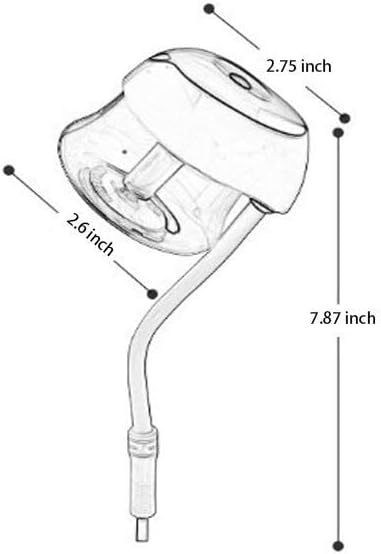
Image: A technical drawing illustrating the dimensions of the humidifier, including its depth, width, and height.
Setup Instructions
Follow these steps to set up your Nyrapag Car Diffuser Humidifier:
- Open the Water Tank: Gently counter-rotate the top section of the humidifier to detach it from the water tank.
- Add Water: Fill the transparent water tank with clean tap water. You may add a few drops of water-soluble essential oil for aromatherapy. Do not exceed the maximum fill line.
- Secure the Tank: Place the top section back onto the water tank and clockwise rotate to tighten it securely. Ensure it is properly sealed to prevent leaks.
- Connect Power: Plug the integrated USB cable into a compatible 5V USB power source (e.g., car USB port, power bank, laptop, or wall adapter).

Image: A visual guide demonstrating the four steps for setting up the humidifier: detaching the tank, adding water, reattaching the tank, and connecting the USB power.
Operating Instructions
Once set up, operating your humidifier is straightforward:
- Power On/Off: After connecting to power, press the power button located on the top of the device to turn on the mist function. Press again to turn off.
- LED Light Control: Long press the power button to activate the 7-color LED light feature. The lights will cycle through various colors. Long press again to turn off the lights.
- Automatic Shut-off: The humidifier is equipped with an intelligent auto-off feature. It will automatically power down when the water level in the tank falls below the minimum required level, preventing dry burning and ensuring safety.

Image: The portable humidifier plugged into a laptop's USB port, demonstrating its versatility for office or personal use.

Image: The humidifier connected to a wall power outlet using a USB adapter, highlighting its suitability for home or bedroom use.
Maintenance
Regular maintenance ensures optimal performance and longevity of your humidifier:
- Daily Cleaning: Empty any remaining water from the tank daily. Rinse the tank with clean water and wipe it dry with a soft cloth.
- Weekly Cleaning: For a more thorough cleaning, gently wipe the inside of the water tank and the ultrasonic mist outlet with a soft cloth dampened with a mild detergent solution. Rinse thoroughly to remove any residue.
- Avoid Harsh Chemicals: Do not use abrasive cleaners, alcohol, or corrosive chemicals, as these can damage the device.
- Cotton Rod: The humidifier uses a cotton rod to absorb water. If you notice reduced mist output, ensure the cotton rod is fully saturated. If it appears discolored or hardened, it may need replacement.
- Storage: If not in use for an extended period, clean the humidifier thoroughly, ensure it is completely dry, and store it in a cool, dry place.
Troubleshooting
If you encounter issues with your Nyrapag Car Diffuser Humidifier, please refer to the following common problems and solutions:
| Problem | Possible Cause | Solution |
|---|---|---|
| No mist or low mist output |
|
|
| Device not powering on |
|
|
| Water leakage |
|
|
| LED lights not working |
|
|
Warranty and Support
Nyrapag is committed to providing quality products. While specific warranty details are not provided in this manual, please retain your proof of purchase. For any product inquiries, technical support, or warranty claims, please contact the retailer or manufacturer directly through their official support channels. Refer to the product packaging or the retailer's website for contact information.
For more information about Nyrapag products, you may visit the official Nyrapag Store on Amazon: Nyrapag Store.