
OWLOTECH OT-BOOM-MAX
OWLOTECH BOOM MAX 10W Bluetooth Speaker User Manual
Brand: OWLOTECH | Model: OT-BOOM-MAX
1. Introduction
Thank you for choosing the OWLOTECH BOOM MAX 10W Bluetooth Speaker. This manual provides essential information for the safe and effective use of your new device. Please read it thoroughly before operation and retain it for future reference.
2. Safety Information
- Do not expose the speaker to extreme temperatures, direct sunlight, or high humidity.
- Avoid dropping or subjecting the speaker to strong impacts.
- Do not disassemble, repair, or modify the device yourself. Refer all servicing to qualified personnel.
- Keep the speaker away from water and other liquids. It is not waterproof.
- Use only the specified charging cable and power source.
- Clean the speaker only with a dry, soft cloth.
3. Package Contents
- OWLOTECH BOOM MAX 10W Bluetooth Speaker
- Lanyard/Strap
- USB Charging Cable (not explicitly listed but inferred for battery-powered device)
- User Manual
4. Product Overview
Familiarize yourself with the various parts and controls of your OWLOTECH BOOM MAX speaker.

Figure 4.1: Front View. Shows the main speaker grille and the prominent '+' and '-' buttons for volume control.

Figure 4.2: Bottom/Rear View. Displays the input ports including AUX, USB, TF card slot, and DC5V charging port, along with playback control buttons.
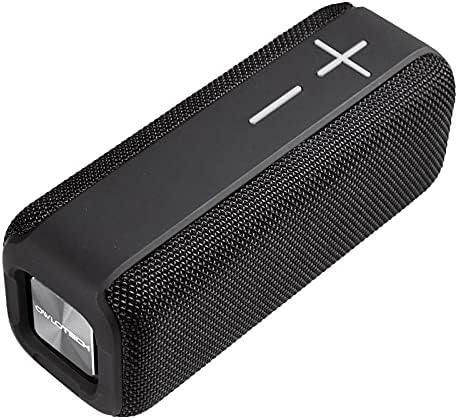
Figure 4.3: Angled View. Provides a perspective of the speaker's overall design and texture.
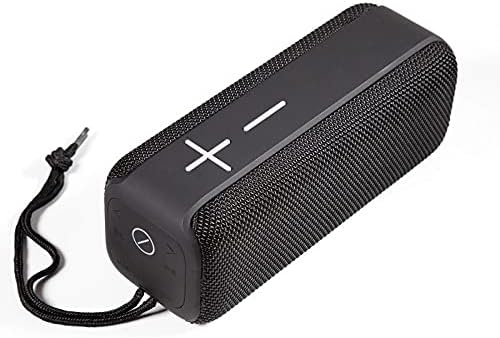
Figure 4.4: View with Lanyard. Illustrates the speaker with its attached lanyard, highlighting its portability.
5. Setup
5.1 Charging the Speaker
- Connect the USB charging cable to the DC5V port on the speaker.
- Connect the other end of the USB cable to a compatible USB power adapter (e.g., 5V/1A) or a computer's USB port.
- The charging indicator light will illuminate. It will turn off or change color once fully charged.
- A full charge typically takes 2-3 hours.
5.2 Bluetooth Pairing
- Ensure the speaker is charged and powered off.
- Press and hold the Power button (usually the 'play/pause' button or a dedicated power button) for a few seconds until you hear an audible prompt or see the LED indicator flash rapidly, indicating pairing mode.
- On your mobile device (smartphone, tablet, computer), enable Bluetooth.
- Search for available Bluetooth devices. You should see "OWLOTECH BOOM MAX" or a similar name in the list.
- Select the speaker from the list to connect. Once connected, you will hear a confirmation sound, and the LED indicator will typically stop flashing and remain solid.
- If prompted for a password, enter "0000".
6. Operating Instructions
6.1 Power On/Off
- Power On: Press and hold the Power button for approximately 3 seconds.
- Power Off: Press and hold the Power button for approximately 3 seconds.
6.2 Music Playback (Bluetooth Mode)
- Play/Pause: Press the Play/Pause button (often marked with a circle or play symbol).
- Volume Up: Press the '+' button. Hold the '+' button to increase volume rapidly.
- Volume Down: Press the '-' button. Hold the '-' button to decrease volume rapidly.
- Next Track: Press the '>>|' or 'Next' button.
- Previous Track: Press the '|<<' or 'Previous' button.
6.3 AUX Mode
- Insert a 3.5mm audio cable into the AUX port on the speaker and connect the other end to your audio source.
- The speaker should automatically switch to AUX mode.
- Volume control can be adjusted on both the speaker and the connected device.
6.4 TF Card Playback
- Insert a TF (microSD) card with MP3 audio files into the TF card slot.
- The speaker will automatically detect the card and begin playing music.
- Use the playback controls (Play/Pause, Next/Previous) to manage music.
7. Maintenance
7.1 Cleaning
- Wipe the speaker's surface with a soft, dry, lint-free cloth.
- Do not use abrasive cleaners, alcohol, benzene, or other chemical solvents, as these may damage the casing.
7.2 Storage
- When not in use for extended periods, store the speaker in a cool, dry place, away from direct sunlight and extreme temperatures.
- It is recommended to charge the speaker at least once every three months to maintain battery health.
8. Troubleshooting
| Problem | Possible Cause | Solution |
|---|---|---|
| Speaker does not turn on. | Low battery; Power button not pressed long enough. | Charge the speaker; Press and hold the Power button for 3 seconds. |
| Cannot pair via Bluetooth. | Speaker not in pairing mode; Bluetooth disabled on device; Device too far. | Ensure speaker is in pairing mode; Enable Bluetooth on your device; Move device closer to speaker (within 10m). |
| No sound. | Volume too low; Incorrect input mode; Device not connected. | Increase volume on speaker and device; Check if speaker is in correct mode (Bluetooth/AUX/TF); Reconnect device. |
| Sound distortion. | Volume too high; Device too far from speaker. | Lower volume; Move device closer to speaker. |
9. Specifications
| Feature | Detail |
|---|---|
| Brand | OWLOTECH |
| Model Name | OWLOTECH BOOM MAX ALTAVOZ BLUETOOTH 10W |
| Manufacturer Reference | OT-BOOM-MAX |
| Connectivity Type | Bluetooth |
| Connectivity Technology | Ethernet (Note: Bluetooth is the primary wireless connectivity for audio) |
| Power Source | Battery |
| Audio Output Mode | Stereo |
| Speaker Type | Multimedia |
| Special Feature | Bluetooth |
| Recommended Uses | Speaker |
| Compatible Devices | Speaker (refers to general audio playback devices) |
| Product Dimensions | 30 x 1.2 x 1.5 cm |
| Product Weight | 20 g |
| Is Waterproof | False |
| Controller Type | Remote Control (Note: This likely refers to the speaker's own buttons acting as controls for the connected device) |
| Mounting Type | Table Mount |
| Number of Units | 1.0 unit |
| First Available Date | 28 April 2021 |
| ASIN | B093QF3F2Q |
| Software Updates Guaranteed Until | Unknown |
10. Warranty and Support
For warranty information or technical support, please refer to the documentation provided with your purchase or contact OWLOTECH customer service directly. Contact details can typically be found on the product packaging or the official OWLOTECH website.