
GIKPAL B093PFXCN4
GIKPAL 55-inch L-Shaped Desk Instruction Manual
Model: B093PFXCN4
Introduction
Thank you for choosing the GIKPAL 55-inch L-Shaped Desk. This manual provides detailed instructions for the assembly, proper usage, and maintenance of your new desk. Please read this manual thoroughly before beginning assembly and retain it for future reference.
Safety Information
- Keep all small parts and packaging materials away from children.
- Assemble the desk on a soft, clean surface to prevent scratches.
- Ensure all screws and fasteners are tightened securely before use. Periodically check and re-tighten as needed.
- Do not overload the desk or shelves beyond their weight capacity.
- Avoid standing or sitting on the desk.
- Use caution when moving the desk to prevent injury or damage.
Package Contents
Before assembly, verify that all components listed below are present and undamaged. If any parts are missing or damaged, please contact customer support.
- L-Shaped Desk Panels
- Metal Frame Components
- Monitor Stand
- CPU Stand
- Assembly Kit (screws, screwdriver, adjustable feet)
- Instruction Manual (this document)
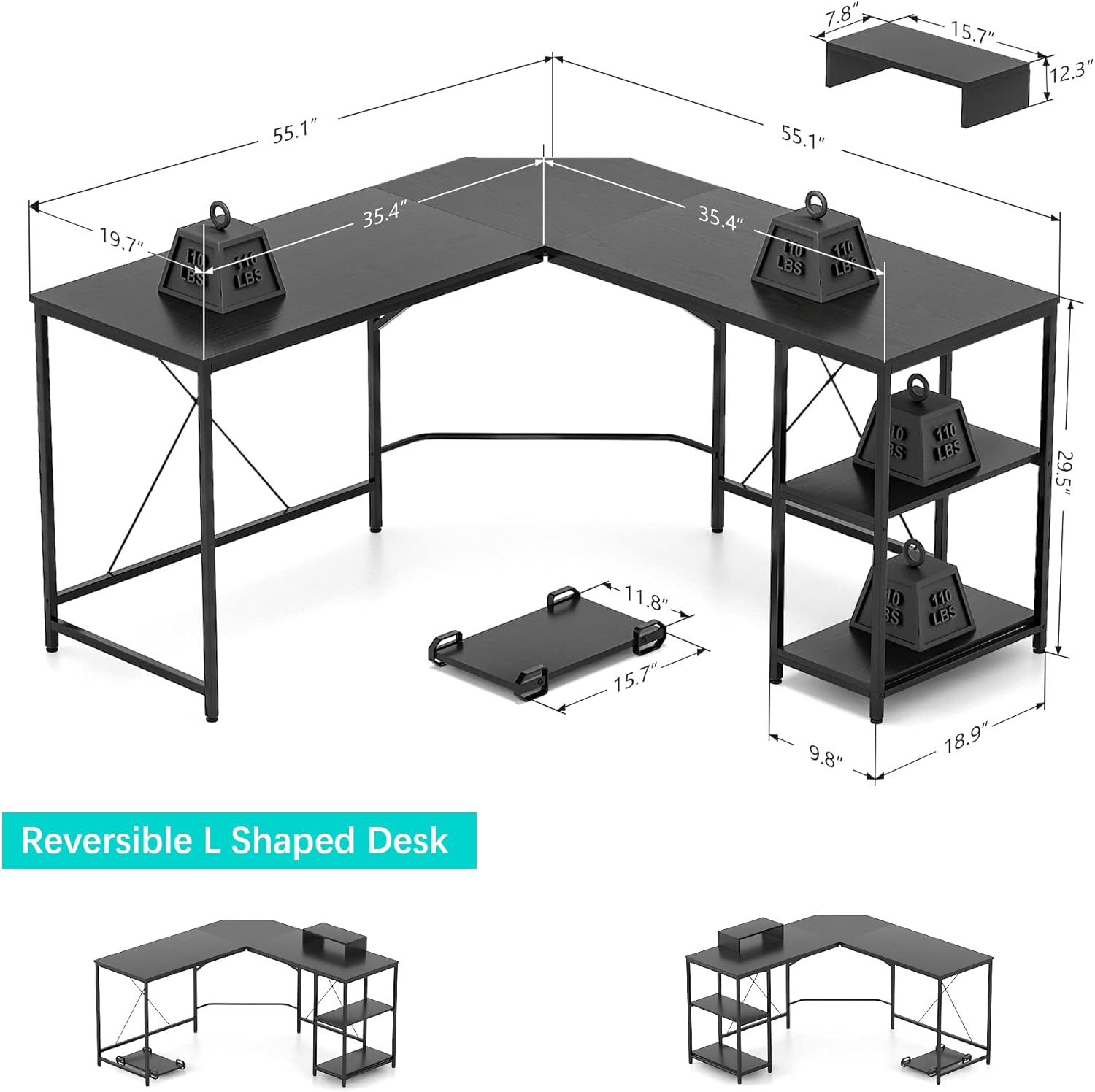
Figure 1: Overview of desk dimensions and included components.
Assembly Instructions
Follow these steps carefully to assemble your GIKPAL L-Shaped Desk. It is recommended to have two people for easier assembly.
Assembly Video Guide
Video 1: Step-by-step assembly guide for the GIKPAL L-Shaped Desk. This video demonstrates the process of connecting the metal frames, attaching the desk panels, and installing the shelves and accessories.
Step-by-Step Written Instructions
- Unpack and Identify Parts: Carefully remove all components from the packaging. Lay them out on a soft, clean surface. Refer to the parts list and diagrams to identify each piece.
- Assemble the Main Frame: Begin by connecting the metal frame sections using the provided screws and screwdriver. Ensure the stable buckle design aligns correctly for a secure fit.
- Attach Crossbars and Adjustable Feet: Install the support crossbars between the frame legs. Screw in the adjustable feet at the bottom of each leg to ensure stability and level the desk on uneven floors.
- Install Storage Shelves: Attach the storage shelves to the designated frame sections using the shorter screws. These shelves can be configured on either the left or right side of the desk.
- Secure Desk Panels: Place the L-shaped desk panels onto the assembled metal frame. Align the pre-drilled holes and secure the panels to the frame using the appropriate screws.
- Assemble Monitor Stand: Attach the skidproof pads to the bottom of the monitor stand. Secure the monitor stand components together using the provided screws.
- Position CPU Stand: Place the CPU stand on the floor beneath the desk. Its wheeled design allows for easy movement.

Figure 2: The desk features reversible shelves, allowing for flexible configuration to suit your space.

Figure 3: Shelves can be installed or removed to customize your storage needs.
Usage Guidelines
The GIKPAL L-Shaped Desk is designed for versatile use in home offices, gaming setups, or study areas. Its L-shaped design maximizes corner space, providing ample room for multiple monitors, a computer, and other accessories.
- Large Desktop: Utilize the expansive desktop for your computer, gaming equipment, or study materials. The L-shape allows for efficient organization and separation of tasks.
- Storage Shelves: The integrated shelves provide convenient storage for books, files, or other office supplies. These shelves are reversible and can be positioned on either side of the desk during assembly.
- Monitor Stand: Place your monitor on the elevated stand to improve ergonomics and free up desktop space.
- CPU Stand: The movable CPU stand keeps your computer tower off the floor, protecting it from dust and allowing for easy access and cleaning.
- Cable Management: The desk's design includes a corner cut-out to facilitate cable routing, helping to keep your workspace tidy.

Figure 4: Integrated corner design for efficient cable management.

Figure 5: The monitor stand elevates your screen for better viewing comfort.

Figure 6: The CPU stand with wheels provides mobility and keeps your computer off the floor.
Maintenance
To ensure the longevity and appearance of your GIKPAL L-Shaped Desk, follow these simple maintenance guidelines:
- Cleaning: The desktop surface is waterproof. Wipe clean with a soft, damp cloth. Avoid harsh chemicals or abrasive cleaners that could damage the finish.
- Regular Checks: Periodically inspect all screws and connections to ensure they remain tight. Re-tighten any loose fasteners to maintain stability.
- Avoid Excessive Weight: Do not place excessively heavy items on the desk or shelves.
- Protect from Heat and Moisture: While the desktop is waterproof, prolonged exposure to extreme heat or moisture should be avoided to prevent damage.

Figure 7: The desk features a waterproof desktop for easy cleaning.
Troubleshooting
If you encounter any issues with your GIKPAL L-Shaped Desk, refer to the following common problems and solutions:
- Desk is Unstable/Wobbly:
- Ensure all screws are fully tightened.
- Adjust the leveling feet at the bottom of each leg to compensate for uneven flooring.
- Parts Do Not Align During Assembly:
- Double-check the orientation of the parts against the assembly diagrams.
- Loosen screws slightly, adjust alignment, then re-tighten.
- Missing Parts:
- Review the package contents list. If parts are genuinely missing, contact GIKPAL customer support.
Specifications
| Feature | Detail |
|---|---|
| Brand | GIKPAL |
| Model | B093PFXCN4 |
| Shape | L-Shaped (Rectangular sections) |
| Desk Design | Computer Desk / Gaming Table |
| Product Dimensions (D x W x H) | 55"D x 55"W x 29.5"H |
| Color | Black |
| Style | Modern |
| Top Material Type | Engineered Wood (Desktop), Metal (Frame) |
| Base Material | Engineered Wood |
| Room Type | Dormitory, Living Room, Office |
| Storage | Reversible Storage Shelves |
| Included Accessories | Monitor Stand, CPU Stand, Adjustable Feet |
| Assembly Required | Yes |

Figure 8: Adjustable feet ensure stability on various floor surfaces.
Warranty and Support
For warranty information, missing parts, or technical support, please contact GIKPAL customer service through the retailer's platform or the official GIKPAL website. Please have your model number (B093PFXCN4) and purchase date available when contacting support.