
1. Introduction
This manual provides instructions for the assembly, operation, and maintenance of your unho 950A Mobile TV Cart. Please read this manual thoroughly before installation and use to ensure safe and correct operation.

Figure 1: unho 950A Mobile TV Cart in a living room setting.
2. Safety Information
Please observe the following safety precautions:
- Weight Capacity: Do not exceed the maximum load capacity of 143 lbs (65 kg).
- TV Size: Recommended for TV screens between 32 and 80 inches.
- VESA Compatibility: Ensure your TV's VESA pattern is compatible with the mount (100x100mm to 600x400mm).
- Assembly: Two people are recommended for assembly. Do not fully tighten screws until all parts are correctly aligned.
- Stability: Always lock the casters when the cart is stationary to prevent accidental movement.
- Cable Management: Secure all cables to prevent tripping hazards and damage.
3. Package Contents
Verify that all parts are included before beginning assembly. If any parts are missing or damaged, contact customer support.
- 1 x Floor TV Stand with Mount
- 1 (set) x Screw Fittings (various sizes for TV mounting)
- 1 x User Manual (this document)
4. Assembly Instructions
Follow these steps carefully to assemble your unho 950A Mobile TV Cart. Two people are recommended for safe assembly.
4.1 Identify Components
Familiarize yourself with the main components of the TV cart.

Figure 2: Front view of the TV cart frame.

Figure 3: Back view of the TV cart frame.
4.2 Base Assembly
- Attach the casters to the base plate. Ensure all four casters are securely fastened.
- Insert the vertical support poles into the designated slots on the base. Secure them with the provided screws.
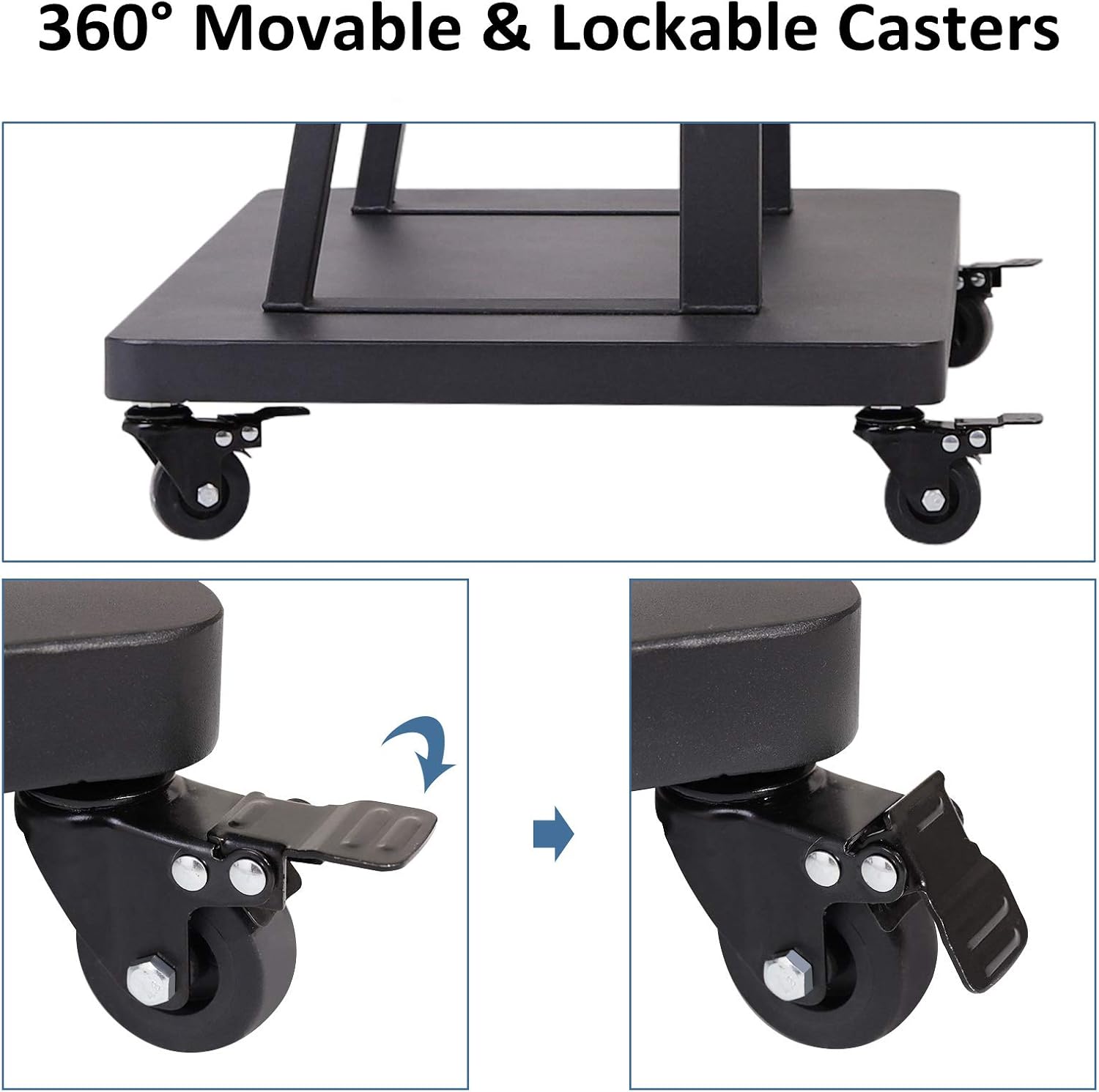
Figure 4: Detail of 360° movable and lockable casters.
4.3 Shelf Installation
- Attach the AV shelves to the vertical support poles at your desired height. The shelves feature triangle support reinforcement for stability.
- Secure the shelves using the appropriate screws.

Figure 5: AV shelves for media devices.
4.4 TV Mounting Bracket Installation
- Attach the TV mounting brackets to the back of your television using the appropriate VESA screws from the provided fittings. Ensure the brackets are centered and level.
- Carefully lift the TV with the attached brackets and hook them onto the main TV mount frame on the cart.
- Secure the TV to the mount using the safety screws or locking mechanisms to prevent accidental dislodgement.

Figure 6: Key structural features and quality details.
5. Operation
5.1 Adjusting Height
The TV cart allows for height adjustment from 55 inches to 64 inches. To adjust the height:
- Loosen the locking mechanisms on the vertical poles.
- Carefully raise or lower the TV mount to the desired viewing height.
- Securely tighten the locking mechanisms to fix the height in place.
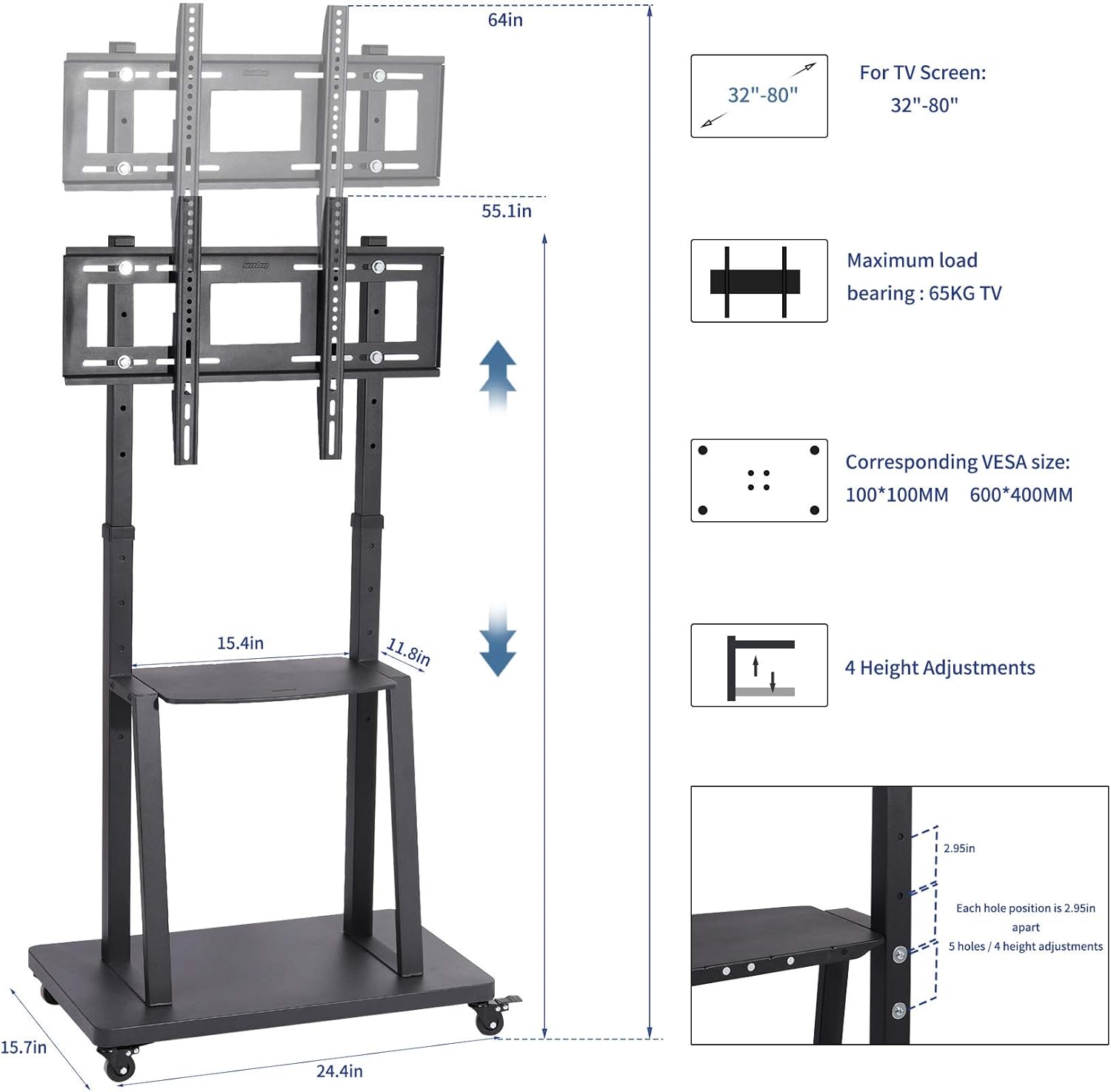
Figure 7: Height adjustment and VESA compatibility details.
5.2 Moving the Cart
The cart is equipped with four 360-degree rotation casters for easy mobility.
- To move the cart, ensure all casters are unlocked.
- Gently push the cart to its desired location.
- Once in position, engage the locks on all four casters to prevent unintended movement.
6. Maintenance
- Cleaning: Wipe the metal surfaces with a soft, damp cloth. Avoid abrasive cleaners.
- Fasteners: Periodically check all screws and bolts to ensure they are tight. Re-tighten if necessary.
- Casters: Keep casters free of debris to ensure smooth movement.
7. Troubleshooting
| Problem | Possible Cause | Solution |
|---|---|---|
| TV not level | Mounting brackets unevenly installed. | Re-adjust TV mounting brackets to ensure they are level before tightening. |
| Cart difficult to move | Casters are locked or obstructed. | Unlock all casters. Check for and remove any debris around the wheels. |
| TV feels unstable | Screws not fully tightened; TV exceeds weight limit. | Ensure all assembly screws and TV mounting screws are securely tightened. Verify TV weight is within the 143 lbs limit. |
| Missing parts | Packaging error. | Contact unho customer support with your purchase details. |
8. Specifications
- Model: 950A
- Brand: unho
- Material: Alloy Steel
- Color: Black
- Compatible TV Sizes: 32 - 80 inches
- Maximum Load Capacity: 143 lbs (65 kg)
- VESA Compatibility: 100x100mm, 200x100mm, 200x200mm, 300x100mm, 300x200mm, 300x300mm, 400x100mm, 400x200mm, 400x300mm, 400x400mm, 500x100mm, 500x200mm, 500x300mm, 500x400mm, 600x100mm, 600x200mm, 600x300mm, 600x400mm
- Height Adjustment Range: 55 inches to 64 inches
- Item Weight: 35.6 pounds
- Package Dimensions: 34.57 x 18.43 x 3.7 inches
9. Warranty and Support
For warranty information or technical support, please refer to the official unho website or contact their customer service directly. Keep your purchase receipt for warranty claims.
Manufacturer: unho
Date First Available: April 28, 2021