
1. Product Overview
The havcybin IMAX B6 80W 6A Balance Charger is a versatile and intelligent digital charger designed for various rechargeable battery types. It features multiple charging modes, safety protections, and an LCD display for monitoring charging status.

Image 1.1: The havcybin IMAX B6 80W 6A Lipo Battery Balance Charger.
Key Features:
- Wide Battery Compatibility: Supports NiCd/NiMH, Li-ion, LiPo, LiFe, LiHV, and Pb batteries.
- Safety Protections: Includes short-circuit, overcharge, overcurrent, and overheat protection.
- LCD Display: Provides real-time charging status and settings.
- User-Friendly Interface: Simple button controls for mode selection and parameter adjustment.
2. Setup Instructions
2.1 Package Contents
Ensure all components are present:
- IMAX B6 Balance Charger
- AC Power Adapter (12V 5A)
- Various charging cables (e.g., banana plug to XT60, JST-XH balance leads)
2.2 Power Connection
- Connect the AC power adapter to a suitable wall outlet.
- Plug the DC output of the AC power adapter into the 10-20V DC input port on the side of the IMAX B6 charger.
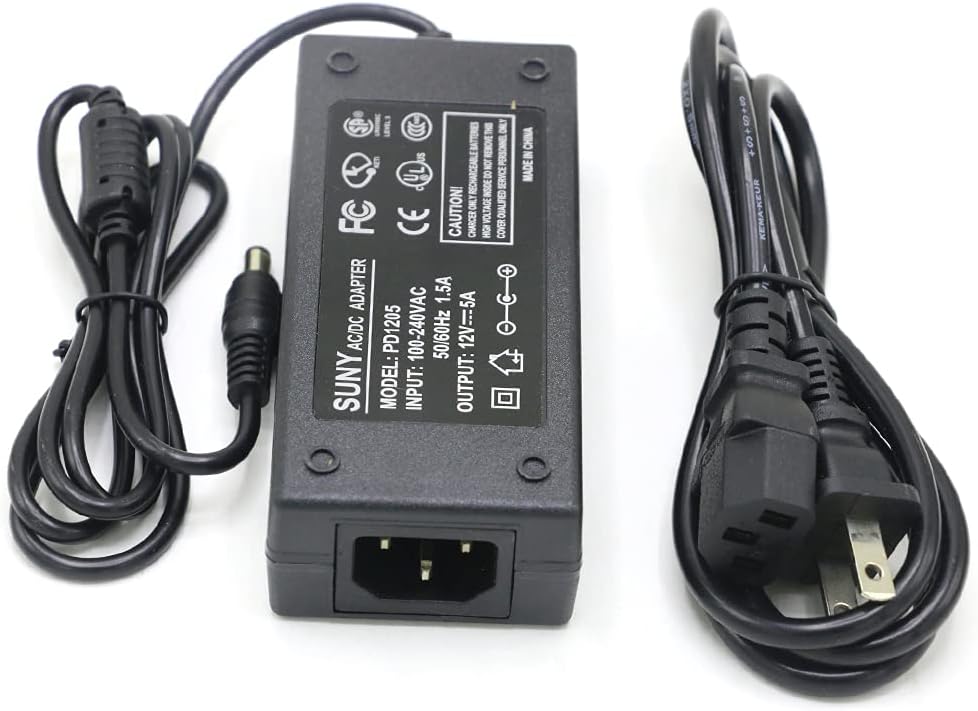
Image 2.1: The included 12V 5A AC Power Adapter.
2.3 Battery Connection
- Identify the correct charging cable for your battery type.
- Connect the main charging lead (e.g., 4mm banana plug) to the OUTPUT ports on the right side of the charger (red for positive, black for negative).
- For balance charging LiPo, LiFe, Li-ion, or LiHV batteries, connect the battery's balance lead to the appropriate JST-XH balance port on the right side of the charger (labeled 2S, 3S, 4S, 5S, 6S). Ensure the correct cell count port is used.
- Connect the other end of the main charging lead to your battery.

Image 2.2: Input power cable, output charge lead (4mm banana plug), and JST-XH balance lead sockets on the charger.
3. Operating Instructions
3.1 Navigating the Menu
The charger features an LCD screen and four buttons: Batt. Type, Dec., Inc., and Start/Enter.

Image 3.1: Charger buttons and LCD screen for navigation and status display.
- Batt. Type: Press to enter user settings, select battery type, or exit the current program.
- Dec. (Decrease): Decreases parameter values or scrolls down through options.
- Inc. (Increase): Increases parameter values or scrolls up through options.
- Start/Enter: Confirms selections, starts charging processes, or makes a parameter blink for editing.
3.2 Selecting Battery Type and Mode
- After powering on, the charger will display the main menu.
- Press the Batt. Type button to cycle through different battery types (e.g., LiPo, NiMH, Pb) and charging modes (e.g., Balance Charge, Fast Charge, Storage, Discharge).
- Once the desired battery type and mode are displayed, press Start/Enter to select it.
3.3 Adjusting Parameters
- After selecting a mode, parameters such as charge current, cell count, or discharge voltage will be displayed.
- Press Start/Enter once to make the parameter value blink.
- Use the Inc. or Dec. buttons to change the value.
- Press Start/Enter again to store the new value.
3.4 Starting a Charge Cycle
- After setting all parameters, press and hold the Start/Enter button for a few seconds.
- The charger will perform a battery check. Confirm the settings if prompted.
- The charging process will begin, and the LCD will display real-time information such as current, voltage, and elapsed time.

Image 3.2: The IMAX B6 charger is compatible with various battery types including LiPo/LiHV, Li-ion, LiFePO4, SLA, NiMH, and NiCd.
4. Maintenance
Proper maintenance ensures the longevity and safe operation of your charger.
- Cleaning: Keep the charger clean and free from dust and debris. Use a soft, dry cloth for cleaning. Do not use liquid cleaners.
- Storage: Store the charger in a cool, dry place away from direct sunlight and extreme temperatures.
- Ventilation: Ensure the charger's heat dissipation fins are not obstructed during operation to prevent overheating. The charger is designed with heat dissipation fins and a temperature control line interface to manage temperature safely.
- Cable Inspection: Regularly inspect all cables and connectors for any signs of wear, damage, or corrosion. Replace damaged cables immediately.
5. Troubleshooting
This section addresses common issues you might encounter.
5.1 Common Error Messages
- "CONNECTION ERROR": This typically indicates a problem with the battery connection.
- Check that the main charging leads are securely connected to both the charger and the battery.
- Ensure the balance lead (if used) is correctly plugged into the appropriate balance port on the charger and the battery.
- Verify that the battery's connectors are clean and free from damage.
- "INPUT VOLTAGE ERROR": The input power voltage is outside the acceptable range (10-20V DC).
- Check the AC power adapter and ensure it is providing the correct 12V output.
- Ensure the power source is stable.
- "CELL ERROR": Indicates an issue with the battery's cell count or voltage.
- Verify that the cell count setting on the charger matches your battery's actual cell count.
- Inspect the battery for any physical damage or swelling.
5.2 Charger Not Powering On
- Ensure the AC power adapter is correctly plugged into a live wall outlet.
- Check the connection between the AC adapter and the charger's DC input port.
- Test the wall outlet with another device to confirm it has power.
6. Specifications
| Feature | Specification |
|---|---|
| Product Dimensions | 1.2 x 3 x 5 inches (3.05 x 7.62 x 12.7 cm) |
| Item Weight | 12.3 ounces (0.35 Kilograms) |
| Brand | havcybin |
| Manufacturer | Mitoot |
| Output Voltage | 18 Volts (DC) |
| Max Charge Power | 80W |
| Charge Current Range | 0.1-6.0A |
| Max Discharge Power | 5W |
| Discharge Current Range | 0.1-2.0A |
| LiPo/LiFe/Li-ion/LiHV Cells | 1-6 series |
| NiMH/NiCd Cells | 1-15 cells |
| Pb Battery Voltage | 2-20V |
7. Warranty and Support
7.1 Warranty Information
This havcybin IMAX B6 charger comes with a 1-year warranty from the date of purchase. This warranty covers manufacturing defects under normal use. It does not cover damage caused by misuse, accidents, unauthorized modifications, or improper operation.
7.2 Customer Support
If you have any questions, encounter issues, or require technical assistance with your havcybin IMAX B6 charger, please contact our customer support team. We aim to respond within 24 hours to resolve your concerns.
Please refer to your purchase documentation or the retailer's website for specific contact details.