
1. Introduction
The CORSAIR RM750 is a 750 Watt, 80 PLUS Gold certified, fully modular power supply designed to deliver consistent and efficient power to your personal computer. This manual provides essential information for the proper installation, operation, and maintenance of your RM750 power supply.
Key features include:
- Fully Modular Design: Connect only the cables required for your system, reducing clutter and improving airflow.
- 80 PLUS Gold Efficiency: Ensures up to 90% power efficiency, reducing heat generation and operating costs.
- Ultra-Low Noise Operation: Features a 140mm rifle bearing fan with Zero RPM mode for near-silent operation at low to medium loads.
- Industrial-Grade Capacitors: 105°C-rated capacitors provide superb electrical performance and long-term reliability.
- Triple EPS12V Connectors: Provides compatibility with modern graphics cards and motherboards.

This image displays the CORSAIR RM750 power supply unit, highlighting its modular cable connections and the fan grille on the top surface. The unit is black with the CORSAIR logo and RM750 model name visible.
2. Setup and Installation
Before installing the CORSAIR RM750 power supply, ensure your computer system is powered off and disconnected from the main power outlet. Refer to your computer case and motherboard manuals for specific installation instructions.
2.1 Package Contents
Verify that all components are present:
- CORSAIR RM750 Power Supply Unit
- AC Power Cord
- Modular Cable Set (as detailed below)
- Mounting Screws
- Cable Ties

This image shows the CORSAIR RM750 power supply unit alongside its full set of modular cables, including the 24-pin ATX, EPS/ATX 12V 8-pin, PCIe 8-pin, PATA 4-pin, and SATA power cables.
2.2 Cable Connections
The RM750 is fully modular, allowing you to connect only the necessary cables. This improves cable management and airflow within your PC case.

This diagram visually represents the various modular cables included with the RM750 power supply: 1x ATX 24-Pin, 3x EPS/ATX 12V 8-Pin (4+4), 4x PCIe 8-Pin (6+2), 4x PATA 4-Pin, and 14x SATA connectors.
- Mount the PSU: Secure the RM750 into your PC case using the provided screws.
- Connect Motherboard Power:
- Connect the 24-pin ATX cable to your motherboard.
- Connect the 8-pin (4+4) EPS/ATX 12V cable(s) to your motherboard's CPU power connector(s).
- Connect Graphics Card Power: Connect the appropriate PCIe 8-pin (6+2) cables to your graphics card(s).
- Connect Peripherals: Use SATA power cables for SSDs, HDDs, and optical drives. Use PATA 4-pin cables for older peripherals if needed.
- Connect AC Power: Once all internal connections are secure, connect the AC power cord to the PSU and then to a wall outlet.
Ensure all connections are firm and properly seated to prevent system instability or damage.
3. Operating Instructions
The CORSAIR RM750 is designed for reliable and efficient operation. After successful installation, power on your computer system.
3.1 Zero RPM Fan Mode
The RM750 features a Zero RPM fan mode. At low to medium loads, the fan will not spin, resulting in near-silent operation. The fan will automatically activate when the power supply load increases to maintain optimal cooling.
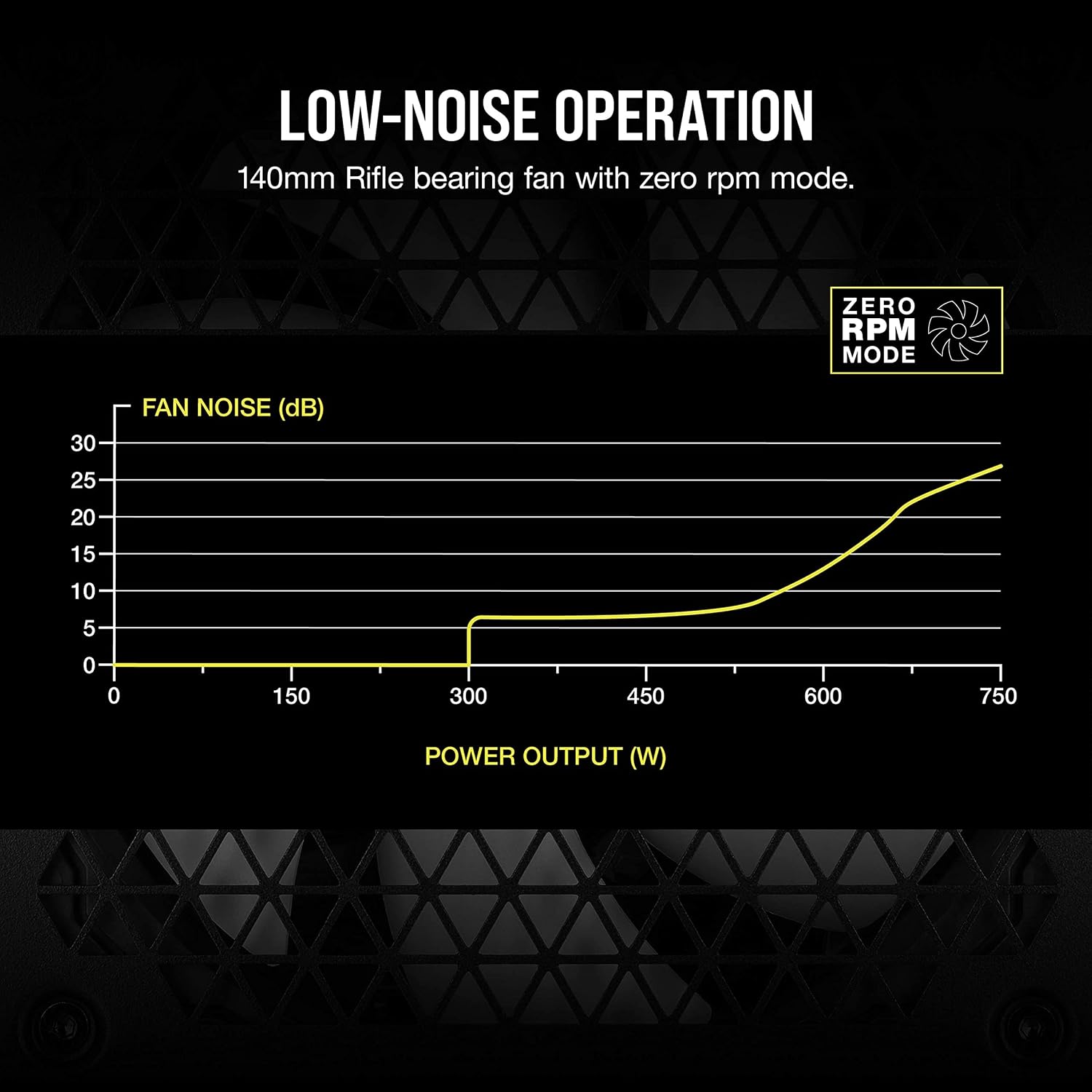
This graph illustrates the fan noise levels of the RM750 power supply. It shows that the fan remains off (0 dB) until approximately 300W of power output, after which the noise level gradually increases with load.
3.2 80 PLUS Gold Efficiency
The 80 PLUS Gold certification indicates that the RM750 operates with high efficiency, converting a significant percentage of AC power into usable DC power for your components. This reduces wasted energy and heat.

This graph displays the power efficiency of the RM750 power supply at different system loads, showing it maintains high efficiency (above 80%) across its operational range, peaking around 90% efficiency.
4. Maintenance
To ensure optimal performance and longevity of your CORSAIR RM750 power supply, periodic maintenance is recommended:
- Dust Removal: Regularly clean dust from the power supply's fan grille and interior using compressed air. Ensure the system is powered off and unplugged before cleaning.
- Airflow: Ensure adequate airflow around the power supply within your PC case. Avoid obstructing intake or exhaust vents.
- Cable Management: Maintain tidy cable management to prevent interference with airflow and potential overheating.
5. Troubleshooting
If you encounter issues with your CORSAIR RM750 power supply, consider the following troubleshooting steps:
- No Power:
- Check if the AC power cord is securely connected to both the power supply and the wall outlet.
- Ensure the power switch on the back of the PSU is in the 'ON' position.
- Verify all modular cables are firmly seated in both the PSU and the respective components (motherboard, GPU, etc.).
- Test the wall outlet with another device to confirm it has power.
- System Instability/Crashes:
- Ensure your system's power requirements do not exceed the RM750's 750W capacity.
- Check for loose cable connections.
- Monitor system temperatures to rule out overheating of other components.
- Fan Not Spinning:
- The RM750 features a Zero RPM fan mode. The fan will not spin at low loads. This is normal operation.
- If the fan does not spin under heavy load, ensure there are no obstructions and contact support if the issue persists.
If these steps do not resolve the issue, contact CORSAIR customer support for further assistance.
6. Specifications
Detailed specifications for the CORSAIR RM750 Power Supply:
| Feature | Detail |
|---|---|
| Brand | Corsair |
| Model Name | CORSAIR RM750 |
| Item Model Number | CP-9020234-NA |
| Output Wattage | 750 Watts |
| Efficiency Certification | 80 PLUS Gold |
| Form Factor | EPS12V |
| Modularity | Fully Modular |
| Cooling Method | Air (140mm Rifle Bearing Fan) |
| Fan Mode | Zero RPM Fan Mode |
| Capacitors | Industrial-grade, 105°C-rated |
| Dimensions (LxWxH) | 160mm x 150mm x 86mm (6.3 x 5.91 x 3.39 inches) |
| Item Weight | 1.6 Kilograms (3.52 pounds) |
| Compatible Devices | Personal Computer |

This diagram provides the exact measurements of the CORSAIR RM750 power supply: 160mm in length, 150mm in width, and 86mm in height.
7. Warranty and Support
The CORSAIR RM750 Power Supply is backed by a ten-year warranty, ensuring long-term reliability and peace of mind.
For warranty claims, technical support, or additional product information, please visit the official CORSAIR website or contact their customer service department.
Online Support: www.corsair.com/support