
1. Introduction
Thank you for choosing the DP WO-FIT V101 Smart Watch Band. This device is designed to help you monitor your fitness activities, track health metrics, and stay connected. This manual provides essential information for the proper setup, operation, and maintenance of your smart watch band.
2. Safety Information
- Do not attempt to disassemble or modify the device.
- Keep the device away from extreme temperatures, direct sunlight, and corrosive liquids.
- Avoid strong impacts or dropping the device.
- Consult a medical professional before starting any new exercise regimen, especially if you have pre-existing health conditions.
- This device is not a medical instrument and should not be used for diagnostic or treatment purposes.
3. Package Contents
Please check the package for the following items:
- 1 x DP WO-FIT V101 Smart Watch Band
- 1 x Magnetic Charging Cable
- 1 x User Manual
4. Setup
4.1 Charging the Device
Before first use, fully charge your smart watch band. Connect the magnetic charging cable to the charging contacts on the back of the device and plug the USB end into a standard USB power adapter (not included) or a computer USB port. A full charge typically takes approximately 2 hours.
4.2 App Installation and Pairing
- Scan the QR code provided in the manual or search for the companion app (e.g., 'WO-FIT' or similar as indicated in the package) on your smartphone's app store (Google Play Store for Android, Apple App Store for iOS).
- Install the app on your smartphone. The device is compatible with Android 4.4 or above and iOS 9.0 or above.
- Ensure Bluetooth is enabled on your smartphone.
- Open the app and follow the on-screen instructions to create an account and pair your DP WO-FIT V101. The device uses Bluetooth V5.0 for connection.
- During pairing, ensure the smart watch band is close to your smartphone.
5. Operating Instructions
5.1 Basic Navigation
The DP WO-FIT V101 features an intuitive touchscreen interface:
- Swipe: Swipe left or right on the screen to navigate between different screens and functions. This allows for easy and efficient page turning.
- Single Touch: Tap the screen to select an option or enter a menu.
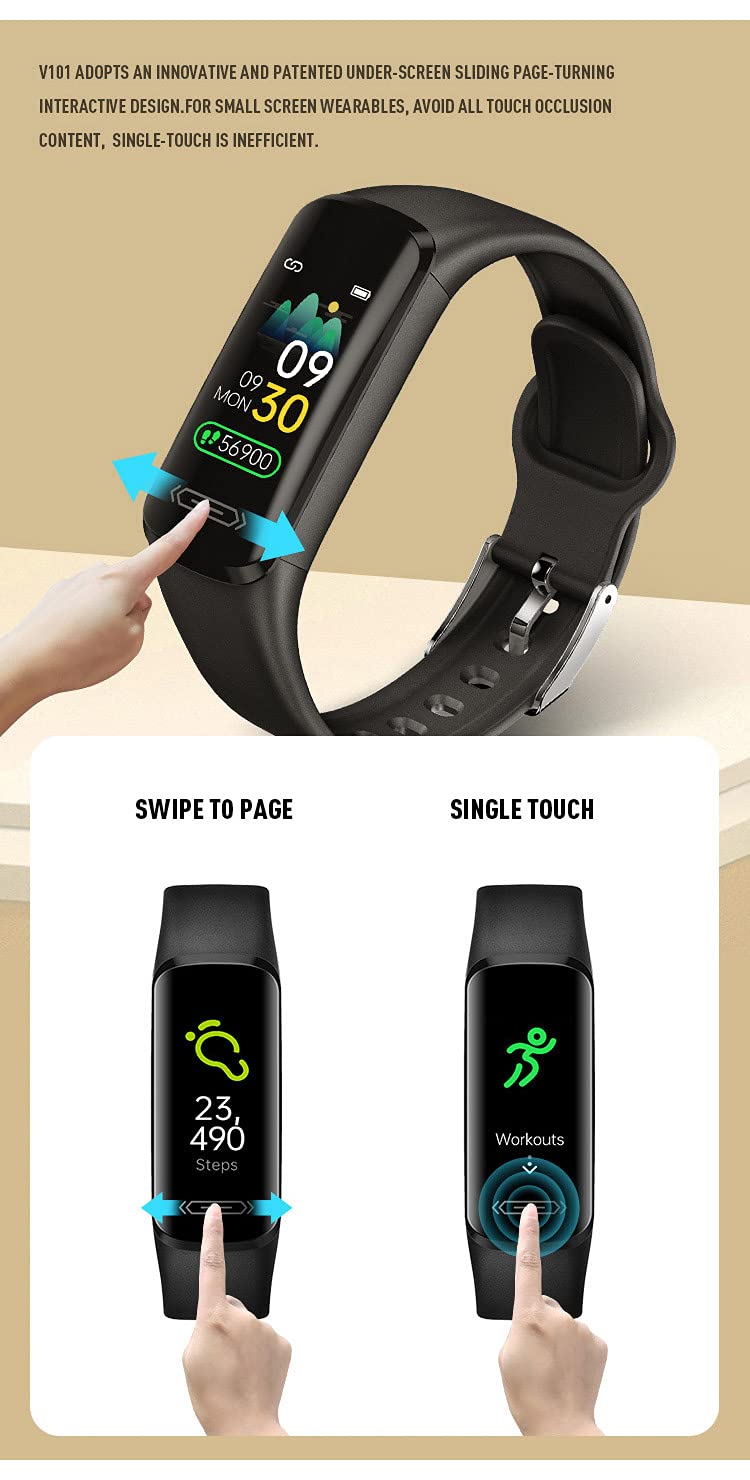
Figure 1: Swipe and Touch Navigation

Figure 2: Display and Key Features Overview
5.2 Key Features
The DP WO-FIT V101 offers a range of features to support your health and fitness:
- Heart Rate Monitoring: The device features a PPG sensor for continuous 24-hour heart rate detection, monitoring every 100 milliseconds.
- Activity Tracking (Pedometer): Tracks your steps, distance, and calories burned throughout the day.
- Sleep Monitoring: Monitors your sleep patterns to help you understand and improve your sleep quality.
- Body Temperature Measurement: Utilizes AI for body temperature measurement.
- Multi-Sport Mode: Supports various activities including outdoor run, outdoor walk, outdoor cycle, HIIT, indoor run, and plank.
- Call and Message Reminders: Receive notifications for incoming calls and messages directly on your wrist.
- Stopwatch & Countdown: Built-in tools for timing activities.
- Silent Alarm Clock: Set alarms that vibrate discreetly.
- Sedentary Reminder: Get alerts when you've been inactive for too long.
- Remote Control Photographing: Use your watch band as a remote shutter for your phone's camera.
- Intelligent Lock Screen: Enhances privacy and prevents accidental touches.

Figure 3: Heart Rate Monitoring Feature
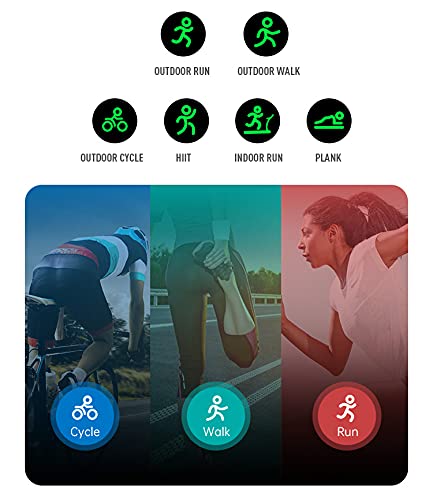
Figure 4: Multi-Sport Modes
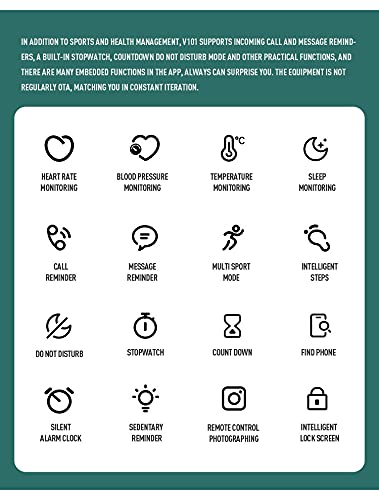
Figure 5: Overview of Smartwatch Functions
6. Maintenance
6.1 Cleaning
Regularly clean your smart watch band to ensure optimal performance and hygiene. Wipe the device with a soft, damp cloth. Avoid using harsh chemicals or abrasive materials.
6.2 Water Resistance
The DP WO-FIT V101 is IP68 waterproof, meaning it is resistant to dust and can withstand immersion in water up to 1.5 meters for up to 30 minutes. It is suitable for daily use, such as washing hands or light rain. However, it is not recommended for swimming, diving, or exposure to hot water or steam.
7. Troubleshooting
- Device not turning on: Ensure the device is fully charged. Connect it to the charger and wait a few minutes.
- Cannot pair with smartphone: Make sure Bluetooth is enabled on your phone and the watch band is within range. Restart both the watch band and your phone, then try pairing again through the app.
- Inaccurate readings: Ensure the watch band is worn snugly on your wrist, not too tight or too loose. Clean the sensor area regularly.
- Notifications not received: Check app permissions on your smartphone to ensure the app has access to notifications. Verify that notifications are enabled within the app settings.
8. Specifications
| Feature | Specification |
|---|---|
| Model | DP WO-FIT V101 |
| Bluetooth Version | V5.0 |
| Chip | REALTEK8752CJ |
| HR Sensor | LC11 |
| G-Sensor | STK8321 |
| Bluetooth Distance | 10m |
| Flash Memory | 160KB SRAM + 32Mb Flash |
| Display Type | 0.96 inch IPS TFT OLED Touchscreen |
| Resolution | 160*80 |
| Battery Capacity | 90mAh Lithium Polymer |
| Charging Method | Magnetic USB Direct Charging |
| Charging Time | Approx. 2 hours |
| Working Time | 7-10 days |
| Waterproof Rating | IP68 |
| Case Material | ABS |
| Strap Material | TPU |
| Compatible Phone System | Android 4.4 or above; iOS 9.0 or above |
| Device Weight | 20 g |
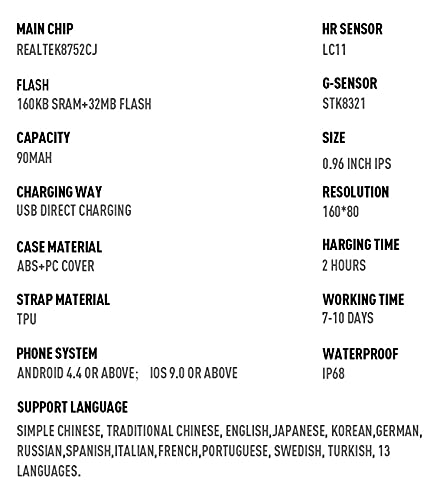
Figure 6: Detailed Product Specifications
9. Warranty and Support
9.1 Warranty Information
The DP WO-FIT V101 Smart Watch Band comes with a 1-year limited warranty from the date of purchase. This warranty covers manufacturing defects. It does not cover damage caused by misuse, accidents, unauthorized modifications, or normal wear and tear.
9.2 Customer Support
For technical assistance, warranty claims, or any questions regarding your DP WO-FIT V101, please refer to the contact information provided with your purchase or visit the official DP product support website.