
Depusheng DX6- 6 Channels
Depusheng DX6 Professional Mixer Sound Board Console
Model: DX6- 6 Channels | Brand: Depusheng
Introduction
The Depusheng DX6 is a professional 6-channel audio mixer designed to provide high-quality sound control for a variety of applications. Its robust steel chassis ensures durability, while its intuitive interface makes it suitable for both beginners and experienced audio engineers. Key features include multi-device compatibility, Bluetooth wireless audio streaming, and ultra-musical 3-band EQ on all channels.

Figure 1: Front view of the Depusheng DX6 Professional Mixer, showcasing its compact design and control layout.
Setup and Connections
Power Connection
Connect the provided power adapter to the mixer's power input socket located on the rear panel, and then plug it into a suitable electrical outlet. Ensure the power switch is in the 'off' position before connecting. Once connected, you can turn on the mixer using the power switch.
Video 1: This video demonstrates the initial power connection for the mixer, showing how to plug in the power cable and turn on the unit.
Audio Inputs (Microphone & Line)
The DX6 mixer features 6 input channels, each equipped with a combination XLR/TRS input for microphones (MIC) and a 1/4" TRS input for line-level instruments or devices (LINE). For condenser microphones requiring external power, activate the +48V phantom power button located in the master section.

Figure 2: Close-up view of the microphone (XLR) and line (1/4" TRS) input jacks for each channel, along with the gain control knobs.
Bluetooth and USB MP3 Playback
The mixer supports wireless audio streaming via Bluetooth and direct MP3 playback from a USB flash drive. To connect via Bluetooth, select the Bluetooth mode on the MP3 player section using the 'MODE' button and pair with your Bluetooth-enabled device (e.g., smartphone, tablet). For USB playback, simply insert a USB flash drive containing MP3 files into the USB port.

Figure 3: This image shows the USB port and the Bluetooth & MP3 Player control panel, illustrating how to connect external devices for audio streaming.
Video 2: This video segment demonstrates the process of connecting a mobile phone to the mixer via Bluetooth for wireless audio playback.
Audio Outputs
Main audio output is available via balanced XLR (L MAIN OUT R) and unbalanced 1/4" TRS (L MAIN OUT R) connectors for connecting to powered speakers or amplifiers. A dedicated headphone output (PHONES) with its own volume control is provided for monitoring the mix.

Figure 4: This image details the main output section, including XLR and 1/4" TRS main outputs, headphone jack, and auxiliary send/return connections.
Operating the Mixer
Channel Controls
Each input channel on the DX6 mixer features a comprehensive set of controls to shape your sound:
- GAIN: Adjusts the input sensitivity for microphones and line-level signals. Set this to achieve a strong signal without clipping.
- EQ (HF, MF, LF): A 3-band equalizer (High Frequency, Mid Frequency, Low Frequency) allows you to boost or cut specific frequency ranges to fine-tune the tone of each channel.
- AUX: Controls the send level of the channel's signal to the auxiliary output, useful for external effects processors or monitor mixes.
- FX: Adjusts the send level of the channel's signal to the internal DSP effects processor.
- PAN: Pans the channel's signal between the left and right main outputs, allowing for stereo imaging.
- Volume Fader: Controls the overall output level of the individual channel.
- PFL/AFL: Pre-Fader Listen/After-Fader Listen button for monitoring individual channels through headphones without affecting the main mix.
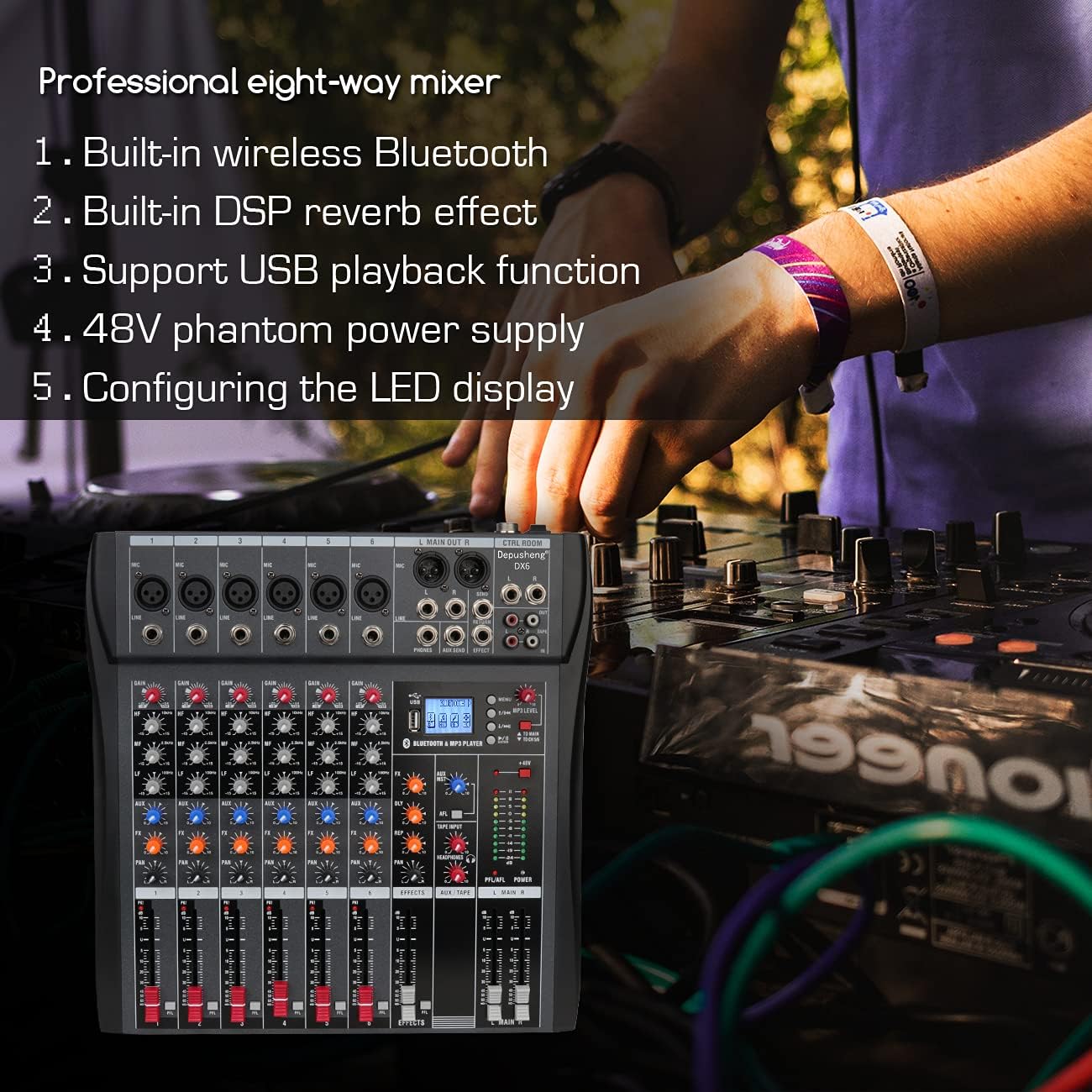
Figure 5: This image provides a close-up view of the controls for a single channel, including Gain, 3-band EQ, AUX, FX, PAN, and the channel fader.
Master Controls
The master section provides overall control of the mixer's output and monitoring functions. This includes the main output level faders (L MAIN R), headphone volume control, and dedicated controls for the MP3 player section.
Built-in Effects
The DX6 features a built-in DSP effects processor with various effects. Use the FX controls on each channel to send signal to the effects processor, and adjust the master FX return level to blend the effect into the main mix. The MP3 player section also allows for control over playback, pause, track skipping, and mode switching.
Video 3: This video segment demonstrates how to adjust the built-in effects on the mixer, showcasing the various parameters that can be controlled.
Maintenance
To ensure the longevity and optimal performance of your Depusheng DX6 mixer, follow these maintenance guidelines:
- Cleaning: Regularly wipe the mixer's surface with a soft, dry, lint-free cloth. Avoid using abrasive cleaners, solvents, or chemical sprays, as these can damage the finish and internal components.
- Ventilation: Ensure proper ventilation around the mixer. Do not block the cooling vents located on the sides or rear of the unit. Adequate airflow prevents overheating and extends component life.
- Storage: When not in use, store the mixer in a cool, dry place away from direct sunlight, excessive heat, humidity, and dust. Using a dust cover is recommended.
- Handling: Handle the mixer with care. Avoid dropping it or subjecting it to strong impacts. Do not place heavy objects on top of the unit.
Troubleshooting
If you encounter issues with your Depusheng DX6 mixer, refer to the following common troubleshooting steps:
No Sound Output
- Check Connections: Verify that all audio cables (inputs, outputs) are securely connected to the correct jacks. Ensure the power adapter is properly connected and the mixer is turned on.
- Volume Levels: Confirm that all relevant volume faders (channel, main output, headphone) and gain knobs are set to audible levels and not muted.
- Input Source: Ensure the correct input source (e.g., MIC/LINE, Bluetooth, USB) is selected for the active channel or the MP3 player.
- Phantom Power: If using a condenser microphone, ensure the +48V phantom power is engaged.
Distorted Sound
- Gain Staging: Reduce the gain on input channels or the main output faders if the red 'PEAK' LEDs are consistently lighting up, indicating signal clipping.
- Cable Integrity: Inspect all audio cables for damage or loose connections. Replace faulty cables if necessary.
- Impedance Matching: Ensure that the input impedance of the mixer channels is compatible with the connected source devices.
Bluetooth Connection Issues
- Pairing Mode: Ensure the mixer's MP3 player is set to Bluetooth pairing mode (usually indicated by a flashing Bluetooth icon on the display).
- Device Visibility: Check that your mobile device's Bluetooth is enabled and set to be discoverable.
- Proximity: Move your Bluetooth device closer to the mixer to improve signal strength and reduce interference.
- Re-pairing: If issues persist, try 'forgetting' the mixer from your device's Bluetooth settings and then re-pairing.
Specifications
| Feature | Detail |
|---|---|
| Item Weight | 6.28 pounds |
| Product Dimensions | 13.46 x 13.39 x 1.46 inches |
| Country of Origin | China |
| Item model number | DX6- 6 Channels |
| Power Source | Corded Electric |
| Brand | Depusheng |
| Number of Channels | 6 |
| Connectivity Technology | Bluetooth, USB |
Warranty and Support
For detailed warranty information, technical support, or service inquiries regarding your Depusheng DX6 Professional Mixer, please refer to the contact details provided on the product packaging or visit the official Depusheng website. Keep your purchase receipt as proof of purchase for any warranty claims.
Ask a question about this manual
Ask about setup, troubleshooting, compatibility, parts, safety, or missing instructions. Manuals+ will review the question and use this page’s manual context to help answer it.