
Introduction
This manual provides comprehensive instructions for the VINABTY AKB37026852 replacement remote control. It is designed to operate various LG DVD Home Cinema systems. Please read this manual carefully to ensure proper use and to maximize your experience with the remote control.
Product Overview
The VINABTY AKB37026852 is a direct replacement remote control, offering full functionality for compatible LG DVD Home Cinema models. It features an ergonomic design for comfortable handling and intuitive button layout for ease of use.
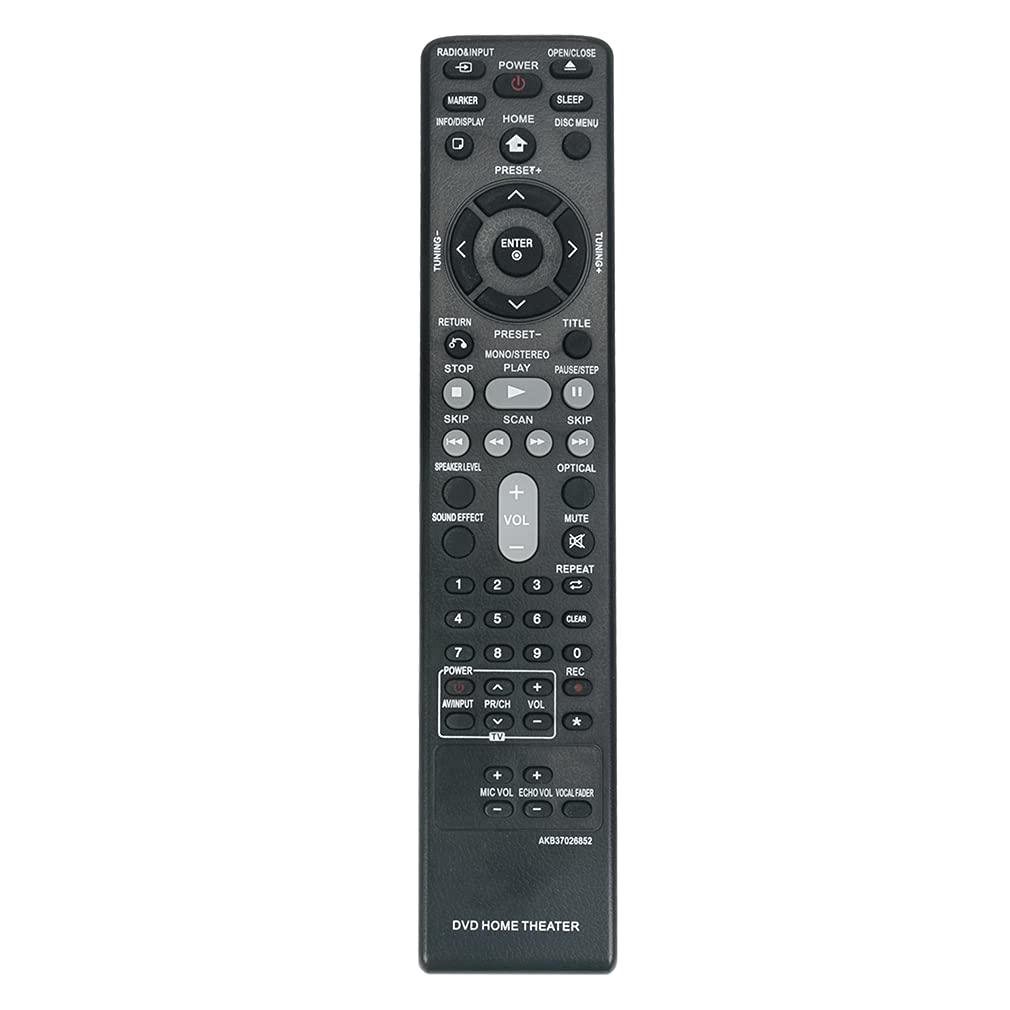
Image: Front view of the VINABTY AKB37026852 replacement remote control, showing all buttons and their labels.
Compatible Models:
- LG DVD Home Cinema Systems: DH4130S, HT304, HT305, HT532, HT805, HT806, HT906, W95, LHD625, S63S1-S, S63T1-C, S75T1-W
- Specific models: HT805ST (HT805ST, SH85ST-S/C/W), DH4220S (DH4220S, S42S1-S/W), DH7531T (DH7531T, S73T1-S/W, S73T4-C), S43S3-S/W DH6530T (DH6530T, S63T1-S/C/W), HT806ST (HT806ST, SH86ST-S/C, SH95TA-W), DVD Wireless Home Theater System HT906TAW (HT906TAW, SH96TA-S/W, SH96SB-C)
Setup
Battery Installation:
- Locate the battery compartment cover on the back of the remote control.
- Slide the cover downwards or press the latch and lift to open the compartment.
- Insert two AAA alkaline batteries (not included), ensuring the positive (+) and negative (-) terminals match the diagrams inside the compartment.
- Replace the battery compartment cover by sliding it back into place until it clicks securely.
No additional setup or programming is required. The remote control is ready for use immediately after battery installation.
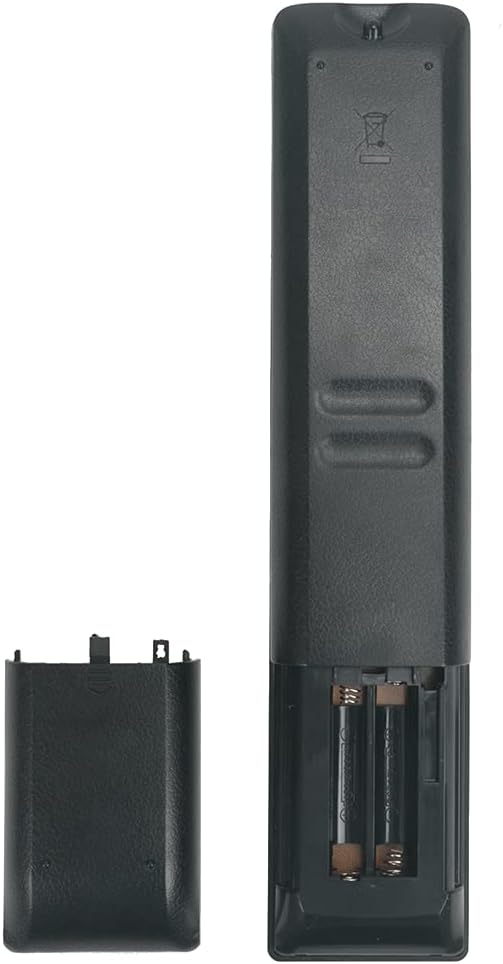
Image: Rear view of the remote control with the battery compartment open, showing where to insert two AAA batteries.
Operating Instructions
Point the remote control directly at your LG DVD Home Cinema system. Ensure there are no obstructions between the remote and the device. The effective range is approximately 10 meters (33 feet).
Key Functions:
| Button | Function |
|---|---|
| POWER | Turns the LG Home Cinema system On or Off. |
| RADIO/INPUT | Switches between different input sources or radio mode. |
| OPEN/CLOSE | Opens or closes the disc tray. |
| INFO/DISPLAY | Displays information about the current playback or system status. |
| HOME | Accesses the main menu or home screen. |
| SLEEP | Sets the sleep timer. |
| DISC MENU | Accesses the menu of the loaded disc. |
| Navigation Buttons (Up, Down, Left, Right, ENTER) | Used to navigate menus and confirm selections. |
| RETURN | Goes back to the previous menu or screen. |
| TITLE | Accesses the disc title menu. |
| PRESET+/- | Changes radio presets or navigates through stored settings. |
| TUNING+/- | Adjusts radio frequency manually. |
| STOP | Stops playback. |
| PLAY | Starts or resumes playback. |
| PAUSE/STEP | Pauses playback or advances frame by frame. |
| SKIP (<< / >>) | Skips to the previous or next track/chapter. |
| SCAN (<< / >>) | Fast reverse or fast forward playback. |
| VOL+/- | Adjusts the master volume level. |
| MUTE | Mutes or unmutes the audio. |
| REPEAT | Repeats the current track, chapter, or disc. |
| CLEAR | Clears entries or selections. |
| Number Buttons (0-9) | Direct selection of tracks, chapters, or inputting numbers. |
| SOUND EFFECT | Cycles through available sound effects or equalizer presets. |
| SPEAKER LEVEL | Adjusts individual speaker levels. |
| OPTICAL | Selects the optical audio input. |
| MIC VOL +/- | Adjusts microphone volume. |
| ECHO VOL +/- | Adjusts microphone echo effect volume. |
| VOCAL FADER | Reduces the vocal track on karaoke discs. |
Troubleshooting
- Remote not responding:
- Ensure batteries are inserted correctly with the correct polarity (+/-).
- Replace old batteries with new alkaline batteries.
- Check for any obstructions between the remote control and the LG Home Cinema system's infrared receiver.
- Ensure you are within the effective operating range (approx. 10 meters) and pointing the remote directly at the device.
- Specific functions not working:
- Verify that your LG Home Cinema system model is listed as compatible in the "Product Overview" section. While this remote is broadly compatible, some very specific functions might vary slightly depending on the original remote's layout for certain older or niche models.
- If a particular button does not seem to work, ensure the system is in the correct mode (e.g., DVD mode for disc functions, Radio mode for tuning).
Maintenance
- Cleaning: Wipe the remote control with a soft, dry cloth. Do not use liquid cleaners or abrasive materials.
- Battery Care: Remove batteries if the remote control will not be used for an extended period to prevent leakage.
- Storage: Store the remote in a cool, dry place away from direct sunlight and extreme temperatures.
- Avoid Drops: Protect the remote from physical impact, as this can damage internal components.
Specifications
- Brand: VINABTY
- Model Name: AKB37026852
- Connectivity Technology: Infrared
- Compatible Devices: LG DVD Home Cinema Systems
- Maximum Range: 10 Meters
- Battery Type: Alkaline (AAA x 2, not included)
- Special Feature: Ergonomic design
- Color: Black
Warranty and Support
VINABTY is committed to providing excellent after-sales service. If you encounter any issues with your remote control or have questions regarding its operation, please do not hesitate to contact our customer support. We are dedicated to ensuring your satisfaction with our products and services.
For support, please refer to the contact information provided with your purchase or visit the VINABTY official website.