
Etrogo ET 866
Etrogo ET 866 12V/24V Intelligent Pulse Fast Battery Charger User Manual
Model: ET 866
1. Product Overview
The Etrogo ET 866 is an intelligent pulse fast battery charger designed for 12V and 24V lead-acid batteries, including AGM, GEL, MF, SLA, and VRLA types, with capacities ranging from 3AH to 200AH. It features automatic voltage detection, multiple charging modes, and a battery repair function, all displayed on a clear LCD screen. This charger is equipped with advanced micro-computer control for precise temperature management and various safety protections.

Figure 1: Etrogo ET 866 Intelligent Pulse Fast Battery Charger.
2. Safety Instructions
Please read and understand all safety instructions before operating the charger. Failure to follow these instructions may result in electric shock, fire, or serious injury.
- Inspection: Before each use, ensure the charger is in good condition. Do not use if there are loose components, broken wires, or deformed appearances.
- Battery Compatibility: Verify battery information and condition before use. This charger is designed for 12V/24V lead-acid batteries (AGM, GEL, MF, SLA, VRLA) and is not suitable for lithium batteries.
- Ventilation: Use the charger indoors in a well-ventilated area. Do not operate in environments with high humidity, high temperatures, or flammable/explosive gases.
- Cooling Fan: Do not block the ventilation grilles. If the built-in fan is not operating, do not use the charger. Intermittent fan operation during charging is normal.
- Polarity: Always connect the red clamp to the positive (+) terminal and the black clamp to the negative (-) terminal of the battery. Reverse polarity connection will trigger an alarm and protection.
- Disconnection: Disconnect the power supply from the wall outlet before disconnecting the battery clamps.
- Children and Pets: Keep the charger out of reach of children and pets.
3. Package Contents
Ensure all items are present in the package:
- Etrogo ET 866 Intelligent Pulse Fast Battery Charger
- Integrated Power Cable (Input line length: 130 cm)
- Integrated Battery Clamps (Output line length: 50 cm)
4. Product Features and Components
4.1. LCD Screen Display
The charger features an LCD screen that provides real-time information on charging status, voltage, current, and battery percentage.

Figure 2: LCD Screen displaying charging information.
4.2. Charging Modes
The charger offers two primary charging modes:
- Intelligent Mode (Default): Suitable for regular battery charging and maintenance.
- Fast Charge Mode: Recommended for deeply discharged batteries or charging in low-temperature conditions.

Figure 3: Switching between Intelligent and Fast Charge modes.
4.3. Automatic Detection and Micro-Computer Control
The charger automatically detects 12V or 24V batteries based on their internal real voltage (10V-14.5V for 12V, 18V-29V for 24V). An advanced micro-computer system controls the charging process, automatically adjusting the output current from 0A to 10A for optimal charging.
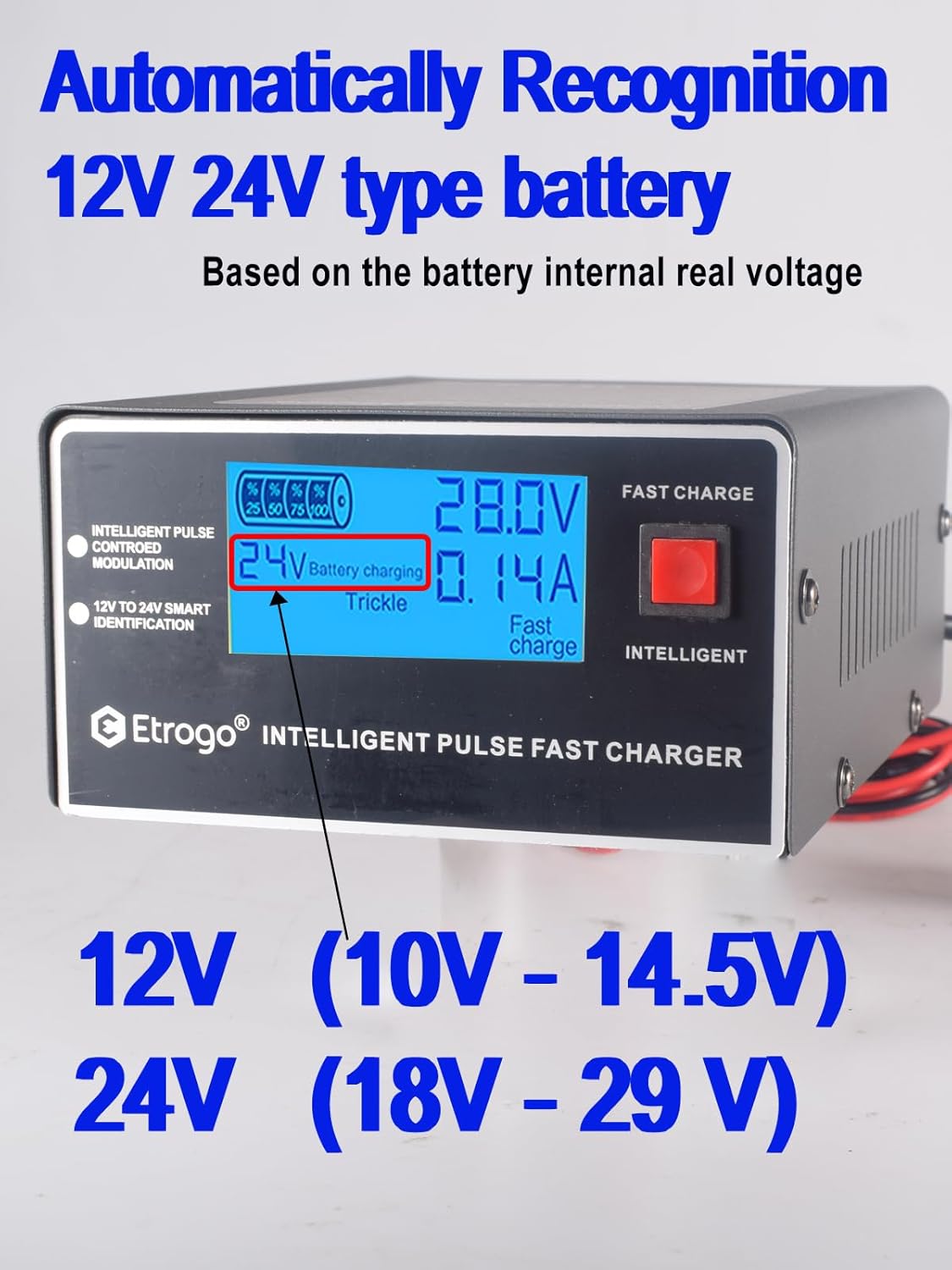
Figure 4: Automatic 12V/24V battery type recognition.
4.4. Battery Repair Function
The charger includes an automatic battery repair function. When a battery issue is detected upon connection, an audible alarm will sound, and the charge percentage on the display will flash. The charger will then automatically enter maintenance mode and attempt to repair the battery. Once repair is complete, the display will stop flashing, and the alarm will cease. Note that the effectiveness of repair depends on the battery's condition, and some severely damaged batteries may not be repairable.
4.5. Multiple Protections
The ET 866 charger incorporates several safety features:
- Overheat Protection
- Short-Circuit Protection
- Reverse Polarity Protection
- Overcurrent Protection
- Overvoltage Protection
- Low Voltage Protection
When any of these protections are activated, the charger will emit an audible alarm and automatically enter repair mode.

Figure 5: Multi-Protection features and built-in cooling fan.
4.6. Built-in Cooling Fan
An integrated cooling fan efficiently dissipates heat during operation, ensuring the charger's longevity and stable performance.
4.7. Copper Clamps and Dimensions
The battery clamps are made of thickened anodized copper to reduce oxidation and extend their lifespan. The charger's dimensions are 17cm x 13cm x 7cm.

Figure 6: Charger dimensions and clamp details.
5. Setup
Follow these steps to set up your Etrogo ET 866 battery charger:
- Prepare the Battery: Ensure the battery terminals are clean and free of corrosion.
- Connect Battery Clamps:
- Connect the RED (+) clamp to the positive terminal of the battery.
- Connect the BLACK (-) clamp to the negative terminal of the battery.
- Connect to Power: Plug the charger's power cable into a standard AC 110-250V 50/60Hz wall outlet.
- Verify Connection: The LCD screen will illuminate, and the charger will automatically detect the battery voltage (12V or 24V).

Figure 7: Connection Diagram. Top: Single 12V/24V battery. Bottom: Two 12V batteries in series for 24V.
6. Operating Instructions
Once the charger is set up and connected:
- Automatic Detection: The charger will automatically detect the battery voltage (12V or 24V) and display it on the LCD screen.
- Select Charging Mode: Press the 'INTELLIGENT' button once to switch between 'Intelligent Charge Mode' (default) and 'Fast Charge Mode'.
- Initiate Charging: The charging process will begin automatically. The LCD screen will show the current voltage, current, and charging progress.
- Repair Mode: To activate the repair function, long-press the 'INTELLIGENT' button for 3 seconds (for 12V batteries) or 5 seconds (for 24V batteries). The charger will attempt to repair the battery.
- Automatic Stop: The charger will automatically stop charging once the battery is fully charged, regardless of the selected mode. An audible alarm will sound to indicate completion.
- Disconnect: After charging is complete, first unplug the charger from the AC power outlet, then disconnect the black (-) clamp, followed by the red (+) clamp from the battery.
7. Maintenance
Proper maintenance ensures the longevity of your charger and batteries:
- Regular Cleaning: Keep the charger clean and free of dust. Use a dry cloth to wipe the exterior.
- Cable Inspection: Periodically check the power cable and battery clamps for any signs of damage or wear. Replace if necessary.
- Storage: Store the charger in a cool, dry, and well-ventilated place when not in use.
- Battery Care: For optimal battery health, recharge batteries once a week if they are not in use to prevent deep discharge and potential damage.
8. Troubleshooting
If you encounter issues with your Etrogo ET 866 charger, refer to the following:
| Problem | Possible Cause | Solution |
|---|---|---|
| Charger does not power on. | No power from outlet; faulty cable; internal issue. | Check power outlet; inspect cable; contact support if problem persists. |
| Alarm sounds and display flashes. | Battery issue detected; protection activated (e.g., reverse polarity, low voltage). | Check battery connections for correct polarity; allow charger to enter repair mode; inspect battery condition. |
| Charging does not start or is very slow. | Battery deeply discharged or severely damaged; incorrect battery type. | Ensure battery is compatible (not lithium); try repair mode; if battery is very old or deeply discharged, charging effect may be limited. |
| Cooling fan not working. | Fan malfunction. | Do not use the charger. Contact support. |
9. Specifications
| Feature | Specification |
|---|---|
| Brand | Etrogo |
| Model Number | ET 866 |
| Input Voltage | AC 110-250V, 50/60Hz |
| Output Voltage | 12V / 24V (Automatic Detection) |
| Output Current | 10A (Max) |
| Rated Power | 250W |
| Battery Types | Lead-Acid (AGM, GEL, MF, SLA, VRLA) - Not for Lithium |
| Battery Capacity Range | 3AH - 200AH |
| Protections | Overheat, Short-Circuit, Reverse Polarity, Overcurrent, Overvoltage, Low Voltage |
| Dimensions (L x W x H) | 17 cm x 13 cm x 7 cm |
| Certifications | CE |
| UPC | 760273098981 |
10. Warranty and Support
Information regarding product warranty and customer support is typically provided with the product packaging or by the seller at the time of purchase. Please refer to those resources for details on warranty coverage, returns, and technical assistance.
Ask a question about this manual
Ask about setup, troubleshooting, compatibility, parts, safety, or missing instructions. Manuals+ will review the question and use this page’s manual context to help answer it.