
BLUEAIR 107076
BLUEAIR Pure Fan Auto Gray Pre-Filter Instruction Manual
Model: 107076
1. Product Overview
The BLUEAIR Pure Fan Auto Pre-Filter (Model 107076, Arctic Trail color) is designed to enhance the performance and longevity of your Pure Fan Auto's primary filter. This washable fabric pre-filter acts as a first line of defense, capturing larger airborne particles such as dust, lint, pollen, and pet hair before they reach the main filter. This extends the life of the primary filter and helps maintain optimal air purification.

Figure 1: BLUEAIR Pure Fan Auto Pre-Filter (Arctic Trail) in its packaging.

Figure 2: The Arctic Trail fabric pre-filter, unfolded and ready for installation.
2. Installation Instructions
Follow these steps to install the pre-filter onto your BLUEAIR Pure Fan Auto unit:
- Prepare the Fan Unit: Ensure your BLUEAIR Pure Fan Auto is turned off and unplugged from the power outlet before beginning installation.
- Access the Main Filter: Carefully remove the back panel of your Pure Fan Auto to access the main filter. Refer to your Pure Fan Auto's primary instruction manual for specific details on how to open the unit.
- Position the Pre-Filter: Gently slide the Arctic Trail pre-filter over the main filter of the Pure Fan Auto. The stretchy fabric is designed to fit snugly around the filter cartridge.
- Secure the Pre-Filter: Ensure the pre-filter completely covers the exposed surfaces of the main filter. Smooth out any wrinkles to ensure an even fit.
- Reassemble the Unit: Once the pre-filter is securely in place, reattach the back panel of your Pure Fan Auto. Ensure all components are properly aligned and secured before plugging the unit back in.

Figure 3: Exploded view illustrating the placement of the pre-filter over the main filter within the Pure Fan Auto.

Figure 4: Demonstrating the process of sliding the fabric pre-filter onto the primary filter.
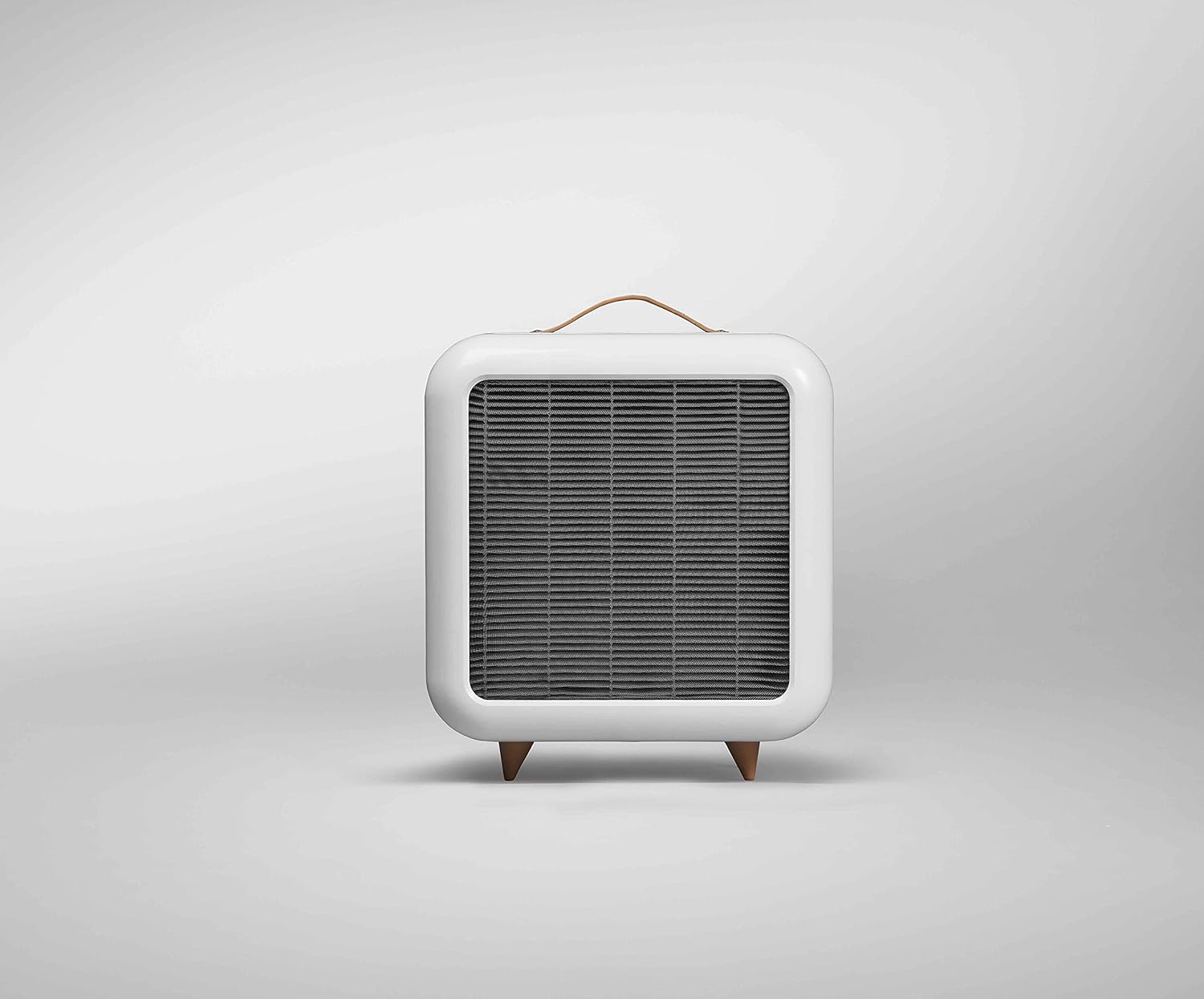
Figure 5: The BLUEAIR Pure Fan Auto with the Arctic Trail pre-filter correctly installed.
3. Operation
The pre-filter operates passively once installed. It works in conjunction with your BLUEAIR Pure Fan Auto's main filter to capture larger airborne particles. No additional operational steps are required for the pre-filter itself. Simply operate your Pure Fan Auto as directed in its primary user manual.
4. Maintenance and Cleaning
Regular cleaning of your pre-filter is essential to maintain optimal air purification performance and extend the life of your main filter. The pre-filter is designed for repeated use and is both washable and reusable.
4.1. Routine Cleaning (Vacuuming)
For visible dust and dirt accumulation, you can clean the exterior of the fabric pre-filter without removing it from the unit. This can be done as often as needed.
- Step 1: Turn off and unplug your BLUEAIR Pure Fan Auto.
- Step 2: Use a soft brush attachment on your vacuum cleaner to gently vacuum the surface of the pre-filter.
- Step 3: Ensure all visible dust and debris are removed.
4.2. Deep Cleaning (Washing Machine)
When the pre-filter requires a more thorough cleaning, it can be washed in a washing machine.
- Step 1: Turn off and unplug your BLUEAIR Pure Fan Auto.
- Step 2: Remove the pre-filter from the main filter by reversing the installation steps.
- Step 3: Place the fabric pre-filter into a washing machine. Use a gentle, low-temperature cycle. Avoid using harsh detergents or bleach, as these can damage the fabric.
- Step 4: After washing, hang the pre-filter to air dry completely. Do not tumble dry or use high heat, as this may cause shrinkage or damage.
- Step 5: Once completely dry, reinstall the pre-filter onto your Pure Fan Auto as described in the Installation section.
5. Troubleshooting
| Problem | Possible Cause | Solution |
|---|---|---|
| Reduced airflow from Pure Fan Auto | Pre-filter is clogged with excessive dust and debris. | Clean the pre-filter using either the routine vacuuming method or a deep wash as described in the Maintenance section. |
| Pre-filter does not fit correctly | Incorrect positioning or not fully stretched over the main filter. | Ensure the pre-filter is properly aligned and stretched evenly over the entire main filter. Refer to the Installation section. |
| Pre-filter appears damaged after washing | Incorrect washing cycle, high temperature, or harsh chemicals used. | Always use a gentle, low-temperature wash cycle and air dry. Avoid bleach or strong detergents. If damaged, replace the pre-filter. |
6. Specifications
- Model Name: 107076
- Brand: BLUEAIR
- Color: Arctic Trail (Gray)
- Material: Fabric
- Item Weight: 0.95 ounces
- Package Dimensions: 9.17 x 6.18 x 0.87 inches
- Compatibility: Designed for BLUEAIR Pure Fan Auto
7. Warranty and Support
For information regarding warranty coverage or technical support for your BLUEAIR products, please refer to the documentation included with your BLUEAIR Pure Fan Auto or visit the official BLUEAIR website. Contact information for customer service can typically be found on the product packaging or the brand's official support pages.
You can visit the BLUEAIR Store on Amazon for more product information.
Ask a question about this manual
Ask about setup, troubleshooting, compatibility, parts, safety, or missing instructions. Manuals+ will review the question and use this page’s manual context to help answer it.