
JBL JBLKMC500PIKCN
JBL KMC500 Wireless Karaoke Microphone User Manual
Model: JBLKMC500PIKCN
1. Introduction
Thank you for choosing the JBL KMC500 Wireless Karaoke Microphone. This manual provides essential information for the safe and effective use of your new device. Please read it thoroughly before operation and retain it for future reference.
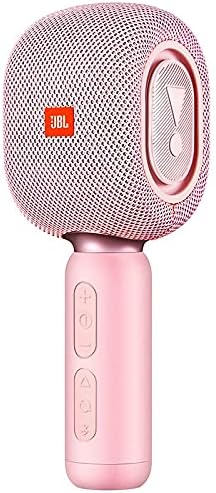
Image: The JBL KMC500 Wireless Karaoke Microphone in its pink color, showcasing its sleek design.
2. Package Contents
Please check that all items are present and in good condition upon unboxing:
- JBL KMC500 Wireless Karaoke Microphone (Pink)
- USB Charging Cable
- User Manual (this document)
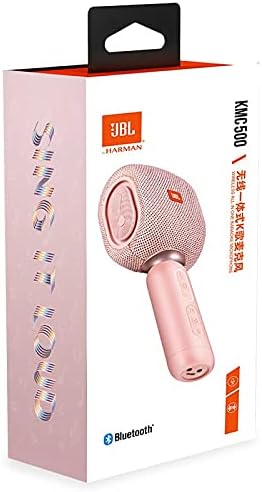
Image: Retail packaging of the JBL KMC500 Wireless Karaoke Microphone, showing the product and branding.
3. Product Features
The JBL KMC500 Wireless Karaoke Microphone is designed for an enjoyable karaoke experience with the following key features:
- Wireless Connectivity: Enjoy freedom of movement with wireless operation.
- Built-in Lithium Battery: Provides portable power for extended use.
- Durable Construction: Crafted from high-quality Aluminum Alloy.
- Handheld Design: Ergonomically designed for comfortable use.
- Unidirectional Polar Pattern: Focuses on sound from one direction, reducing background noise.
- Karaoke Machine Compatibility: Designed to seamlessly integrate with karaoke systems.

Image: An angled view of the JBL KMC500 Wireless Karaoke Microphone, highlighting its controls and design.
4. Setup Guide
4.1 Charging the Microphone
- Connect the small end of the USB charging cable to the charging port on the microphone.
- Connect the larger end of the USB cable to a compatible USB power adapter (not included) or a computer's USB port.
- The charging indicator light will illuminate (color may vary) to show that the microphone is charging.
- Once fully charged, the indicator light will change or turn off. Disconnect the cable.
4.2 Powering On/Off
- To power on, press and hold the Power button until the indicator light turns on.
- To power off, press and hold the Power button until the indicator light turns off.
4.3 Bluetooth Pairing
- Ensure the microphone is powered on and in pairing mode (indicator light may flash rapidly).
- On your audio device (e.g., karaoke machine, speaker, smartphone), enable Bluetooth and search for available devices.
- Select "JBL KMC500" from the list of found devices.
- Once connected, the indicator light on the microphone will typically become solid.
5. Operating Instructions
5.1 Basic Microphone Usage
- Hold the microphone approximately 2-6 inches from your mouth for optimal sound pickup.
- Speak or sing directly into the top mesh grille of the microphone.
5.2 Volume Control
- Use the + button to increase the microphone volume.
- Use the - button to decrease the microphone volume.
5.3 Connecting to an Audio System
After successful Bluetooth pairing, your microphone's audio will be transmitted to the connected device. Ensure the volume on your audio system is also adjusted appropriately.
6. Maintenance
6.1 Cleaning
- Wipe the microphone body with a soft, dry, lint-free cloth.
- Do not use abrasive cleaners, alcohol, or solvents, as these may damage the finish.
- Avoid getting moisture into the microphone grille or charging port.
6.2 Battery Care
- To prolong battery life, avoid fully discharging the battery frequently.
- Charge the microphone regularly, even if not in use, to maintain battery health.
- Store the microphone in a cool, dry place when not in use for extended periods.
7. Troubleshooting
| Problem | Possible Cause | Solution |
|---|---|---|
| Microphone does not power on. | Battery is depleted. | Charge the microphone fully. |
| No sound from microphone. | Not paired correctly; Volume too low; Microphone muted. | Ensure Bluetooth is connected; Increase microphone and connected device volume; Check for mute function (if applicable). |
| Bluetooth connection unstable. | Too far from connected device; Interference. | Move microphone closer to the connected device; Avoid obstacles; Turn off other Bluetooth devices temporarily. |
8. Specifications
| Feature | Detail |
|---|---|
| Brand | JBL |
| Model Number | KMC500 |
| Item Model Number | JBLKMC500PIKCN |
| Type | Microphone |
| Connectivity Technology | Wireless (Bluetooth) |
| Power Source | Battery Powered (Built-in lithium battery) |
| Color | Pink |
| Material | Aluminum Alloy |
| Microphone Form Factor | Handheld |
| Polar Pattern | Unidirectional |
| Compatible Devices | Karaoke Machine |
| Package Dimensions | 26.6 x 14.2 x 9.6 cm |
| Item Weight | 760 g |
9. Warranty and Support
JBL products are manufactured to the highest quality standards. For information regarding warranty coverage, please refer to the warranty card included with your product or visit the official JBL website.
For technical support, troubleshooting assistance, or service inquiries, please contact JBL customer support through their official channels. You can find more information and support resources on the JBL Store on Amazon or the official JBL website.
Related Documents - JBLKMC500PIKCN
 |
5 CORE WM SPK GLD Professional Bluetooth Karaoke Microphone Manual & Instructions Comprehensive manual and technical specifications for the 5 CORE WM SPK GLD Professional Bluetooth Karaoke Microphone. Learn about button operations, wireless connectivity, recording, selfie function, and troubleshooting. |
 |
Easy Karaoke EKS 717 Wireless Microphone Instruction Manual Comprehensive instruction manual for the Easy Karaoke EKS 717 wireless microphone system, covering setup, operation, safety, maintenance, and troubleshooting. |
 |
Mockins WS-858 Wireless Karaoke Microphone User Manual | Features, Specs, How-To User manual for the Mockins WS-858 Wireless Karaoke Microphone. This guide covers product introduction, dimensions, button functions, specifications, usage instructions, recording, charging, connectivity options (Bluetooth, Auxiliary, TF Card), and frequently asked questions (FAQ). |
 |
OTL PopSing Karaoke Fun Wireless Microphone & Speaker User Manual | OTL Technologies Comprehensive user manual for the OTL PopSing Karaoke Fun wireless karaoke microphone and speaker with LED light. Learn how to charge, pair via Bluetooth, use functions, troubleshoot, and understand safety and warranty information. |
 |
LifeGoods LG962 Wireless Bluetooth Karaoke Microphone User Manual Official user manual for the LifeGoods LG962 Wireless Bluetooth Karaoke Microphone. Provides detailed instructions, features, and operational guidance for this portable karaoke device. |
 |
i-Star 90043PI Wireless Karaoke Microphone User Guide Comprehensive user guide for the i-Star 90043PI Wireless Karaoke Microphone, covering setup, operation, features, troubleshooting, and specifications. |
Ask a question about this manual
Ask about setup, troubleshooting, compatibility, parts, safety, or missing instructions. Manuals+ will review the question and use this page’s manual context to help answer it.