
NHOPEEW NHOPEEW Single Din Car Stereo
NHOPEEW Single Din Car Stereo User Manual
Model: NHOPEEW Single Din Car Stereo
Brand: NHOPEEW
1. Important Safety Information
Please read all instructions carefully before installation and operation. Failure to follow these instructions may result in damage to the unit, vehicle, or personal injury. Keep this manual for future reference.
- Ensure proper wiring and connections to prevent short circuits or electrical hazards.
- Do not operate the unit in a manner that distracts you from driving.
- Avoid exposing the unit to extreme temperatures, direct sunlight, or moisture.
- Professional installation is recommended for optimal performance and safety.
2. Product Overview
The NHOPEEW Single Din Car Stereo is a versatile in-dash multimedia system featuring a 7-inch retractable touchscreen. It offers a range of functions including Bluetooth connectivity, FM radio, mirror link, and support for a backup camera.

Figure 2.1: Front view of the NHOPEEW Single Din Car Stereo with its 7-inch retractable touchscreen extended, displaying a smartphone-like interface. The unit also shows the included backup camera, remote control, and a smartphone demonstrating mirror link.
2.1 Front Panel and Rear Connections
Familiarize yourself with the various buttons, ports, and connections on the unit.
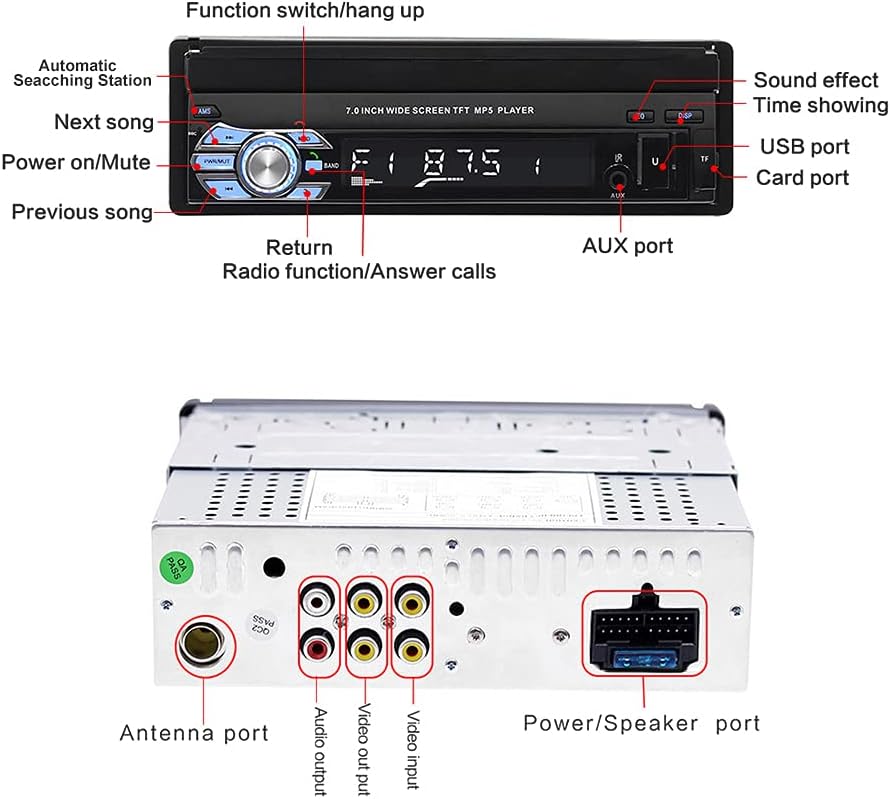
Figure 2.2: Detailed diagram showing the front panel controls (Function switch/hang up, Automatic Searching Station, Next song, Power on/Mute, Previous song, Return, Radio function/Answer calls, Sound effect, Time showing, USB port, Card port, AUX port) and the rear connections (Antenna port, Audio output, Video output, Video input, Power/Speaker port).
2.2 Package Contents
Verify that all items are included in your package:
- 1 x Single Din Bluetooth Car Stereo
- 1 x Remote Control
- 1 x 12 LED Backup Camera and Cable
- 1 x English User Manual
- 1 x Connector Wire
- 2 x Bracket

Figure 2.3: Image displaying all components included in the product package: the car stereo unit, remote control, connector wire, reversing camera, and the English user manual.
3. Installation Guide
This section provides instructions for installing your NHOPEEW Single Din Car Stereo. It is highly recommended to have the installation performed by a qualified professional.
3.1 Dimensions and Screen Operation
The unit's installation size is 188mm (Length) x 58mm (Height) x 173mm (Depth). The 7-inch HD screen is manually retractable.
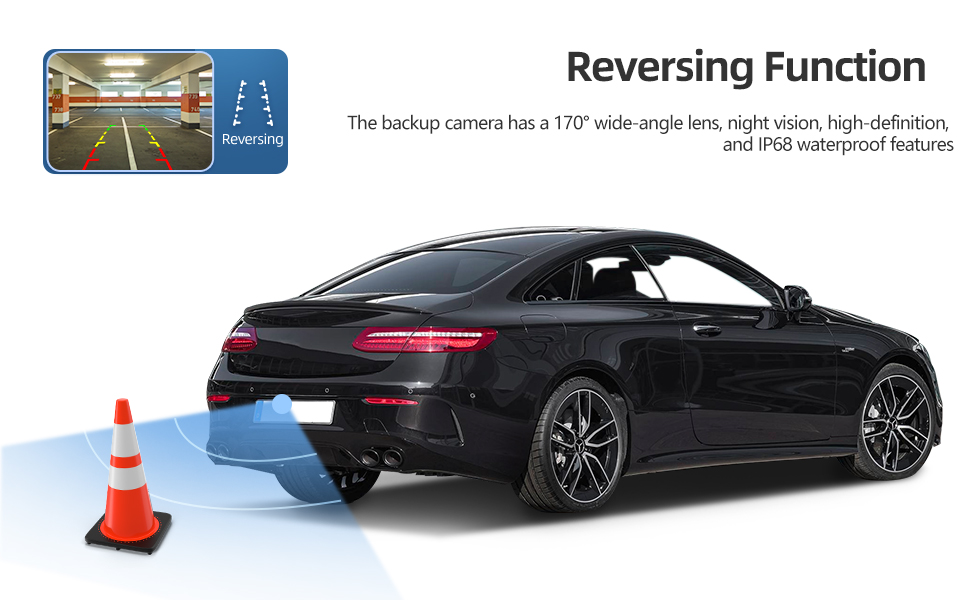
Figure 3.1: Diagram illustrating the dimensions of the car stereo unit (188mm x 58mm x 173mm) and a three-step visual guide on how to manually pull out and push back the retractable screen.
3.2 Wiring Diagram
Carefully follow the wiring diagram to connect the stereo to your vehicle's electrical system. Incorrect wiring can cause damage.
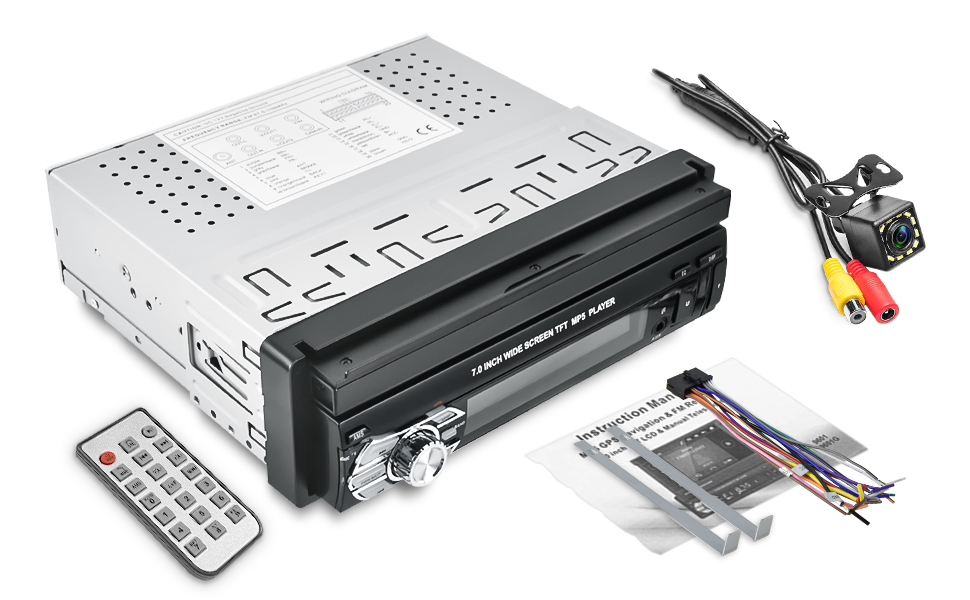
Figure 3.2: Comprehensive wiring diagram showing connections for speakers (Front Left/Right, Rear Left/Right), power (Battery, ACC), ground (GND), antenna (ANT), reverse signal (REVERSE), parking brake (PARKING), illumination (ILL), steering wheel controls (KEY1, KEY2), and rear camera input.
Key Wiring Notes:
- Yellow (B+): Connect to the constant 12V power supply.
- Red (ACC): Connect to the accessory 12V power supply (switched with ignition).
- Black (GND): Connect to a good chassis ground point.
- Orange (ILL): Connect to the vehicle's illumination wire for dimming.
- Brown (REVERSE): Connect to the reverse light signal for automatic camera display.
- Pink (PARKING): Connect to the parking brake wire. This wire must be grounded for video playback while the vehicle is stationary.
- Speaker Wires: Ensure correct polarity (+/-) for each speaker.
4. Operating Instructions
4.1 Basic Operation
- Power On/Off: Press the power button on the front panel or remote control.
- Volume Control: Use the rotary knob or volume buttons on the remote.
- Mode Selection: Press the MODE button to switch between Radio, Bluetooth, USB, SD, and AUX modes.
- Screen Retraction: Manually pull out or push back the screen as needed.
4.2 Bluetooth Functionality
Connect your smartphone via Bluetooth for hands-free calling and audio streaming.
- Enable Bluetooth on your mobile device.
- On the car stereo, select the Bluetooth mode.
- Search for "NHOPEEW" or a similar device name on your phone and pair.
- Once connected, you can make/receive calls and play music wirelessly.

Figure 4.1: The car stereo display showing an active Bluetooth call interface, including contact name, number, call duration, and call control options. The image also highlights the Bluetooth connectivity icon.

Figure 4.2: Close-up view of the car stereo highlighting the built-in microphone, essential for hands-free Bluetooth phone calls.
4.3 FM Radio Operation
Enjoy your favorite radio stations with the built-in FM tuner.
- Select FM mode.
- Press the "AMS" button for automatic station search and storage (up to 18 presets).
- Use the "Next/Previous song" buttons to manually tune or select preset stations.
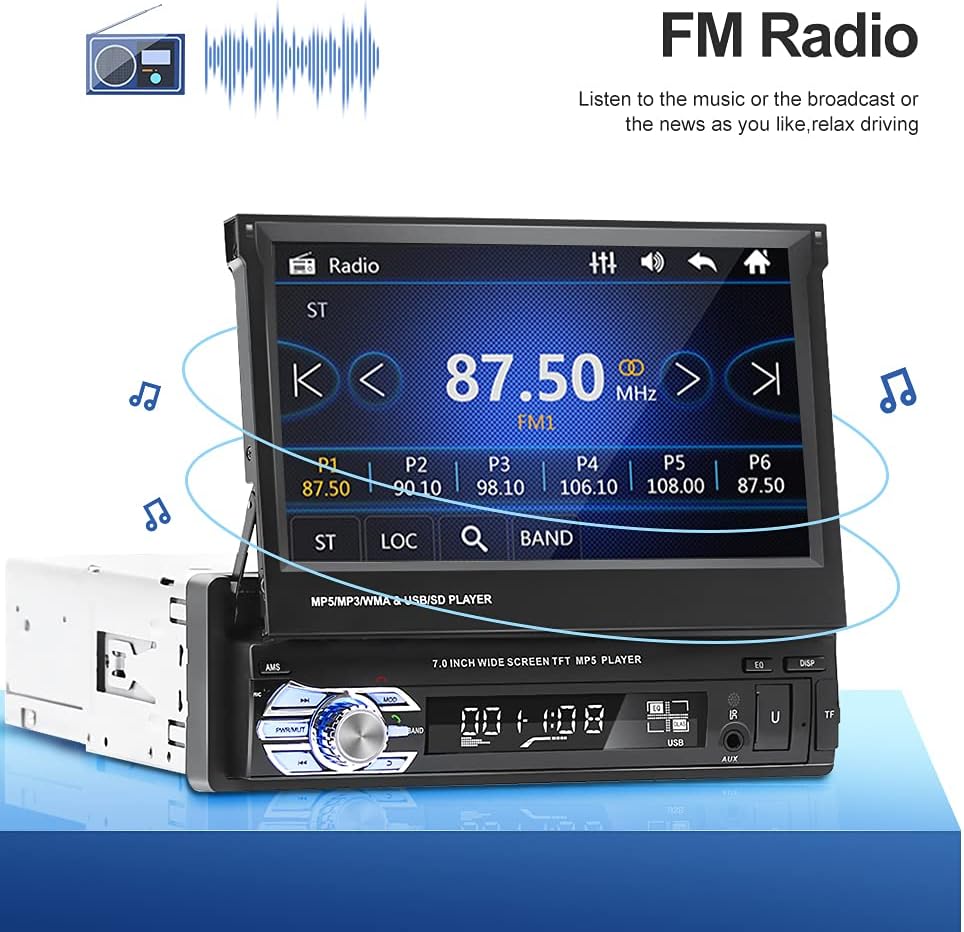
Figure 4.3: The car stereo display showing the FM radio interface with current frequency (87.50 MHz) and preset stations (P1-P6). Visuals of radio waves and music notes indicate active radio function.
4.4 Mirror Link Function
Synchronize your smartphone's screen to the car stereo display via USB cable. This feature is compatible with Android 4.0-8.0 and iPhone 8 and below.
- Connect your smartphone to the stereo's USB port using a high-quality USB cable.
- Follow the on-screen prompts on both your phone and the stereo to establish the connection.
- Once connected, your phone's screen will be mirrored on the stereo display, allowing navigation, video playback, and app access.

Figure 4.4: The car stereo display mirroring a smartphone's home screen with various app icons, demonstrating the Mirror Link functionality. A hand holding a smartphone is shown below the stereo, indicating the connection.

Figure 4.5: A visual representation of the Mirror Link connection, showing a smartphone connected via USB cable to the car stereo, with the phone's display mirrored on the stereo screen. Text indicates compatibility with Android 4.0-10.0 and iPhone X and below.
4.5 Backup Camera Operation
The included 12-LED backup camera provides a clear view of your vehicle's rear when reversing.
- When the vehicle is shifted into reverse gear, the stereo will automatically display the rear view.
- The camera features a 170° wide-angle lens, night vision, high-definition resolution, and IP68 waterproof rating.

Figure 4.6: The car stereo display showing the live feed from the backup camera, including parking guidelines. The image also shows the backup camera module and its key features: 170° wide-angle, night vision, high-definition, and IP68 waterproof.
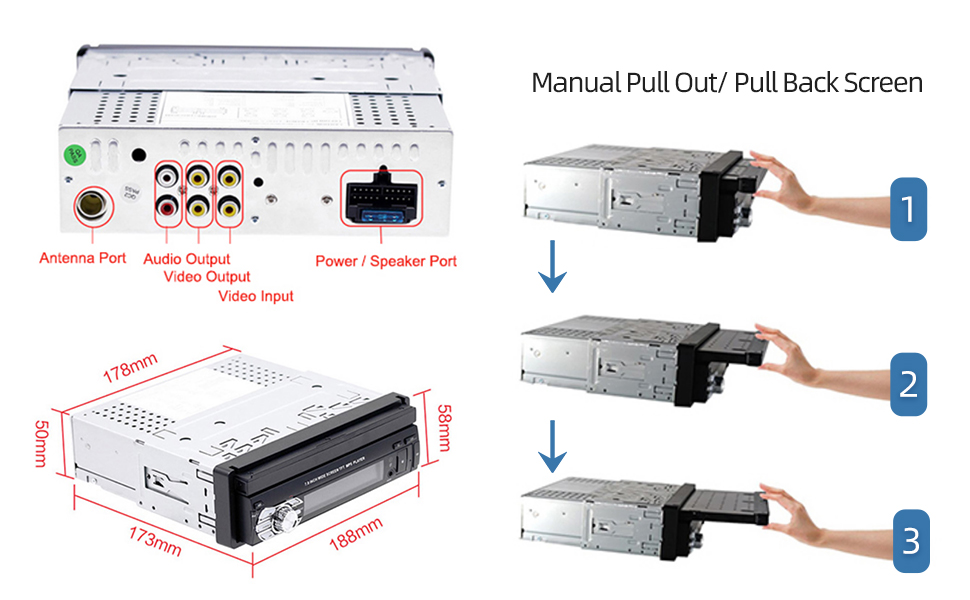
Figure 4.7: An illustration depicting a car reversing with the aid of the backup camera, showing the camera's wide-angle view and the projected path. Text reiterates the camera's 170° wide-angle lens, night vision, high-definition, and IP68 waterproof features.
4.6 Steering Wheel Control (SWC)
If your vehicle supports steering wheel controls, you can connect them to the stereo for convenient operation.
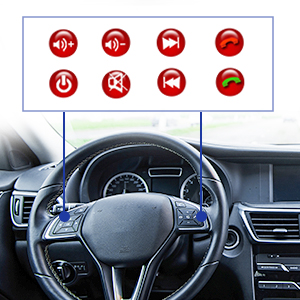
Figure 4.8: Icons representing common steering wheel control functions such as volume up/down, track skip, power, mute, and call answer/end, indicating compatibility with the car stereo.
Refer to the wiring diagram (Figure 3.2) for KEY1 and KEY2 connections. Configuration may be required in the stereo's settings menu.
5. Maintenance
- Cleaning the Screen: Use a soft, lint-free cloth to gently wipe the touchscreen. Do not use abrasive cleaners or solvents.
- General Cleaning: Wipe the unit's exterior with a dry or slightly damp cloth.
- Software Updates: Check the manufacturer's website periodically for any available firmware updates.
6. Troubleshooting
If you encounter issues with your car stereo, refer to the following common problems and solutions:
| Problem | Possible Cause | Solution |
|---|---|---|
| No Power | Incorrect wiring; Blown fuse; Loose connection. | Check power (Yellow B+, Red ACC) and ground (Black GND) connections. Inspect vehicle's fuse box and the unit's fuse. Ensure all connections are secure. |
| No Sound | Incorrect speaker wiring; Volume too low; Mute function active; Incorrect audio source. | Verify speaker wire connections and polarity. Increase volume. Check if mute is enabled. Select the correct audio source (e.g., Bluetooth, FM, USB). |
| Bluetooth Not Connecting | Bluetooth not enabled on phone/stereo; Device not in pairing mode; Interference. | Ensure Bluetooth is active on both devices. Put stereo in pairing mode. Delete previous pairings and try again. Move closer to the unit. |
| Mirror Link Not Working | Incompatible phone OS version; Faulty USB cable; Incorrect settings. | Check phone OS compatibility (Android 4.0-8.0, iPhone 8 and below). Try a different, high-quality USB cable. Ensure USB debugging (Android) or Trust (iPhone) is enabled. |
| Backup Camera Not Displaying | Reverse trigger wire not connected; Camera faulty; Loose video connection. | Verify the REVERSE (Brown) wire is correctly connected to the reverse light signal. Check the camera's power and video (RCA) connections. |
7. Specifications
| Feature | Detail |
|---|---|
| Display Size | 7 Inches |
| Display Type | Retractable HD Touchscreen |
| Connectivity Technology | Bluetooth, USB |
| Bluetooth Version | 4.0 |
| FM Frequency Range | 87.5M-108M |
| Mirror Link Compatibility | Android 4.0-8.0, iPhone 8 and below |
| Backup Camera | 12 LED, 170° wide-angle, Night Vision, IP68 Waterproof |
| Audio Output Mode | Stereo |
| Mounting Type | Dashboard Mount (Single Din) |
| Installation Dimensions (L x H x D) | 188mm x 58mm x 173mm |
| Item Weight | 3.45 pounds |
| Included Components | Car stereo, Remote control, Backup camera, User manual, Connector wire, Brackets |
8. Warranty and Support
NHOPEEW is committed to providing high-quality products and excellent customer service.
- Return Policy: 30-day refund or replacement policy from the date of purchase.
- Post-Sales Support: 2-years post-sales support is provided for this product.
- Protection Plans: Optional 2-Year and 3-Year protection plans are available for extended coverage.
- Contact Support: For any questions, installation assistance, or if the radio harness does not fit, please contact NHOPEEW customer service. We offer 24-hour email reply support.
For the most up-to-date support information, please visit the official NHOPEEW store or contact their customer service directly.
Ask a question about this manual
Ask about setup, troubleshooting, compatibility, parts, safety, or missing instructions. Manuals+ will review the question and use this page’s manual context to help answer it.