
Introduction
Thank you for choosing the Fonicer 2.4GHz Wireless Vertical Ergonomic Mouse and Keyboard Combo. This product is designed to provide a comfortable and efficient computing experience with its ergonomic design and reliable wireless connectivity. This manual provides essential information for setting up, operating, maintaining, and troubleshooting your new device.
Package Contents
- 1 x Wireless Keyboard
- 1 x Wireless Vertical Ergonomic Mouse
- 1 x Nano USB Receiver
Setup Instructions
- Install Batteries:
- For the keyboard: Open the battery compartment on the underside of the keyboard and insert two (2) AA batteries, ensuring correct polarity.
- For the mouse: Open the battery compartment on the underside of the mouse and insert two (2) AAA batteries, ensuring correct polarity.
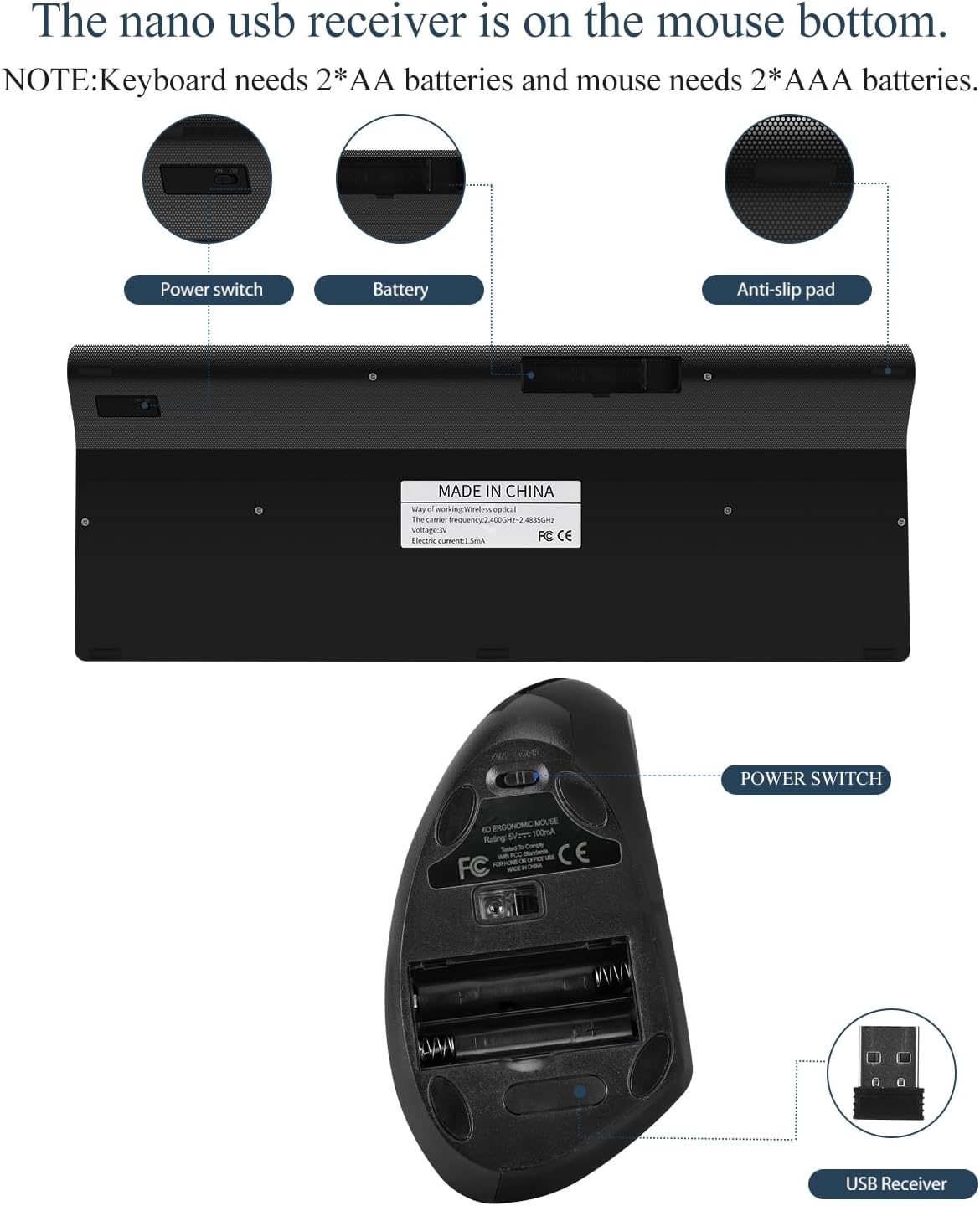 Figure 1: Battery installation and USB receiver location.
 - Connect the USB Receiver:
- Locate the Nano USB receiver, which is typically stored in the battery compartment of the mouse.
- Plug the Nano USB receiver into an available USB port on your computer (PC, Laptop, Mac, Tablet).
 Figure 2: Connecting the Nano USB receiver.
 - Power On Devices:
- Turn on the power switch located on the underside of both the keyboard and the mouse.
- Automatic Connection:
- The keyboard and mouse should automatically connect to your computer within a few seconds. No additional drivers are typically required.
Operating Instructions
Ergonomic Design Benefits
The vertical ergonomic design of the mouse promotes a natural "handshake" wrist and arm position, which can reduce strain and discomfort during prolonged use. The keyboard features a comfortable slope angle to minimize hand fatigue.
 Figure 3: Ergonomic benefits of the vertical mouse.
Mouse DPI Adjustment
The vertical mouse features adjustable DPI settings to suit your preference for cursor speed and precision. Press the DPI button on the top of the mouse to cycle through the available resolutions: 800, 1200, and 1600 DPI.
Keyboard Features
- Full Size Layout: The keyboard features a full 101-key layout for comprehensive functionality.
- Ultra-Thin Design: Its slim profile makes it portable and suitable for various workspaces.
- Scissor-Key-Switch: Provides a smooth typing experience with responsive and quiet keys.
- Hot Keys: The keyboard includes 12 hot keys for quick access to functions. Note that these hot keys are compatible with Windows systems only.
 Figure 4: Detail of responsive scissor-switch keys.
 Figure 5: Keyboard and mouse dimensions.
Compatibility
This wireless keyboard and mouse combo is compatible with Windows 98/2000/XP/ME/Mac/Linux/Android operating systems. It is not suitable for iOS systems.
Maintenance
- Cleaning: Use a soft, dry cloth to clean the surfaces of the keyboard and mouse. For stubborn dirt, a slightly damp cloth can be used, but ensure no moisture enters the device.
- Battery Replacement: Replace batteries when performance degrades. Always use new batteries of the specified type (AA for keyboard, AAA for mouse) and dispose of old batteries responsibly.
- Storage: When not in use for extended periods, turn off the power switches on both devices and store them in a dry, cool place.
Troubleshooting
| Problem | Possible Cause | Solution |
|---|---|---|
| Keyboard or mouse not responding | Low or dead batteries; Devices not powered on; USB receiver not connected; Out of range. | Replace batteries; Ensure power switches are ON; Plug USB receiver firmly into a working USB port; Ensure devices are within 10 meters (33 feet) of the receiver. |
| Intermittent connection or lagging input | Interference from other wireless devices; Low battery; Distance from receiver. | Move devices closer to the receiver; Replace batteries; Avoid placing receiver near large metal objects or other strong wireless signals. |
| Mouse cursor erratic or not moving smoothly | Dirty optical sensor; Unsuitable surface; Low battery. | Clean the optical sensor on the mouse bottom; Use on a clean, non-reflective mouse pad or surface; Replace batteries. |
| Hot keys not working | Operating system incompatibility. | The 12 hot keys are compatible with Windows systems only. They may not function on Mac, Linux, or Android. |
| Keyboard typing incorrect characters or duplicating spaces | Keyboard layout settings; Low battery; Hardware defect. | Check your computer's keyboard language settings; Replace batteries; If issues persist, contact support. |
Specifications
| Model Number | KM-06 |
| Connectivity | 2.4GHz Wireless (Radio Frequency) |
| Interface Type | USB (Nano Receiver) |
| Wireless Range | Up to 10 meters (33 feet) |
| Keyboard Keys | 101 Keys |
| Keyboard Dimensions | 17.72 x 5.91 x 1.57 inches (approx.) |
| Mouse Dimensions | 4.7 x 2.9 x 2.5 inches (approx.) |
| Mouse DPI Settings | 800 / 1200 / 1600 DPI |
| Keyboard Battery | 2 x AA batteries (not included) |
| Mouse Battery | 2 x AAA batteries (not included) |
| Key Lifespan | Over 8 million times |
| Material | ABS |
| Compatibility | Windows 98/2000/XP/ME/Mac/Linux/Android (Not iOS) |
| Product Weight (Combo) | 1.65 pounds (approx.) |
Warranty Information
Specific warranty details are not provided in the product information. Please refer to the product packaging or contact the manufacturer directly for warranty terms and conditions.
Support
For further assistance, technical support, or inquiries regarding your Fonicer 2.4GHz Wireless Vertical Ergonomic Mouse and Keyboard Combo, please contact Fonicer customer service through their official website or the contact information provided with your purchase.