
Rolanstar B09329PTQB
Rolanstar TV Stand Instruction Manual
Model: B09329PTQB
1. Safety Information
Please read and understand all instructions before assembly and use. Keep this manual for future reference.
- Do not exceed the maximum weight capacity of 150 pounds for the TV stand.
- Ensure all connections for the LED lights and power outlets are secure before use.
- Place the TV stand on a flat, stable surface to prevent tipping.
- Keep children and pets away during assembly. Small parts can be a choking hazard.
- This product is made from engineered wood and tempered glass. Handle glass components with care.
2. Package Contents
Verify that all components listed below are present before beginning assembly. If any parts are missing or damaged, please contact customer support.
- TV Stand Panels (various sizes)
- Hardware Pack (screws, dowels, cam locks, etc.)
- RGB LED Light Strip with Remote Control
- Built-in Power Outlet Strip with 2 USB Ports and 6.5ft Power Cord
- Tempered Glass Shelf
- Barn Door Cabinet Components
- Assembly Tools (L-shaped Allen wrench, screwdriver)

Figure 2.1: Overview of TV Stand Dimensions and LED Kit
3. Assembly Instructions
Assembly typically requires two adults. Follow the numbered steps and diagrams carefully. All parts are labeled for easy identification.
- Unpack all components and lay them out on a clean, soft surface to prevent scratches.
- Identify each part using the labels and the provided assembly diagram.
- Assemble the main frame of the TV stand according to the step-by-step instructions. Ensure all screws and fasteners are tightened securely.
- Install the tempered glass shelf into the designated central compartment.
- Attach the barn door cabinet components, ensuring smooth sliding operation.
- Mount the RGB LED light strip within the designated areas, typically along the inner edges of the open shelves.
- Install the built-in power outlet strip into its designated slot on the top surface.
- Once fully assembled, carefully move the TV stand to its desired location.

Figure 3.1: Assembled TV Stand Overview
4. Operating Instructions
4.1. RGB LED Lights
The integrated RGB LED lights offer customizable ambiance for your entertainment area.
- Connect the LED light strip to the power source (typically a USB port on the power strip or a separate USB adapter).
- Use the included remote control to power the lights on or off.
- Select from 16 different colors to match your mood or decor.
- Utilize the remote's functions for color jump, fade, strobe, and other light modes.

Figure 4.1: LED Light System and Remote Control
4.2. Power Outlet and USB Ports
The built-in power strip provides convenient access to power for your electronic devices.
- Plug the 6.5ft power cord from the TV stand into a standard wall outlet.
- Use the 4 standard plug outlets to power your television, media players, gaming consoles, or other appliances.
- The 2 USB ports are suitable for charging smartphones, tablets, or other USB-powered devices.
- Utilize the back panel cutouts for effective cord management, keeping cables tidy and organized.
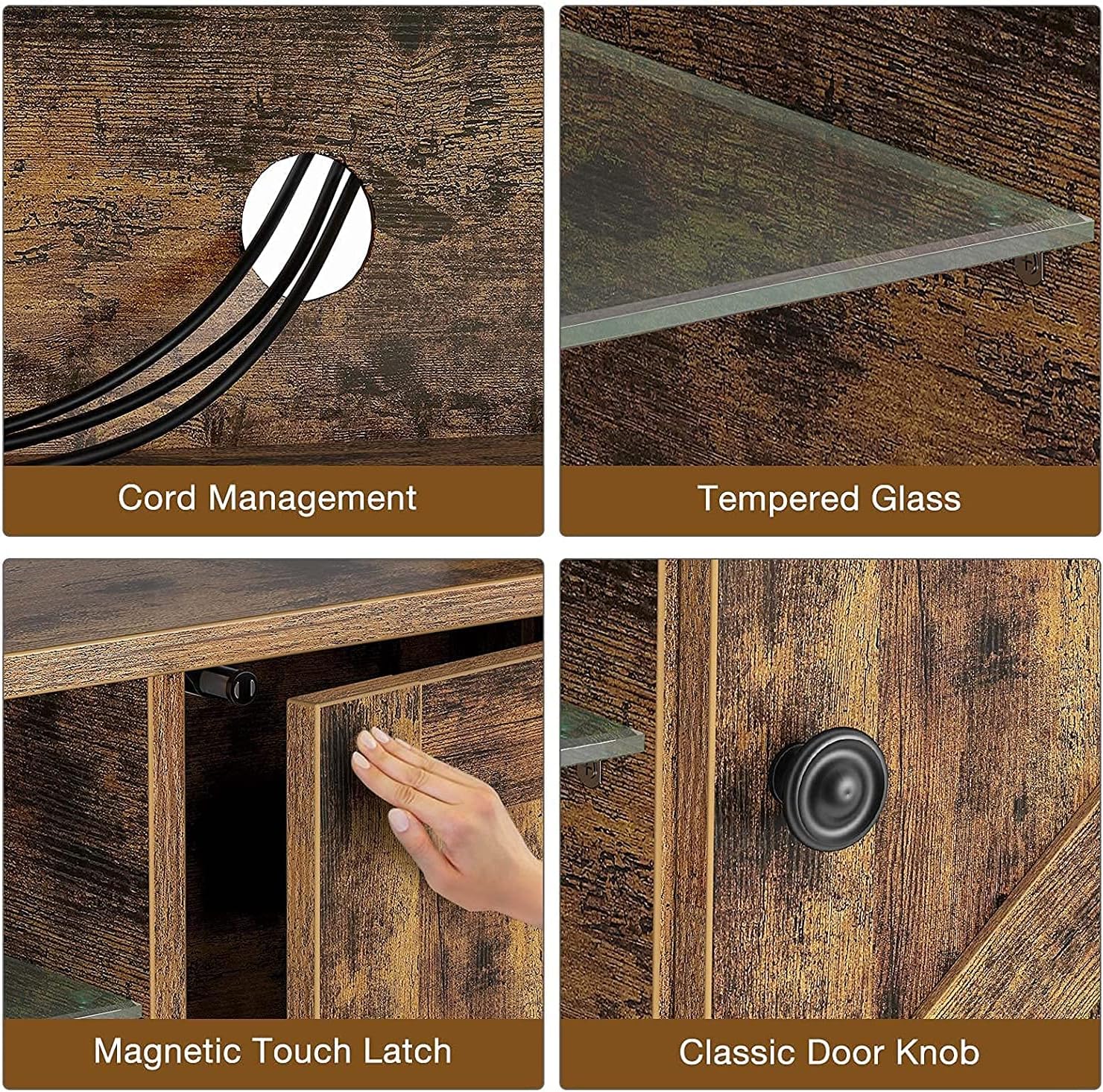
Figure 4.2: Cord Management and Other Features
5. Maintenance and Care
Proper care will ensure the longevity and appearance of your TV stand.
- Cleaning: Wipe surfaces with a soft, damp cloth. Avoid harsh chemicals or abrasive cleaners. For glass, use a standard glass cleaner.
- Dusting: Regularly dust all surfaces with a dry, soft cloth.
- Spills: Clean spills immediately to prevent staining or damage to the engineered wood.
- Hardware: Periodically check and tighten all screws and fasteners to maintain stability.
- LED Lights: If the LED strip becomes dirty, gently wipe it with a dry cloth. Do not immerse in water.
6. Troubleshooting
If you encounter issues with your TV stand, refer to the following common problems and solutions:
| Problem | Possible Cause | Solution |
|---|---|---|
| LED lights not turning on or flickering. | Loose connection, remote battery low, LED strip damage. | Check all power connections. Replace remote battery. If issue persists, contact customer support. |
| Power outlets/USB ports not working. | Power cord not plugged in, circuit breaker tripped, internal wiring issue. | Ensure the main power cord is securely plugged into a working wall outlet. Check your home's circuit breaker. Avoid overloading the outlets. |
| TV stand feels unstable or wobbly. | Loose fasteners, uneven floor. | Retighten all assembly screws. Ensure the stand is on a level surface; use shims if necessary. |
| Barn doors not sliding smoothly. | Track obstruction, misaligned hardware. | Check tracks for debris. Ensure door hardware is correctly installed and aligned. |
7. Specifications
| Feature | Detail |
|---|---|
| Brand | Rolanstar |
| Model | B09329PTQB |
| Dimensions (D x W x H) | 13.8" x 59" x 19.6" |
| Weight Limit | 150 Pounds |
| Material | Engineered Wood, Tempered Glass |
| LED Lights | RGB, 16 Colors, Multiple Modes |
| Power Outlets | 4 Standard AC Outlets, 2 USB Ports |
| Power Cord Length | 6.5 ft |
| Compatible TV Sizes | 40" / 50" / 55" / 60" / 65" |
8. Warranty and Support
For warranty information, replacement parts, or technical assistance, please contact Rolanstar customer support. Refer to your purchase documentation for specific contact details or visit the official Rolanstar website.
We are committed to providing high-quality products and support.
Ask a question about this manual
Ask about setup, troubleshooting, compatibility, parts, safety, or missing instructions. Manuals+ will review the question and use this page’s manual context to help answer it.