
1. Introduction
The DIGIQUEST SH5 is a DVB-T2 terrestrial digital receiver designed to provide access to digital television channels. This device supports HEVC Main 10 (10bit) encoding, offering Full HD video resolution up to 1080p. It also functions as a media player, allowing you to enjoy various multimedia content from a USB drive. The SH5 features an alphanumeric display for convenience and includes advanced functionalities like CEC control and software updates via FTP.

Figure 1: Front view of the DIGIQUEST SH5 Decoder.
2. Package Contents
Please check the package carefully to ensure all items are present and in good condition. If any items are missing or damaged, contact your retailer.
- DIGIQUEST SH5 Receiver
- Power Supply Unit
- Remote Control
- Quick Start Guide
- User Manual (this document)

Figure 2: Contents included in the DIGIQUEST SH5 package.
3. Product Overview
3.1. Connections
Familiarize yourself with the connection ports on your DIGIQUEST SH5 receiver.
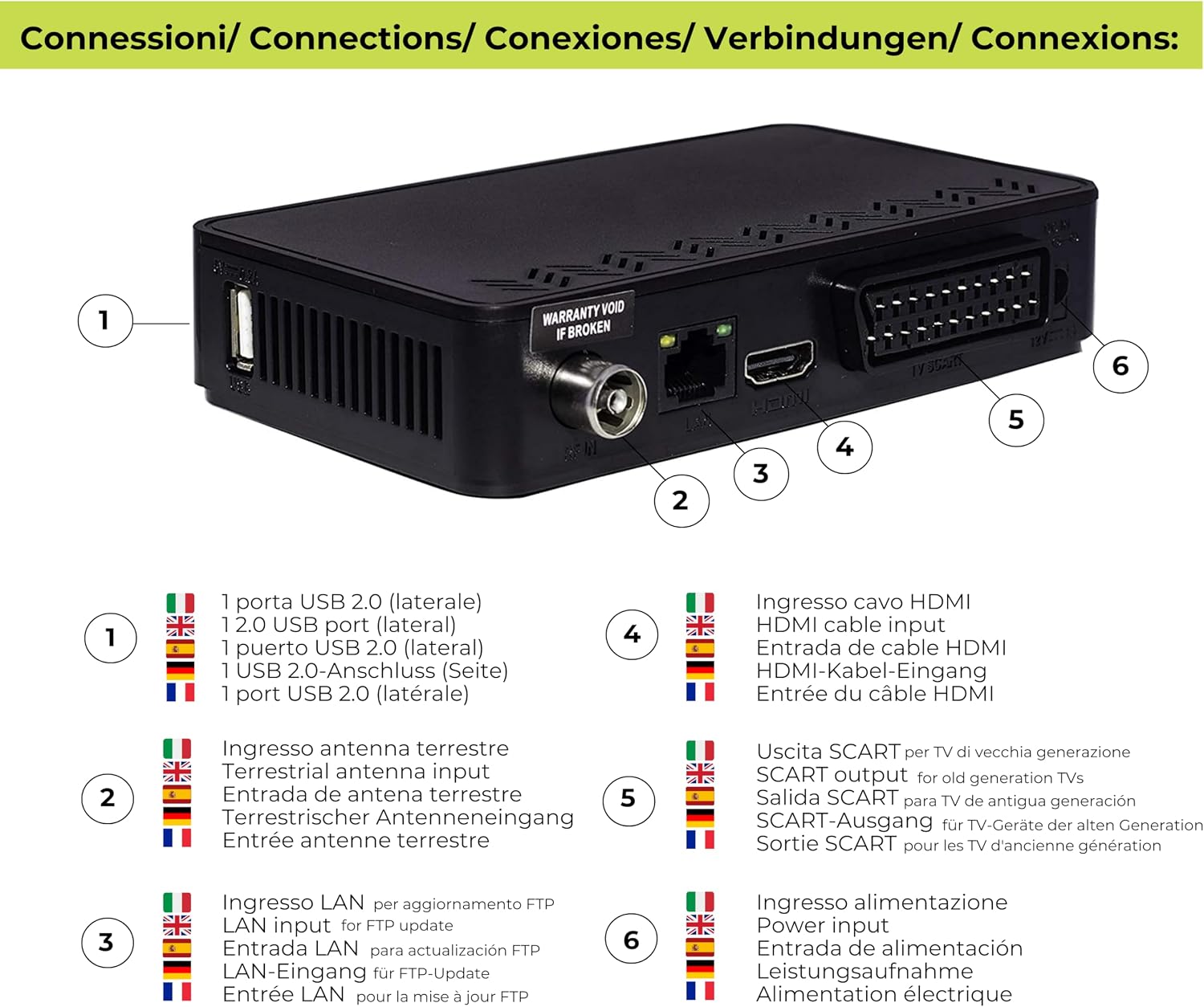
Figure 3: Rear and side connections of the DIGIQUEST SH5.
- USB 2.0 Port (Lateral): For connecting USB storage devices for media playback or software updates.
- Terrestrial Antenna Input: Connect your DVB-T2 antenna cable here.
- LAN Input: For FTP updates and Network APP functionality.
- HDMI Cable Input: Connect to your TV's HDMI port for high-definition video and audio output.
- SCART Output: For connecting to older generation TVs.
- Power Input: Connect the provided 12V power adapter.
3.2. Remote Control
The remote control allows you to operate all functions of your DIGIQUEST SH5 receiver.

Figure 4: DIGIQUEST SH5 Remote Control.
- Power Button: Turns the receiver on or off.
- TXT: Access Teletext.
- SUBT: Display subtitles (if available).
- INFO: Display program information.
- FAV: Access favorite channel list.
- LANG: Change audio language (if available).
- MENU: Access the main menu.
- OK: Confirm selection or display channel list.
- EXIT: Exit current menu or screen.
- Arrow Buttons (Up/Down/Left/Right): Navigate menus and adjust settings.
- Volume Up/Down: Adjust volume.
- Channel Up/Down: Change channels.
- Number Buttons (0-9): Directly enter channel numbers.
- EPG: Access Electronic Program Guide.
- Media Player Controls: Play, Pause, Stop, Fast Forward, Rewind.
4. Setup
4.1. Connecting the Receiver
- Connect Antenna: Connect your terrestrial antenna cable to the "Terrestrial Antenna Input" port (2) on the back of the SH5 receiver.
- Connect to TV:
- For modern TVs: Connect an HDMI cable from the "HDMI Cable Input" port (4) on the SH5 to an available HDMI port on your TV.
- For older TVs: Connect a SCART cable from the "SCART Output" port (5) on the SH5 to the SCART input on your TV.
- Connect Power: Plug the provided 12V power adapter into the "Power Input" port (6) on the SH5, then plug the adapter into a wall outlet. The SH5 can also be powered by a 12V source, making it suitable for boats and campers.
- Power On TV: Ensure your television is powered on and set to the correct input source (HDMI or SCART) corresponding to where the SH5 is connected. It is recommended to power on the TV at least 5 seconds before powering on the decoder to avoid a "No Signal" message.
4.2. First-Time Installation
Upon first power-on, the receiver will guide you through an initial setup wizard. Follow the on-screen prompts:
- Language Selection: Choose your preferred menu language.
- Country Selection: Select your country for correct channel sorting (LCN).
- Channel Search: The receiver will automatically scan for available DVB-T2 channels. This process may take several minutes. Do not interrupt the scan.
- Save Settings: Once the scan is complete, the channels will be saved, and the receiver will tune to the first available channel.
You can perform a manual channel search later via the main menu if needed.
5. Operating Instructions
5.1. Basic Operation
- Power On/Off: Press the Power button on the remote control.
- Channel Change: Use the Channel Up/Down buttons or enter the channel number directly using the Number Buttons (0-9). Note that there might be a slight delay (a couple of seconds) when changing channels.
- Volume Adjustment: Use the Volume Up/Down buttons.
- Program Information: Press the INFO button to display current program details.
- Electronic Program Guide (EPG): Press the EPG button to view the program schedule for all channels.
5.2. Menu Navigation
Press the MENU button to access the main menu. Use the Arrow Buttons to navigate through options and OK to confirm. Press EXIT to return to the previous screen or live TV.
5.3. Advanced TV Features
- Favorite Channels: Create and manage lists of your favorite channels via the menu. Press FAV to access these lists.
- Parental Control: Set up parental locks for specific channels or programs based on rating.
- Teletext: Access teletext services by pressing the TXT button.
- Subtitles: Enable or disable subtitles, and select subtitle language (if available) by pressing the SUBT button.
- Dual Audio: Change the audio track language (if available) by pressing the LANG button.
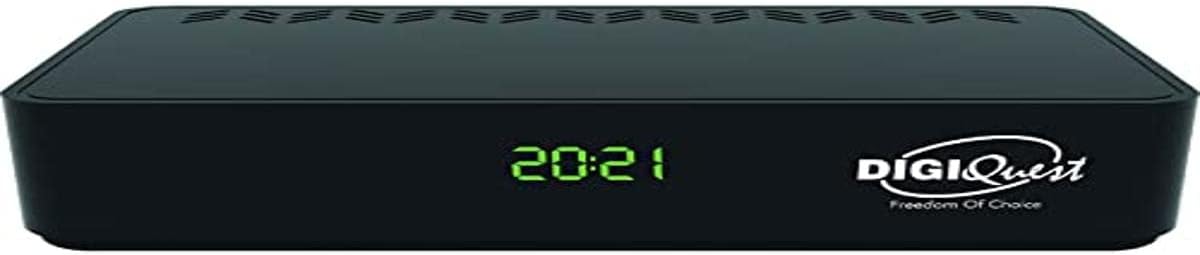
Figure 5: DIGIQUEST SH5 in a home entertainment setup.
6. Media Player Functionality
The DIGIQUEST SH5 includes a media player function, allowing you to play various multimedia files from a USB storage device.
- Connect USB Device: Insert your USB flash drive or external hard drive into the USB 2.0 port (1) on the side of the receiver.
- Access Media Player: Navigate to the "Media Player" section in the main menu.
- Select File Type: Choose whether you want to play videos, music, or view photos.
- Browse and Play: Browse your files on the USB device and select the desired file to play.
Supported Formats:
- Video: MKV, AVI, MP4, DiVX
- Audio: MP3
- Images: JPG, BMP
7. Advanced Features
7.1. CEC Function
The SH5 supports the CEC (Consumer Electronics Control) function. If your TV also supports CEC, you may be able to control basic functions of the SH5 (like power on/off or input switching) using your TV's remote control. Refer to your TV's manual for CEC setup and compatibility.
7.2. Software Update
Keeping your receiver's software updated ensures optimal performance and access to the latest features. Software updates can be performed via:
- OTA (Over-The-Air): Automatic updates broadcast by the service provider.
- USB: Download the update file from the DIGIQUEST website to a USB drive and update via the USB port.
- FTP: Connect the receiver to your network via the LAN port (3) for FTP-based software updates.
It is recommended to regularly check for and install the latest firmware updates for improved stability and functionality.
7.3. Automatic Shutdown
The receiver is designed to automatically shut down after 3 hours of inactivity to conserve energy.
8. Maintenance
- Cleaning: Use a soft, dry cloth to clean the exterior of the receiver. Do not use liquid cleaners or abrasive materials.
- Ventilation: Ensure the receiver has adequate ventilation. Do not block the ventilation openings.
- Software Updates: As mentioned in Section 7.2, regularly updating the software is a key maintenance step.
9. Troubleshooting
If you encounter issues with your DIGIQUEST SH5, refer to the following common problems and solutions:
| Problem | Possible Cause | Solution |
|---|---|---|
| "No Signal" message on TV. | Incorrect TV input selected, antenna not connected, or TV powered on after decoder. |
|
| No channels found during scan. | Antenna issue, incorrect country setting, or weak signal. |
|
| Remote control not working. | Batteries depleted or incorrect line of sight. |
|
| Slow channel changing. | Normal operation for some decoders, or outdated firmware. |
|
| Media player not recognizing USB device. | USB device not formatted correctly or incompatible. |
|
10. Specifications
| Feature | Description |
|---|---|
| Model | SH5 |
| Receiver Type | DVB-T2 Terrestrial Digital Receiver |
| Video Encoding | HEVC Main 10 (10bit) |
| Video Resolution | Up to 1080p (Full HD) |
| Display | Alphanumeric display with time in standby |
| Media Player Support | Video (MKV, AVI, MP4, DiVX), Audio (MP3), Images (JPG, BMP) |
| Connectivity | HDMI, USB Type A (1 port), LAN (for FTP updates), Terrestrial Antenna Input, SCART Output |
| Special Features | CEC Function, Network APP, LCN (Automatic Channel Sorting), Automatic Channel Update in Standby, Parental Control, Favorite Channel Lists, Teletext, Subtitles, Dual Audio, Automatic Shutdown (3 hours inactivity) |
| Power Supply | 12V, 1A (suitable for boats and campers) |
| Audio Output Mode | Surround (5.1, 7.1 channel configuration) |
| Video Format | 16:9, 4:3 LB, 4:3 PS |

Figure 6: Key features of the DIGIQUEST SH5.
11. Warranty Information
Specific warranty terms and conditions may vary by region and retailer. Please retain your proof of purchase. For detailed warranty information, refer to the documentation provided with your product or visit the official DIGIQUEST website.
12. Support
If you require further assistance or have questions not covered in this manual, please contact DIGIQUEST customer support. You can typically find contact information on the official DIGIQUEST website or through your product retailer.