1. Introduction
Thank you for choosing the Lago LDH1500 Dehumidifier. This manual provides important information for the proper setup, operation, and maintenance of your dehumidifier. Please read this manual thoroughly before using the appliance and retain it for future reference.
The Lago LDH1500 Dehumidifier is designed to effectively reduce excess moisture in indoor spaces up to 1500 square feet, helping to prevent issues such as dampness, condensation, and musty odors. Its compact design and efficient operation contribute to a more comfortable and healthier environment.
2. Safety Information
WARNING: Read all safety warnings and instructions before using this appliance to reduce the risk of fire, electric shock, or injury.
- Ensure the power supply matches the voltage specified on the rating label of the dehumidifier.
- Always plug the unit into a grounded electrical outlet. Do not use extension cords or adapter plugs.
- Do not operate the dehumidifier with a damaged cord or plug. If the supply cord is damaged, it must be replaced by the manufacturer, its service agent, or similarly qualified persons to avoid a hazard.
- Do not block the air inlet or outlet. Maintain at least 8 inches (20 cm) of clear space around the unit for proper airflow.
- Do not insert fingers or foreign objects into the air inlets or outlets.
- Always turn off the unit and unplug it before cleaning, moving, or performing any maintenance.
- Do not use the dehumidifier in wet areas such as bathrooms or laundry rooms where it may come into contact with water.
- Keep the appliance away from children and pets.
- Do not use chemical solvents or flammable materials near the unit.
- Place the unit on a flat, stable surface to prevent tipping.
3. Product Features
The Lago LDH1500 Dehumidifier incorporates several features designed for efficient and convenient moisture removal:
- Efficient Design: Compact and equipped with wheels for easy relocation and installation in various areas of your home.
- Complete Coverage: Effectively reduces moisture in rooms up to 1500 square feet, maintaining comfortable humidity levels.
- Advanced Filtration: Produces fresh, filtered air for up to 250 hours of continuous use.
- Quiet Operation: Low-decibel filtration ensures a tranquil atmosphere throughout the day and night.
- Illuminated Display Panel: Monitor filtration status, turbo speeds, and filter life.
- 24-Hour Timer: Auto-start and auto-stop timer options for convenience and energy efficiency.
- Overflow Protection: Automatic shut-off when the water bucket is full to prevent leaks.
- Water Tank Window: Allows for real-time monitoring of the water level.
- Washable Air Filter: Quick-release design for easy cleaning.
- Continuous Drain Plug: Option to attach a drain hose for continuous water removal.

Image: The dehumidifier actively removing moisture, indicated by arrows, with icons representing common moisture problems it addresses: damp clothing, water condensation, and musty odors.

Image: The compact design of the Lago LDH1500 Dehumidifier, illustrating its dimensions for easy placement in various spaces.

Image: Key operational features including the 24-hour timer, the 3-liter water tank with overflow protection, and the quiet 49dB operation for minimal disturbance.
4. Setup
4.1 Unpacking
- Carefully remove the dehumidifier from its packaging.
- Remove all packing materials, tapes, and protective films.
- Inspect the unit for any shipping damage. If damaged, do not operate and contact customer support.
4.2 Placement
- Place the dehumidifier on a firm, level surface in a location where the ambient temperature will not fall below 41°F (5°C) or exceed 95°F (35°C).
- Ensure there is at least 8 inches (20 cm) of space around the unit for proper air circulation. Do not place it against a wall or furniture that could obstruct airflow.
- For optimal performance, place the unit in the center of the room or area requiring dehumidification. The integrated wheels allow for easy movement.
- Avoid placing the unit near heat sources or in direct sunlight.
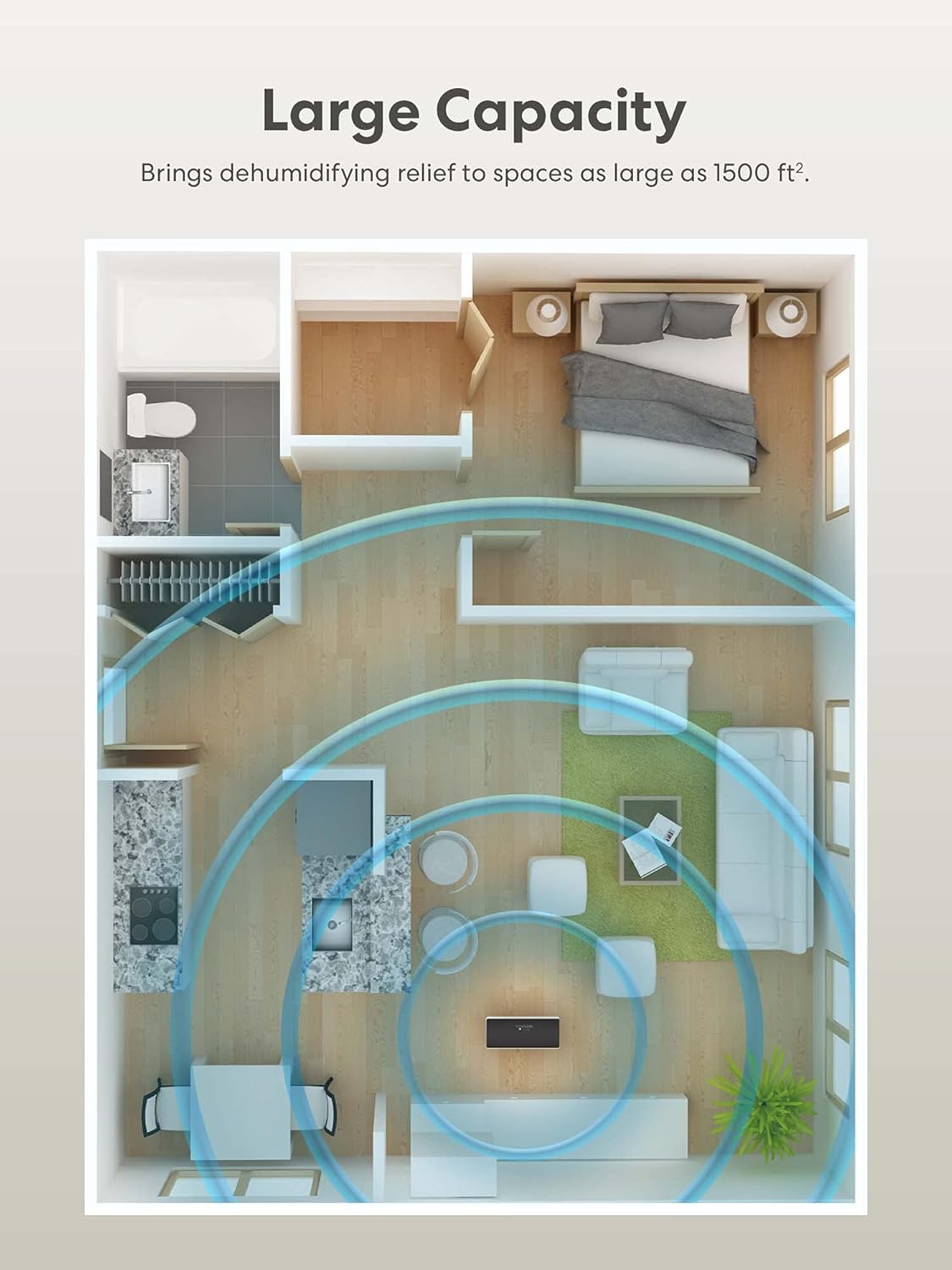
Image: An overhead view of a floor plan illustrating the effective coverage area of the dehumidifier in a typical living space.
4.3 Power Connection
- Plug the power cord into a grounded 120V AC, 60Hz electrical outlet.
- The unit is now ready for operation.
4.4 Continuous Drainage Setup (Optional)
For continuous operation without manually emptying the water tank, you can attach a drain hose (not included).
- Locate the continuous drain plug at the back of the unit.
- Remove the plug.
- Attach a standard garden hose (or suitable drain hose) to the drain outlet. Ensure the connection is secure to prevent leaks.
- Direct the other end of the hose to a floor drain or a large container, ensuring the hose is sloped downwards to allow gravity drainage.
- Ensure the hose is not kinked or blocked.

Image: Detailed view of the water tank window for level monitoring, the washable air filter for easy cleaning, and the continuous drain plug for optional hose connection.
5. Operating Instructions
5.1 Control Panel Overview

Image: A diagram illustrating the control panel layout, including buttons for Power, Auto, Filter, Cont. (Continuous), Turbo, Timer, and Left/Right Arrows, along with indicators for Auto Defrost, Full, and Display.
- Power Button: Turns the unit on or off.
- Auto Mode: Automatically adjusts to real-time humidity levels.
- Filter Indicator: Flashes when it's time to clean the filter.
- Cont. (Continuous) Mode: Continuously dehumidifies regardless of humidity level.
- Turbo Mode: Instantly increases fan speed to maximum for faster dehumidification.
- Timer Button: Sets desired start and stop times.
- Left & Right Arrows: Adjusts timer settings and desired humidity level.
- Auto Defrost Indicator: Lights up when the unit is defrosting evaporator coils.
- Full Indicator: Flashes when the water tank is full.
- Display: Shows current humidity level, timer settings, or error codes.
5.2 Basic Operation
- Power On: Press the Power button to turn on the dehumidifier. The display will show the current room humidity.
- Set Desired Humidity: Use the Left and Right Arrow buttons to set your desired humidity level (e.g., 40% - 60% relative humidity is generally recommended). The unit will operate until the set humidity is reached, then cycle on and off to maintain it.
- Select Mode:
- Press Auto for automatic humidity control.
- Press Cont. for continuous dehumidification.
- Press Turbo for maximum fan speed.
- Timer Function: Press the Timer button to set an auto-on or auto-off time (from 1 to 24 hours). Use the Left and Right Arrow buttons to adjust the hours.
- Power Off: Press the Power button again to turn off the unit.
6. Maintenance
Regular maintenance ensures optimal performance and extends the lifespan of your dehumidifier.
6.1 Emptying the Water Tank
When the water tank is full, the unit will automatically shut off, and the Full indicator will flash. The tank has a capacity of approximately 3 liters.
- Gently pull out the water tank from the front of the unit using its handle.
- Carefully carry the tank to a sink or drain.
- Empty the collected water.
- Slide the empty water tank back into the dehumidifier until it clicks into place. The unit will resume operation.

Image: The dehumidifier's design for easy maintenance, including the removable water tank with a handle for no-spill emptying, an easy carry handle, a smooth surface for cleaning, and four wheels for convenient mobility.
6.2 Cleaning the Air Filter
The Filter indicator will flash after approximately 250 hours of operation, signaling that the filter needs cleaning.
- Turn off and unplug the dehumidifier.
- Locate the air filter cover on the back of the unit.
- Gently pull out the filter.
- Clean the filter with a vacuum cleaner or wash it with warm, soapy water. Rinse thoroughly.
- Allow the filter to air dry completely before reinstalling. Do not expose to direct sunlight or high heat.
- Reinsert the dry filter into the unit and close the cover.
- Plug in the unit and press the Filter button for 3 seconds to reset the filter timer.
6.3 Cleaning the Exterior
- Wipe the exterior of the unit with a soft, damp cloth.
- Do not use abrasive cleaners, harsh chemicals, or flammable sprays.
6.4 Storage
- If storing the unit for an extended period, ensure the water tank is empty and clean, and the air filter is clean and dry.
- Wrap the power cord and secure it.
- Store the dehumidifier upright in a cool, dry place, away from direct sunlight and extreme temperatures.
7. Troubleshooting
Before contacting customer support, please refer to the following troubleshooting guide for common issues.
| Problem | Possible Cause | Solution |
|---|---|---|
| Dehumidifier does not turn on. | No power supply. Power cord not securely plugged in. Water tank is full or not correctly seated. | Check power outlet and circuit breaker. Ensure power cord is firmly plugged into a grounded outlet. Empty the water tank and ensure it is properly reinserted. |
| No water collected or insufficient dehumidification. | Air filter is dirty. Room temperature is too low. Humidity level setting is too high. Air inlet/outlet blocked. Room size exceeds capacity. | Clean the air filter. Dehumidifiers operate less efficiently below 41°F (5°C). Set a lower desired humidity level. Ensure at least 8 inches (20 cm) clearance around the unit. Confirm the room size is within the 1500 sq ft coverage area. |
| Unit is noisy. | Unit not on a level surface. Air filter is dirty. Fan obstruction. | Place the unit on a flat, stable surface. Clean the air filter. Check for any foreign objects near the fan. |
| Water leaks from the unit. | Water tank not properly installed. Continuous drain hose is loose or kinked. | Ensure the water tank is fully inserted and seated correctly. Check the continuous drain hose connection and ensure it is not kinked or blocked. |
| Auto Defrost indicator is on. | Unit is automatically defrosting. | This is normal operation. The unit will resume dehumidifying once defrosting is complete. |
8. Specifications
| Specification | Detail |
|---|---|
| Brand | Lago |
| Model Name/Number | LDH1500 |
| Coverage Area | Up to 1500 Square Feet |
| Max Floor Area (General) | 4500 Square Feet |
| Color | White |
| Special Feature | Manual Controls |
| Air Volume Capacity | 1500 Cubic Feet |
| Water Tank Volume | 3 Liters (approx. 101 fl oz) |
| Recommended Uses | Commercial, Residential |
| Material | Plastic |
| Wattage | 70 watts |
| Operation Mode | Sleep, Auto, Continuous, Turbo |
| Upper Temperature Rating | 95 Degrees Fahrenheit (35°C) |
9. Warranty and Support
For warranty information, please refer to the warranty card included with your product or visit the official Lago website. Keep your purchase receipt as proof of purchase.
If you encounter any issues not covered in this manual or require further assistance, please contact Lago customer support through their official channels. Provide your model number (LDH1500) and a detailed description of the problem for efficient service.