
1. Introduction
Thank you for purchasing the Smart Tech 40" Full HD LED TV. This manual provides essential information for the safe and efficient operation of your television. Please read it thoroughly before use and retain it for future reference.
2. Safety Information
- Power Supply: Ensure the TV is connected to a power outlet with the correct voltage as indicated on the product label.
- Ventilation: Do not block ventilation openings. Allow adequate space around the TV for proper airflow to prevent overheating.
- Water and Moisture: Do not expose the TV to rain or moisture. Avoid placing objects filled with liquids, such as vases, on the TV.
- Cleaning: Disconnect the power cord before cleaning. Use a soft, dry cloth. Do not use liquid cleaners or aerosol cleaners.
- Mounting: If wall-mounting, ensure the wall mount is compatible with the TV's VESA specifications and can support the TV's weight. Professional installation is recommended.
- Children: Supervise children to ensure they do not play with the TV or remote control.
3. Package Contents
Verify that all items are present in the packaging:
- Smart Tech 40" FHD LED TV
- Remote Control
- Power Cable
- User Manual (this document)
- TV Stand (2 pieces) and Screws
- Batteries for Remote Control
4. Physical Overview
4.1 Front View

Image: Front view of the Smart Tech 40" FHD LED TV, showcasing the screen and branding.
4.2 Rear View and Connections

Image: Rear view of the TV, highlighting various input/output ports and VESA mounting points.
- EARPHONE OUT: For connecting headphones.
- USB: For connecting USB storage devices.
- CI: Common Interface slot for conditional access modules.
- COAXIAL: Digital audio output.
- HDMI 1, 2, 3: High-Definition Multimedia Interface inputs for external devices.
- DVB-T2/C/S2: Antenna/Cable/Satellite input for digital broadcasting.
- AV IN: Analog audio/video input.
- PC AUDIO IN: Audio input for PC connection.
- VGA: Video Graphics Array input for PC connection.
4.3 Dimensions and Remote Control

Image: TV dimensions (width 904mm, height with stand 567mm, height without stand 518mm, depth with stand 207mm) and the included infrared remote control.
The TV features a VESA mount pattern of 200mm x 100mm for wall mounting.
4.4 Energy Label
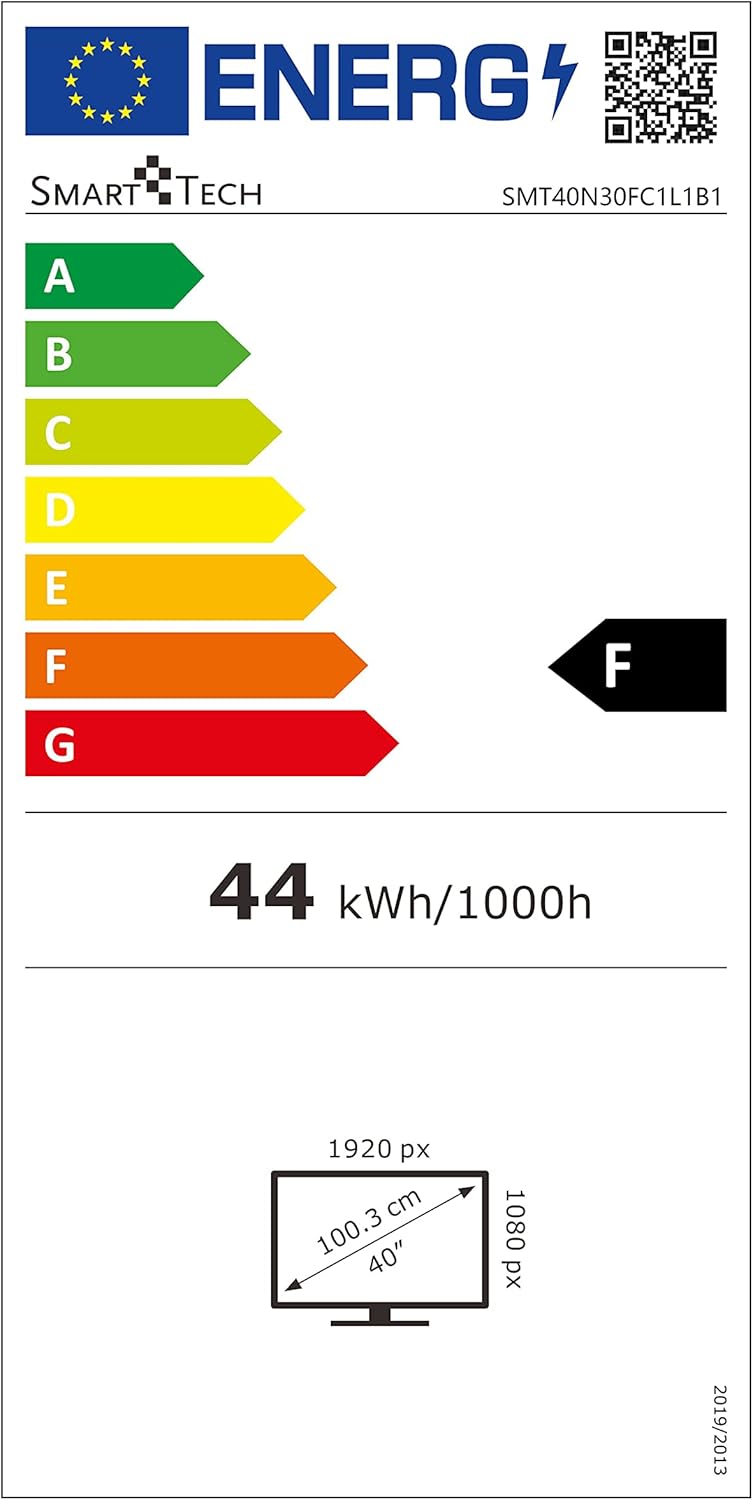
Image: EU Energy Label for the Smart Tech TV, indicating an 'F' energy efficiency class and 44 kWh/1000h consumption. For more details, visit the EPREL database.
5. Setup
5.1 Attaching the TV Stand
- Carefully place the TV face down on a soft, clean surface to prevent screen damage.
- Align the stand pieces with the corresponding slots on the bottom of the TV.
- Secure the stands using the provided screws. Do not overtighten.
- Carefully lift the TV to its upright position on a stable, level surface.
5.2 Wall Mounting (Optional)
If you choose to wall mount your TV, ensure you use a VESA-compatible wall mount (200mm x 100mm) that can support the weight of the TV (approximately 5.66 kg). Follow the instructions provided with your wall mount kit. Remove the TV stand before wall mounting.
5.3 Connecting External Devices
- Power: Connect the power cable to the TV's power input and then to a wall outlet.
- Antenna/Cable/Satellite: Connect your antenna, cable, or satellite dish to the DVB-T2/C/S2 input.
- HDMI Devices: Use HDMI cables to connect devices like Blu-ray players, game consoles, or set-top boxes to the HDMI 1, 2, or 3 ports.
- USB Devices: Insert USB storage devices into the USB port for media playback.
- Other Devices: Use AV IN, VGA, or PC AUDIO IN for older devices as needed.
6. Operating Instructions
6.1 Power On/Off
Press the POWER button on the remote control or the TV to turn the TV on or off.
6.2 Initial Setup
The first time you turn on the TV, an initial setup wizard will guide you through language selection, country, and channel scanning. Follow the on-screen prompts.
6.3 Channel Tuning
To scan for channels:
- Press the MENU button on the remote.
- Navigate to the 'Channel' or 'Setup' menu.
- Select 'Auto Scan' or 'Auto Tuning' and confirm. The TV will search for available digital and analog channels.
6.4 Input Source Selection
Press the SOURCE or INPUT button on the remote control to cycle through available input sources (HDMI 1, HDMI 2, HDMI 3, DVB-T2/C/S2, AV, VGA, USB).
6.5 Smart Features (Browser)
This TV includes a built-in browser. Access it from the main menu to navigate the internet. An active internet connection is required.
7. Maintenance
7.1 Cleaning the Screen
Gently wipe the screen with a soft, lint-free cloth. For stubborn marks, slightly dampen the cloth with water or a specialized screen cleaner (ensure it's safe for LED screens) and wipe gently. Do not apply pressure.
7.2 Cleaning the Cabinet
Wipe the TV cabinet with a soft, dry cloth. Avoid using abrasive cleaners or solvents.
8. Troubleshooting
| Problem | Possible Cause | Solution |
|---|---|---|
| No power | Power cable not connected; Power outlet not working | Check power cable connection; Test outlet with another device |
| No picture, but sound is present | Incorrect input source selected; External device not powered on | Press SOURCE button to select correct input; Ensure external device is on |
| No sound, but picture is present | Volume too low or muted; Audio settings incorrect | Increase volume or unmute; Check audio output settings in TV menu |
| Remote control not working | Batteries depleted or incorrectly inserted; Obstruction between remote and TV | Replace batteries; Ensure line of sight to TV's IR sensor |
| Poor picture quality | Weak antenna signal; Incorrect picture settings | Check antenna connection/position; Adjust picture settings (brightness, contrast, etc.) |
9. Specifications
| Feature | Specification |
|---|---|
| Model | SMT40N30FC1L1B1 |
| Screen Size | 40 Inches |
| Display Technology | LED |
| Resolution | 1080p (1920 x 1080 Pixels) |
| Refresh Rate | 60 Hz |
| Aspect Ratio | 16:9 |
| Tuner Technology | DVB-T2/C/S2 |
| Hardware Interface | HDMI, USB |
| Connectivity Technology | HDMI (x3), USB (x1), AV IN, VGA, PC Audio In, Earphone Out, CI, Coaxial |
| Special Features | Browser |
| Audio Output Mode | Digital |
| Speakers Maximum Output Power | 70 Watts |
| Wattage (Power Consumption) | 70 watts |
| Product Dimensions (with stand) | 90.3 x 20.7 x 56.7 cm |
| Product Weight | 5.66 kg |
| VESA Mount Compatibility | 200mm x 100mm |
| Included Components | Power Cable, Remote Control |
| Remote Control Technology | Infrared |
| Batteries Required for Remote | Yes (Batteries Included) |
| Model Year | 2020 |
10. Warranty and Support
For warranty information and technical support, please refer to the warranty card included with your product or contact Smart Tech customer service. Keep your purchase receipt as proof of purchase.


