
Introduction
The Lulia White Noise Machine is designed to assist with sleep and relaxation by providing a variety of soothing natural sounds and a gentle breathing light. This device aims to create a peaceful environment for users of all ages, promoting healthy sleep patterns and aiding in concentration or privacy.
Key features include 30 high-quality natural sounds across 6 scenarios, a multi-mode timing function, a soft breathing light, and a compact, portable design with a headphone jack for private listening.
Package Contents
- 1 x Lulia White Noise Sound Machine
- 1 x USB Cable
- 1 x Power Adapter
- 1 x User Manual
Setup
- Power Connection: Connect the provided USB cable to the DC Input port on the back of the white noise machine. Plug the other end of the USB cable into the power adapter, then plug the adapter into a standard electrical outlet. Alternatively, you can power the device directly via a USB port on a computer or other compatible power source using the USB cable.
- Initial Startup: Upon first connection, the device may take a few seconds to fully awaken. During this brief period, the sound output might be low or sound source switching may be less responsive. This is normal and not a defect. Please wait a few seconds for the sound to reach its normal level before operation.

Image: Rear view of the Lulia White Noise Machine showing the DC Input and 3.5mm headphone output ports, along with power options via USB cable or AC adapter.
Operating Instructions
Controls Overview
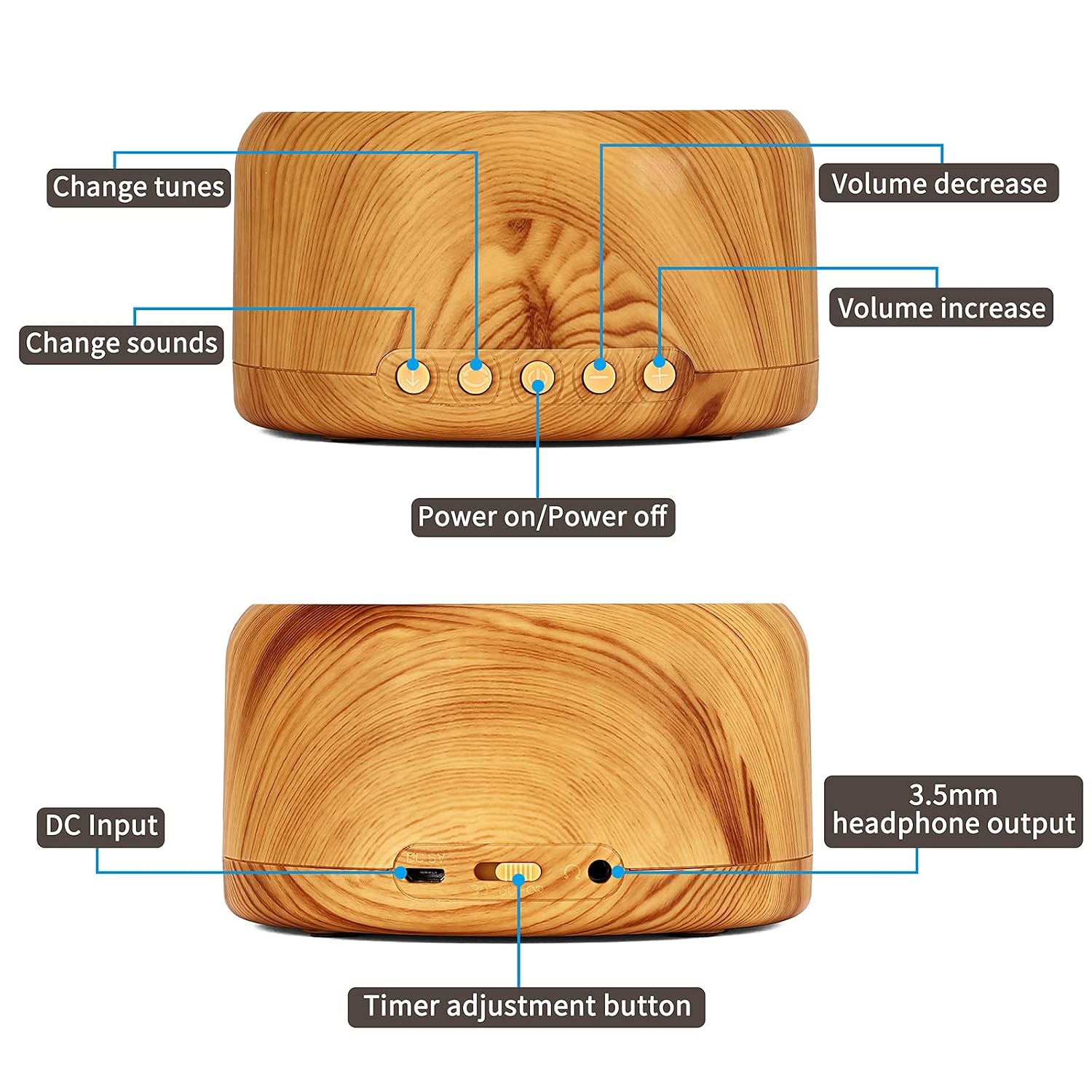
Image: Detailed view of the Lulia White Noise Machine's control panel, indicating buttons for changing tunes, changing sounds, volume adjustment, power on/off, DC input, 3.5mm headphone output, and timer adjustment.
- Power On/Off: Press the designated power button to turn the device on or off.
- Volume Adjustment: Use the 'Volume Increase' and 'Volume Decrease' buttons to adjust the sound level.
- Change Sounds: Press the 'Change Sounds' button to cycle through the available sound categories.
- Change Tunes: Within a sound category, press the 'Change Tunes' button to select different specific sounds.
- Timer Adjustment: Use the 'Timer Adjustment' button to set the automatic shut-off timer.
Sound Selection
The machine offers 30 high-quality natural sounds organized into 6 distinct scenarios. These include:
- White Noise: 5 variations
- Fan Sound: 5 variations
- Nature Sounds: Birdsong by the stream, birdsong by the waterfall, cuckoo, brook, cricket
- Ocean Sounds: Soothing sound of waves, boating, ocean wave, seagull cawing, campfire
- Rain Sounds: Rain sound on the eaves, summer rain, lotus pond after rain, thunderstorm, thunder and lightning
- Baby Sleep Sounds: Womb, fetal beating, baby heartbeat, blue whale, vintage bell

Image: The Lulia White Noise Machine on a shelf, illustrating the six main categories of soothing sounds available.

Image: An overhead view of the Lulia White Noise Machine, surrounded by a circular graphic detailing the 30 high-fidelity soothing nature sounds across 6 scenarios.
Timer Function
The device features a three-level timing function:
- 30 Minutes: The machine will play for 30 minutes and then automatically shut off.
- 60 Minutes: The machine will play for 60 minutes and then automatically shut off.
- Continuous Play: The machine will play continuously until manually turned off.
Press the 'Timer Adjustment' button repeatedly to cycle through these options.
Breathing Light
The integrated soft breathing light can be activated to create a calming visual atmosphere, complementing the soothing sounds. This light gently pulsates, mimicking a breathing rhythm, which can further aid in relaxation and sleep induction.

Image: The Lulia White Noise Machine with its unique breathing light feature, positioned near a sleeping baby, illustrating its use for creating a peaceful environment.
Headphone Use
For private listening, connect any standard 3.5mm headphones to the headphone output jack located on the back of the device. This allows for an exclusive audio experience without disturbing others.

Image: A person using headphones connected to the Lulia White Noise Machine, demonstrating the private listening feature via the earphone jack.
Maintenance
- Cleaning: Ensure the device is powered off and unplugged before cleaning. Use a soft, dry cloth to wipe the exterior. Do not use liquid cleaners, aerosols, or harsh chemicals.
- Storage: Store the machine in a cool, dry place away from direct sunlight and extreme temperatures when not in use for extended periods.
- Handling: Avoid dropping the device or exposing it to water or excessive moisture.
Troubleshooting
- No Power:
- Ensure the USB cable is securely connected to both the device and the power adapter/USB port.
- Verify that the power adapter is properly plugged into a working electrical outlet.
- Try a different USB cable or power adapter if available.
- No Sound or Low Sound:
- Check the volume level and increase it using the 'Volume Increase' button.
- If this is the first time connecting power, allow a few seconds for the device to fully initialize. Initial sound may be low until fully awakened.
- Ensure no headphones are plugged in if you intend to use the built-in speaker.
- Try changing the sound or tune to see if the issue persists across all sounds.
- Breathing Light Not Working:
- Ensure the device is powered on.
- Refer to the operating instructions for how to activate the breathing light feature.
- Buttons Unresponsive:
- Power off the device, unplug it, wait 10 seconds, then plug it back in and power it on again to reset.
Specifications
| Model Name | LU-WNM-002 |
| Input | DC 5V 1A |
| Timer Options | 30 minutes, 60 minutes, Loop Playback (Continuous) |
| Material | ABS Plastic |
| Dimensions (LxWxH) | 11.43 x 11.43 x 6.1 cm (4.5" x 4.5" x 2.4") |
| Weight | 500 g (12.7 ounces) |
| Power Source | Corded Electric |
| Battery | 1 Lithium Ion battery required (included) - Note: Device operates via corded electric power. Battery likely for internal memory/settings. |
| Sounds | 30 High Quality Natural Sounds (6 scenarios) |
Warranty Information
Please refer to the warranty card included in your product packaging for specific warranty terms and conditions. Typically, Lulia products come with a limited warranty covering manufacturing defects from the date of purchase. Keep your proof of purchase for any warranty claims.
Customer Support
For any questions, technical assistance, or support regarding your Lulia White Noise Machine, please contact Lulia customer service. Contact details can usually be found on the product packaging or the official Lulia website. When contacting support, please have your model number (LU-WNM-002) and purchase information ready.