
1. Introduction
The HiDow XPDS 4|24 is an advanced Transcutaneous Electrical Nerve Stimulation (TENS) and Electrical Muscle Stimulation (EMS) device designed for pain relief and muscle performance enhancement. TENS therapy uses low-voltage electrical currents to relieve pain, while EMS therapy stimulates muscle contractions to aid in muscle strengthening and recovery. This manual provides essential information for the safe and effective use of your device.
Please read this instruction manual thoroughly before operating the device and keep it for future reference.
2. Package Contents
Verify that all items listed below are included in your package:
- 1 x HiDow XPDS 4|24 Unit
- 2 sets of Large Single-Sided Adhesive Electrode Pads
- 2 sets of Extra-Large Single-Sided Adhesive Electrode Pads
- 4 x Electrode Wires
- 1 x USB Cable
- 1 x AC Adapter
- 1 x User Manual
- 1 x Pad Holder

Figure 1: HiDow XPDS 4|24 TENS/EMS Unit with all included accessories.
3. Product Overview
The HiDow XPDS 4|24 features a large LCD screen for easy navigation and control. It offers 4 output channels, 24 different modalities (TENS and EMS functions), and 20 intensity levels per channel. The device is powered by a rechargeable lithium battery.
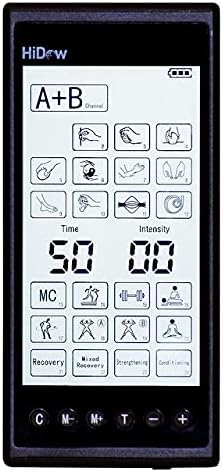
Figure 2: Close-up view of the HiDow XPDS 4|24 LCD screen and control buttons.

Figure 3: Physical dimensions of the HiDow XPDS 4|24 unit.
4. Setup
4.1 Charging the Device
- Connect the USB cable to the HiDow XPDS 4|24 unit.
- Plug the USB cable into the AC adapter.
- Insert the AC adapter into a standard electrical outlet.
- The battery indicator on the LCD screen will show charging status. Ensure the device is fully charged before first use.
4.2 Connecting Electrode Pads
- Gently peel the protective film from the adhesive side of the electrode pads.
- Connect the electrode wires to the electrode pads by inserting the pin connectors into the pad sockets.
- Plug the other end of the electrode wires into the desired output channels (1-4) on the top of the HiDow XPDS 4|24 unit.
- Ensure all connections are secure.
5. Operating Instructions
5.1 Power On/Off
- To power on: Press and hold the Power button (⏻) until the LCD screen illuminates.
- To power off: Press and hold the Power button (⏻) until the screen turns off.
5.2 Selecting Modes (TENS/EMS)
- The device offers 24 different modalities. Use the 'M' button to cycle through the available TENS and EMS programs.
- The LCD screen will display the selected mode.
5.3 Adjusting Intensity
- After selecting a mode, apply the electrode pads to the desired area of your body.
- Use the '+' and '-' buttons for each channel (A, B, C, D) to increase or decrease the intensity level. There are 20 intensity levels available.
- Start with the lowest intensity and gradually increase it until you feel a comfortable, yet effective, sensation. Avoid setting the intensity too high, which may cause discomfort.
5.4 Setting the Timer
- The device features an adjustable timer. Press the 'T' button to cycle through preset treatment durations.
- The selected time will be displayed on the LCD screen.
5.5 Using Multiple Channels
- The HiDow XPDS 4|24 has 4 independent output channels, allowing you to treat multiple areas simultaneously or use different modes/intensities on different body parts.
- Connect electrode pads to each desired channel and adjust settings as needed.
6. Electrode Pad Placement
Proper placement of electrode pads is crucial for effective therapy. Refer to the detailed diagrams and instructions in the full user manual for specific pad placement recommendations for various body parts and conditions. General guidelines include:
- Place pads on clean, dry, and intact skin.
- Avoid placing pads directly over joints, bony prominences, or areas with broken skin.
- For localized pain, place pads on either side of the painful area.
- For muscle stimulation, place pads on the belly of the muscle.
Video 1: Preview of the KONGZEE 4-in-1 Combo Unit demonstrating various massage techniques and features. This video is a short preview from the seller.
7. Maintenance
7.1 Cleaning the Device and Pads
- Wipe the device with a soft, damp cloth. Do not use abrasive cleaners or immerse the device in water.
- To clean electrode pads, gently wipe the adhesive surface with a damp cloth or a small amount of mild soap and water. Allow them to air dry completely before re-applying the protective film.
7.2 Storage
- Store the HiDow XPDS 4|24 unit and accessories in a cool, dry place, away from direct sunlight and extreme temperatures.
- Always re-apply the protective film to the electrode pads after each use and store them on the provided pad holder to maintain their adhesive quality.
7.3 Battery Care
- Charge the device regularly, even if not in frequent use, to prolong battery life.
- Avoid completely draining the battery before recharging.
8. Troubleshooting
If you experience any issues with your HiDow XPDS 4|24 unit, please refer to the following common troubleshooting steps:
- No power: Ensure the device is fully charged. Check the USB cable and AC adapter connections.
- No sensation or weak sensation: Verify that the electrode pads are securely attached to the skin and the electrode wires are properly connected to both the pads and the device. Ensure the intensity level is set appropriately for your comfort. The pads may need to be replaced if their adhesive quality is diminished.
- Pads not sticking: Clean the adhesive surface of the pads as described in the Maintenance section. If cleaning does not restore adhesion, replace the pads.
For more detailed troubleshooting or persistent issues, please consult the full user manual or contact HiDow customer support.
9. Specifications
- Model: XPDS 4|24
- Device Type: TENS/EMS Unit (Class II Medical Device)
- Output Channels: 4
- Modalities: 24 (TENS and EMS functions)
- Intensity Levels: 20 per channel
- Display: Large LCD (non-touchscreen)
- Battery: Rechargeable Lithium Battery
- Package Dimensions: 8.62 x 6.02 x 2.2 inches
- Weight: 1.44 Pounds
10. Important Safety Warnings
WARNING: Consult your physician before using this device, especially if you have any pre-existing medical conditions, are pregnant, have a pacemaker, or have any other electronic medical implants. Do not use on broken skin, over cancerous lesions, or in areas of the body where sensation is impaired. Keep out of reach of children. Statements regarding dietary supplements have not been evaluated by the FDA and are not intended to diagnose, treat, cure, or prevent any disease or health condition.
11. Warranty & Support
For warranty information, product support, or any questions regarding your HiDow XPDS 4|24 TENS/EMS Unit, please refer to the official HiDow website or contact their customer service department. Contact details can typically be found in the full user manual or on the product packaging.