
DollaTek TK15
DollaTek TK15 5-50A 8-120V Coulomb Meter and Battery Capacity Monitor User Manual
Model: TK15
1. Introduction
The DollaTek TK15 Coulomb Meter is a high-precision instrument designed to monitor battery capacity, voltage, current, and power for various battery types. It is suitable for lithium batteries, lithium iron phosphate batteries, lead-acid batteries, and nickel-metal hydride batteries with an operating voltage range of 10-80V. This manual provides detailed instructions for the proper installation, operation, and maintenance of your TK15 Coulomb Meter.

Figure 1.1: DollaTek TK15 Coulomb Meter and 50A Shunt. The image displays the main meter unit with its LCD screen and control buttons, along with the separate 50A current sampling board and connecting cable.
2. Features
- Adjustable empty and full battery voltage settings.
- Automatic backlight activation during use.
- Automatic memory function upon power-off.
- Fast response rate for real-time monitoring.
- Low power consumption with automatic wake-up.
- Compatible with various battery types: Lithium, Lithium Iron Phosphate, Lead-Acid, Nickel-Metal Hydride.
- 50A sampler suitable for charge and discharge currents between 5A and 50A.
3. Specifications
| Parameter | Value |
|---|---|
| Operating Voltage | 10 - 50V (Max: 80V) |
| Working Power Consumption | 8.0 mA (Max: 10.0 mA) |
| Standby Power Consumption | 0.5 mA (Max: 0.6 mA) |
| Voltage Acquisition Accuracy | ± 1.0% |
| Current Acquisition Accuracy | ± 1.0% |
| Default Capacity Value | 0.1 Ah |
| Conventional Working Current | 30.0A (MAX: 50A) |
| Backlight On Current | 40mA (Max: 50mA) |
| Backlight Off Current | 30mA (Max: 40mA) |
| Ambient Temperature | 0-20 °C (MAX: 30 °C) |
| Charge/Discharge Current Range | 5-50A |
| Brand | DollaTek |
| Model Number | TK15 |

Figure 3.1: Rear view of the TK15 Coulomb Meter, showing the model number and current rating information.
4. Package Contents
Verify that all items are present in the package:
- 1 x TK15 Coulomb Meter
- 1 x 5M Coulomb Meter Connection Line + Accessories (including the 50A current sampling board)

Figure 4.1: The 5-meter connection cable and accessories for the TK15 Coulomb Meter.
5. Setup and Installation
5.1. Wiring Diagram
Proper wiring is crucial for accurate measurement and safe operation. Refer to the diagrams below for the 50A sampler wiring method. Ensure all connections are secure and correctly polarized.

Figure 5.1: Wiring diagrams for the 50A sampler. The top diagram shows a regular connection, while the bottom diagram illustrates an upgraded connection using a shielded wire for improved signal integrity. Connect B+ and B- to the battery terminals, and P+ and P- to the load/charger terminals, passing through the shunt.
5.2. Installation Method
The TK15 Coulomb Meter is designed for panel mounting. Follow these steps for installation:
- Cut a rectangular opening in your panel according to the dimensions provided in the diagram.
- Insert the meter into the opening from the front.
- Secure the meter using the provided screws or mounting clips from the rear of the panel.

Figure 5.2: Dimensions of the TK15 Coulomb Meter and its panel installation method. The diagram shows the front and side views with measurements in millimeters, and an exploded view of the mounting process.
5.3. Shunt/Sensor Board
The 50A current sampling board (shunt) is an essential component for current measurement. Ensure it is installed correctly in series with the negative terminal of your battery system, as shown in the wiring diagrams.
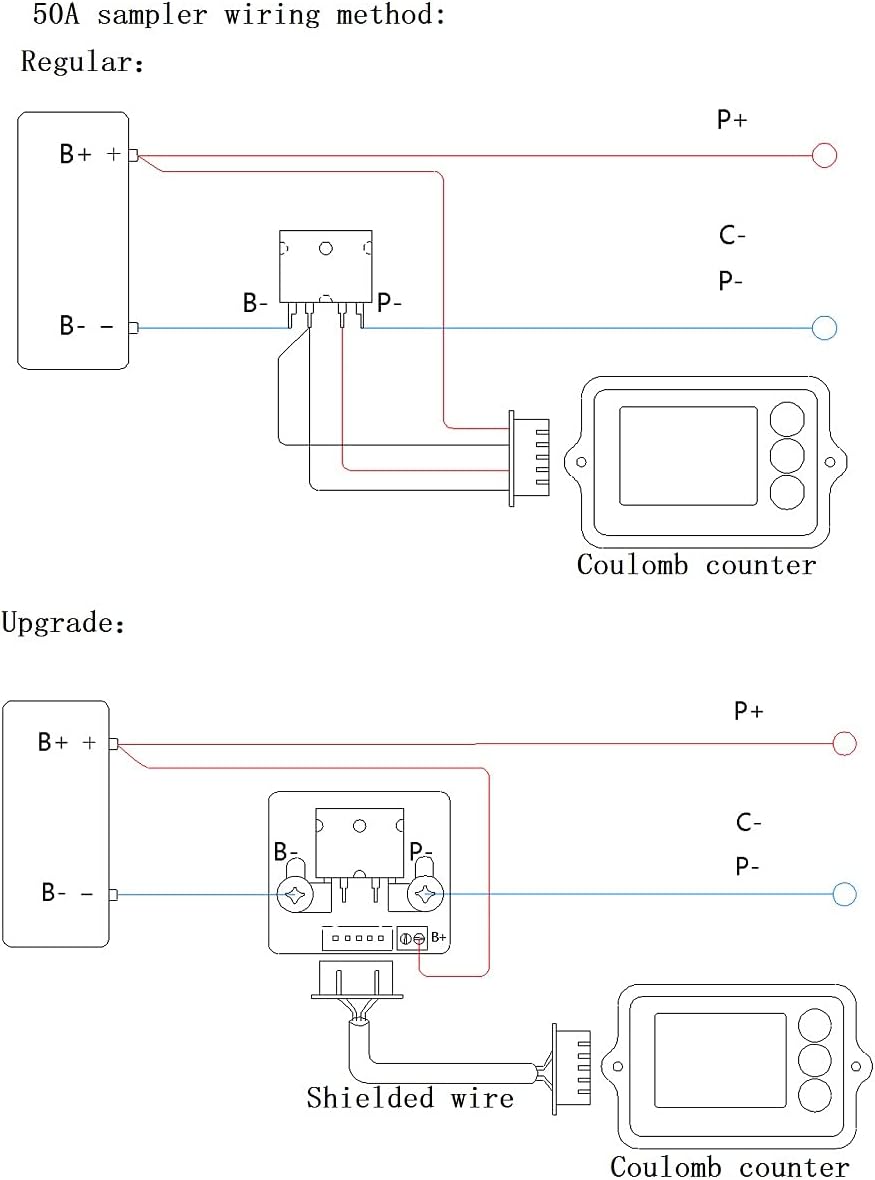
Figure 5.3: Close-up view of the 50A current sampling board (shunt). This component measures the current flowing through the circuit.
6. Operating Instructions
Once installed and powered on, the TK15 Coulomb Meter will display real-time battery information. The device features an intuitive interface with an LCD screen and control buttons.

Figure 6.1: The TK15 Coulomb Meter display showing battery percentage, remaining capacity (Ah), time remaining, voltage (V), current (A), and power (W).
6.1. Initial Setup and Calibration
- Power On: Connect the meter to the battery system as per the wiring diagram. The display should light up automatically.
- Adjusting Voltage Settings: The meter allows adjustment of the empty and full battery voltage. Refer to the device's on-screen menu or specific button combinations (usually involving the up/down arrows) to enter calibration mode and set these values according to your battery type and specifications.
- Capacity Setting: Ensure the default capacity value (0.1 Ah) is adjusted to match your battery's actual capacity for accurate percentage readings.
6.2. Display Information
The LCD screen provides comprehensive real-time data:
- Battery Percentage: Indicates the remaining charge.
- Remaining Capacity (Ah): Shows the ampere-hours left in the battery.
- Time Remaining: Estimates the operational time based on current discharge rate.
- Voltage (V): Displays the current battery voltage.
- Current (A): Shows the real-time charge or discharge current.
- Power (W): Indicates the instantaneous power consumption or generation.
6.3. Button Functions
The meter typically features three buttons for navigation and settings:
- Up Arrow: Used for navigating menus or increasing values.
- Down Arrow: Used for navigating menus or decreasing values.
- Enter/Confirm (Curved Arrow): Used to select options or confirm settings.
7. Maintenance
To ensure the longevity and accurate performance of your DollaTek TK15 Coulomb Meter, follow these maintenance guidelines:
- Cleaning: Wipe the display and casing with a soft, dry cloth. Avoid using abrasive cleaners or solvents.
- Environmental Conditions: Operate the meter within the specified ambient temperature range (0-20 °C, max 30 °C). Avoid exposure to extreme temperatures, humidity, or direct sunlight.
- Connections: Periodically check all wiring connections for tightness and corrosion. Loose connections can lead to inaccurate readings or device malfunction.
- Storage: If storing the device for an extended period, ensure it is kept in a dry, cool place.
8. Troubleshooting
If you encounter issues with your TK15 Coulomb Meter, consider the following common troubleshooting steps:
- No Display/Power:
- Check all power connections to ensure they are secure and correctly wired.
- Verify that the battery voltage is within the operating range (10-80V).
- Inaccurate Readings:
- Confirm that the wiring to the shunt and meter is correct according to the diagrams.
- Ensure the battery capacity setting in the meter matches your actual battery capacity.
- Check for loose connections or corrosion on the shunt or wiring.
- Recalibrate the empty and full voltage settings if necessary.
- Backlight Not Working:
- The backlight activates automatically during use. If it remains off, check power supply and connections.
If the problem persists after attempting these steps, please contact DollaTek customer support or your retailer for further assistance.
9. Warranty and Support
For warranty information and technical support, please refer to the documentation provided with your purchase or visit the official DollaTek website. Keep your proof of purchase for warranty claims.
Manufacturer: DollaTek
Model: TK15
Ask a question about this manual
Ask about setup, troubleshooting, compatibility, parts, safety, or missing instructions. Manuals+ will review the question and use this page’s manual context to help answer it.