
Wildgame Innovations WGIWGICM0741
Wildgame Innovations Hex Trail Camera User Manual
Model: WGIWGICM0741
Product Overview
The Wildgame Innovations Hex Trail Camera is a compact and powerful device designed for capturing high-quality images and videos of wildlife. Its small footprint and TruBark HD Camo finish allow for discreet placement in various outdoor environments. Featuring 20-megapixel photo capabilities and 720p HD video recording, it ensures clear and detailed captures. The camera incorporates advanced technologies such as Adaptive Illumination and Exposure Control for optimal image quality, and Silent Shield Technology for undetectable operation.

Figure 1: Front view of the Wildgame Innovations Hex Trail Camera, showcasing its compact design, infrared LEDs, and user interface.
Key Features
- 20 Megapixel Images & 720p HD: Captures high-resolution photos and clear video footage.
- Compact Size: With a footprint of just 7.5 square centimeters, it's easy to conceal and transport.
- Silent Shield Technology: Ensures quiet operation to avoid disturbing wildlife.
- Adaptive Illumination: Automatically adjusts lighting for optimal exposure based on target distance.
- Exposure Control: Offers three settings for balancing image clarity and distance.
- TruBark HD Camo Finish: Blends seamlessly with natural environments for enhanced concealment.
- HuntSmart App Integration: Allows for uploading, organizing, and analyzing photos via a mobile app.
- Long Battery Life: Designed for extended operation with minimal battery changes.
Setup Guide
1. Installing Batteries and SD Card
The Hex Trail Camera operates on 4 AA batteries. Ensure you use fresh, high-quality batteries for optimal performance and longevity. The camera also requires an SD card (not included) to store captured images and videos. A 16GB SD card can store approximately 7,000 photos.
- Locate the battery compartment on the side of the camera. It is secured by a small latch or button.
- Press the latch/button to open the compartment.
- Insert 4 AA batteries into the designated slots, ensuring correct polarity (+/-).
- Insert the SD card into the SD card slot until it clicks into place.
- Close the compartment securely to ensure the water seal is intact.

Figure 2: The camera with its side compartment open, revealing the battery slots and SD card slot.

Figure 3: Close-up view of the battery compartment with 4 AA batteries properly installed.
2. Initial Configuration
After installing batteries and the SD card, power on the camera to set basic parameters.
- Locate the power button, typically on the side or front panel. Press and hold to power on the device.
- The backlit display will illuminate. Use the control buttons (usually labeled with arrows and 'ENTER') to navigate the menu.
- Set the current time and date. This is crucial for accurate timestamping of your captures.
- Format the SD card through the camera's menu. This prepares the card for use and ensures compatibility.
- Adjust basic settings such as photo resolution (20MP recommended), video resolution (720p recommended), and trigger delay.
- Select your preferred exposure control setting based on your environment and desired image quality.
Operating the Camera
1. Mounting the Camera
The Hex Trail Camera is designed for easy mounting on trees or fence posts using the included adjustable strap.
- Choose a location that provides a clear view of the area you wish to monitor, considering potential animal paths and sunlight.
- Thread the adjustable strap through the mounting slots on the camera.
- Securely fasten the camera to a tree or post at the desired height. Ensure it is stable and won't shift due to wind or animal contact.
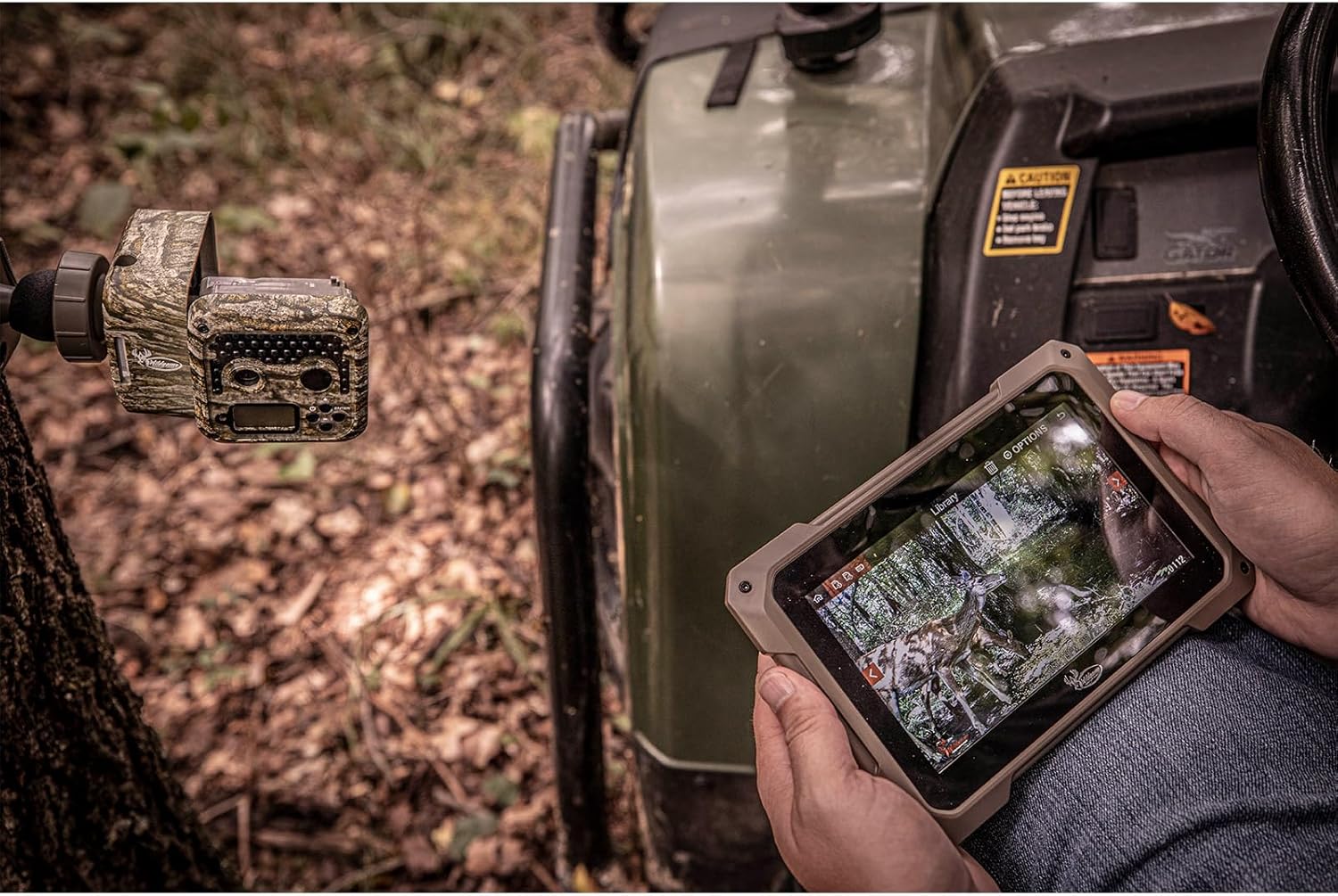
Figure 4: The Hex Trail Camera mounted on a tree, demonstrating its discreet placement and integration with the HuntSmart app for remote viewing.
2. Capturing Images and Videos
Once mounted and configured, the camera will automatically capture images or videos when motion is detected within its sensor range.
- The camera's infrared LEDs provide illumination up to 85 feet for clear night vision captures.
- The trigger speed is less than 1/2 second, ensuring quick capture of moving subjects.
- Review captured media by removing the SD card and inserting it into a compatible device (computer, card reader, or tablet with adapter).
3. Using the HuntSmart App
The HuntSmart app enhances your trail camera experience by providing tools for managing and analyzing your data.
- Download the HuntSmart app from your device's app store (available on App Store and Google Play).
- Connect your camera to the app via Wi-Fi or Bluetooth (as per specifications).
- Upload HD photos to the app for organization and analysis.
- Utilize the Artificial Intelligence Management System within the app to categorize species, track geolocation, and gain insights from your captures.
Maintenance
Regular maintenance ensures the longevity and optimal performance of your Wildgame Innovations Hex Trail Camera.
- Battery Replacement: Replace all 4 AA batteries when the battery indicator on the display shows low power. Do not mix old and new batteries.
- SD Card Management: Regularly check the SD card capacity. Transfer important files to a computer and format the card periodically to maintain performance and prevent data corruption.
- Cleaning: Gently wipe the camera lens and infrared LEDs with a soft, lint-free cloth to remove dirt, dust, or smudges. Ensure the exterior is clean, especially around the seals, to maintain its waterproof integrity.
- Environmental Protection: While the camera has an IP54 rating for protection against dust and splashing water, avoid submerging it in water. Ensure the battery and SD card compartments are always securely closed.
- Storage: When not in use for extended periods, remove batteries and store the camera in a cool, dry place away from direct sunlight.
Troubleshooting
| Problem | Possible Cause | Solution |
|---|---|---|
| Camera not powering on. | Low or dead batteries; Incorrect battery insertion. | Replace with fresh AA batteries; Ensure correct polarity. |
| No images/videos captured. | SD card full or corrupted; Incorrect settings (e.g., trigger delay too long); Sensor obstructed. | Format or replace SD card; Adjust trigger delay; Clear any obstructions from the sensor area. |
| Poor image/video quality. | Dirty lens; Low light conditions; Incorrect exposure settings. | Clean the lens; Adjust Adaptive Illumination/Exposure Control settings; Ensure adequate lighting for optimal results. |
| Water inside camera. | Compartment not sealed properly; Extreme weather exposure. | Ensure all compartments are securely latched; Check rubber seals for damage. If water ingress occurs, dry thoroughly and contact support if issues persist. |
Specifications
| Model Name | Wildgame Innovations Hex Trail Camera |
| Model Number | WGIWGICM0741 |
| Effective Still Resolution | 20 MP |
| Video Capture Resolution | 720p HD |
| Illumination Range | 85 ft (Infrared LEDs) |
| Trigger Speed | Less than 1/2 sec |
| Power Source | 4 AA Batteries (not included) |
| SD Card Support | Up to 32 GB (not included) |
| Connectivity | Wi-Fi, Bluetooth (for app integration) |
| Dimensions (Approx.) | 75mm x 75mm x 51.7mm (2.95 x 2.95 x 2.04 inches) |
| Weight | 7.68 ounces (without batteries) |
| IP Rating | IP54 (Dust and splashing water resistant) |
| Color | TruBark HD Camo |
Warranty and Support
The Wildgame Innovations Hex Trail Camera comes with a 1-Year Limited Warranty from the manufacturer. This warranty covers defects in materials and workmanship under normal use.
For warranty claims, technical support, or any product-related inquiries, please contact Wildgame Innovations customer service directly. Refer to the official Wildgame Innovations website or the product packaging for the most current contact information.
Online Resources:
Ask a question about this manual
Ask about setup, troubleshooting, compatibility, parts, safety, or missing instructions. Manuals+ will review the question and use this page’s manual context to help answer it.