
1. Introduction
This manual provides detailed instructions for the safe and effective use of your Lytool Digital Angle Finder AM55301. This precision instrument is designed for accurate angle measurement in various applications, including woodworking, construction, and machinery. Please read this manual thoroughly before operating the device and retain it for future reference.

Figure 1: Lytool Digital Angle Finder AM55301. The device features a digital display showing an angle of 45.0 degrees, along with ON/OFF, HOLD, and ZERO buttons. A small carrying pouch and an AAA battery are also visible.
2. Product Overview
The Lytool Digital Angle Finder AM55301 is a compact and versatile tool equipped with a high-accuracy microprocessor and a magnetic base for secure attachment to metal surfaces. It features an upgraded backlight LCD display for clear readings in various lighting conditions.
2.1 Key Features
- High Accuracy: Measures angles with a precision of ±0.2° across a 360° (4*90°) range.
- Powerful Magnetic Base: Allows for firm attachment to metal surfaces, ideal for precise measurements on saws and machinery.
- Upgraded Backlight LCD Display: Ensures clear visibility of readings, even in low-light environments. The display auto-reverses for easy reading when rotated 180°.
- IP54 Waterproof Performance: Provides protection against dust and splashing water.
- Easy to Use: Simple 3-button operation for power, hold, and zero functions.
- Portable and Lightweight: Compact design (L2.36'' × W1.11'' × H2.36'') for easy transport and storage.
2.2 Components

Figure 2: Product components and button functions. The image highlights the LCD Screen, ON/OFF button, HOLD button, and ZERO button on the device.
- LCD Screen: Displays angle measurements and status indicators.
- ON/OFF Button: Powers the device on or off.
- HOLD Button: Freezes the current reading on the display.
- ZERO Button: Resets the current angle to zero for relative measurements.
- Magnetic Base: Located on the bottom of the device for secure attachment to metal surfaces.
- Bubble Level: Provides a visual reference for horizontal and vertical leveling.
3. Setup
3.1 Battery Installation
The Lytool Digital Angle Finder requires one AAA battery (included). No screwdriver is needed for installation.
- Locate the battery compartment cover on the back of the device.
- Slide or gently pry open the battery compartment cover.
- Insert one AAA battery, ensuring correct polarity (+/-) as indicated inside the compartment.
- Close the battery compartment cover securely.
4. Operation
4.1 Powering On/Off
- To turn the device ON, long press the "ON/OFF" button.
- To turn the device OFF, long press the "ON/OFF" button again.
- The device will automatically shut down if no operation is performed for 3 minutes to conserve battery life.
4.2 Absolute and Relative Measurement
The device can measure angles in two modes: absolute and relative.
- Absolute Measurement: When the device is first turned on, it typically displays the absolute angle relative to a true horizontal surface.
- Relative Measurement (ZERO function): To measure the angle relative to a specific surface:
- Place the angle finder on the desired reference surface.
- Press the "ZERO" button. The display will show "0.0°", indicating that this surface is now the reference point.
- Move the angle finder to the surface you wish to measure. The display will show the angle relative to your set zero point.
- To exit relative measurement mode, press the "ZERO" button again.
4.3 Holding a Reading
- To freeze the current reading on the display, press the "HOLD" button. The "HOLD" indicator will appear on the screen.
- To release the held reading and resume live measurement, press the "HOLD" button again.
4.4 Display Orientation

Figure 3: The display automatically rotates 180 degrees for easy reading when the device is inverted. The image shows the device upside down with the display reading 179.8 degrees, correctly oriented for viewing.
The LCD display features an auto-reverse function. If the device is rotated 180°, the displayed values will automatically flip to remain upright, ensuring easy readability from any orientation.
4.5 Using the Magnetic Base

Figure 4: The digital angle finder attached to a miter saw blade. The magnetic base allows for secure placement on metal surfaces, aiding in precise angle adjustments for cutting tools.
The strong magnetic base allows the angle finder to be securely attached to metal surfaces such as saw blades, drill presses, or other machinery. This feature is particularly useful for setting and verifying angles on power tools like miter saws and table saws.
5. Maintenance
- Keep the device clean and dry. Wipe with a soft, damp cloth if necessary. Do not use abrasive cleaners or solvents.
- Avoid exposing the device to extreme temperatures or direct sunlight for prolonged periods.
- When not in use for an extended period, remove the battery to prevent leakage and damage to the device.
- Store the angle finder in its protective cloth bag to prevent scratches and damage.
6. Troubleshooting
| Problem | Possible Cause | Solution |
|---|---|---|
| Device does not turn on. | Battery is dead or incorrectly installed. | Check battery polarity. Replace with a new AAA battery. |
| Inaccurate readings. | Device not calibrated or placed on an unstable surface. | Ensure the device is on a stable, flat surface. Perform a zero calibration on a known level surface. |
| Display shows "Err". | Measurement angle exceeds the device's operational range or an internal error. | Ensure the device is within its 360° measuring range. Turn off and restart the device. If the error persists, contact support. |
| Display is dim or flickering. | Low battery power. | Replace the AAA battery. |

Figure 5: Examples of correct and incorrect measuring techniques. The top left shows correct measuring with a stable base. The top right and bottom images show "Erro" (Error) when the device is tilted beyond 30 degrees or not placed flat, indicating improper use.
7. Specifications
| Feature | Detail |
|---|---|
| Model Number | AM55301 |
| Measuring Range | 360° (4 x 90°) |
| Accuracy | ±0.2° (0° and 90° ±0.1°) |
| Resolution | 0.1° |
| Power Source | 1 x AAA Battery (included) |
| Automatic Shut-off | 3 minutes of inactivity |
| Operating Temperature | 0°C to 50°C (32°F to 122°F) |
| Operating Humidity | ≤85% |
| Dimensions (L x W x H) | 2.36" x 1.11" x 2.36" (6cm x 2.8cm x 6cm) |
| Weight | Approximately 118 grams (4.2 ounces) |
| Material | Metal |
| Waterproof Rating | IP54 |
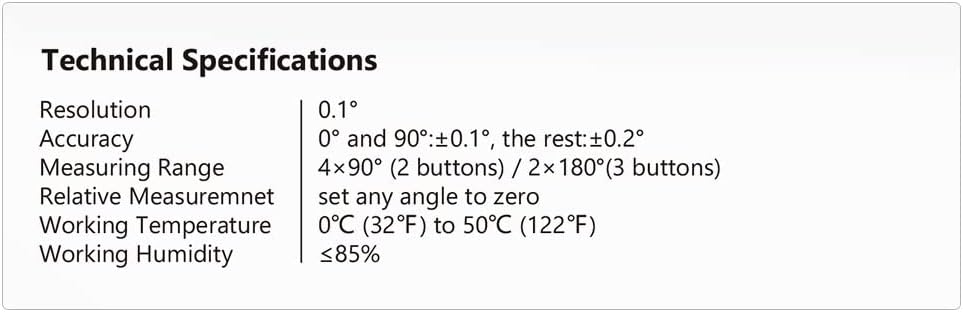
Figure 6: Detailed technical specifications of the Lytool Digital Angle Finder, including resolution, accuracy, measuring range, and environmental conditions.
8. Warranty and Support
Lytool products are manufactured with quality and precision. For warranty information or technical support, please refer to the contact details provided below or on the product packaging.
Manufacturer Information:
Manufacturer Name: Guilin GemRed Sensor Technology Co., Ltd
Manufacturer Address: Chengtian Science and Technology Park Information Industrial District, National High-Tech Zone, Guilin, Guangxi, China
Email: support@am.lytool.com

Figure 7: Product packaging displaying manufacturer details and contact information for support in various regions.
For further assistance, please contact Lytool customer service through the provided email address.