
E6S E6S
E6S TWS Bluetooth Earphones User Manual
Model: E6S | Brand: E6S
1. Introduction
Thank you for choosing the E6S TWS Bluetooth Earphones. These wireless earbuds are designed to provide a superior audio experience with advanced features such as Bluetooth 5.0 connectivity, noise cancellation, and a convenient digital power display. This manual will guide you through the setup, operation, and maintenance of your new earphones.
2. Package Contents
- E6S TWS Bluetooth Earphones (Left and Right)
- Charging Case
- Protective Case
- User Manual (This document)
- Charging Cable (Not explicitly listed but implied for charging case)
- Ear Tips (S/M/L, implied for in-ear fit)
Note: Specific contents may vary. Please check the product packaging for a complete list.
3. Product Overview
The E6S TWS Bluetooth Earphones feature an in-ear design for a comfortable and secure fit. The charging case includes a digital LED display to show battery levels. Key components include the earbuds, charging contacts, and the charging case with its lid.

Figure 1: E6S TWS Bluetooth Earphones and Charging Case. The image shows the black charging case open, revealing two earbuds inside. A digital display on the case shows "100", indicating full charge. One earbud is shown outside the case.

Figure 2: Top-down view of the E6S TWS Earphones in their charging case. The case is open, showing both earbuds securely seated in their charging slots. The digital LED display shows "100", indicating the charging status.
4. Setup and First Use
4.1 Charging the Earphones and Case
Before first use, ensure both the earphones and the charging case are fully charged. Place the earbuds into the charging case. Connect the charging cable (not included, typically USB-C or Micro-USB) to the charging port on the case and plug the other end into a USB power source. The digital LED display on the case will indicate the charging progress. A full charge for the case takes approximately 2.5 hours, and for the earphones, about 1 hour.
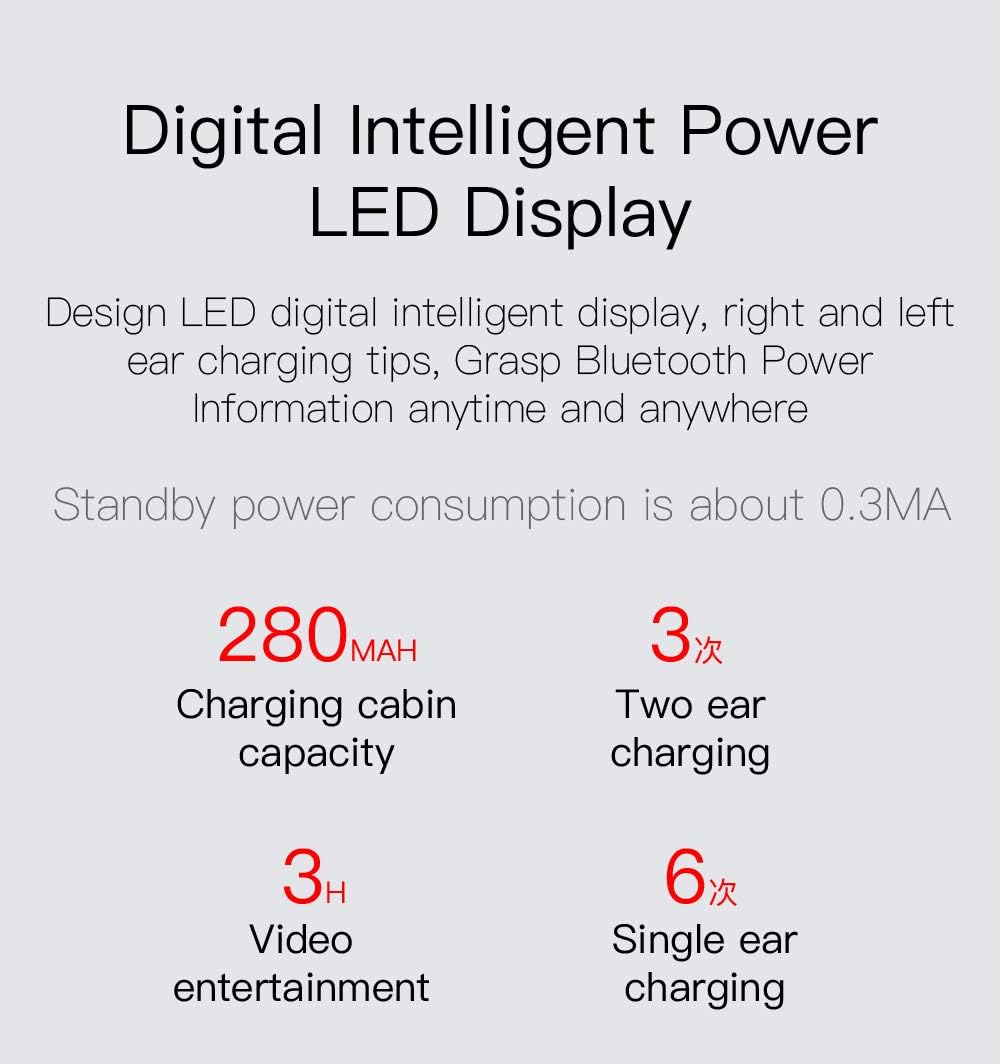
Figure 3: Digital LED Power Display. This image highlights the LED display on the charging case, which shows the current battery percentage (e.g., "100") for both the case and the individual earbuds, allowing users to monitor charge status.
4.2 Pairing with Your Device
- Open the charging case. The earphones will automatically power on and enter pairing mode.
- On your mobile phone or other Bluetooth-enabled device, go to the Bluetooth settings.
- Search for "E6S" in the list of available devices.
- Select "E6S" to connect. Once connected, you will hear a confirmation tone, and the earphones will be ready for use.
Note: The E6S earphones feature automatic boot-up and matching. After the initial pairing, they will automatically connect to the last paired device when removed from the case.

Figure 4: Automatic Connection Feature. This image illustrates the automatic connection process, showing a hand taking an earbud out of the charging case, signifying that the earbuds will automatically power on and pair with the last connected device.
5. Operating Instructions
5.1 Touch Controls
The E6S earphones utilize touch controls for various functions. Specific touch gestures may vary slightly, but common functions include:
- Play/Pause: Single tap on either earbud.
- Next Track: Double tap on the right earbud.
- Previous Track: Double tap on the left earbud.
- Answer/End Call: Single tap on either earbud.
- Reject Call: Press and hold on either earbud.
- Activate Voice Assistant (Siri): Triple tap on either earbud (or press and hold for 2 seconds, refer to specific product instructions if available).

Figure 5: One-Button Siri Access. This image emphasizes the ease of activating voice assistants like Siri with a single button press (or tap gesture) on the earbuds, enhancing smart functionality.
5.2 Power On/Off
- Power On: Remove the earbuds from the charging case. They will automatically power on.
- Power Off: Place the earbuds back into the charging case and close the lid. They will automatically power off and begin charging.
6. Features and Technology
6.1 Bluetooth 5.0 Connectivity
Equipped with an upgraded Bluetooth 5.0 chip, the E6S earphones offer more stable transmission, easier connection, and improved audio quality. Enjoy seamless listening and gaming without interruptions, with a transmission distance of up to 10 meters in an ideal environment.

Figure 6: Bluetooth 5.0 Chip. This image visually represents the advanced Bluetooth 5.0 chip inside the earbud, highlighting its role in providing stable and high-quality wireless connectivity.
6.2 Active Noise Cancellation & Hi-Fi Sound
Experience immersive audio with active noise cancellation, designed to reduce ambient noise for clearer sound. The earphones feature 6D surround stereo sound effect and special speakers for Fever Hi-Fi sound quality, ensuring rich and detailed audio. The built-in microphone also supports intelligent noise reduction for clear calls.

Figure 7: Intelligent Noise Reduction and Hi-Fi Sound. This image provides an exploded view of an earbud, showcasing its internal components like the speaker and circuitry, illustrating the technology behind its noise reduction and high-fidelity sound capabilities.
6.3 IPX-5 Waterproof Rating
The E6S earphones are rated IPX-5 waterproof, providing protection against sweat and light splashes. This makes them suitable for sports, travel, and daily use, offering durability in various conditions.
6.4 Digital Intelligent Power LED Display
The charging case features a digital LED display that shows the remaining battery power for both the charging case and the individual earbuds, allowing you to monitor the charge status anytime, anywhere.
7. Battery Information
The E6S earphones are equipped with a 45mAh battery in each earbud, providing approximately 2.5 to 3 hours of continuous playback and about 4 hours of talk time. The charging case has a 280mAh capacity, capable of recharging the earphones approximately 2.5 times. The standby time for the earphones is about 80 hours.
Note: Battery life may vary based on usage, volume level, and device. Standby power consumption is approximately 0.3mA.
8. Device Compatibility
These versatile earphones are compatible with a wide range of Bluetooth-enabled devices, including mobile phones, computers, and portable media players. They offer broad compatibility for your audio needs across different platforms.
9. Maintenance and Care
- Cleaning: Regularly clean the earbuds and charging contacts with a soft, dry cloth. Avoid using abrasive materials or harsh chemicals.
- Storage: When not in use, store the earphones in their charging case to protect them and keep them charged.
- Water Exposure: While IPX-5 rated, avoid submerging the earphones in water. Dry them thoroughly if they get wet from sweat or splashes.
- Temperature: Avoid exposing the earphones to extreme temperatures (hot or cold) as this can affect battery life and performance.
10. Troubleshooting
10.1 Earbuds Not Pairing with Each Other
If only one earbud is playing sound or they are not pairing together:
- Place both earbuds back into the charging case.
- Ensure both earbuds are charged.
- Remove both earbuds simultaneously from the case. They should automatically pair with each other.
- If the issue persists, try resetting the earphones (refer to specific product instructions for reset procedure, usually involves holding touch areas for a few seconds while in the case).
10.2 Earbuds Not Connecting to Device
- Ensure Bluetooth is enabled on your device.
- Make sure the earphones are charged and in pairing mode.
- Forget "E6S" from your device's Bluetooth list and try pairing again.
- Move closer to your device to ensure you are within the 10-meter range.
10.3 Low Volume or Poor Sound Quality
- Adjust the volume on both your device and the earphones.
- Ensure the earbuds are properly seated in your ears for optimal sound.
- Clean any earwax or debris from the earbud mesh.
- Try playing audio from a different source or device to rule out source issues.
11. Specifications
| Feature | Detail |
|---|---|
| Model Number | E6S |
| Bluetooth Standard | Bluetooth v5.0 |
| Transmission Distance | 10 meters (in ideal environment) |
| Headphone Battery Capacity | 3.7V 45mAh |
| Charging Case Battery Capacity | 280mAh |
| Headphone Working Time | About 2.5 - 3 hours |
| Talk Time | About 4 hours |
| Charging Time | About 1 hour (earphones), 2.5 hours (case) |
| Standby Time | About 80 hours |
| Waterproof Standard | IPX-5 |
| Vocalism Principle | Other (Hi-Fi Sound Quality) |
| Active Noise-Cancellation | YES |
| Microphone | YES |
| Volume Control | YES |
| Control Method | Touch |
| Color | Black |
| Material | ABS |
| Product Dimensions | 5.51 x 3.15 x 1.18 inches |
| Item Weight | 1.41 ounces (40 Grams) |
12. Official Product Video
Video Description: This official product video provides an overview of the E6S TWS Bluetooth Wireless Earphones, highlighting key features such as Bluetooth 5.0 connectivity, digital LED power display, one-button Siri access, automatic device pairing, IPX-5 waterproof rating, and compact design. It visually demonstrates the product's design, functionality, and benefits for daily use.
13. Warranty and Support
For warranty information and customer support, please refer to the product packaging or contact the manufacturer directly. Keep your purchase receipt for warranty claims.
For further information, visit the product detail page on Amazon: Amazon Product Page
Related documentsE6S

Ask a question about this manual
Ask about setup, troubleshooting, compatibility, parts, safety, or missing instructions. Manuals+ will review the question and use this page’s manual context to help answer it.