
Anncus UTN-05BE1BA5FF770950B9277F0B6CA0036C
User Manual: Anncus Multi-function Desktop Storage Box
Model: UTN-05BE1BA5FF770950B9277F0B6CA0036C
Brand: Anncus
Introduction
Thank you for choosing the Anncus Multi-function Desktop Storage Box. This versatile organizer is designed to help you declutter and efficiently manage your desktop, coffee table, or vanity space. With its detachable partitions and dedicated compartments, it's ideal for storing remote controls, cosmetics, stationery, and various small items. This manual provides essential information on setup, usage, maintenance, and specifications to ensure optimal performance and longevity of your product.
Product Overview
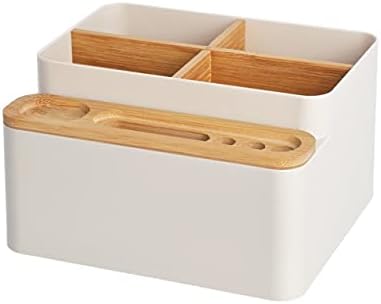
Figure 1: Front view of the Anncus Multi-function Desktop Storage Box in Apricot color, featuring its main compartment with bamboo dividers and an integrated side tray for smaller items.

Figure 2: Top-down perspective of the storage box, highlighting the four main compartments created by the detachable bamboo partitions and the detailed layout of the side tray.
Setup and Assembly
The Anncus Multi-function Desktop Storage Box requires minimal assembly. Follow these steps to prepare your organizer for use:
- Unboxing: Carefully remove all components from the packaging. You should find the main storage box, two bamboo partition pieces, and the bamboo side tray.
- Insert Partitions: The main compartment of the storage box is designed to accommodate two interlocking bamboo partitions. Gently slide the first bamboo piece into the designated slots within the main box. Then, interlock the second bamboo piece into the first one, forming a cross-shape that creates four distinct compartments. These partitions are detachable, allowing for flexible storage configurations.
- Place Side Tray: Position the bamboo side tray onto the designated ledge on the front side of the main storage box. Ensure it sits securely. This tray features various slots for pens, remote controls, or other small accessories.
- Placement: Place the assembled storage box on your desired surface, such as a desk, coffee table, or vanity.

Figure 3: Illustration of the storage box with its bamboo dividers and side tray, demonstrating how the detachable partitions fit into the main compartment for customizable organization.
Operating Instructions
The Anncus Multi-function Desktop Storage Box is designed for intuitive use. Here are some common ways to utilize its features:
- Desktop Organization: Use the main compartments for larger items like notebooks, small books, or electronic devices. The side tray is perfect for pens, pencils, paper clips, and sticky notes.
- Cosmetics Storage: The deeper compartments can hold makeup brushes, palettes, and bottles, while the side tray can store lipsticks, eyeliners, or smaller cosmetic tools.
- Remote Control Holder: The main compartments are spacious enough for multiple remote controls, keeping them tidy and easily accessible on your coffee table.
- Stationery Management: Organize office supplies such as staplers, tape dispensers, scissors, and various writing instruments.
- Customization: Remove one or both bamboo partitions to create larger compartments as needed for bulkier items.

Figure 4: The storage box in use on a desk, holding notebooks, glasses, and pens, demonstrating its utility for office and study organization.
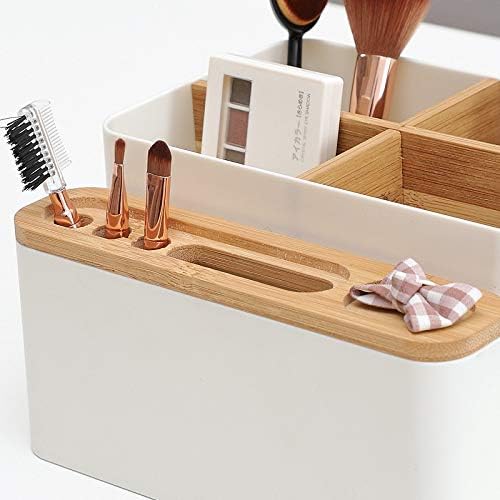
Figure 5: The storage box configured for cosmetic organization, neatly holding makeup brushes, palettes, and other beauty essentials, showcasing its versatility for vanity use.
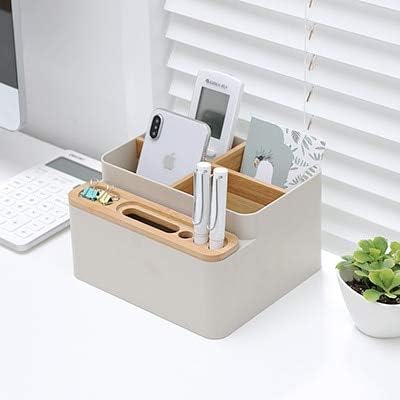
Figure 6: The storage box on a coffee table, effectively organizing remote controls, a smartphone, and other small items, illustrating its function as a living room organizer.
Maintenance and Care
To ensure the longevity and appearance of your Anncus Multi-function Desktop Storage Box, follow these simple care instructions:
- Cleaning: Wipe the plastic body with a soft, damp cloth. For stubborn stains, a mild soap solution can be used, followed by wiping with a clean, dry cloth.
- Bamboo Parts: The bamboo partitions and side tray should be wiped with a dry or slightly damp cloth. Avoid soaking bamboo in water, as this can cause warping or damage.
- Avoid Harsh Chemicals: Do not use abrasive cleaners, solvents, or harsh chemicals, as they may damage the plastic or bamboo surfaces.
- Placement: Avoid placing the storage box in direct sunlight or near extreme heat sources, which can cause discoloration or material degradation over time.
Troubleshooting
This section addresses common questions and minor issues you might encounter:
- Issue: Items do not fit into the compartments.
Solution: The bamboo partitions are detachable. Try removing one or both partitions to create larger storage spaces for bulkier items. - Issue: The storage box appears dusty or dirty.
Solution: Refer to the "Maintenance and Care" section for proper cleaning instructions. Regular wiping with a soft cloth is recommended. - Issue: Bamboo parts seem loose or wobbly.
Solution: Ensure the bamboo partitions are fully inserted into their designated slots and interlocked correctly. The side tray should sit firmly on its ledge.
Specifications
| Feature | Detail |
|---|---|
| Model Number | UTN-05BE1BA5FF770950B9277F0B6CA0036C |
| Brand | Anncus |
| Material | Plastic (PS type) with Bamboo accents |
| Color | Apricot |
| Mounting Type | Tabletop Mount |
| Special Features | Eco-friendly, Multi-function, Detachable Partitions |
| Specific Uses | Cosmetics, Stationery, Remote Control, General Desktop Organization |
| Origin | CN(Origin) |
Warranty and Support
For information regarding warranty coverage, returns, or technical support, please refer to the product's packaging or the retailer's website where the product was purchased. Specific warranty details are not provided in this manual.
For further assistance, you may contact Anncus customer service through their official channels, if available.