
1. Introduction
Thank you for choosing the TAOTOSUNE USB Powered Wired Stereo Desktop Speakers, Model TTS004. This manual provides essential information for setting up, operating, and maintaining your new speakers. Please read it thoroughly to ensure optimal performance and longevity of your device.
2. Package Contents
Please verify that all items listed below are included in your package:
- 1 x TAOTOSUNE Computer Speaker (Model: TTS004)
- 1 x User Manual
3. Product Features
- Stereo Sound: Equipped with 6W large full-range drivers for immersive stereo audio.
- Wired Connectivity: Connects via a 3.5mm AUX audio jack and is USB powered.
- Plug and Play: No drivers or software installation required.
- Wide Compatibility: Compatible with most devices featuring a 3.5mm audio output, including computers, laptops, desktops, tablets, and cellphones. Supports operating systems like Windows, Unix, Linux, and NetWare.
- Compact Design: Slim, unibody design (Dimensions: L 12.4'', W 2.2'', H 2.4'') fits neatly under computer monitors.
- Integrated Volume Control: Front-mounted rotary knob for easy volume adjustment.
- Note: This speaker does not support Bluetooth, nor does it include a built-in headphone jack or microphone port.

Image: Front view of the TAOTOSUNE TTS004 Computer Speaker, showcasing its sleek design and central volume knob with blue LED illumination.
4. Setup and Installation
Follow these steps to connect your TAOTOSUNE speakers:
- Connect USB for Power: Plug the USB-A connector of the speaker cable into an available USB port (5V/0.5A) on your computer, laptop, power bank, or a USB wall adapter. This provides power to the speakers.
- Connect 3.5mm Audio Jack: Insert the 3.5mm audio jack into the audio output port (headphone jack) of your device (computer, laptop, tablet, cellphone, etc.). This transmits the audio signal.
- Verify Connections: Ensure both the USB power cable and the 3.5mm AUX audio cable are securely connected for the speakers to function correctly.
- Placement: Position the speaker on a stable, flat surface, ideally under your monitor, for optimal sound projection and to save desk space.

Image: The TAOTOSUNE TTS004 speaker connected to a laptop via its USB and 3.5mm audio cables, illustrating the plug-and-play setup.
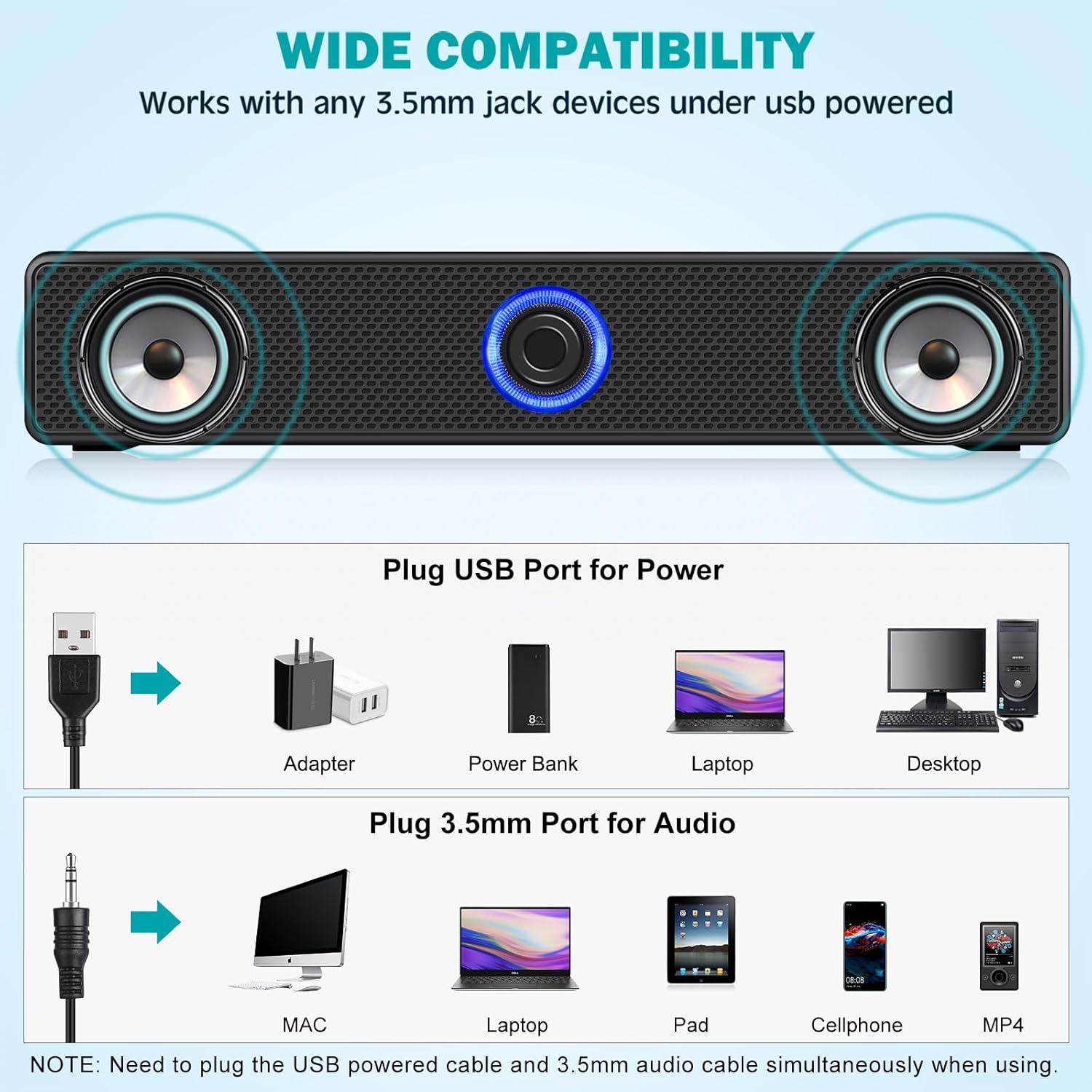
Image: Diagram showing various devices compatible with the TAOTOSUNE TTS004 speaker, highlighting USB for power and 3.5mm for audio connections.
Video: Official product video demonstrating the setup and features of the TAOTOSUNE Computer Speakers.
5. Operating Instructions
Once connected, operating your speakers is straightforward:
- Power On/Off: The speakers power on automatically when connected to a powered USB port. There is no separate power button. The blue LED around the volume knob indicates the speaker is active.
- Volume Adjustment: Rotate the central knob clockwise to increase the volume and counter-clockwise to decrease it. Turn it fully counter-clockwise to mute the sound.
- Audio Source: The speakers will play audio from the device connected via the 3.5mm audio jack. Ensure your device's audio output is directed to the connected speakers.
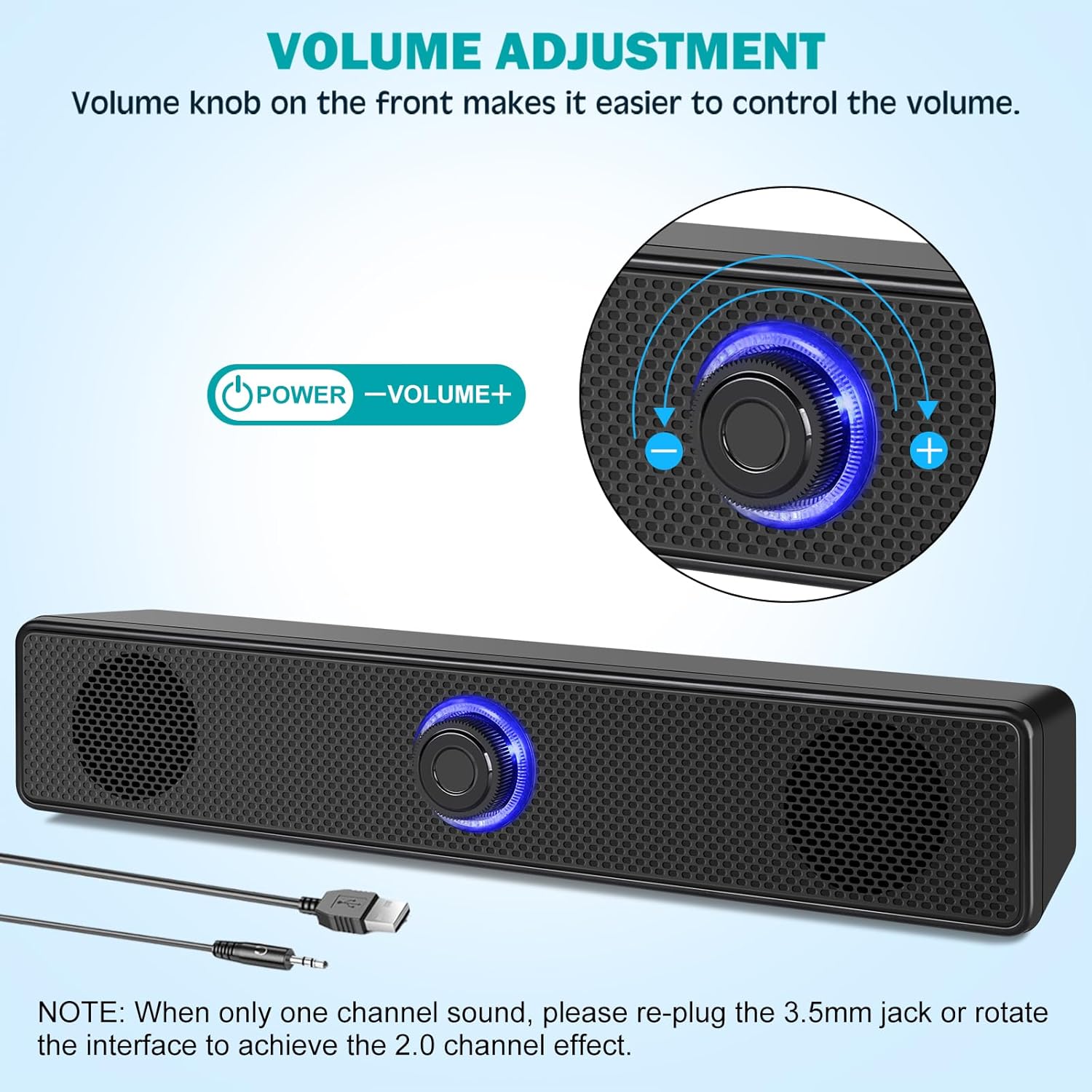
Image: Close-up of the volume adjustment knob on the TAOTOSUNE TTS004 speaker, showing its blue LED illumination.
6. Troubleshooting
If you encounter any issues, please refer to the following common solutions:
- No Sound:
- Ensure both the USB power cable and the 3.5mm audio cable are securely plugged into their respective ports.
- Check if the volume knob on the speaker is turned up.
- Verify that your device's audio output is set to the correct port and its volume is not muted or too low.
- Try connecting the speakers to a different USB port or audio jack on your device, or to another device, to rule out port issues.
- Only One Channel Sound:
- Re-plug the 3.5mm audio jack firmly into your device.
- Gently rotate the 3.5mm audio jack within the port to ensure proper contact for a 2.0 stereo channel effect.
- Distorted Sound:
- Lower the volume on both your device and the speaker.
- Ensure the audio cable is not damaged or kinked.
- Avoid placing the speakers near sources of electromagnetic interference.
- Blue LED Not Lit:
- Confirm the USB power cable is connected to a functional USB port providing sufficient power (5V/0.5A).
- Try a different USB port or power source.
7. Specifications
| Model Name | TTS004 |
| Brand | TAOTOSUNE |
| Speaker Type | Dual Speaker |
| Connectivity Technology | USB (Power) and Auxiliary 3.5mm (Audio) |
| Audio Output Mode | Stereo (2.0 Channel) |
| Speaker Maximum Output Power | 6 Watts (2x3W) |
| Frequency Response | 20 KHz (Range: 120Hz-20kHz) |
| Input Voltage | 5 Volts |
| Impedance | 4 Ohms |
| Product Dimensions (L x W x H) | 12.4" x 2.2" x 2.4" |
| Item Weight | 14 Ounces |
| Material | Plastic |
| Control Method | Rotary Knob |
| Special Features | USB Powered, 3.5mm Audio Plug, Compact Design |
| Bluetooth Support | No |
| Microphone/Headphone Jack | No |

Image: Visual representation of the TAOTOSUNE TTS004 speaker's dimensions and key technical specifications.
8. Maintenance
To ensure the longevity and optimal performance of your TAOTOSUNE speakers, follow these maintenance guidelines:
- Cleaning: Use a soft, dry cloth to wipe the exterior of the speakers. Do not use liquid cleaners or abrasive materials, as they may damage the finish or internal components.
- Storage: When not in use for extended periods, store the speakers in a cool, dry place away from direct sunlight and extreme temperatures.
- Handling: Avoid dropping the speakers or subjecting them to strong impacts.
- Ventilation: Ensure the speaker grilles are not obstructed to allow for proper airflow.
9. Warranty and Support
The TAOTOSUNE TTS004 Computer Speakers come with an 18-month warranty and lifetime customer support.
If you experience any issues or have questions regarding your product, please contact our customer support team for assistance. Refer to your purchase documentation for specific contact details or visit the official TAOTOSUNE website.

