
1. Introduction
Thank you for purchasing the Goshyda AEQ96761 Fixed Telephone. This manual provides detailed instructions for the proper setup, operation, and maintenance of your new telephone. Please read this manual thoroughly before using the product to ensure optimal performance and longevity.
2. Package Contents
Please check the package for the following items:
- 1 x Goshyda AEQ96761 Fixed Telephone
- 1 x Handset Coiled Cord
- 1 x Telephone Line Cord
- 1 x Instruction Manual
- 1 x Telephone Stand
3. Product Overview
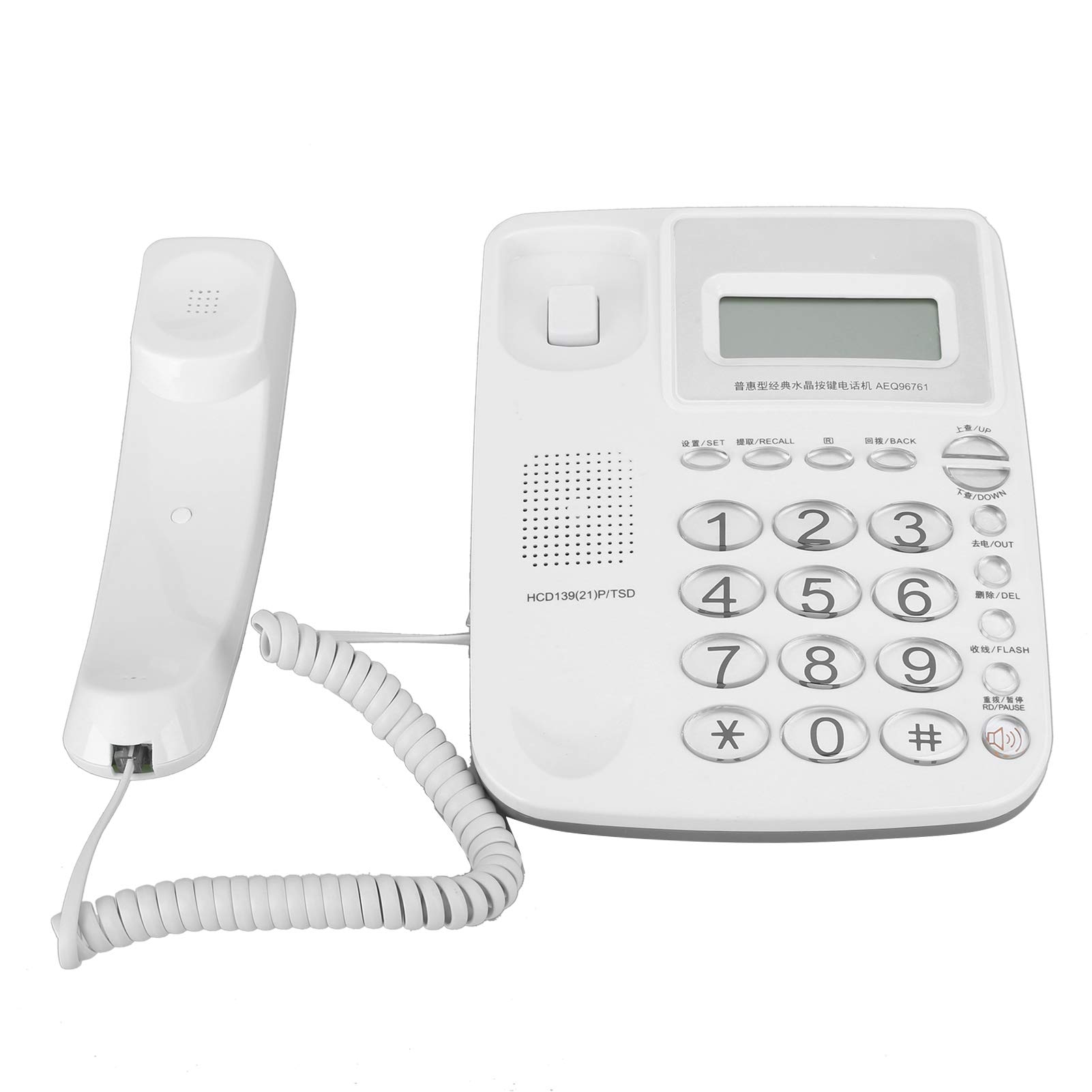
Figure 3.1: Goshyda AEQ96761 Fixed Telephone, a white corded phone with a digital display and keypad.

Figure 3.2: The telephone's LCD display shows real-time date and week, with brightness adjustable in 5 levels.

Figure 3.3: The telephone supports DTMF/FSK dual system caller ID.

Figure 3.4: Close-up of the durable glass buttons on the telephone keypad.

Figure 3.5: The included telephone line cable for connection.
4. Setup
- Connect the Handset: Plug one end of the coiled cord into the handset and the other end into the jack labeled with a handset icon on the side of the telephone base.
- Connect the Telephone Line: Plug one end of the telephone line cord into the jack labeled 'LINE' on the back of the telephone base and the other end into your wall telephone jack.
- Place the Telephone: Position the telephone on a flat, stable surface or mount it on a wall using the integrated wall mount holes (if applicable). Ensure the telephone stand is securely attached if using it for desk placement.
- Initial Power-Up: The telephone is powered via the telephone line. Once connected, the display should activate.
5. Operating Instructions
5.1 Making a Call
- Lift the handset or press the Hands-Free/Speaker button.
- Dial the desired telephone number using the keypad.
- Wait for the call to connect.
- To end the call, replace the handset or press the Hands-Free/Speaker button again.
5.2 Receiving a Call
- When the telephone rings, lift the handset or press the Hands-Free/Speaker button to answer.
- To end the call, replace the handset or press the Hands-Free/Speaker button.
5.3 Caller ID Function
The telephone supports DTMF/FSK dual system caller ID. When an incoming call is received, the caller's number (and name, if available and stored) will be displayed on the LCD screen.
- Use the UP/DOWN buttons to scroll through incoming call records.
- Press the OUT button to view outgoing call records.
5.4 Hands-Free Operation
Press the Hands-Free/Speaker button to activate the speakerphone function. You can adjust the hands-free volume using the dedicated volume controls (if available) or during a call.
5.5 R Key Function
The R key (Flash key) is used for network services such as call waiting or transferring calls, depending on your telephone service provider's features.
5.6 Memory Functions
The telephone features 10 groups of dual-key memory for frequently dialed numbers. Refer to the detailed instructions in the included manual for programming these memory slots.
5.7 Alarm Function
The telephone includes 3 alarm groups, each with different alarm sounds. Consult the full instruction manual for setting up and managing these alarm functions.
6. Features
- DTMF/FSK dual system caller ID.
- 16 selectable ringtones.
- Ability to view incoming and outgoing call information.
- 3 alarm groups, each with distinct alarm sounds.
- 10 groups of dual-key memory function for speed dialing.
- Hands-free volume control.
- R key function for network services.
- Automatic line take-up.
- Super anti-thunder protection.
- Parallel anti-theft features.
- 1-99 hours Do Not Disturb function.
7. Maintenance
- Cleaning: Wipe the telephone with a soft, damp cloth. Do not use abrasive cleaners or solvents.
- Storage: Store the telephone in a cool, dry place away from direct sunlight and extreme temperatures.
- Avoid Liquids: Do not expose the telephone to water or other liquids.
- Handle with Care: Avoid dropping the telephone or subjecting it to strong impacts.
8. Troubleshooting
- No Dial Tone:
- Ensure all cables (handset and line cord) are securely connected.
- Test the wall jack with another working telephone.
- No Display:
- Verify the telephone line cord is properly connected to the wall jack. The phone draws power from the line.
- Caller ID Not Working:
- Ensure you have subscribed to Caller ID service from your telephone provider.
- Check if the telephone line connection is stable.
- Cannot Hear or Be Heard:
- Check the handset coiled cord connection.
- Adjust the volume settings during a call.
9. Specifications
| Feature | Specification |
|---|---|
| Brand | Goshyda |
| Model Number | AEQ96761 |
| Phone Type | Corded Fixed Telephone |
| Material | Acrylonitrile Butadiene Styrene (ABS) |
| Color | White |
| Power Source | Electric Cable (Line Powered) |
| Dialer Type | Single Keypad |
| Item Dimensions (L x W x H) | 10 x 10 x 10 millimeters |
| Item Weight | 621 Grams |
| Caller ID | Yes (DTMF/FSK Dual System) |
| Answering System Type | Digital |
| Country of Origin | China |
10. Warranty and Support
For warranty information and technical support, please refer to the documentation included with your purchase or contact your retailer. Keep your purchase receipt as proof of purchase for any warranty claims.