
KLARSTEIN Skyscraper Ice
Klarstein Skyscraper Ice Smart 4-in-1 Air Cooler User Manual
Model: Skyscraper Ice
Brand: KLARSTEIN
1. Safety Instructions
Please read these safety instructions carefully before using the appliance and keep them for future reference. Incorrect use may result in personal injury or property damage.
- Ensure the power supply voltage matches the rating label on the appliance.
- Do not immerse the appliance, power cord, or plug in water or other liquids.
- Always unplug the appliance before cleaning, refilling water, or when not in use.
- Keep the appliance out of reach of children and pets.
- Do not block the air inlets or outlets. Ensure adequate ventilation around the unit.
- Place the appliance on a stable, flat surface to prevent tipping.
- Do not use the appliance in areas with high humidity, such as bathrooms, or near flammable materials.
- Only use original accessories and spare parts.
- If the power cord is damaged, it must be replaced by the manufacturer, its service agent, or similarly qualified persons to avoid a hazard.
2. Product Overview
The Klarstein Skyscraper Ice Smart is a versatile 4-in-1 appliance designed to improve your indoor climate. It functions as an air cooler, fan, humidifier, and ioniser.
Components
- Main Unit (Tower)
- Water Tank (6 Litres capacity)
- Remote Control
- 2 x Cold Packs
- Power Cord
Key Features
- 4-in-1 Functionality: Fan, Air Cooler, Humidifier, and Ioniser for comprehensive air treatment.
- Powerful Airflow: Delivers 210 m³/h of air, effectively circulating air in the room.
- Evaporative Cooling: Utilises a 6-litre water tank and honeycomb filter to naturally cool the air.
- Cold Pack Support: Includes two reusable cold packs to enhance cooling performance.
- Oscillation: Vertical and horizontal oscillation modes for wide area coverage.
- Multiple Speed Settings: Three fan speeds to adjust airflow intensity.
- Timer Function: Programmable timer for automatic shut-off.
- Smart Control: Compatible with a mobile app for remote operation (Skyscraper Ice Smart model).

Figure 2.1: Front view of the Klarstein Skyscraper Ice Smart air cooler.
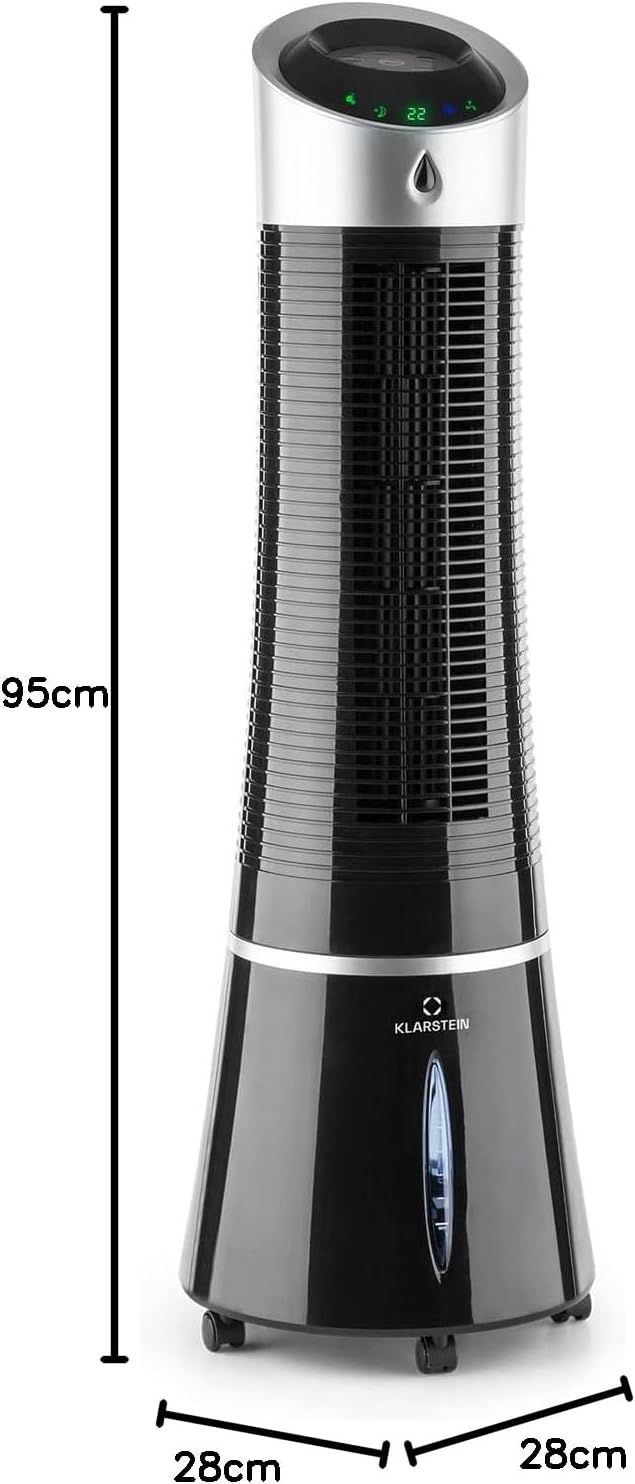
Figure 2.2: Dimensions of the Klarstein Skyscraper Ice Smart air cooler (95cm height, 28cm width/depth).
3. Setup
3.1 Unboxing
- Carefully remove the appliance and all accessories from the packaging.
- Check for any damage during transit. If damaged, do not use the appliance and contact customer support.
- Retain the packaging for future storage or transport.
3.2 Water Tank Filling
The water tank is located at the bottom of the unit. Ensure the appliance is unplugged before filling.
- Pull out the water tank drawer from the bottom rear of the unit.
- Fill the tank with clean, cool water. Do not exceed the 'MAX' fill line.
- For enhanced cooling, proceed to section 3.3 for cold pack preparation.
- Carefully push the water tank drawer back into the unit until it clicks securely into place.
3.3 Cold Pack Preparation
The included cold packs can be used to further cool the water in the tank, providing a colder airflow.
- Place the two cold packs in a freezer for at least 2-3 hours until they are completely frozen.
- Once frozen, place the cold packs directly into the filled water tank before closing the drawer.
- Replace cold packs as needed for continuous enhanced cooling.

Figure 3.1: Illustration of cold packs and ice cubes for enhanced cooling.
4. Operating Instructions
The appliance can be operated via the control panel on top of the unit or using the remote control.
4.1 Control Panel and Remote Control
The control panel features intuitive buttons for various functions. The remote control offers convenient operation from a distance.

Figure 4.1: Top control panel and remote control layout.
- Power Button: Turns the unit On/Off.
- Speed Button: Cycles through fan speeds (Low, Medium, High).
- Mode Button: Selects operating modes (Normal, Natural, Sleep).
- Cool/Humidify Button: Activates/deactivates the air cooling and humidifying function.
- Oscillation Button: Toggles horizontal oscillation.
- Timer Button: Sets the auto-off timer (e.g., 1-12 hours).
- Ioniser Button: Activates/deactivates the ionisation function for air purification.
4.2 Operating Modes
- Fan Mode: Circulates air without cooling or humidifying. Use the Speed button to adjust intensity.
- Air Cooler Mode: Activates the water pump to evaporate water, providing a cooling effect. Ensure the water tank is filled.
- Humidifier Mode: Increases humidity in the air, beneficial in dry environments. This function is integrated with the air cooler mode.
- Ionisation Mode: Releases negative ions to help purify the air by attracting dust and allergens.
4.3 Oscillation
Press the Oscillation button to activate the horizontal swing function, distributing airflow across a wider area. Press again to stop oscillation.
4.4 Timer Function
Press the Timer button repeatedly to set the desired operating time (e.g., 1 hour, 2 hours, up to 12 hours). The unit will automatically turn off after the set time.
4.5 Smart App Control
The Skyscraper Ice Smart model can be controlled via a dedicated mobile application. Download the Klarstein app from your device's app store (Google Play Store or Apple App Store).
- Ensure your mobile device is connected to a 2.4GHz Wi-Fi network.
- Open the Klarstein app and follow the on-screen instructions to add your device.
- Once connected, you can control all functions of the air cooler remotely, including power, speed, mode, oscillation, and timer settings.

Figure 4.2: Controlling the unit via the Klarstein mobile application.
5. Maintenance
Regular cleaning and maintenance will ensure the longevity and optimal performance of your appliance. Always unplug the unit before cleaning.
5.1 Cleaning the Exterior
- Wipe the exterior surfaces with a soft, damp cloth.
- Do not use abrasive cleaners, solvents, or harsh chemicals, as these may damage the surface.
- Ensure no water enters the control panel or other electrical components.
5.2 Cleaning the Water Tank
To prevent mould and mildew growth, clean the water tank regularly, especially if using the humidifying/cooling function frequently.
- Unplug the appliance.
- Pull out the water tank drawer.
- Empty any remaining water from the tank.
- Clean the inside of the tank with a mild detergent and a soft brush or cloth.
- Rinse thoroughly with clean water.
- Allow the tank to air dry completely before reinserting it into the unit.
5.3 Filter Maintenance
The honeycomb filter should be cleaned periodically to maintain airflow and cooling efficiency.
- Unplug the appliance.
- Locate the filter compartment (usually at the rear of the unit).
- Remove the filter.
- Rinse the filter under running water to remove dust and debris. For stubborn dirt, use a soft brush.
- Allow the filter to air dry completely before reinserting it. Do not expose to direct sunlight.
6. Troubleshooting
If you encounter issues with your appliance, please refer to the following table before contacting customer support.
| Problem | Possible Cause | Solution |
|---|---|---|
| Unit does not turn on | No power supply Power button not pressed | Check if the power cord is securely plugged in and the outlet is working. Press the Power button on the unit or remote. |
| No cool air / Weak cooling | Water tank empty Cold packs not frozen/used Filter clogged | Refill the water tank. Freeze and insert cold packs. Clean the honeycomb filter (see Section 5.3). |
| Unit is noisy | Unit not on a flat surface Water level too low/high Internal components loose | Place the unit on a stable, flat surface. Adjust water level to within MIN/MAX marks. If noise persists, contact customer support. |
| Oscillation not working | Oscillation function not activated | Press the Oscillation button. |
| Remote control not working | Batteries depleted Obstruction between remote and unit | Replace batteries in the remote control. Ensure a clear line of sight to the unit's receiver. |
7. Specifications
| Attribute | Value |
|---|---|
| Brand | KLARSTEIN |
| Model Name | Skyscraper Ice Smart |
| Part Number | ACO4-SkyscrprIceSmB |
| Product Dimensions | 28 x 28 x 95 cm |
| Item Weight | 6 kg |
| Colour | Black |
| Voltage | 230 Volts |
| Air Flow Capacity | 210 m³/h (CMPH) |
| Reservoir Capacity | 6 Litres |
| Standby Power Consumption | 30 Watts |
| Special Features | Air Purification Filter, Remote Control, Smart App Control |
| Included Components | 1 x appliance, 1 x remote control, 2 x cold packs |
8. Warranty and Support
Your Klarstein Skyscraper Ice Smart air cooler comes with a standard manufacturer's warranty. Please refer to the warranty card included in your product packaging for specific terms and conditions.
For technical support, spare parts, or warranty claims, please contact Klarstein customer service. Contact details can typically be found on the Klarstein official website or on your purchase receipt.