
1. Introduction
This manual provides essential information for the safe and efficient operation, installation, and maintenance of your Ultimatron LiFePO4 Lithium Battery. Please read this manual thoroughly before using the battery to ensure proper handling and to maximize its lifespan and performance. This battery is designed for various applications including caravans, boats, camping, and solar energy systems.
2. Product Overview
The Ultimatron LiFePO4 Lithium Battery (Model UBL-12-200) is a high-performance, 12.8V 200Ah battery featuring an integrated Smart Battery Management System (BMS) with Bluetooth connectivity. This advanced battery offers significant advantages over traditional lead-acid batteries, including a substantial weight reduction, very high energy density, and stable voltage output even under demanding loads.
Key features include:
- High Cycle Life: Designed for over 3000 cycles at 80% Depth of Discharge (DoD), ensuring long-term reliability.
- Integrated Smart BMS: Protects the battery from overcharge, over-discharge, over-current, and short circuits, while balancing cells for optimal performance.
- Bluetooth Monitoring: Allows real-time monitoring of battery parameters (voltage, temperature, State of Charge (SOC), State of Health (SOH)) via a dedicated smartphone application (compatible with Android and Apple devices).
- Parallel Connection: Multiple batteries can be connected in parallel to increase overall capacity for 12V systems. Note: Series connection for higher voltages (e.g., 24V) is not supported for this model.
- Safe LiFePO4 Technology: Lithium Iron Phosphate (LiFePO4) is recognized as one of the safest lithium battery chemistries available.
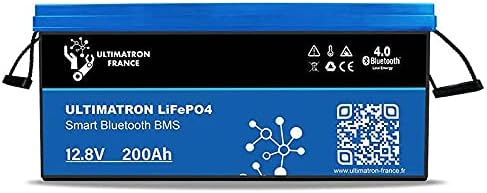
Figure 1: Front view of the Ultimatron LiFePO4 12V 200Ah Lithium Battery, showing the branding, capacity, and Bluetooth BMS label.
3. Safety Instructions
Adhering to these safety guidelines is crucial for preventing injury, damage, and ensuring the longevity of your battery.
- Read the Manual: Always read and understand this manual before installation or operation.
- Qualified Personnel: Installation and maintenance should be performed by qualified personnel familiar with electrical systems and battery safety.
- Personal Protective Equipment (PPE): Wear appropriate PPE, including safety glasses and insulated gloves, when handling the battery.
- Avoid Short Circuits: Do not short-circuit the battery terminals. Use insulated tools.
- Ventilation: Install the battery in a well-ventilated area to prevent heat buildup.
- Temperature: Operate and store the battery within the specified temperature ranges. Avoid extreme heat or cold.
- Water and Moisture: Keep the battery dry and away from water or excessive moisture.
- Charging: Use only chargers compatible with LiFePO4 batteries and the specified voltage/current.
- Disposal: Dispose of the battery according to local regulations. Do not dispose of in household waste.
4. Setup
Proper setup is essential for optimal performance and safety.
4.1 Unpacking and Inspection
Upon receiving the battery, carefully unpack it and inspect for any visible damage. If damage is found, contact your supplier immediately.
4.2 Mounting Location
Choose a clean, dry, and well-ventilated location for installation. Ensure the battery is secured to prevent movement or vibration. Avoid direct sunlight or heat sources.
4.3 Electrical Connections
- Terminal Identification: Identify the positive (+) and negative (-) terminals. The positive terminal is typically red, and the negative is black.
- Cable Sizing: Use appropriately sized cables for your application to minimize voltage drop and prevent overheating.
- Polarity: Ensure correct polarity when connecting to your system (charger, inverter, load). Connecting with reverse polarity will damage the battery and/or connected equipment.
- Tighten Connections: Securely tighten all terminal connections to prevent loose contacts, which can cause arcing and heat buildup.

Figure 2: Angled view of the Ultimatron LiFePO4 battery, highlighting the robust terminals for secure electrical connections.
4.4 Parallel Connection (for increased capacity)
To increase the total capacity of your 12V system, multiple Ultimatron UBL-12-200 batteries can be connected in parallel. When connecting in parallel:
- Ensure all batteries are at a similar State of Charge (SOC) before connecting.
- Connect positive terminals together and negative terminals together.
- Use cables of equal length and gauge for each battery to ensure balanced current distribution.
- Important: This model is designed for 12V systems and does not support series connection for higher voltages.
5. Operating Instructions
5.1 Initial Charging
It is recommended to fully charge the battery before its first use. Use a compatible LiFePO4 charger with appropriate voltage and current settings.
5.2 Battery Management System (BMS)
The integrated BMS is the "brain" of the battery, providing critical protection and monitoring functions. It manages:
- Overcharge Protection: Prevents charging beyond safe voltage limits.
- Over-discharge Protection: Prevents discharging below safe voltage limits, protecting the cells.
- Over-current Protection: Shuts off the battery if current draw exceeds safe limits.
- Short Circuit Protection: Protects against damage from accidental short circuits.
- Temperature Monitoring: Monitors internal battery temperature to prevent operation outside safe ranges.
- Cell Balancing: Ensures all individual cells within the battery pack are balanced, extending overall battery life.
5.3 Bluetooth Monitoring App
The Ultimatron battery can be monitored in real-time via a smartphone application. This app provides detailed insights into the battery's status.
- Download the App: Search for the "Ultimatron" or "Ultimatron BMS" app on the Apple App Store (for iOS) or Google Play Store (for Android).
- Enable Bluetooth: Ensure Bluetooth is enabled on your smartphone or tablet.
- Connect to Battery: Open the app and follow the instructions to scan for and connect to your Ultimatron battery. The battery's unique ID should appear.
- Monitor Data: Once connected, you can view various parameters including:
- Total Voltage (V)
- Individual Cell Voltages (V)
- Current (A) - charge/discharge
- Temperature (°C)
- State of Charge (SOC) (%)
- State of Health (SOH) (%)
- Cycle Count

Figure 3: Top view of the Ultimatron LiFePO4 battery, showing the terminals and a QR code, likely for app download or product information.
6. Maintenance
Regular maintenance helps ensure the longevity and optimal performance of your Ultimatron battery.
- Regular Inspection: Periodically inspect the battery for any physical damage, loose connections, or corrosion on the terminals. Clean terminals if necessary.
- Keep Clean: Keep the battery surface clean and dry. Use a soft, damp cloth for cleaning; avoid harsh chemicals.
- Temperature Control: Ensure the operating environment maintains recommended temperatures. Avoid prolonged exposure to extreme heat or cold.
- Storage: If storing the battery for an extended period, ensure it is charged to approximately 50-70% SOC and stored in a cool, dry place. Recharge every 3-6 months to prevent deep discharge.
7. Troubleshooting
This section addresses common issues you might encounter with your Ultimatron LiFePO4 battery.
| Problem | Possible Cause | Solution |
|---|---|---|
| Battery not charging. | Charger not connected, charger fault, BMS protection activated (over-discharge, over-voltage, temperature). | Check charger connections and functionality. Verify battery voltage with a multimeter. Check app for BMS fault codes or protection status. Allow battery to warm up/cool down if temperature protection is active. |
| Battery not discharging/no power output. | BMS protection activated (over-discharge, over-current, short circuit, temperature), loose connections. | Check app for BMS fault codes. Ensure load is within battery's continuous discharge current limits. Check all cable connections for tightness. Recharge battery if it's in over-discharge protection. |
| Bluetooth app not connecting. | Bluetooth off on device, app not updated, battery too far, multiple devices trying to connect. | Ensure Bluetooth is enabled on your phone/tablet. Restart the app and/or your device. Move closer to the battery. Ensure only one device is attempting to connect at a time. |
| Battery capacity seems lower than expected. | Inaccurate SOC reading, high discharge rate, cold temperature, aging. | Perform a full charge and discharge cycle to recalibrate SOC. Reduce discharge current if possible. Ensure battery operates within optimal temperature range. |
If you encounter issues not listed here or if the suggested solutions do not resolve the problem, please contact Ultimatron customer support.
8. Specifications
| Parameter | Value |
|---|---|
| Model Number | UBL-12-200 |
| Nominal Voltage | 12.8 VDC |
| Nominal Capacity | 200 Ah |
| Energy | 2560 Watt-hours |
| Battery Cell Composition | Lithium Iron Phosphate (LiFePO4) |
| Cycle Life | >3000 cycles at 80% DoD |
| Dimensions (L x W x H) | 52.3 x 23.5 x 22.2 cm (20.6 x 9.3 x 8.7 inches) |
| Item Weight | 24 kg (52.9 lbs) |
| Manufacturer | Ultimatron France |
| Recommended Applications | Electric tools, Bicycle, Scooter, Caravans, Boats, Camping, Solar Energy |
9. Warranty and Support
9.1 Warranty Information
This Ultimatron LiFePO4 battery is protected by a 3-year manufacturer's warranty from the date of product receipt. This warranty covers defects in materials and workmanship under normal use. Please retain your proof of purchase for warranty claims.
9.2 Customer Support
For technical assistance, troubleshooting beyond this manual, or warranty claims, please contact your point of purchase or visit the official Ultimatron website for support contact details. When contacting support, please have your product model number (UBL-12-200) and purchase date readily available.


