
1. Introduction
The GLOBACT Flysky FS-BS6 is a 2.4GHz 6-channel receiver designed for use with various Flysky transmitters in RC car and boat applications. It features AFHDS2A system compatibility, a built-in gyroscope for stability, and a compact, lightweight design. This manual provides essential information for the proper setup, operation, and maintenance of your FS-BS6 receiver.
2. Product Features
- Easy Binding: Designed for quick and stable connection with compatible transmitters.
- Compact Design: Ultra-small size and ultra-light weight for efficient space utilization and reduced overall weight.
- Integrated Gyroscope: Features a built-in gyroscope for automatic recovery from accidental offsets, enhancing model safety when signal is lost (AFHDS2A system).
- Wide Compatibility: Compatible with FlySky FS-GT2E, FS-GT2G, FS-GT2F, FS-IT4S, FS-GT5, FS-i4X, FS-i6, FS-i6X, FS-i6S, FS-TH9A, FS-TM10, FS-i8, FS-i10 transmitters.
- 6 Channels: Provides 6 channels for versatile control of RC vehicles and ships.
3. Specifications
| Item Name | FS-BS6 Receiver |
| Brand Name | Flysky (GLOBACT) |
| Channels | 6 Channels |
| 2.4GHz System | AFHDS2A |
| Model Type | RC Car & Boat |
| Modulation Type | GFSK |
| RF Receiver Sensitivity | -92 dBm |
| Frequency | 2.4 G |
| Power Input | 4.0-8.4 V |
| Weight | 10 g (0.35 oz) |
| Dimensions (L*W*H) | 29 * 22 * 16 mm (1.14 * 0.87 * 0.63 inches) |
| Item Model Number | 002GM |
4. Setup and Binding
Before operating your RC model, the FS-BS6 receiver must be properly bound to your compatible Flysky transmitter. Follow these steps carefully:
4.1 Receiver Overview
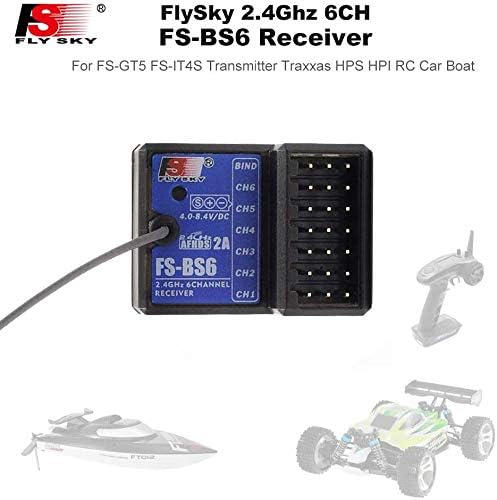
Image 1: Top view of the Flysky FS-BS6 receiver showing the BIND port and channels CH1-CH6. The antenna wire is visible on the left.
The receiver features 6 channels (CH1-CH6) and a dedicated BIND port. The power input range is 4.0-8.4V DC.
4.2 Binding Procedure
- Connect Bind Cable: Insert the provided bind cable into the BIND interface on the FS-BS6 receiver.
- Power On Receiver: Turn on the power to the receiver. The receiver's indicator light will flash quickly, indicating it is in binding mode.
- Activate Transmitter Bind Mode: While the receiver light is flashing, press and hold the BIND button on your compatible Flysky transmitter.
- Power On Transmitter: While still holding the BIND button, turn on the power to your transmitter.
- Verify Connection: The receiver's indicator light should stop flashing and remain steadily on. This indicates a successful binding.
- Test Connection: Turn off both the receiver and transmitter, then power them on normally (transmitter first, then receiver) to confirm the connection and control.
Note: If the binding process is unsuccessful on the first attempt, repeat the steps. Ensure both the receiver and transmitter are fully powered during the binding sequence.

Image 2: Side view of the FS-BS6 receiver, highlighting the antenna wire connection point. Ensure the antenna is positioned correctly for optimal signal reception.
5. Operating Instructions
Once successfully bound, the FS-BS6 receiver will communicate with your transmitter to control your RC model. Ensure all connections are secure before operation.
- Power Sequence: Always turn on your transmitter first, then power on the RC model (receiver). When finished, turn off the RC model (receiver) first, then the transmitter.
- Antenna Placement: Position the receiver antenna away from metal parts and other electronic components to maximize signal range and reliability. Avoid bending or cutting the antenna wire.
- Gyroscope Function: The built-in gyroscope automatically assists in stabilizing the model, particularly useful in situations where the signal might be momentarily interrupted. This feature helps prevent loss of control.
- Channel Connections: Connect your servos, ESC, and other components to the corresponding channels (CH1-CH6) on the receiver as per your RC model's requirements.

Image 3: Detailed view of the FS-BS6 receiver's channel ports (CH1-CH6) and BIND port, ready for component connections.
6. Maintenance
Proper maintenance ensures the longevity and reliable performance of your FS-BS6 receiver.
- Keep Dry: Avoid exposing the receiver to moisture or water. While some RC components are waterproof, this receiver is not explicitly stated as such. If operating in damp conditions, consider additional waterproofing measures.
- Cleanliness: Keep the receiver free from dust, dirt, and debris. Use a soft, dry brush or compressed air for cleaning.
- Physical Protection: Mount the receiver securely within your RC model to protect it from vibrations and impacts.
- Connection Checks: Periodically inspect all wire connections to ensure they are secure and free from damage.
- Temperature: Operate the receiver within reasonable temperature ranges. Avoid extreme heat or cold.
7. Troubleshooting
If you encounter issues with your FS-BS6 receiver, refer to the following common troubleshooting tips:
- Receiver Not Responding:
- Ensure the receiver is powered correctly (4.0-8.4V).
- Verify the receiver is properly bound to your transmitter. Repeat the binding procedure if necessary.
- Check all connections between the receiver, ESC, servos, and battery.
- Confirm the transmitter battery is charged and functioning.
- Intermittent Signal / Loss of Control:
- Check antenna placement. Ensure it is not obstructed by metal or carbon fiber parts.
- Avoid operating in areas with high radio interference.
- Ensure the transmitter and receiver are within effective operating range.
- Binding Failure:
- Ensure the bind cable is fully inserted into the BIND port.
- Confirm the receiver indicator is flashing rapidly before attempting to bind with the transmitter.
- Follow the binding steps precisely, ensuring the transmitter's BIND button is held while powering it on.
8. Warranty Information
No specific warranty information is provided in the product details. Please refer to the seller or manufacturer's website for any applicable warranty terms and conditions.
9. Support
For technical support, troubleshooting assistance beyond this manual, or general inquiries, please contact the product manufacturer, GLOBACT, or your point of purchase. Refer to their official channels for the most up-to-date contact information.