
1. Introduction
The eLinkSmart Smart Fingerprint Padlock offers advanced security with convenient keyless access. This heavy-duty padlock can be unlocked using your registered fingerprint or through a mobile application, providing flexibility and robust protection for your belongings. Its durable, waterproof design makes it suitable for various indoor and outdoor applications.

The eLinkSmart smart padlock, shown alongside a smartphone displaying its control application, highlights the dual unlocking methods: fingerprint and mobile app.
2. Key Features
- Dual Unlocking Methods: Unlock easily via fingerprint recognition or through the dedicated mobile application.
- Remote Authorization: Grant access to others by adding general users via the app or sharing one-time temporary passwords. The app supports up to 20 general users and records unlock events.
- High Security & Durability: Features a 1 cm diameter stainless steel shackle capable of withstanding over 1179.3 kg (2600 lbs) of pulling force, providing superior cut resistance.
- Extended Battery Life: Rechargeable lithium battery offers up to 6 months of standby time or over 2000 unlocks on a single charge. Includes a battery indicator.
- USB Charging: Conveniently recharge the padlock using a standard USB cable or a portable power bank.
- Waterproof Design: Built to withstand various weather conditions, suitable for both indoor and outdoor use.

This image illustrates the robust construction of the eLinkSmart padlock, emphasizing its ability to withstand significant pulling forces (over 11600N or 2600lbs) and its durable 1cm diameter stainless steel shackle, designed for superior cut resistance.
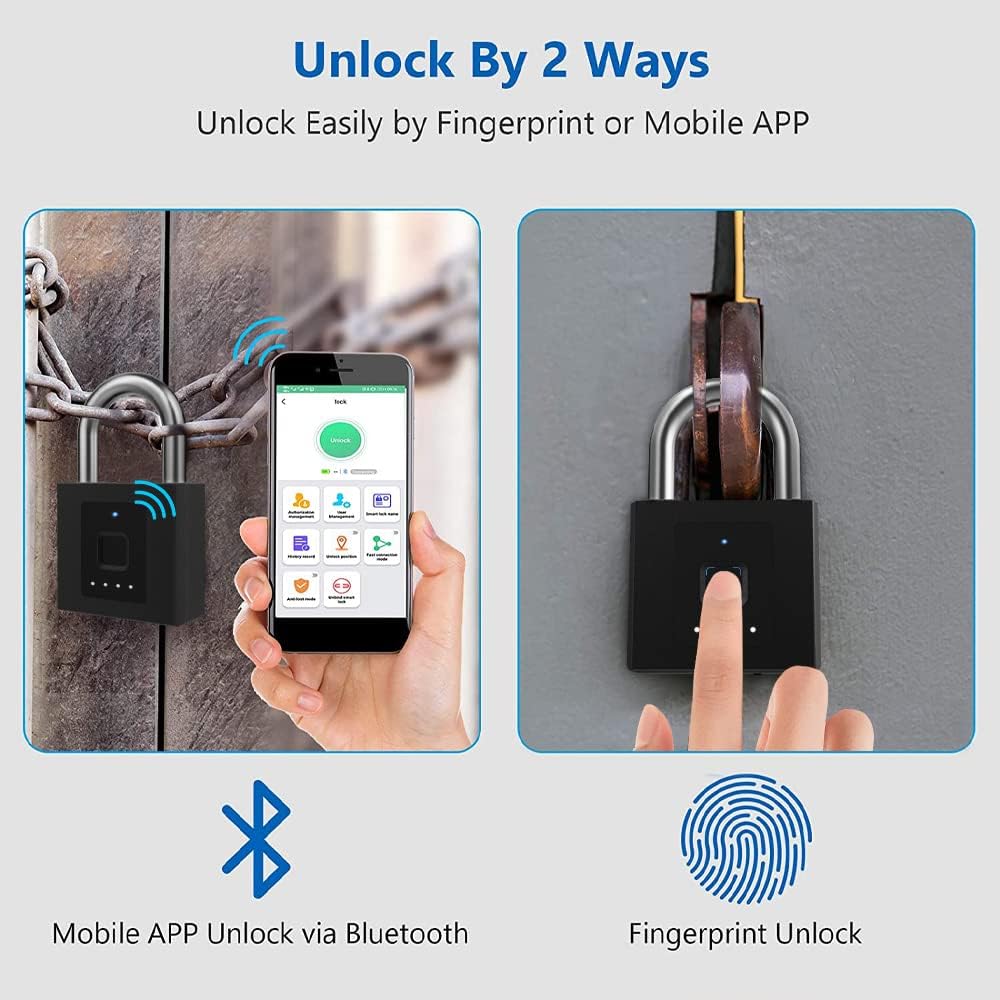
This diagram visually explains the two primary methods of unlocking the eLinkSmart padlock: via the mobile application using Bluetooth connectivity, and directly through fingerprint recognition on the device.

This image highlights the advantages of the fingerprint unlocking feature, including storage for up to 20 fingerprint groups, a rapid 0.2-second unlock speed, and a high 99.9% recognition rate, eliminating the need for traditional keys or complex codes.
3. Setup Guide
3.1 Initial Setup & App Connection
- Download the eLinkSmart application from your device's app store.
- Ensure Bluetooth is enabled on your smartphone.
- Open the eLinkSmart app and follow the on-screen instructions to pair your padlock.
- Important: For the first-time use, it is crucial to connect to the app and pair the lock before registering any fingerprints. If the first fingerprint is registered prior to app setup, the app functionality will not be available. To restore app function, you must perform a factory reset and re-setup via the app.
3.2 Fingerprint Registration
- After successful app pairing, navigate to the fingerprint management section within the app.
- Follow the app's prompts to add new fingerprints. You will typically be asked to place your finger on the sensor multiple times from different angles.
- The padlock supports storage for up to 20 fingerprint groups.
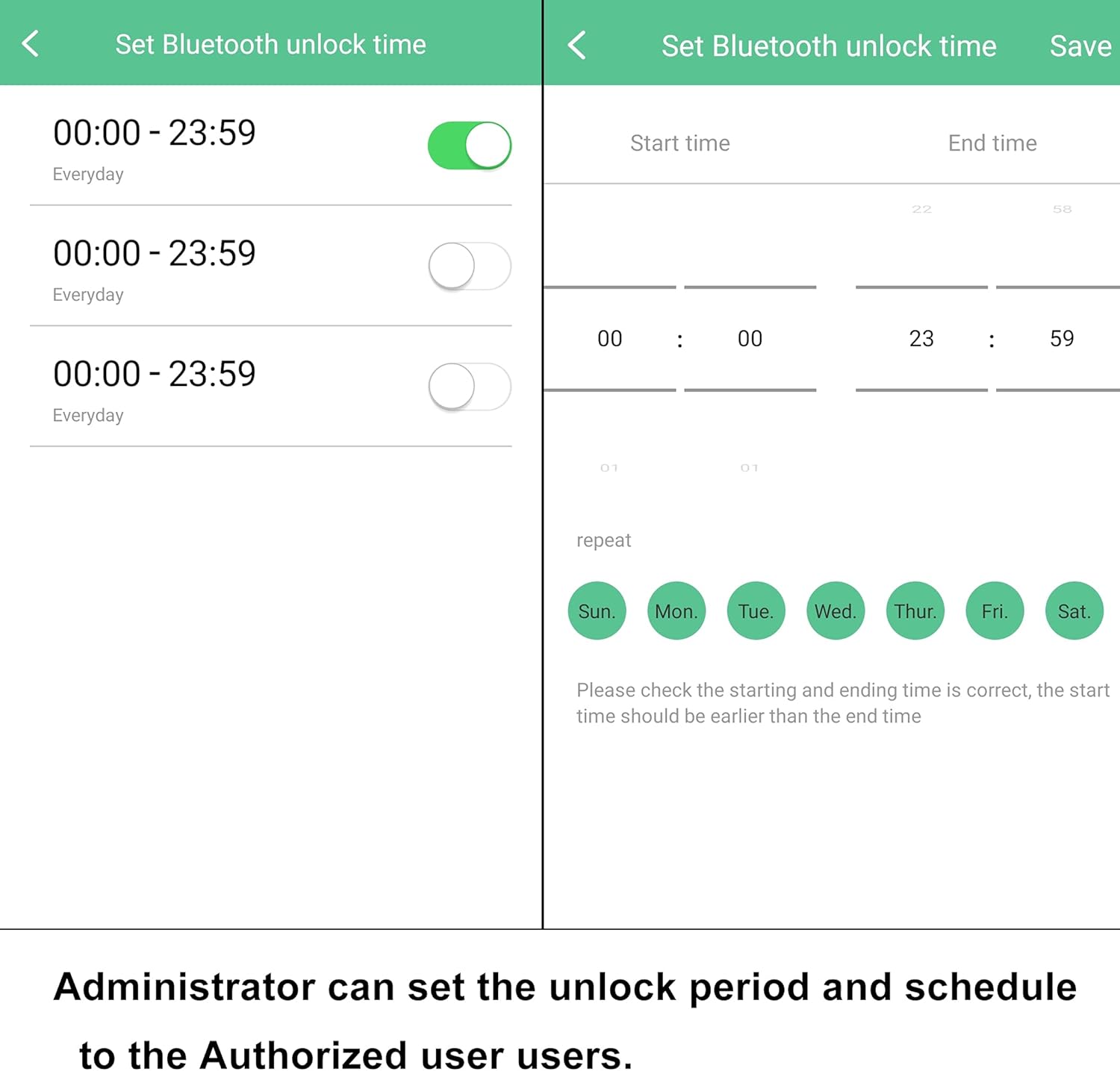
Screenshots from the eLinkSmart mobile application demonstrate features such as setting specific time periods for Bluetooth unlocking and reviewing a detailed log of all unlock events, including user and method.
4. Operating Instructions
4.1 Unlocking with Fingerprint
- Place a registered finger firmly on the fingerprint sensor.
- The padlock will unlock within 0.2 seconds if the fingerprint is recognized.
- A successful unlock will typically be indicated by a light or sound cue.
4.2 Unlocking via Mobile App
- Ensure your smartphone's Bluetooth is active and you are within range of the padlock.
- Open the eLinkSmart application.
- Select the padlock you wish to unlock from the device list.
- Tap the 'Unlock' button within the app. The padlock will unlock.

The padlock is depicted in four common usage scenarios: securing a chain-link fence, locking a bicycle, securing a metal gate, and protecting a wooden door, showcasing its versatility for both indoor and outdoor applications.
5. Maintenance
5.1 Battery Charging
- The padlock features a battery indicator. When the battery is low, the indicator will signal the need for charging.
- Connect the provided USB cable to the padlock's charging port and to a USB power source (e.g., wall adapter, computer, power bank).
- Charging typically takes a few hours. The indicator light will change to show charging status and full charge.
- If the battery is completely depleted, the lock will remain locked. Simply connect a USB power source to activate it for unlocking.
5.2 Care and Storage
- Clean the fingerprint sensor regularly with a soft, dry cloth to ensure optimal performance.
- Avoid exposing the padlock to extreme temperatures or corrosive substances.
- Though waterproof, prolonged submersion is not recommended.
- Store the padlock in a cool, dry place when not in use for extended periods.

The image shows the eLinkSmart padlock being splashed with water, illustrating its waterproof design suitable for outdoor and challenging environments.
6. Troubleshooting
- Padlock not responding: Check the battery level. If low, connect to a USB power source for charging.
- Fingerprint not recognized: Ensure your finger is clean and dry. Try placing your finger on the sensor from different angles. If issues persist, delete and re-register your fingerprint in the app.
- App connection issues: Ensure Bluetooth is enabled on your phone and the padlock is within range. Restart the app or your phone. Check app permissions.
- App function not available after first fingerprint registration: This occurs if a fingerprint was registered before the padlock was paired with the app. To resolve, perform a factory reset on the padlock (refer to manufacturer's instructions for specific reset procedure, usually a long press or specific button combination) and then re-pair it with the app before registering any fingerprints.
- Padlock remains locked when battery is dead: This is a safety feature. Connect the padlock to a USB power source to provide temporary power for unlocking.
7. Product Specifications
| Specification | Detail |
|---|---|
| Manufacturer | Shenzhen Elink Smart Co., Ltd. |
| Model Number | YL-P9BF |
| Product Dimensions (L x W x H) | 9.3 x 2.69 x 13.89 cm |
| Weight | 360 Grams |
| Color | Black |
| Material | Zinc |
| Lock Type | Biometric |
| Special Feature | Passcode Unlock (via app) |
| Included Components | USB Cable |
| Recommended Uses | Outdoor and Heavy-duty Use |

A detailed diagram providing the precise measurements of the eLinkSmart padlock, including its overall dimensions and shackle specifications, crucial for understanding its physical compatibility.
8. Warranty and Support
For warranty information and technical support, please refer to the documentation included with your purchase or contact eLinkSmart customer service directly. Contact details can typically be found on the manufacturer's official website or through the seller's support channels.