
Introduction
Thank you for purchasing the FAMICOZY Digital Alarm Clock. This compact and easy-to-use alarm clock is designed to provide clear time display with adjustable brightness, an ascending alarm, and a convenient snooze function. It is ideal for use in bedrooms, living rooms, or any space where a reliable timekeeping device is needed. Please read this manual carefully to ensure proper operation and to fully utilize all features of your new alarm clock.
Product Features
- Compact Size: Measuring 5.87"x1.77"x2.52", it fits perfectly on nightstands or small spaces.
- Easy to Use: Simple button layout for straightforward time and alarm setting.
- Dual Power Source: Operates on A/C power (adapter included) with 3 AAA batteries (not included) for memory backup during power outages.
- Automatic Dimming: Display automatically dims between 18:00-21:59 and 22:00-06:59 to prevent disturbance during sleep.
- Manual Brightness Adjustment: 6 levels of adjustable brightness (Off, Dim, Low, Medium, High, Full) for personalized viewing.
- Ascending Beep Alarm: Alarm starts quietly and gradually increases in volume over two minutes, reaching approximately 80 decibels.
- Snooze Function: Provides a 5-minute snooze period.
- 12/24 Hour Format: Easily switch between 12-hour and 24-hour time display.
Package Contents
- FAMICOZY Digital Alarm Clock (Model: B09274J2HC)
- Power Adapter with 5ft Cord
- Instruction Manual (This document)
Note: 3 AAA batteries for backup are not included and must be purchased separately.
Product Overview
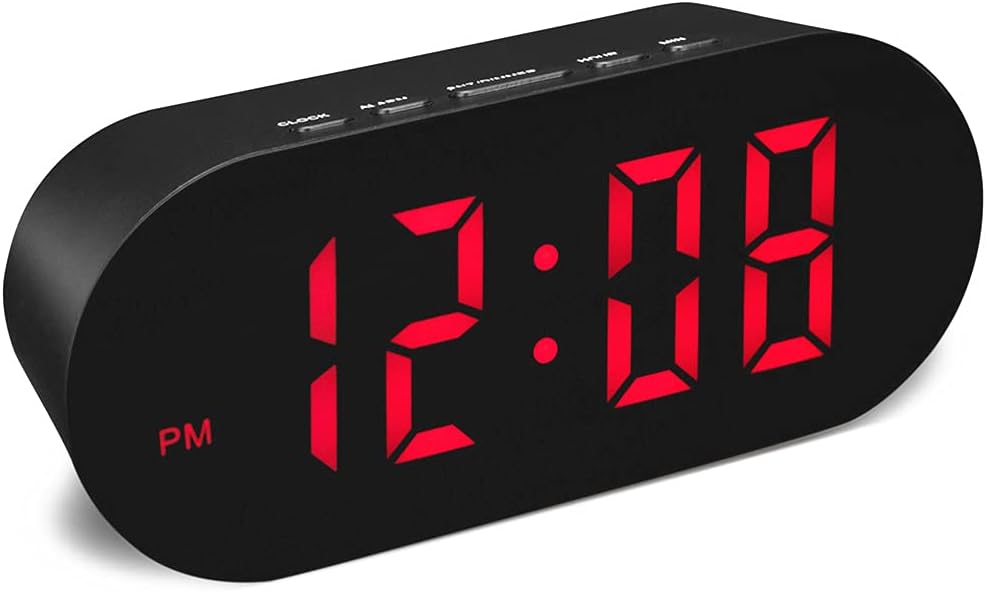
Figure 1: Front view of the FAMICOZY Digital Alarm Clock, displaying the time in red LED digits.

Figure 2: Top view showing the control buttons: CLOCK, ALARM, SNZ/DIMMER, HOUR, and MIN.

Figure 3: Rear view of the alarm clock, showing the battery compartment for backup batteries and the DC power input port.

Figure 4: The alarm clock connected to a power outlet using the included adapter.
Setup
- Connect Power: Insert the DC plug of the included power adapter into the "DC IN" port on the back of the alarm clock. Plug the adapter into a standard wall outlet. The display will light up.
- Install Backup Batteries (Optional but Recommended): Open the battery compartment cover on the back of the clock. Insert 3 new AAA batteries (not included), ensuring correct polarity (+/-). Close the cover. These batteries will preserve your time and alarm settings during a power outage. In battery-only mode, the display will turn off to save power and will only light up for 10 seconds when any button is pressed. The alarm function will still operate.
Operating Instructions
Setting the Time
- Press and hold the CLOCK button for approximately 3 seconds until the hour digits begin to flash.
- Press the HOUR button to adjust the hour. Press and hold for rapid adjustment. Observe the "AM" or "PM" indicator for 12-hour format.
- Press the MIN button to adjust the minute. Press and hold for rapid adjustment.
- Press the CLOCK button again to confirm the time setting and exit time setting mode.
Setting the Alarm
- Press and hold the ALARM button for approximately 3 seconds until the alarm hour digits begin to flash. An alarm icon (bell symbol) will appear on the display.
- Press the HOUR button to adjust the alarm hour.
- Press the MIN button to adjust the alarm minute.
- Press the ALARM button again to confirm the alarm setting. The alarm icon will remain on, indicating the alarm is active.
- To turn the alarm ON/OFF: Briefly press the ALARM button. The alarm icon will appear when the alarm is ON and disappear when it is OFF.
Snooze Function
When the alarm sounds, press the SNZ/DIMMER button to activate the snooze function. The alarm will pause for 5 minutes and then sound again. You can repeat the snooze cycle multiple times.
To stop the alarm completely, press any button other than SNZ/DIMMER (e.g., CLOCK, ALARM, HOUR, MIN).
Brightness Adjustment
The clock features both automatic and manual brightness adjustment.
- Automatic Dimming: The display brightness adjusts automatically based on the time of day:
- Bright: 07:00 - 17:59
- Medium: 18:00 - 21:59
- Dim: 22:00 - 06:59

Figure 5: Illustration of automatic brightness levels throughout the day.
- Manual Brightness Adjustment (6 Levels): To manually adjust the brightness, briefly press the SNZ/DIMMER button repeatedly. This will cycle through 6 brightness levels: Off, Dim, Low, Medium, High, Full. You can override the auto-dim setting with your preferred manual brightness.

Figure 6: Visual representation of the 6 manual brightness levels, from Off to Full.
12/24 Hour Format
While in normal time display mode, briefly press the HOUR button to switch between 12-hour (with AM/PM indicator) and 24-hour formats.
Maintenance
- Clean the clock's surface with a soft, dry cloth. Do not use abrasive cleaners or solvents.
- Avoid exposing the clock to extreme temperatures, direct sunlight, or high humidity.
- If the clock will not be used for an extended period, remove the AAA backup batteries to prevent leakage.
Troubleshooting
| Problem | Possible Cause | Solution |
|---|---|---|
| Display is blank or not lighting up. | No power from AC adapter; AC adapter not properly connected; Power outage; Batteries drained (if in battery mode). | Ensure AC adapter is securely plugged into the clock and a working wall outlet. Check if there's a power outage. Replace AAA backup batteries if using battery mode or if they are old. |
| Alarm does not sound. | Alarm is not activated; Alarm volume is too low (not adjustable, but check if it's sounding at all); Time set incorrectly. | Ensure the alarm icon is displayed on the screen (briefly press ALARM button to toggle). Verify the alarm time is set correctly. |
| Time is inaccurate. | Initial time setting error; Power interruption (if no backup batteries). | Reset the time following the "Setting the Time" instructions. Ensure backup batteries are installed and fresh. |
| Display is too bright/dim. | Automatic dimming is active; Manual brightness needs adjustment. | Briefly press the SNZ/DIMMER button repeatedly to cycle through the 6 manual brightness levels until desired brightness is achieved. |
Specifications
| Brand | FAMICOZY |
| Model | B09274J2HC |
| Color | Black |
| Display Type | Digital LED (Red) |
| Product Dimensions | 5.87"W x 1.77"D x 2.52"H |
| Power Source | Corded Electric (AC Adapter included) |
| Battery Backup | 3 x AAA batteries (not included) |
| Brightness Levels | 6 (Off, Dim, Low, Medium, High, Full) + Auto Dim |
| Alarm Type | Ascending Beep Alarm (up to 80dB) |
| Snooze Duration | 5 minutes |
| Time Format | 12-hour / 24-hour selectable |
| Material | Plastic |
| Item Weight | 4.3 ounces |
Warranty and Support
FAMICOZY products are designed for reliability and performance. For any questions, technical support, or warranty inquiries, please contact FAMICOZY customer service. Please have your product model number (B09274J2HC) and purchase details ready when contacting support.
For the most up-to-date contact information, please refer to the official FAMICOZY website or your purchase platform.