
Mc Haus ARTIC-260
Mc HAUS Artic-260 Portable Air Conditioner User Manual
Model: ARTIC-260
1. Important Safety Information
Please read this manual thoroughly before operating your Mc HAUS Artic-260 portable air conditioner. Retain this manual for future reference.
- Ensure the unit is placed on a stable, level surface.
- Do not block air inlets or outlets.
- Keep a minimum distance of 20 cm from walls and other objects.
- Do not operate the unit with a damaged power cord or plug.
- Unplug the unit before cleaning or maintenance.
- This appliance is not intended for use by persons (including children) with reduced physical, sensory or mental capabilities, or lack of experience and knowledge, unless they have been given supervision or instruction concerning use of the appliance by a person responsible for their safety.
2. Package Contents
Verify that all items are present in the package:
- 1x Portable Air Conditioner Unit
- 1x Remote Control
- 1x Exhaust Hose
- 1x Window Sealing Kit (includes window slider kit and adapters)
- 1x User Manual (this document)

Image: The Mc HAUS Artic-260 portable air conditioner, its remote control, and a smartphone illustrating app connectivity.
3. Setup and Installation
Follow these steps for proper installation of your portable air conditioner:
- Positioning the Unit: Place the air conditioner on a flat, stable surface near a window. Ensure there is at least 20 cm of clear space around the unit for proper airflow.

Image: The portable air conditioner positioned in a living room, demonstrating suitable placement.
- Attaching the Exhaust Hose: Connect the exhaust hose to the designated outlet on the back of the unit. Extend the hose and attach the window kit adapter to the other end.

Image: A visual representation of the exhaust hose and window sealing kit components, designed for easy installation in vertical and horizontal sliding windows.
- Installing the Window Sealing Kit: Adjust the window slider kit to fit your window opening. Secure the exhaust hose adapter into the opening of the window kit. Ensure the window is sealed as much as possible to prevent outside air from entering.
- Power Connection: Plug the power cord into a grounded electrical outlet.
4. Operating Instructions
The Mc HAUS Artic-260 offers 4-in-1 functionality: Cooling, Heating, Fan, and Dehumidifier. It can be controlled via the unit's control panel, remote control, or a smartphone app.
Control Panel and Remote Control

Image: The intuitive LED control panel on the unit and the remote control, showing various function buttons.
- Power Button: Press to turn the unit ON or OFF.
- Mode Button: Cycle through Cooling, Heating, Fan, and Dehumidifier modes.
- Temperature Adjustment Buttons (Up/Down Arrows): Adjust the desired temperature in Cooling or Heating mode.
- Fan Speed Button: Select between Low, Medium, and High fan speeds.
- Timer Button: Set a 24-hour timer for automatic ON/OFF operation.
- Swing Button: Activate or deactivate the automatic oscillation of the air louvers.
- Sleep Mode: Reduces fan speed and noise for quiet operation during sleep.

Image: Using the remote control to operate the portable air conditioner from a distance.
Smart App Control (WiFi)
The unit is compatible with Alexa, Google Home, and TUYA Smart app for convenient control from your mobile device.
- Download the App: Download the TUYA Smart app from Google Play Store or Apple App Store.
- Connect to WiFi: Follow the in-app instructions to connect your Mc HAUS Artic-260 to your home WiFi network.
- Pair with Voice Assistants: Integrate with Alexa or Google Home for voice control.

Image: Examples of the smartphone app interface for remote control, showing easy connection and sharing features, compatible with Alexa and Google Home.
Recommended Usage Area

Image: A diagram illustrating the optimal air distribution and recommended room sizes (13m²-18m²) for effective cooling/heating.
5. Maintenance
Regular maintenance ensures optimal performance and extends the lifespan of your unit.
- Filter Cleaning: The unit is equipped with a pre-filter. Clean the air filter every two weeks or more frequently if used in a dusty environment.
- Unplug the unit.
- Remove the filter from the back of the unit.
- Wash the filter with warm, soapy water. Rinse thoroughly and allow it to air dry completely before reinserting.
- Water Drainage: In Dehumidifier mode or high humidity conditions, the internal water tank may fill up. The unit will stop operating when the tank is full. Drain the water regularly from the drainage port located at the bottom rear of the unit.
- Unit Cleaning: Wipe the exterior of the unit with a soft, damp cloth. Do not use harsh chemicals or abrasive cleaners.
- Storage: If storing the unit for an extended period, drain all water, clean the filter, and cover the unit to protect it from dust.
6. Troubleshooting
Before contacting customer support, please refer to the following common issues and solutions:
| Problem | Possible Cause | Solution |
|---|---|---|
| Unit does not turn on. | No power, power cord unplugged, full water tank. | Check power connection, ensure outlet is working, drain water tank. |
| Unit is not cooling/heating effectively. | Dirty air filter, blocked air vents, room too large, window not sealed properly, door/window open. | Clean air filter, clear obstructions, ensure room size is within recommended range (13-18 m²), seal window kit, close doors/windows. |
| Unit is noisy. | Unit not on a level surface, fan speed too high, internal component issue. | Place on a level surface, reduce fan speed, if noise persists, contact support. (Note: Operating noise level is 65 dB). |
| Remote control not working. | Dead batteries, obstruction between remote and unit. | Replace batteries, remove obstructions, ensure remote is pointed at the unit's receiver. |
| WiFi connection issues. | Incorrect WiFi password, unit too far from router, router issues. | Verify WiFi password, move unit closer to router, restart router, re-attempt app pairing. |
7. Technical Specifications
| Feature | Specification |
|---|---|
| Model Number | ARTIC-260 |
| Cooling Capacity | 9000 BTU |
| Heating Capacity | 9000 BTU (implied by "Frío + Calor 9000BTU") |
| Functions | Cooling, Heating, Fan, Dehumidifier |
| Dehumidification Capacity | 1 L/h |
| Airflow Volume | 350 m³/h |
| Power Supply | 240 Volts |
| Noise Level | 65 dB |
| Energy Efficiency Class | A |
| Refrigerant | R-290 |
| Recommended Room Size | 13 - 18 m² |
| Dimensions (W x D x H) | 32 x 34.8 x 68 cm |
| Weight | 21 kg |

Image: Detailed dimensions of the Mc HAUS Artic-260 unit.
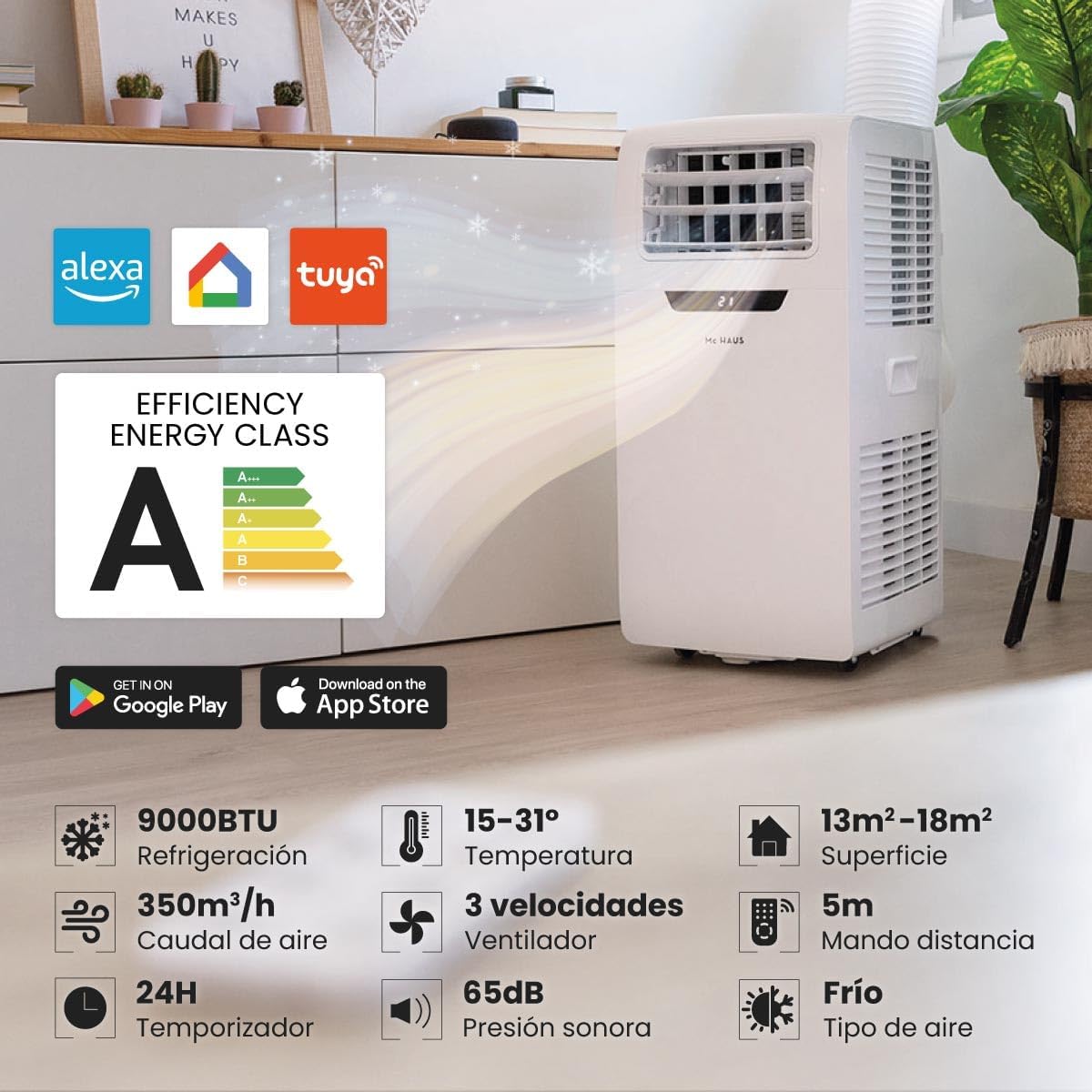
Image: Overview of key technical specifications and features of the Mc HAUS Artic-260.
8. Warranty and Support
For warranty information and customer support, please refer to the official Mc Haus website or contact their customer service directly. Keep your purchase receipt as proof of purchase.
Visit the Mc Haus Brand Store for more information.
Related documentsARTIC-260

Ask a question about this manual
Ask about setup, troubleshooting, compatibility, parts, safety, or missing instructions. Manuals+ will review the question and use this page’s manual context to help answer it.