
1. Introduction
Thank you for choosing the Mc Haus ARTIC-160 Portable Air Conditioner. This manual provides essential information for the safe and efficient operation of your new appliance. Please read it thoroughly before use and retain it for future reference.
The ARTIC-160 is designed to provide cooling, dehumidification, and fan functions for rooms up to 14 square meters, offering a comfortable indoor environment.
2. Important Safety Instructions
Always follow basic safety precautions when using electrical appliances to reduce the risk of fire, electric shock, and injury.
- Read all instructions before using the appliance.
- Ensure the power supply matches the voltage specified on the rating label.
- Do not operate the unit with a damaged cord or plug.
- Keep the appliance away from heat sources and direct sunlight.
- Do not block air inlets or outlets.
- Always place the unit on a flat, stable surface.
- Unplug the unit before cleaning or servicing.
- This appliance is not intended for use by persons (including children) with reduced physical, sensory or mental capabilities, or lack of experience and knowledge, unless they have been given supervision or instruction concerning use of the appliance by a person responsible for their safety.
3. Package Contents
Verify that all components are present and undamaged upon unpacking:
- Mc Haus ARTIC-160 Portable Air Conditioner Unit
- Remote Control
- Exhaust Hose
- Window Sealing Kit (adjustable panels, adapter)
- User Manual

Image 3.1: Main unit, remote control, and smartphone app representation.
4. Setup Instructions
4.1 Placement
Place the air conditioner on a flat, stable surface in the room you wish to cool. Ensure there is at least 30 cm of space around the unit for proper airflow. The recommended room size for optimal performance is 10-14 square meters.

Image 4.1: Recommended room size diagram.
4.2 Exhaust Hose Installation
- Attach one end of the exhaust hose to the air outlet on the back of the unit.
- Connect the other end of the exhaust hose to the window kit adapter.
- Install the adjustable window sealing panels into your window opening (suitable for vertical and horizontal sliding windows).
- Secure the window kit adapter into the opening of the window sealing panels.
- Ensure the exhaust hose is as straight and short as possible to maximize efficiency. Avoid sharp bends.
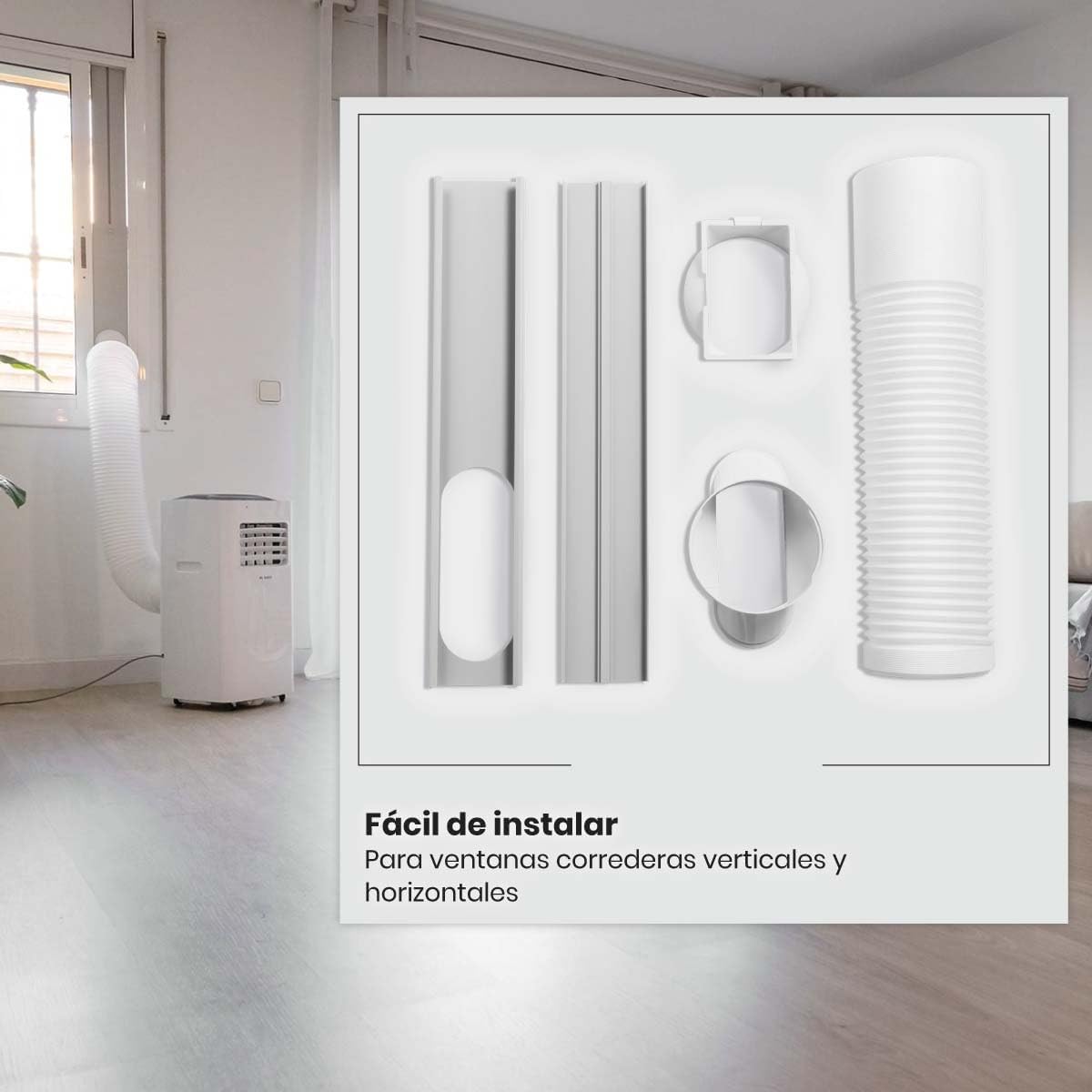
Image 4.2: Window installation kit components.

Image 4.3: Exhaust hose connection to the unit.
5. Operating Instructions
5.1 Control Panel
The control panel is located on the top of the unit. It features a digital display and various buttons for function selection.

Image 5.1: Unit control panel.

Image 5.2: Top view of the unit with control panel.
5.2 Remote Control
The included remote control allows convenient operation from a distance. Ensure batteries are correctly inserted.
5.3 Operating Modes
- Cool Mode: Provides cooling. Adjust temperature between 15°C and 31°C.
- Fan Mode: Circulates air without cooling. Select from 3 fan speeds (Low, Medium, High).
- Dry Mode (Dehumidifier): Reduces humidity in the room.
- Auto Mode: Automatically selects cooling or fan based on room temperature.
- Sleep Mode: Adjusts temperature and fan speed for comfortable sleep and energy saving.
5.4 Timer Function
The 24-hour timer allows you to set the unit to turn on or off automatically after a specified period.
5.5 Wi-Fi and Smart Control
The ARTIC-160 can be controlled via a smartphone application, compatible with Alexa and Tuya platforms. Download the app from Google Play or the App Store for remote control and advanced features.

Image 5.3: Smartphone application interface for smart control.
6. Maintenance
Regular maintenance ensures optimal performance and longevity of your air conditioner.
6.1 Cleaning the Air Filter
The air filter should be cleaned every two weeks or more frequently depending on usage. A dirty filter can reduce efficiency and airflow.
- Unplug the unit from the power outlet.
- Locate and remove the air filter (usually on the back or side of the unit).
- Wash the filter with warm, soapy water. Rinse thoroughly.
- Allow the filter to air dry completely before reinserting it into the unit.
6.2 Draining Water
The unit collects condensate water during operation. Depending on humidity levels, you may need to drain the water periodically. Refer to the unit's drainage port and follow instructions for continuous drainage or manual draining.
6.3 Cleaning the Unit Exterior
Wipe the exterior of the unit with a soft, damp cloth. Do not use harsh chemicals or abrasive cleaners.
7. Troubleshooting
Before contacting customer support, refer to the following common issues and solutions:
| Problem | Possible Cause | Solution |
|---|---|---|
| Unit does not turn on | No power; Power cord not plugged in; Fuse blown/Circuit breaker tripped | Check power outlet; Plug in power cord securely; Reset circuit breaker/Replace fuse |
| Unit does not cool effectively | Dirty air filter; Room too large; Doors/windows open; Exhaust hose blocked/leaking | Clean air filter; Ensure room size is within recommended range; Close doors/windows; Check exhaust hose for blockages or leaks |
| Excessive noise | Unit not on a level surface; Obstruction in fan; Loose parts | Place unit on a flat surface; Check for and remove any obstructions; Contact customer support if noise persists |
| Water leakage | Drain plug not properly sealed; Drainage hose blocked | Ensure drain plug is secure; Clear any blockages in the drainage hose |
8. Technical Specifications
| Feature | Specification |
|---|---|
| Model | ARTIC-160 |
| Brand | Mc Haus |
| Power | 2050 Watts |
| Cooling Capacity | 1.765 frigories (7000 BTU) |
| Voltage | 240 Volts |
| Dimensions (L x W x H) | 30 x 30 x 70 cm |
| Weight | 20 Kilograms |
| Noise Level | 65 dB |
| Energy Efficiency | High (Class A) |
| Recommended Room Area | 10-14 m² |
| Airflow | 350 m³/h |
| Temperature Range | 15-31°C |
| Special Features | Dehumidifier, Air purification filter |
| Installation Type | External outlet |

Image 8.1: Key features and specifications.

Image 8.2: Unit dimensions.
9. Warranty Information
This product comes with a standard manufacturer's warranty. Please refer to the warranty card included in your package for specific terms, conditions, and duration. Keep your proof of purchase for warranty claims.
10. Customer Support
If you encounter any issues not covered in the troubleshooting section or require further assistance, please contact Mc Haus customer support. Contact details can typically be found on the manufacturer's website or on the product packaging.
