
EARISE/Yalan Shi G-10
EARISE/Yalan Shi G-10 Wireless Bluetooth Speaker & Alarm Clock User Manual
Model: G-10
Brand: EARISE/Yalan Shi
1. Introduction
Thank you for purchasing the EARISE/Yalan Shi G-10 Wireless Bluetooth Speaker and Alarm Clock. This device combines a high-quality audio experience with practical alarm clock functionalities, designed for both indoor and outdoor use. Please read this manual carefully before using the product to ensure proper operation and to maximize its lifespan.

The G-10 speaker serving as an alarm clock on a bedside table, illustrating its compact design and clear digital display.
2. Key Features
- Wireless Bluetooth Connectivity: Seamlessly connect to your mobile devices for audio streaming.
- Super Bass Audio: Enhanced bass for a rich and immersive sound experience.
- Multi-functional Alarm Clock: Features a double alarm clock setting for flexible scheduling.
- Digital Display: Clear LED display shows time, temperature, and mode indicators (BT, TF, FM).
- Temperature Display: Real-time ambient temperature display.
- Multiple Playback Modes: Supports Bluetooth, TF card, and FM radio playback.
- Mobile Phone Support: Integrated features for mobile phone broadcast and call handling.
- Portable Design: Suitable for both indoor and outdoor environments.
- Stereoscopic Sound Effect: Delivers a wide soundstage.
- Third Gear Adjustment: Allows for sound customization.

Visual representation of the G-10's key features, including temperature display, mobile phone support, and dual alarm functionality.
3. Package Contents
Please check the package for the following items:
- EARISE/Yalan Shi G-10 Wireless Bluetooth Speaker & Alarm Clock
- USB Charging Cable
- User Manual
4. Product Overview
Familiarize yourself with the various parts and controls of your G-10 speaker.
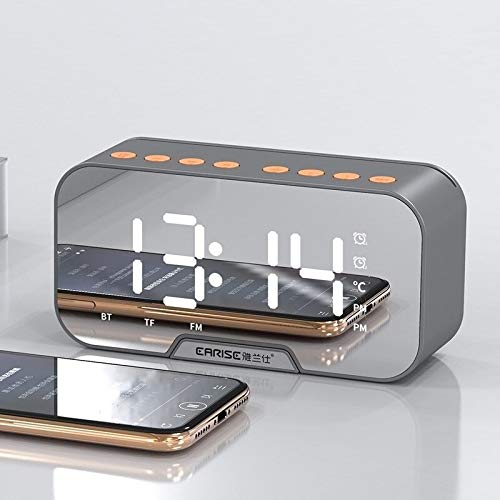
The front display and top control buttons of the G-10 speaker, indicating current time, temperature, and active mode.
Control Buttons (Top Panel):
- Power Button: Press and hold to power on/off. Short press to switch modes.
- Play/Pause Button: Play or pause audio. Answer/end calls.
- Volume Up/Next Track: Short press for volume up, long press for next track.
- Volume Down/Previous Track: Short press for volume down, long press for previous track.
- Alarm Set Button: Enter alarm setting mode.
- Time Set Button: Enter time setting mode.
Ports (Side/Rear Panel):
- USB Port: For charging and USB drive playback.
- TF Card Slot: For TF (MicroSD) card playback.
- Charging Port: Connect the USB charging cable here.

An internal view of the G-10 speaker, highlighting its dual speaker configuration for enhanced sound.
5. Setup
5.1 Charging the Device
Before first use, fully charge the G-10 speaker. Connect the provided USB charging cable to the charging port on the speaker and the other end to a USB power adapter (not included) or a computer's USB port. The charging indicator will illuminate during charging and turn off when fully charged.
5.2 Powering On/Off
Press and hold the Power Button on the top panel for approximately 3 seconds to power the device on or off.
6. Operating Instructions
6.1 Bluetooth Pairing
- Power on the G-10 speaker. It will automatically enter Bluetooth pairing mode, indicated by a flashing "BT" icon on the display.
- Enable Bluetooth on your mobile device (smartphone, tablet, etc.).
- Search for "G-10" in the list of available Bluetooth devices and select it to pair.
- Once successfully paired, you will hear a confirmation sound, and the "BT" icon will stop flashing.
- You can now play audio from your device through the G-10 speaker.
6.2 Setting the Time
- Short press the Time Set Button. The hour digits will start flashing.
- Use the Volume Up/Next Track and Volume Down/Previous Track buttons to adjust the hour.
- Press the Time Set Button again to move to the minute digits. Adjust minutes using the volume buttons.
- Press the Time Set Button one more time to confirm and exit time setting mode.
6.3 Setting the Alarm Clock
The G-10 supports setting two independent alarms.
- Short press the Alarm Set Button. "AL1" will appear, and the hour digits for Alarm 1 will flash.
- Use the Volume Up/Next Track and Volume Down/Previous Track buttons to adjust the hour for Alarm 1.
- Press the Alarm Set Button again to move to the minute digits for Alarm 1. Adjust minutes using the volume buttons.
- Press the Alarm Set Button a third time to set the alarm sound (e.g., FM radio, built-in tone). Use volume buttons to select.
- Press the Alarm Set Button a fourth time to confirm Alarm 1 settings.
- To set Alarm 2, repeat steps 1-5. After setting Alarm 1, pressing the Alarm Set Button will cycle to "AL2".
- To enable/disable an alarm, short press the Alarm Set Button until the desired alarm (AL1 or AL2) is displayed, then short press the Play/Pause Button to toggle it on/off. An alarm icon will appear/disappear on the display.
6.4 FM Radio Operation
- Short press the Power Button to cycle through modes until "FM" is displayed.
- Long press the Play/Pause Button to automatically scan and save available FM stations.
- Short press the Volume Up/Next Track or Volume Down/Previous Track buttons to switch between saved stations.
6.5 TF Card / USB Playback
- Insert a TF card (MicroSD) into the TF card slot or a USB drive into the USB port.
- The speaker will automatically switch to TF or USB mode and begin playing audio files. If not, short press the Power Button to cycle modes.
- Use the Play/Pause Button to play/pause.
- Use the Volume Up/Next Track and Volume Down/Previous Track buttons to navigate tracks.
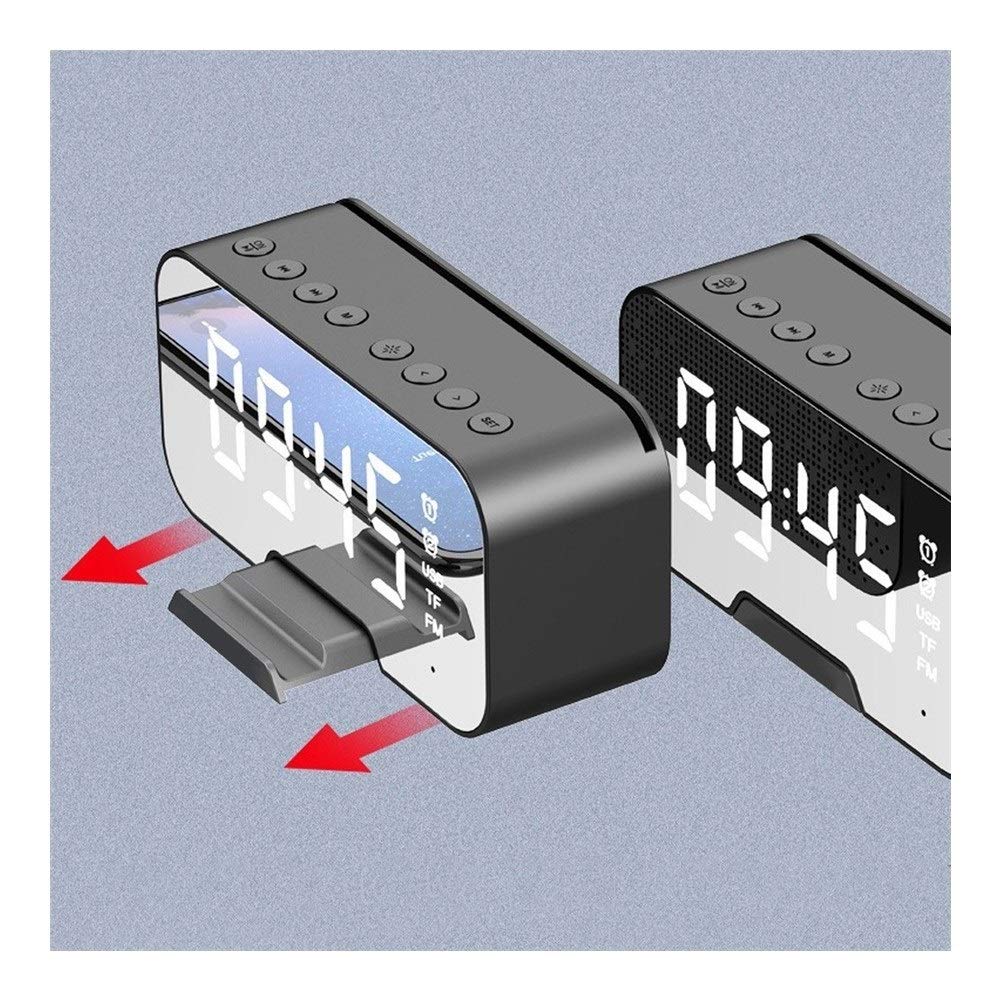
The G-10 speaker demonstrating its mobile phone support feature, allowing for direct connection or placement.
6.6 Call Handling (Bluetooth Mode)
- Answer Call: When a call comes in, short press the Play/Pause Button.
- End Call: During a call, short press the Play/Pause Button.
- Reject Call: When a call comes in, long press the Play/Pause Button.
- Redial Last Number: In Bluetooth mode, double-press the Play/Pause Button.
7. Maintenance
- Cleaning: Use a soft, dry cloth to clean the surface of the speaker. Do not use abrasive cleaners or solvents.
- Storage: Store the device in a cool, dry place away from direct sunlight and extreme temperatures.
- Battery Care: To prolong battery life, charge the device regularly, even if not in frequent use. Avoid fully discharging the battery for extended periods.
- Water Resistance: This device is not waterproof. Avoid exposure to water or high humidity.
8. Troubleshooting
| Problem | Possible Cause | Solution |
|---|---|---|
| Device does not power on. | Low battery. | Charge the device fully. |
| No sound. | Volume too low; device not paired; incorrect mode. | Increase volume; ensure Bluetooth is paired; switch to correct mode (BT, TF, FM). |
| Bluetooth pairing fails. | Device too far; interference; speaker not in pairing mode. | Ensure devices are within 10m; restart both devices; ensure speaker is in BT pairing mode. |
| FM radio signal is poor. | Weak signal area; interference. | Relocate the speaker; extend the antenna (if applicable, or use charging cable as antenna). |
9. Specifications
| Feature | Detail |
|---|---|
| Model | G-10 (Weituoae) |
| Connectivity | Bluetooth, TF Card, USB, FM Radio |
| Power Source | Battery Powered |
| Indoor/Outdoor Usage | Indoor, Outdoor |
| Item Weight | 1500 Grams (1.5 kg) |
| Mounting Type | Tabletop |
| Alarm Clock | Yes (Double Alarm) |
| Special Features | Temperature Display, Mobile Phone Support, Stereoscopic Sound |
| Country of Origin | China |

Dimensions of the G-10 speaker: 139mm (length) x 68mm (height) x 45mm (depth).
10. Warranty and Support
This product comes with a standard manufacturer's warranty. For details regarding warranty coverage, please refer to the warranty card included in your package or contact your point of purchase.
For technical support, troubleshooting assistance, or inquiries about replacement parts, please contact the seller or manufacturer directly. Contact information can typically be found on the product packaging or the seller's website.
Please retain your purchase receipt as proof of purchase for warranty claims.