
1. Introduction
The BLAZEVIDEO 32MP 1296P Game & Trail Camera (Model A262) is a camouflage digital camera designed for outdoor surveillance, wildlife tracking, hunting, and plant observation. It is triggered by sudden changes in ambient temperature caused by the movement of humans or animals within its detection range. Equipped with a highly sensitive Passive Infra-Red (PIR) sensor, the camera automatically captures high-resolution pictures (up to 32MP) or records HD video clips (2304x1296P).

Figure 1: BLAZEVIDEO 32MP 1296P Game & Trail Camera (Model A262).
2. Main Features
- High-Resolution Imaging: Captures up to 32MP still photos and 2304x1296P HD video clips.
- Advanced Sensor: Equipped with a Sony Starlight sensor, premium F1.6 great aperture lens, and exclusive imaging optimization algorithm for clear photos and videos in low light or dark environments.
- PIR Sensor: High-sensitive Passive Infra-Red (PIR) sensor with up to 60° detection angle and 90ft night vision range.
- Night Vision: Clear night vision with 36pcs high-performance infrared no-glow 940nm LEDs, invisible to humans and animals.
- Durable & Waterproof: Camouflage design for outdoor use, operating temperature between -4°F to +140°F (-20°C to +60°C), and IP66 waterproof rating.
- Long Battery Life: Up to 8 months in standby mode with 8*AA batteries.
- Multiple Working Modes: Photo, Video, Photo+Video, Motion Detection, Time Lapse, and Hybrid.
- User-Friendly Interface: Easy to program with well-designed operation buttons and a built-in 2.4-inch LCD color screen for reviewing pictures and videos.
- Security Features: Password protection and Serial Number function to code locations in photos.

Figure 2: Key features of the BLAZEVIDEO Trail Camera.
3. Package Contents
- 1 x BLAZEVIDEO 32MP 1296P Game & Trail Camera (Model A262)
- 1 x Mounting Strap
- 1 x USB Cable
- 1 x DC Adapter
4. Parts and Controls
Familiarize yourself with the camera's components:

Figure 3: Internal and external components of the BLAZEVIDEO Trail Camera.
- LCD Screen: 2.4-inch color screen for menu navigation and viewing media.
- Keypad: Buttons for menu, OK, navigation (up/down/left/right), and start/shot.
- SD Card Slot: For inserting your memory card.
- Mini USB Port: For connecting to a PC to download files.
- DC Port: For external power supply (12V/1A).
- Tripod Screw Mat: Standard UNC 1/4-20 thread for mounting.
- Battery Slot: Holds 8*AA batteries.
5. Setup
5.1 Battery Installation
The camera requires eight (8) 1.5V AA alkaline or lithium batteries for optimal performance and battery life (up to 8 months in standby mode). Open the camera casing and insert the batteries into the battery slot, ensuring correct polarity. Remove batteries when the camera is not in use for extended periods.
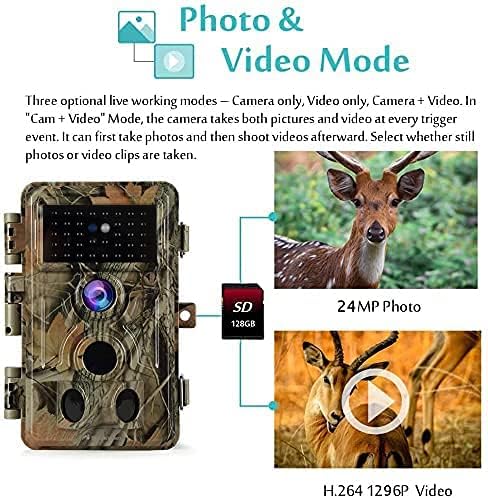
Figure 4: SD card and batteries are not included with the camera.
5.2 SD Card Installation
Insert a standard-size SDHC/SDXC memory card (maximum capacity 512GB, Class 10 recommended) into the SD card slot. Ensure the camera's power switch is in the OFF position before inserting or removing the SD card. It is recommended to format the SD card in the camera's menu settings before first use.
5.3 Mounting
Use the provided mounting strap to secure the camera to a tree or post. The strap can be adjusted to fit various sizes. Alternatively, use the 1/4-20 tripod screw mat at the bottom of the camera to mount it on a tripod or other compatible mounting accessories.
6. Operating Modes
- Motion Detection Mode: The camera takes photos or videos when triggered by the PIR sensor.
- Time Lapse Mode: The camera automatically and constantly takes pictures/videos at specified intervals. This is useful for observing slow processes or monitoring unattended properties.
- Hybrid Mode: Combines Motion Detection and Time Lapse functionalities.

Figure 5: Photo & Video Mode options.
7. Settings Configuration
Access the menu using the keypad to customize camera settings:
- Photo/Video Mode: Select between Photo, Video, or Photo+Video.
- Photo Quality: Choose resolution (32MP, 24MP, 16MP, 8MP, 4MP). Higher resolution produces better quality but creates larger files.
- Video Quality: Select resolution (1296P, 1080P, 720P).
- Video Length: Set video recording duration.
- Video Sound: Enable or disable audio recording with videos.
- Video Format: Choose between MP4 or MOV.
- Detection Delay: Set the time interval between subsequent triggers from the PIR sensor.
- PIR Sensitivity: Adjust sensitivity (High/Medium/Low) based on ambient temperature and desired detection range.
- Side Motion Sensors: Enable or disable side PIR sensors.
- Time Lapse Interval: Set the interval for time lapse photos/videos.
- Date & Time: Set current date and time.
- Temperature Unit: Select Celsius (°C) or Fahrenheit (°F).
- Loop Recording: Enable to overwrite oldest files when SD card is full.
- Password: Set a password to protect camera access.
- Serial Number: Enable to code locations in photos for multi-camera users.
8. Viewing Photos and Videos
You can review captured media directly on the camera or transfer it to a computer:
- On Camera: Use the 2.4-inch LCD screen and keypad to view and playback photos/videos.
- Via PC: Connect the camera to your computer using the provided USB cable to download files from the SD card.
- Via SD Card Reader: Remove the SD card and insert it into a card reader connected to a computer for faster browsing and playback.
Sample Videos
Video 1: Night Vision footage captured by the BLAZEVIDEO Trail Camera, demonstrating its performance in low-light conditions.
Video 2: Wide View Angle footage from the BLAZEVIDEO Trail Camera, showcasing its broad field of view.
Video 3: Deer captured in a video by the BLAZEVIDEO Trail Camera, demonstrating motion activation.
Video 4: Clear video footage from the BLAZEVIDEO Game Camera, highlighting image clarity.
Video 5: Daytime footage from the BLAZEVIDEO Trail Camera, showing performance in daylight.
9. Maintenance
To ensure optimal performance and longevity of your camera:
- Regularly check battery levels and replace them as needed.
- Ensure the SD card has sufficient available space. Format the SD card periodically.
- Keep the camera lenses and PIR sensors clean. Use a soft, dry cloth to gently wipe away dirt or debris. Do not use abrasive materials.
- Avoid installing the camera behind glass windows as this can interfere with motion detection.
- When not in use for extended periods, remove batteries to prevent leakage.
10. Troubleshooting
If you encounter issues with your camera, consider the following:
- Camera not turning on: Check if batteries are inserted correctly with proper polarity and have sufficient power. Ensure the power switch is in the ON position.
- SD card issues: Verify the SD card is correctly inserted and has available space. Format the SD card if it's not recognized or causing errors.
- Poor night vision: Ensure the IR LEDs are not obstructed. The dark background of night images is usually caused by strong reflections from obstacles close to the camera. Adjust camera position to avoid close-up obstacles.
- Motion detection issues: Check PIR sensitivity settings. Avoid placing the camera behind glass or near heat sources/windy bushes.
11. Specifications
| Feature | Specification |
|---|---|
| Max. Still Resolution | 32 MP |
| Video Resolution | 2304 x 1296P (1296p) |
| IR Flash Range | 90 Feet |
| PIR Sensing Distance | 90 Feet |
| Viewing Angle | 120 Degrees |
| Max Shutter Speed | 0.1 Seconds |
| Stand-by Time | Up to 8 months |
| Waterproof Rating | IP66 |
| Operation Temperature | -4°F to +140°F (-20°C to +60°C) |
| Dimensions (L x W x H) | 5 x 3 x 2 inches |
| Item Weight | 1 Pounds |
12. Warranty & Support
12.1 Warranty
Your BLAZEVIDEO Trail Camera is covered by a One-Year Limited Warranty from the original purchase date. This warranty covers defects in materials and workmanship under normal use. It does not cover consumer-caused damages such as misuse, abuse, improper handling, or damage caused by wild animals.
For warranty claims or replacement, please contact BLAZEVIDEO Official support with your purchase receipt or order number.
12.2 Support
For further assistance, technical support, or to check for the latest firmware updates, please visit the BLAZEVIDEO Official Store on Amazon or contact your dealer.


