
1. Introduction
This manual provides comprehensive instructions for the safe and efficient use of your Total Tools TS1222356 235mm 2200W Circular Saw. Please read all instructions carefully before operating the tool to ensure personal safety and optimal performance. Keep this manual for future reference.
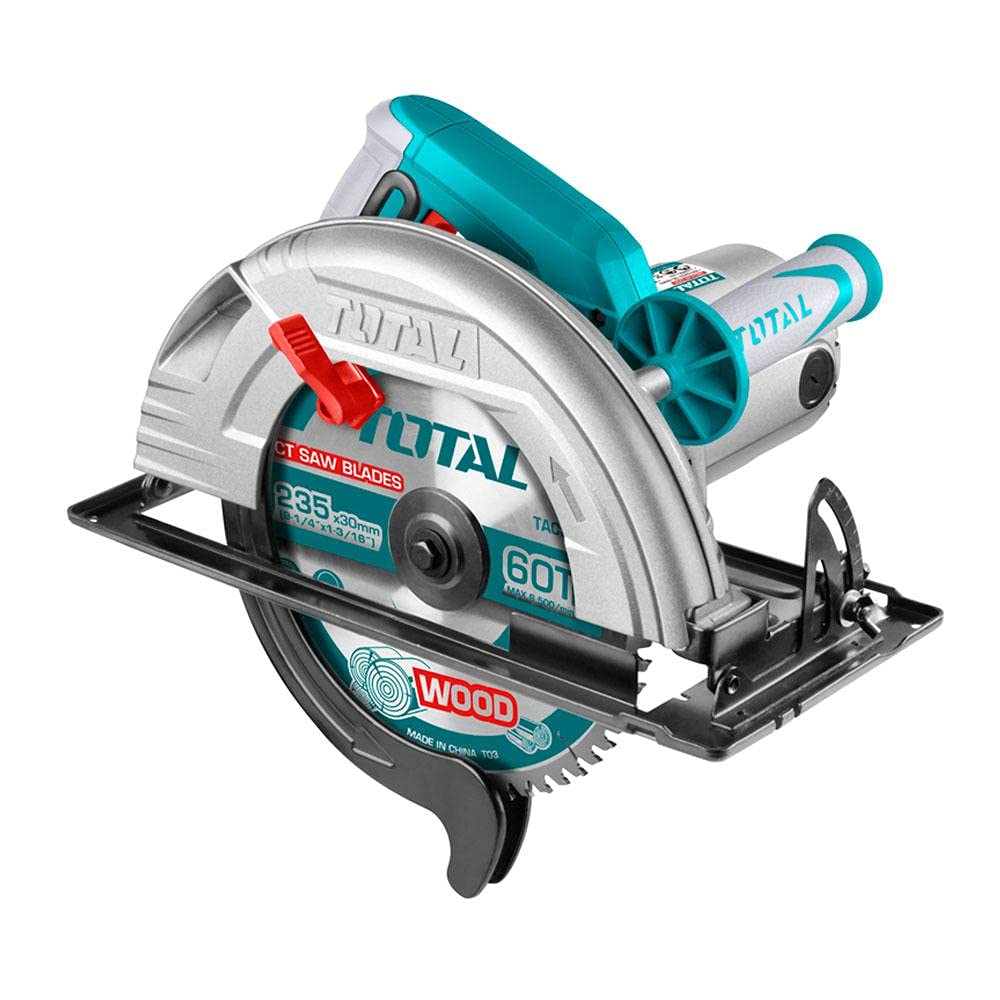
Image 1: Total Tools TS1222356 235mm 2200W Circular Saw. This image shows the main unit of the circular saw, typically in its Teal/Silver/Black color scheme, highlighting its robust design and primary components.
2. Safety Instructions
Always follow basic safety precautions to reduce the risk of fire, electric shock, and serious personal injury. This section outlines general power tool safety and specific circular saw safety guidelines.
General Power Tool Safety
- Work Area Safety: Keep your work area clean and well-lit. Cluttered or dark areas invite accidents. Do not operate power tools in explosive atmospheres, such as in the presence of flammable liquids, gases, or dust.
- Electrical Safety: Power tool plugs must match the outlet. Never modify the plug in any way. Do not use any adapter plugs with earthed (grounded) power tools. Avoid body contact with earthed or grounded surfaces such as pipes, radiators, ranges, and refrigerators.
- Personal Safety: Always wear eye protection. Use appropriate safety equipment such as dust masks, non-skid safety shoes, hard hats, or hearing protection when necessary. Dress properly; avoid loose clothing or jewelry.
- Tool Use and Care: Do not force the power tool. Use the correct power tool for your application. Disconnect the plug from the power source before making any adjustments, changing accessories, or storing power tools.
Circular Saw Specific Safety
- Keep Hands Away: Keep hands away from the cutting area and the blade. Keep your second hand on the auxiliary handle, or motor housing. If both hands are holding the saw, they cannot be cut by the blade.
- Guard Operation: Never bypass the blade guard. Ensure the guard operates freely and closes instantly.
- Blade Selection: Use only blades recommended by the manufacturer. Ensure the blade is sharp and free from damage.
- Kickback Prevention: Always hold the saw firmly with both hands. Position your body and arm to allow you to resist kickback forces. Kickback is the sudden reaction to a pinched, bound, or misaligned saw blade, causing an uncontrolled saw to lift up and out of the workpiece toward the operator.
- Secure Workpiece: Always clamp or secure the workpiece to a stable platform. Do not hold the workpiece by hand or across your leg.
3. Package Contents
Upon opening the package, verify that all items are present and undamaged. If any items are missing or damaged, contact your retailer immediately.
- Total Tools TS1222356 235mm 2200W Circular Saw Unit
- User Manual
- Hex Wrench (for blade changes)
- Parallel Guide (for straight cuts)
Note: The product is supplied as a bare tool. Cutting blades and other accessories may be sold separately.
4. Setup
Proper setup is crucial for safe and accurate operation.
4.1 Blade Installation
- Ensure the saw is unplugged from the power source.
- Press the spindle lock button to secure the blade shaft.
- Using the provided hex wrench, loosen the blade retaining bolt by turning it counter-clockwise.
- Lift the lower blade guard and remove the outer flange and old blade (if applicable).
- Place the new 235mm blade onto the spindle, ensuring the teeth are pointing in the direction of the arrow on the saw and the lower guard.
- Replace the outer flange and tighten the blade retaining bolt clockwise while holding the spindle lock button. Do not overtighten.
- Release the spindle lock and check that the blade rotates freely.
4.2 Depth Adjustment
Adjust the cutting depth to be approximately 3-6mm deeper than the material being cut. This ensures a clean cut and reduces kickback risk.
- Loosen the depth adjustment lever/knob.
- Raise or lower the saw base to achieve the desired cutting depth.
- Tighten the depth adjustment lever/knob securely.
4.3 Bevel Adjustment
The saw can make bevel cuts up to a certain angle (refer to specifications for maximum angle).
- Loosen the bevel adjustment lever/knob.
- Tilt the saw base to the desired angle, aligning with the angle scale.
- Tighten the bevel adjustment lever/knob securely.
5. Operating Instructions
Follow these steps for safe and effective operation of your circular saw.
5.1 Starting and Stopping
- To Start: Plug the saw into a suitable power outlet. Depress the safety lock-off button (if present) and then squeeze the trigger switch.
- To Stop: Release the trigger switch. Allow the blade to come to a complete stop before setting the saw down.
5.2 Making a Cut
- Mark your cutting line clearly on the workpiece.
- Place the front edge of the saw base plate flat on the workpiece, ensuring the blade is clear of the material.
- Start the saw and allow the blade to reach full speed before beginning the cut.
- Slowly push the saw forward along the cutting line, maintaining firm pressure. Do not force the saw; let the blade do the work.
- Keep the saw base flat against the workpiece throughout the cut.
- Once the cut is complete, release the trigger and allow the blade to stop before removing the saw from the workpiece.
5.3 Tips for Different Materials
- Wood: Use a sharp, appropriate wood-cutting blade. For cross-cuts, support the workpiece to prevent splintering. For rip-cuts, use a parallel guide for straightness.
- Metal: Use a specialized metal-cutting blade. Ensure the material is securely clamped. Be aware of sparks and hot metal chips; wear appropriate PPE.
6. Maintenance
Regular maintenance ensures the longevity and safe operation of your circular saw.
- Cleaning: After each use, unplug the saw and use a brush or compressed air to remove sawdust and debris from the motor vents, blade guard, and base plate. Do not use solvents.
- Blade Care: Inspect the blade regularly for sharpness and damage. A dull or damaged blade can cause kickback and poor cuts. Replace blades as needed.
- Cord Inspection: Periodically check the power cord for cuts, fraying, or damage. If damaged, have it repaired by a qualified technician.
- Storage: Store the saw in a dry, secure location out of reach of children. Ensure the blade is protected.
7. Troubleshooting
This section addresses common issues you might encounter.
| Problem | Possible Cause | Solution |
|---|---|---|
| Saw does not start | No power supply; Faulty switch; Damaged cord | Check power outlet and cord. If problem persists, seek professional service. |
| Blade binds or smokes | Dull blade; Incorrect cutting depth; Forcing the saw; Workpiece not secured | Replace blade. Adjust depth. Do not force saw. Secure workpiece. |
| Inaccurate cuts | Dull blade; Incorrect guide setting; Loose blade | Replace blade. Check and adjust parallel guide. Ensure blade is securely tightened. |
| Excessive vibration | Damaged blade; Loose blade; Internal issue | Inspect and replace blade if damaged. Ensure blade is tightened. If vibration continues, seek professional service. |
8. Specifications
Detailed technical specifications for the Total Tools TS1222356 Circular Saw.
| Feature | Specification |
|---|---|
| Model Number | TS1222356 |
| Brand Name | Total Tools |
| Power Source | Corded Electric |
| Power Output | 2200W |
| Blade Diameter | 235mm (9.25 inches) |
| Blade Material | High-Speed Steel |
| Number of Teeth | 24 |
| Blade Shape | Round |
| Surface Recommendation | Wood and Metal |
| Color | Teal/Silver/Black |
| Handle Material | Plastic |
| Product Dimensions (L x W x H) | 39.2 x 28.8 x 31.6 cm |
| Item Weight | 9.75 kg |
| Included Components | Circular Saw Unit (accessories sold separately) |
9. Warranty and Support
Total Tools products are manufactured to high-quality standards. For warranty information, please refer to the warranty card included with your purchase or visit the official Total Tools website. For technical support or service, please contact your local Total Tools dealer or authorized service center.
Keep your purchase receipt as proof of purchase for any warranty claims.


