
1. Introduction
Thank you for purchasing the Spider-Man Touch Screen Interactive Watch. This multi-function watch is designed for children and combines traditional watch functions with modern touch screen technology. It features a camera, video recording, various games, a calculator, voice recorder, multiple clock dials, an alarm, a pedometer, and an album viewer. This manual provides detailed instructions to help you set up, operate, and maintain your watch.
2. Safety Information
- This product is intended for children. Adult supervision is recommended during initial setup and use.
- Do not expose the watch to extreme temperatures, direct sunlight for prolonged periods, or excessive moisture.
- Avoid dropping the watch or subjecting it to strong impacts, as this may damage the screen or internal components.
- Do not attempt to disassemble or repair the watch yourself. Refer to the troubleshooting section or contact customer support for assistance.
- Keep the watch away from small children who may attempt to put it in their mouth, as small parts could pose a choking hazard.
- Clean the watch with a soft, dry cloth. Do not use harsh chemicals or abrasive cleaners.
3. Package Contents
Please check the package to ensure all items are present:
- Spider-Man Touch Screen Interactive Watch (Model: SPD4705AC)
- USB Charging Cable
- User Manual (this document)
4. Product Overview
Familiarize yourself with the different parts of your Spider-Man Interactive Watch.

Figure 4.1: Front view of the watch, displaying the digital clock face with Spider-Man's iconic eyes and a red and blue web-patterned strap.
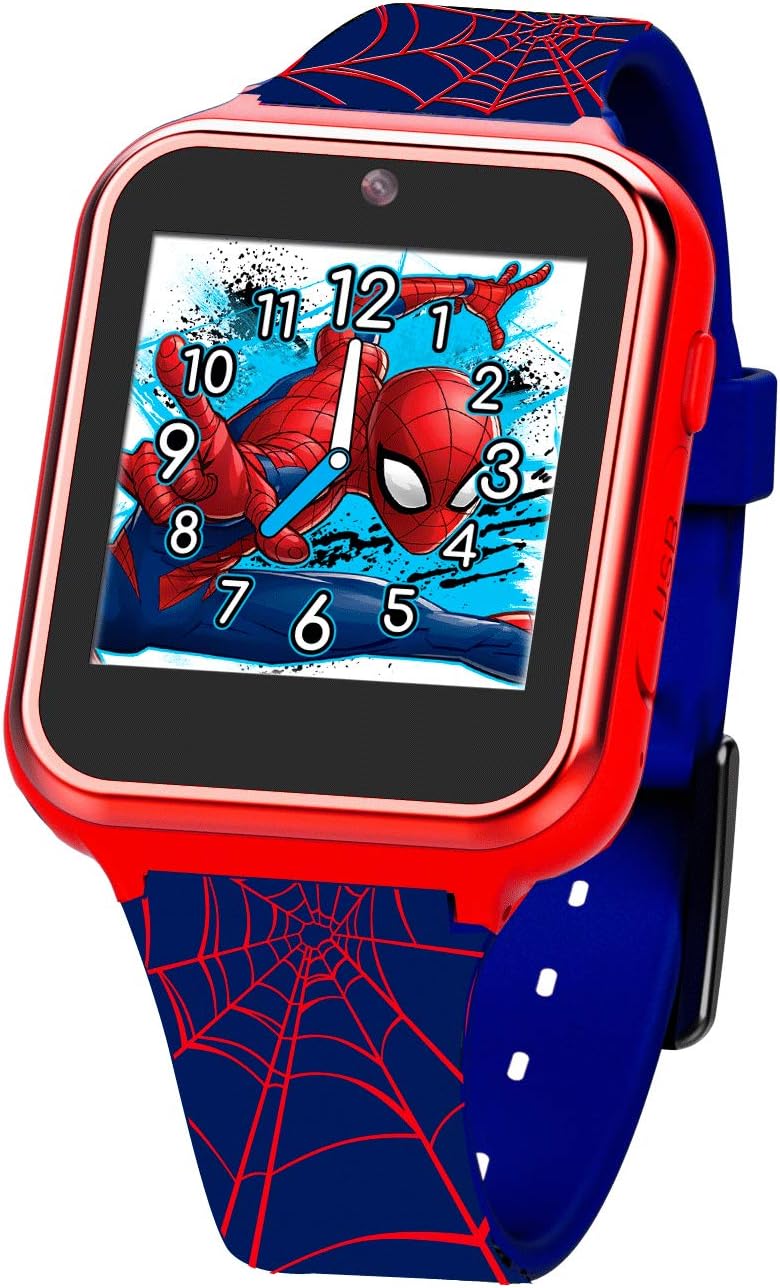
Figure 4.2: Angled view of the watch, highlighting the side button and the USB charging port. The screen displays a vibrant image of Spider-Man in action.
The watch features a touch-sensitive screen for navigation, a side button for power and menu access, and a micro-USB port for charging and data transfer.
5. Setup
5.1. Initial Charging
Before first use, fully charge the watch. Connect the provided USB charging cable to the watch's USB port and plug the other end into a USB power adapter (not included) or a computer's USB port. The charging indicator will appear on the screen. A full charge typically takes approximately 2-3 hours.
5.2. Powering On/Off
- To Power On: Press and hold the side button for a few seconds until the screen lights up.
- To Power Off: Press and hold the side button until the power-off option appears on the screen. Tap to confirm.
5.3. Setting Date and Time
Upon first power-on or after a factory reset, you may need to set the date and time. Navigate to the 'Settings' menu, then select 'Date & Time' to adjust the current time, date, and time format.
6. Operating Instructions
The watch features a touch screen interface. Swipe left or right to navigate between applications and tap an icon to open it.
6.1. Camera
Tap the 'Camera' icon to open the camera application. Tap the screen to take a photo. Photos are saved to the watch's internal memory and can be viewed in the 'Album Viewer'.
6.2. Video Recorder
Select the 'Video' icon to start recording. Tap the screen once to begin recording and tap again to stop. Videos are also saved to the watch's memory.
6.3. Games
The watch comes pre-loaded with several interactive games. Tap the 'Games' icon and select a game from the list to play. Follow the on-screen instructions for each game.
6.4. Calculator
Access the 'Calculator' application for basic arithmetic operations. Use the touch screen to input numbers and operations.
6.5. Voice Recorder
Open the 'Voice Recorder' to record short audio clips. Tap the record button to start and stop. Recordings can be played back within the application.
6.6. Clock Dial
Customize the watch face by selecting different 'Clock Dials'. Swipe through the available designs and tap to set your preferred one.
6.7. Alarm
Set alarms by navigating to the 'Alarm' application. You can set multiple alarms with custom times.
6.8. Pedometer
The 'Pedometer' tracks steps taken. Ensure the watch is worn securely on the wrist for accurate readings. You can view your daily step count in this application.
6.9. Album Viewer
View photos and videos taken with the watch's camera in the 'Album Viewer'. You can swipe through media files and delete unwanted items.
6.10. Stop Watch
Use the 'Stop Watch' function for timing activities. It includes start, stop, and reset options.
7. Maintenance
7.1. Cleaning
Wipe the watch screen and body with a soft, lint-free cloth. For stubborn smudges, slightly dampen the cloth with water. Do not use chemical cleaners, abrasives, or immerse the watch in water.
7.2. Battery Care
To prolong battery life, avoid fully discharging the battery frequently. Charge the watch regularly, especially if it will not be used for an extended period. Store the watch in a cool, dry place.
7.3. Data Transfer
To transfer photos and videos to a computer, connect the watch using the provided USB cable. The watch should appear as a removable storage device on your computer, allowing you to copy files.
8. Troubleshooting
| Problem | Possible Cause | Solution |
|---|---|---|
| Watch does not power on. | Battery is depleted. | Charge the watch for at least 30 minutes before attempting to power on again. |
| Screen is unresponsive. | Software glitch or temporary freeze. | Press and hold the side button for 10-15 seconds to force a restart. |
| Cannot transfer files to computer. | Incorrect USB connection or driver issue. | Ensure the USB cable is securely connected. Try a different USB port or computer. |
| Poor camera image quality. | Insufficient lighting or dirty lens. | Ensure adequate lighting. Gently clean the camera lens with a soft cloth. |
9. Specifications
| Feature | Detail |
|---|---|
| Model Number | SPD4705AC |
| Manufacturer | Accutime |
| Dimensions (Parcel) | 14.9 x 9.1 x 8.3 cm |
| Weight (Parcel) | 250 g |
| Country of Origin | China |
| Functions | Camera, Video, Games, Calculator, Voice Recorder, Clock Dial, Alarm, Pedometer, Album Viewer, Stop Watch |
| Display | Touch Screen |
10. Warranty and Support
For warranty information and customer support, please refer to the documentation included with your purchase or visit the manufacturer's official website. Keep your proof of purchase for any warranty claims.