
1. Safety Instructions
Always observe basic safety precautions when using electrical tools to reduce the risk of fire, electric shock, and personal injury. Read and understand all instructions before operating this tool.
- Work Area Safety: Keep the work area clean and well-lit. Cluttered or dark areas invite accidents. Do not operate power tools in explosive atmospheres, such as in the presence of flammable liquids, gases, or dust.
- Electrical Safety: Power tool plugs must match the outlet. Never modify the plug in any way. Do not abuse the cord. Never use the cord for carrying, pulling, or unplugging the power tool. Keep cord away from heat, oil, sharp edges, or moving parts.
- Personal Safety: Always wear eye protection. Use hearing protection when operating for extended periods. Wear a dust mask if working in dusty conditions. Dress properly; avoid loose clothing or jewelry.
- Tool Use and Care: Do not force the power tool. Use the correct power tool for your application. Disconnect the plug from the power source before making any adjustments, changing accessories, or storing power tools.
- Service: Have your power tool serviced by a qualified repair person using only identical replacement parts. This will ensure that the safety of the power tool is maintained.
2. Product Overview
The Ferm HDM 1037 is a robust corded electric concrete tool designed for demanding tasks such as drilling into concrete, masonry, and stone, as well as light demolition work like chiseling and breaking. Its powerful motor and impact mechanism provide efficient performance for construction and renovation projects.
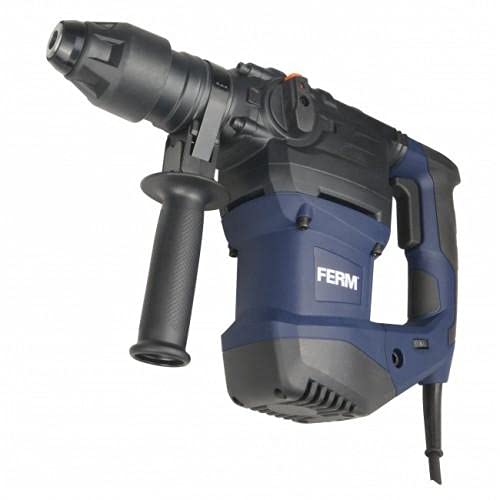
This image displays the Ferm HDM 1037 wired concrete tool, a powerful hammer drill or demolition hammer, shown with a chisel bit securely inserted into its chuck. The tool features a blue and black housing, a main handle with a trigger, and an adjustable auxiliary handle for improved control during operation. The power cord extends from the rear of the tool.
3. Setup
3.1 Attaching the Auxiliary Handle
The auxiliary handle provides additional grip and control. Loosen the handle clamp, slide the handle onto the tool's barrel, and rotate it to a comfortable working position. Tighten the clamp securely.
3.2 Inserting/Removing Drill Bits or Chisels
- Ensure the tool is unplugged from the power source.
- Pull back the chuck collar and insert the SDS-Plus or SDS-Max bit (depending on model) into the chuck until it clicks into place.
- Release the collar. Pull on the bit to ensure it is securely locked. There should be a slight play, which is normal for SDS systems.
- To remove, pull back the chuck collar and pull the bit out.
3.3 Power Connection
Connect the tool's power cord to a suitable grounded electrical outlet. Ensure the voltage and frequency of the power supply match the specifications on the tool's rating plate.
4. Operating Instructions
4.1 Selecting Operating Mode
The Ferm HDM 1037 typically features a mode selector switch. Depending on your model, options may include:
- Rotary Drilling: For drilling into wood, metal, or plastic (requires appropriate drill bits and adapter if not SDS).
- Hammer Drilling: For drilling into concrete, brick, and masonry.
- Chiseling/Demolition: For breaking and chiseling concrete or masonry.
Rotate the mode selector to the desired setting before starting the tool.
4.2 Starting and Stopping
- To start the tool, press the trigger switch.
- To stop, release the trigger switch.
- Some models may have a lock-on button for continuous operation. Press the trigger, then press the lock-on button. To release, press the trigger again.
4.3 Working with the Tool
- Hold the tool firmly with both hands, using the main handle and the auxiliary handle.
- Apply steady, even pressure. Do not force the tool; let the hammer action do the work.
- For drilling, start slowly to prevent the bit from wandering.
- For chiseling, position the chisel at the desired angle and apply pressure.
- Regularly check the bit for wear and replace if necessary.
5. Maintenance
Regular maintenance ensures the longevity and safe operation of your Ferm HDM 1037.
5.1 Cleaning
- Always unplug the tool before cleaning.
- Clean the ventilation openings regularly to prevent overheating. Use a soft brush or compressed air.
- Wipe the tool housing with a damp cloth. Do not use harsh chemicals or abrasive cleaners.
- Keep the chuck clean and free of dust and debris.
5.2 Lubrication
The internal components are typically factory-lubricated. Refer to the specific model's manual for any user-serviceable lubrication points, usually for the chuck mechanism.
5.3 Storage
Store the tool in a dry, secure place out of reach of children. Protect it from moisture and direct sunlight. If storing for extended periods, ensure it is clean and free of debris.
6. Troubleshooting
This section addresses common issues you might encounter with your Ferm HDM 1037.
| Problem | Possible Cause | Solution |
|---|---|---|
| Tool does not start | No power supply; Faulty power cord/plug; Damaged switch | Check power connection and outlet; Inspect cord/plug for damage; Contact qualified service personnel. |
| Reduced impact/drilling performance | Worn or incorrect bit; Overheating; Internal mechanism issue | Replace bit or use correct type; Allow tool to cool down; Contact qualified service personnel. |
| Excessive vibration or unusual noise | Damaged bit; Loose components; Internal fault | Check and replace bit; Ensure all external components are secure; Discontinue use and contact service personnel. |
7. Specifications
Key technical details for the Ferm HDM 1037 concrete tool.
- Brand Name: Ferm
- Model Number: HDM 1037
- Power Source: Corded Electric
- Item Model Number: HDM 1037
- Part Number: HDM 1037
- Manufacturer: Ferm
- Shipping Dimensions: 44 x 38 x 13 cm
- Item Weight: 8.64 kg
- ASIN: B09233C4YJ
- First Available Date: April 8, 2021
8. Warranty and Support
For warranty information, service, or technical support regarding your Ferm HDM 1037 concrete tool, please refer to the warranty card included with your purchase or visit the official Ferm website. Keep your proof of purchase for any warranty claims.
For further assistance, you may contact Ferm customer service through their official channels. Always provide the model number (HDM 1037) and purchase details when seeking support.
