
1. Introduction
This manual provides detailed instructions for the assembly, operation, and maintenance of your OMAX M82ES 40X-2000X Lab LED Binocular Compound Microscope. This instrument is designed for educational, clinical, and laboratory applications, offering a wide magnification range and precise controls for observing microscopic specimens.
Please read this manual thoroughly before using the microscope to ensure proper handling and to achieve optimal performance and longevity of the device.
2. Safety Information
- Always handle the microscope with care. Avoid sudden impacts or vibrations.
- Do not expose the microscope to direct sunlight, high temperatures, or high humidity.
- Ensure the microscope is placed on a stable, level surface to prevent tipping.
- Disconnect the power cord before cleaning or performing any maintenance.
- Use only the specified power adapter.
- Keep optical components clean. Use only specialized lens cleaning solutions and cloths.
- Do not attempt to disassemble the microscope or its optical components beyond what is described in this manual. This may void the warranty.
3. Package Contents
Verify that all items listed below are present in your package:
- Microscope Body with LED Illumination and Mechanical Stage
- Binocular Viewing Head
- WF10X Eyepieces (Pair)
- WF20X Eyepieces (Pair)
- Achromatic Objective Lenses: 4X, 10X, 40X (Spring), 100X (Spring, Oil)
- Power Adapter
- Immersion Oil Bottle
- Blue Color Filter
- Dust Cover
- User Manual (this document)

Figure 1: OMAX M82ES Microscope and its accessories, including eyepieces, power adapter, immersion oil, and color filter.
4. Component Identification
Familiarize yourself with the main components of your microscope:
- Eyepieces (Oculars): Where you look to view the specimen.
- Binocular Head: Holds the eyepieces and can rotate.
- Revolving Nosepiece: Holds the objective lenses and allows for easy switching between magnifications.
- Objective Lenses: Primary magnification lenses (4X, 10X, 40X, 100X).
- Mechanical Stage: Platform for holding microscope slides, with X-Y movement controls.
- Stage Clips: Secure the slide on the mechanical stage.
- Condenser: Focuses light onto the specimen.
- Iris Diaphragm: Located within the condenser, controls the amount of light reaching the specimen.
- Illuminator (Light Source): LED light located beneath the stage.
- Coarse Focus Knob: Large knob for large adjustments to focus.
- Fine Focus Knob: Small knob for precise adjustments to focus.
- Stage Movement Knobs: Control the X and Y movement of the mechanical stage.
- Illumination Brightness Control: Adjusts the intensity of the LED light.
- Power Switch: Turns the microscope's illumination on/off.

Figure 2: Overview of the OMAX M82ES microscope, highlighting its main structural components.
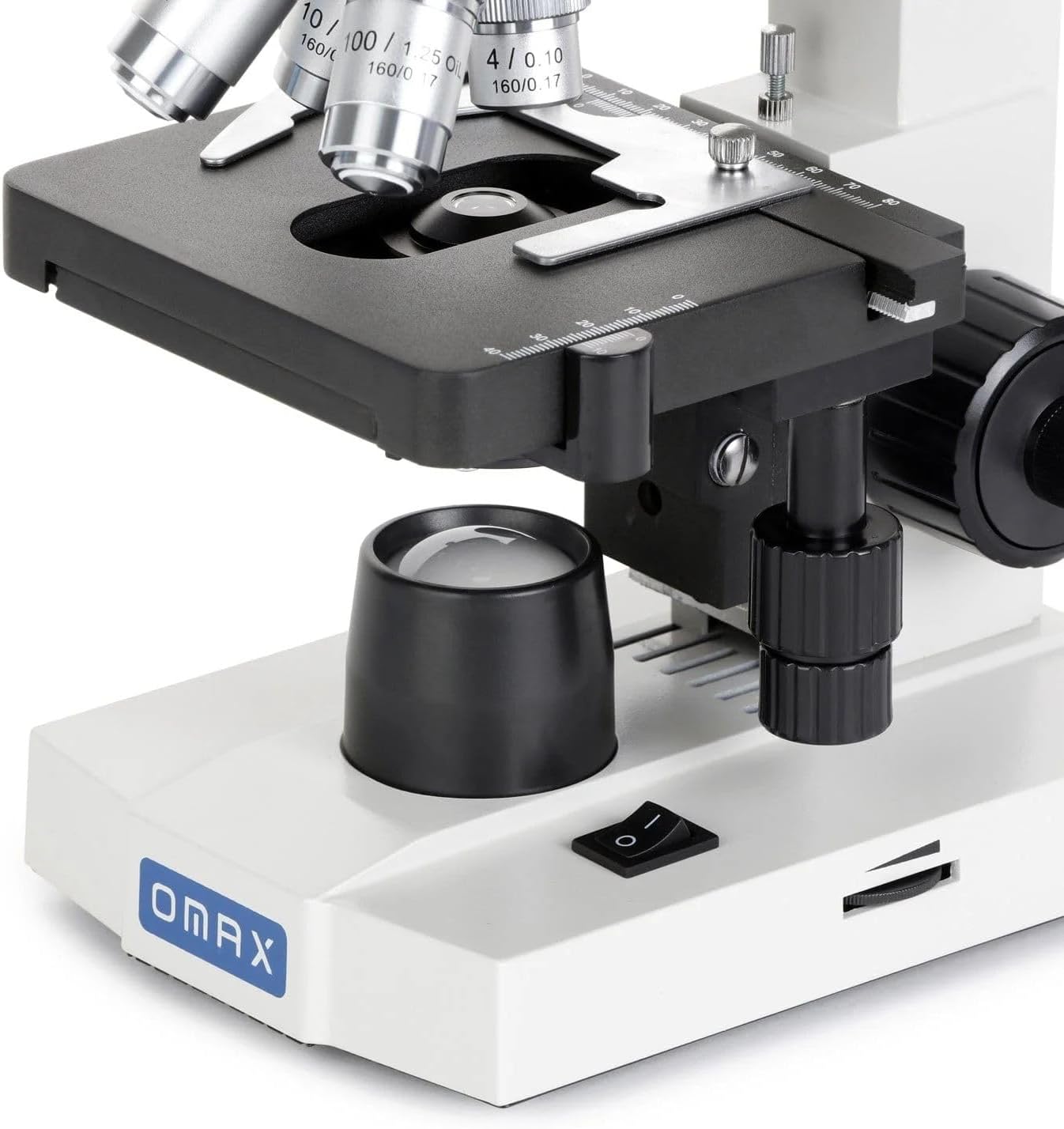
Figure 3: Detailed view of the mechanical stage, objective lenses, and condenser assembly.
5. Setup Instructions
Follow these steps to set up your microscope:
- Unpacking: Carefully remove all components from the packaging. Keep the original packaging for future transport or storage.
- Placement: Place the microscope body on a stable, level, and vibration-free surface. Ensure adequate space around the microscope for comfortable operation.
- Attach Binocular Head: Loosen the head locking screw on the top of the microscope body. Gently insert the binocular viewing head into the top opening, ensuring it is fully seated. Tighten the locking screw to secure the head.
- Insert Eyepieces: Remove the protective caps from the eyepiece tubes on the binocular head. Insert the desired eyepieces (e.g., WF10X) into the tubes.
- Install Objective Lenses: Rotate the revolving nosepiece until the lowest power objective (4X) is positioned directly over the stage. Screw the objective lenses into the nosepiece in increasing order of magnification (4X, 10X, 40X, 100X).
- Connect Power: Plug the power adapter into the microscope's power input port (usually at the back or side of the base). Connect the adapter to a suitable electrical outlet.

Figure 4: Binocular head with eyepieces and objective lenses mounted on the revolving nosepiece.
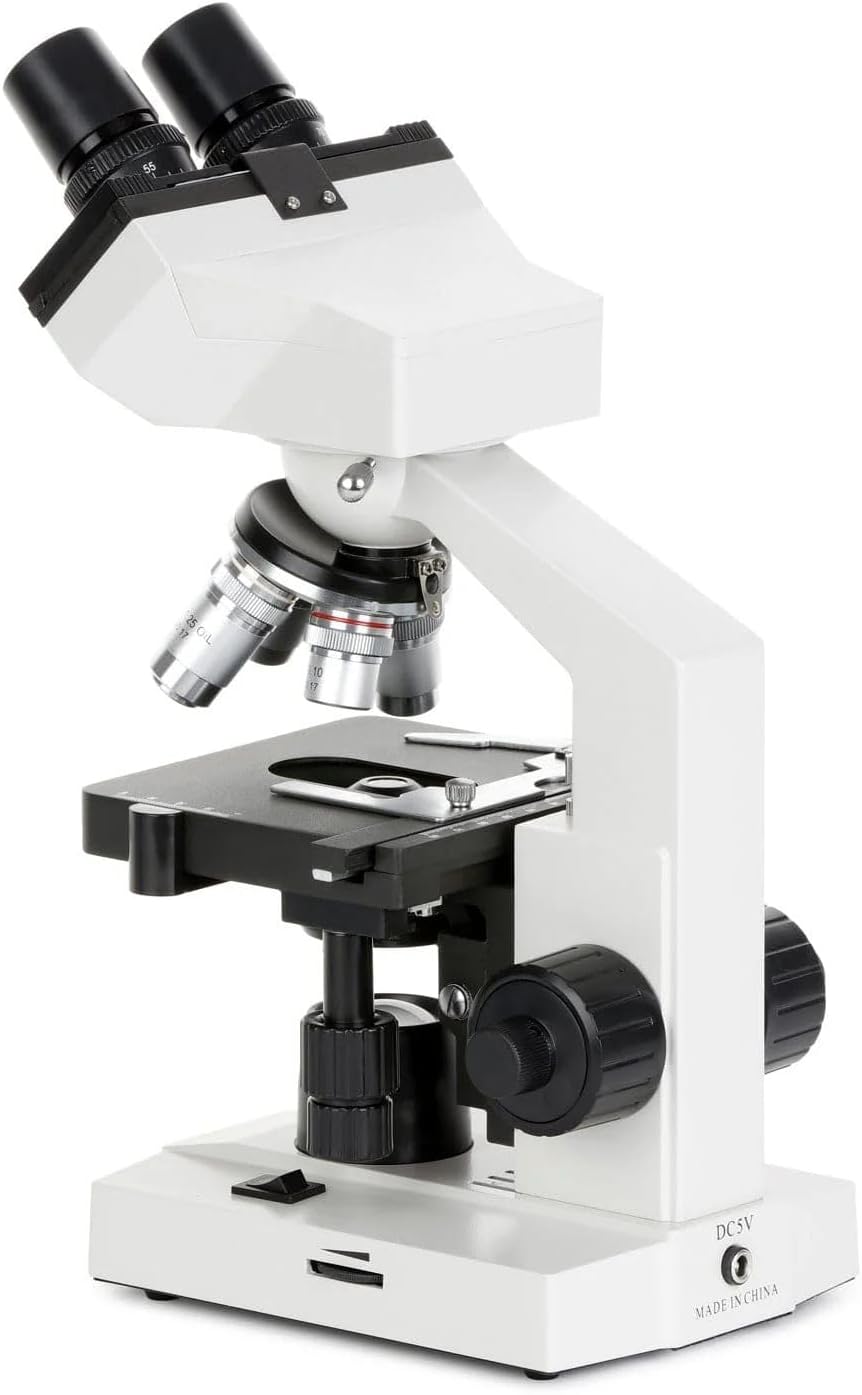
Figure 5: Side view illustrating the coarse and fine focus knobs, and the power input port.
6. Operating Instructions
6.1 Preparing a Specimen
- Ensure your specimen is properly mounted on a clean microscope slide with a coverslip.
- Place the slide onto the mechanical stage, securing it with the stage clips.
- Use the stage movement knobs to position the desired area of the specimen directly under the objective lens.
6.2 Illumination and Focusing
- Turn On Illumination: Flip the power switch to the "ON" position. Adjust the illumination brightness control to a comfortable level.
- Select Objective: Rotate the revolving nosepiece to select the lowest power objective (4X). This provides the widest field of view and makes initial focusing easier.
- Adjust Interpupillary Distance: While looking through the eyepieces, adjust the distance between the two eyepiece tubes until you see a single, circular field of view.
- Focus:
- Using the coarse focus knob, slowly raise the stage until the specimen comes into rough focus.
- Use the fine focus knob to achieve a sharp, clear image.
- Adjust Diopter: If one eye sees a sharper image than the other, adjust the diopter ring on one of the eyepieces until both eyes see a sharp image without strain.
- Adjust Iris Diaphragm: Open or close the iris diaphragm to optimize contrast and resolution. A good starting point is usually about 70-80% open.
6.3 Changing Magnification
- Once focused at a lower power (e.g., 4X or 10X), rotate the revolving nosepiece to a higher power objective (e.g., 40X).
- Due to the parfocal design, the image should remain nearly in focus. Use only the fine focus knob to make minor adjustments for a sharp image.
- For the 100X oil immersion objective, apply a small drop of immersion oil directly onto the coverslip over the specimen. Carefully rotate the 100X objective into the oil drop. Focus using only the fine focus knob. After use, clean the 100X objective and slide immediately with lens cleaning solution.

Figure 6: Front view of the microscope base, showing the power switch and OMAX branding.
7. Maintenance
7.1 Cleaning
- Optical Components: Use a soft brush to remove loose dust. For smudges or oil, use a specialized lens cleaning solution and lens paper or a microfiber cloth designed for optics. Apply solution to the cloth, not directly to the lens.
- Body: Wipe the microscope body with a soft, damp cloth. Avoid using harsh chemicals or solvents.
- Immersion Oil: Always clean the 100X objective lens immediately after use with immersion oil. Failure to do so can damage the lens.
7.2 Storage
- When not in use, cover the microscope with the provided dust cover to protect it from dust and debris.
- Store the microscope in a cool, dry place, away from direct sunlight and extreme temperatures.
- Ensure the lowest power objective (4X) is in position and the stage is lowered before storing.
8. Troubleshooting
| Problem | Possible Cause | Solution |
|---|---|---|
| No illumination | Power switch off, power cord disconnected, brightness control set to minimum, LED failure. | Turn on power switch, check power cord connection, increase brightness, contact support if LED is faulty. |
| Image is blurry or out of focus | Incorrect focus knob used, objective lens not fully clicked into place, dirty objective/eyepiece, slide upside down. | Use fine focus knob for adjustments, rotate nosepiece until objective clicks, clean optics, ensure slide is correctly oriented. |
| Dark field of view or poor contrast | Iris diaphragm closed too much, condenser too low, illumination too dim, dirty optics. | Adjust iris diaphragm, raise condenser, increase illumination brightness, clean optics. |
| Dust or spots visible in the field of view | Dust on eyepiece, objective, or slide. | Clean eyepieces, objectives, and slides. Rotate eyepiece to determine if dust is on it. |
| Cannot achieve focus at 100X | No immersion oil used, air bubbles in oil, dirty 100X objective. | Apply immersion oil, ensure no air bubbles, clean 100X objective thoroughly. |
9. Specifications
| Model | M82ES |
| Magnification Range | 40X - 2000X |
| Eyepieces | WF10X, WF20X |
| Objective Lenses | Achromatic 4X, 10X, 40X (Spring), 100X (Spring, Oil) |
| Viewing Head | Binocular, 360° Rotatable, 45° Inclined |
| Stage | Double Layer Mechanical Stage |
| Focusing | Coaxial Coarse & Fine Focusing Knobs |
| Illumination | LED, Variable Intensity |
| Condenser | NA 1.25 Abbe Condenser with Iris Diaphragm |
| Power Supply | AC 100V-240V, 50/60Hz (Adapter included) |
| Dimensions | 11.69"L x 8.35"W x 16.54"H |
| Weight | 7.61 pounds |
| Material | Metal |
| Color | Black, Silver, White |
10. Warranty & Support
10.1 Warranty Information
OMAX products are typically covered by a manufacturer's warranty against defects in materials and workmanship. Specific warranty terms and duration may vary. Please refer to the warranty card included with your product or visit the official OMAX website for detailed warranty information.
Keep your proof of purchase for warranty claims.
10.2 Customer Support
For technical assistance, troubleshooting beyond this manual, or warranty service, please contact OMAX customer support:
- Website: Visit the official OMAX website for FAQs, support resources, and contact forms.
- Email: Refer to your product packaging or the OMAX website for the most current support email address.
- Phone: Refer to your product packaging or the OMAX website for the most current support phone number.
When contacting support, please have your microscope model (M82ES) and purchase date available.
