
1. Safety Instructions
Please read these safety instructions carefully before using the SKYLEO LED Desk Lamp. Keep this manual for future reference.
- Electrical Safety: Ensure the lamp is connected to a 5V/2A USB power adapter. Do not use adapters with different voltage or current ratings. Disconnect the power before cleaning or when not in use.
- Placement: Place the lamp on a stable, flat surface or securely attach it with the clamp. Avoid placing it near heat sources, flammable materials, or in excessively humid environments.
- Handling: Do not disassemble, modify, or attempt to repair the lamp yourself. Refer all servicing to qualified personnel. Avoid direct eye exposure to the LED light for prolonged periods.
- Children and Pets: Keep the lamp out of reach of children and pets to prevent accidents or damage.
- Cleaning: Use a soft, dry cloth to clean the lamp. Do not use abrasive cleaners or solvents.
2. Product Overview
The SKYLEO LED Desk Lamp is designed for versatile lighting in home and office environments, featuring adjustable light modes, brightness levels, and flexible positioning.
Key Features:
- 3 Light Modes: Cool White (6000K), Nature White (4500K), Warm White (3000K).
- 10 Brightness Levels: Dimmable from 10% to 100%.
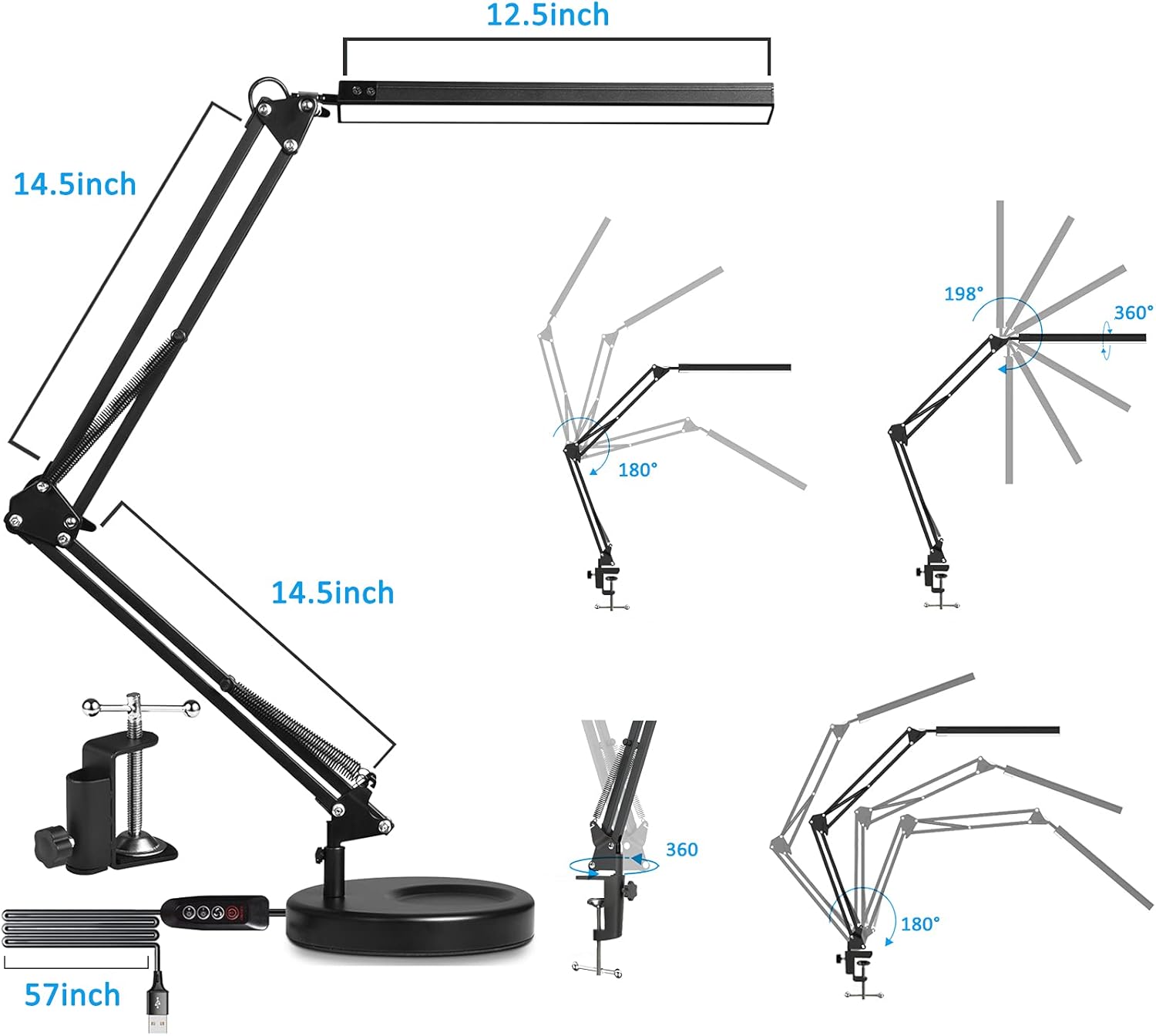
- Flexible Swing Arm: Multi-angle adjustment for optimal light positioning.
- Dual Mounting Options: Includes both a stable round base and a space-saving clamp.
- USB Power: Conveniently powered via USB (5V/2A adapter recommended).
- Memory Function: Retains the last used brightness and color mode settings.
- Eye Protection: Designed to provide flicker-free, smooth, and even light with a high Color Rendering Index (CRI).
Components:
- LED Lamp Head
- Adjustable Swing Arm
- Round Base
- Desk Clamp
- In-line Control Panel
- USB Power Cable
- 5V/2A USB Adapter (included)


3. Setup
The SKYLEO LED Desk Lamp offers two installation methods: using the round base or the desk clamp.
3.1. Base Installation
- Place the round base on a stable, flat surface.
- Insert the bottom pin of the swing arm into the designated hole on the round base.
- Secure the arm to the base by tightening the screw from underneath the base.

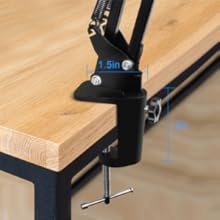
3.2. Clamp Installation
- Attach the desk clamp to the edge of your desk or shelf. Ensure the surface thickness is suitable for the clamp (up to 2.1 inches).
- Tighten the clamp screw until it is firmly secured and stable.
- Insert the bottom pin of the swing arm into the designated hole on the clamp.
- Secure the arm to the clamp by tightening the screw.

3.3. Power Connection
Connect the USB power cable from the lamp to the provided 5V/2A USB adapter, then plug the adapter into a standard wall outlet.
Video: SKYLEO LED Desk Lamp with Clamp and Round Base Installation
This video demonstrates the assembly process for both the clamp and round base options, as well as the lamp's adjustable features and light modes.
4. Operating Instructions
The lamp is controlled via an in-line control panel on the USB cable.

4.1. Control Panel Functions
- Power Button (On/Off): Press once to turn the lamp on or off.
- Brightness Up (+): Press to increase the brightness level. There are 10 levels.
- Brightness Down (-): Press to decrease the brightness level. There are 10 levels.
- Color Mode Button (M): Press to cycle through the 3 color modes:
- Cool White (6000K)
- Nature White (4500K)
- Warm White (3000K)

4.2. Memory Function
The lamp features a memory function that automatically saves the last used brightness and color mode settings. When you turn the lamp back on, it will resume with these settings.
4.3. Adjusting the Lamp Position
The swing arm and lamp head are highly adjustable. Carefully move the arm and head to achieve your desired lighting angle and height. The joints are designed to hold their position once set.


Video: SKYLEO Desk Lamp for Study, Working
This video showcases the lamp's features, including its adjustable color modes, brightness levels, memory function, and flexible positioning for various tasks like studying and working.
5. Maintenance
5.1. Cleaning
- Always unplug the lamp from the power source before cleaning.
- Use a soft, dry, lint-free cloth to wipe down the lamp's surfaces.
- Do not use liquid cleaners, sprays, or abrasive materials, as these can damage the finish or electrical components.
5.2. Storage
If storing the lamp for an extended period, ensure it is clean and dry. Store it in a cool, dry place away from direct sunlight and extreme temperatures.
5.3. LED Light Source
The SKYLEO LED Desk Lamp uses integrated LED light sources that are designed for long-term use and are not user-replaceable. Do not attempt to open the lamp head or replace the LEDs.
6. Troubleshooting
| Problem | Possible Cause | Solution |
|---|---|---|
| Lamp does not turn on. | No power, loose connection, faulty adapter. |
|
| Light flickers or is unstable. | Insufficient power, loose connection. |
|
| Cannot change brightness or color mode. | Control panel issue, lamp not powered correctly. |
|
| Lamp arm does not hold position. | Joints are loose. |
|
7. Specifications
| Feature | Detail |
|---|---|
| Model Number | Noir Base et Clip |
| Product Dimensions (D x W x H) | 5.12" x 16.14" x 2.36" |
| Item Weight | 2 Kilograms |
| Lamp Type | LED Desk Lamp |
| Shade Color | Black |
| Shade Material | Metal |
| Additional Features | Dimmable, Energy Efficient |
| Number of Light Sources | 10 (LEDs) |
| Connectivity Technology | USB |
| Mounting Type | Tabletop (Base or Clamp) |
| Wattage | 10 watts |
| Control Method | Touch (via in-line control panel) |
| Voltage | 5 Volts |
| Efficiency | 110 lumens/watt |
| Indoor/Outdoor Usage | Indoor |
| Base Diameter | 40 Centimeters |
8. Warranty and Support
SKYLEO products are manufactured to high-quality standards. For specific warranty information, please refer to the warranty card included with your purchase or contact SKYLEO customer support.
If you encounter any issues or have questions regarding your SKYLEO LED Desk Lamp, please contact our customer support team for assistance. Do not attempt to repair the product yourself, as this may void your warranty.
Contact Information: Please refer to the product packaging or the official SKYLEO website for the most up-to-date customer support contact details.