
Seville Classics OFF65951B
Seville Classics Airlift Electric Height Adjustable Desk
Model: OFF65951B
Product Overview
The Seville Classics Airlift Electric Height Adjustable Desk offers a sophisticated and ergonomic workspace solution. Featuring a tempered glass top, integrated USB charging ports, and touch-sensitive controls, this desk allows for seamless transitions between sitting and standing positions, promoting an active and comfortable work environment. Its robust steel frame ensures stability, while the elegant design complements modern home and office aesthetics.

An overview of the Seville Classics Airlift Electric Height Adjustable Desk, showcasing its sleek design and spacious tempered glass top, ideal for a modern workspace.
Important Safety Information
WARNING:
- Do not exceed the maximum weight limit of 175 lbs (evenly distributed) on the desk top.
- Ensure the desk is stable by properly adjusting the leveling feet before use.
- Follow all assembly instructions carefully to avoid potential hazards and ensure proper function.
- Keep children and pets away from the desk during height adjustments.
- Do not place hands or objects near moving parts during operation.
Product Features
- Luxurious Glass & Wood Face Top: Features a 47.5" x 24" solid tempered glass surface with a woodgrain vinyl face, supported by a durable steel frame.
- Dual USB Charging Ports: Two USB-A ports (2.4A each) for convenient charging of smartphones and other devices.
- Touchscreen Height Controller: Includes 3 touch-sensitive memory buttons and a cool blue LED height display for easy and consistent height adjustments.
- Electric Height Adjustment: Smoothly adjusts from 27.5" to 46.5" with a quick and quiet electric motor.
- Dry-Erase Ready Surface: The tempered glass top can be used as a dry-erase board for notes and reminders.
- Child-Lock Safety Feature: A built-in safety feature to lock the desk in place, preventing accidental adjustments.
Setup Instructions
1. Unpacking and Component Identification
Carefully unpack all components from the packaging. Lay out all parts on a clean, soft surface to prevent scratches. Verify that all listed components are present before beginning assembly.

Image showing the desk components laid out for assembly, including the pre-assembled top, legs, and hardware.
2. Attaching Legs and Feet
Attach the desk legs to the pre-assembled top frame using the provided screws and tools. Ensure all connections are secure. Once the legs are attached, fasten the leveling feet to the bottom of each leg. These feet can be adjusted to stabilize the desk on uneven surfaces.

A close-up view illustrating the process of securing the desk legs to the main frame.
3. Initial Placement and Cable Management
Carefully flip the assembled desk upright and place it in your desired location. Connect the power cable to a suitable outlet. Utilize the included cable management accessories to organize and secure any loose wires, ensuring a tidy and safe workspace.
The desk positioned in a home office, demonstrating its full size and potential for dual monitors, with attention to cable organization.
Operating Instructions
1. Adjusting Desk Height
The desk's height can be adjusted using the touch-sensitive control panel located on the front edge. Use the up (▲) and down (▼) arrows to raise or lower the desk to your preferred height. The current height is displayed on the LED screen. The desk can adjust from 27.5 inches to 46.5 inches.

A hand interacting with the touch-sensitive control panel, showing the LED display indicating the current desk height.
2. Setting Memory Presets
The control panel allows you to save up to three preferred height settings. To save a preset:
- Adjust the desk to the desired height.
- Press the "M" button. The display will flash.
- Press one of the numbered preset buttons (1, 2, or 3) before the display stops flashing. The height is now saved to that preset.
3. Using USB Charging Ports
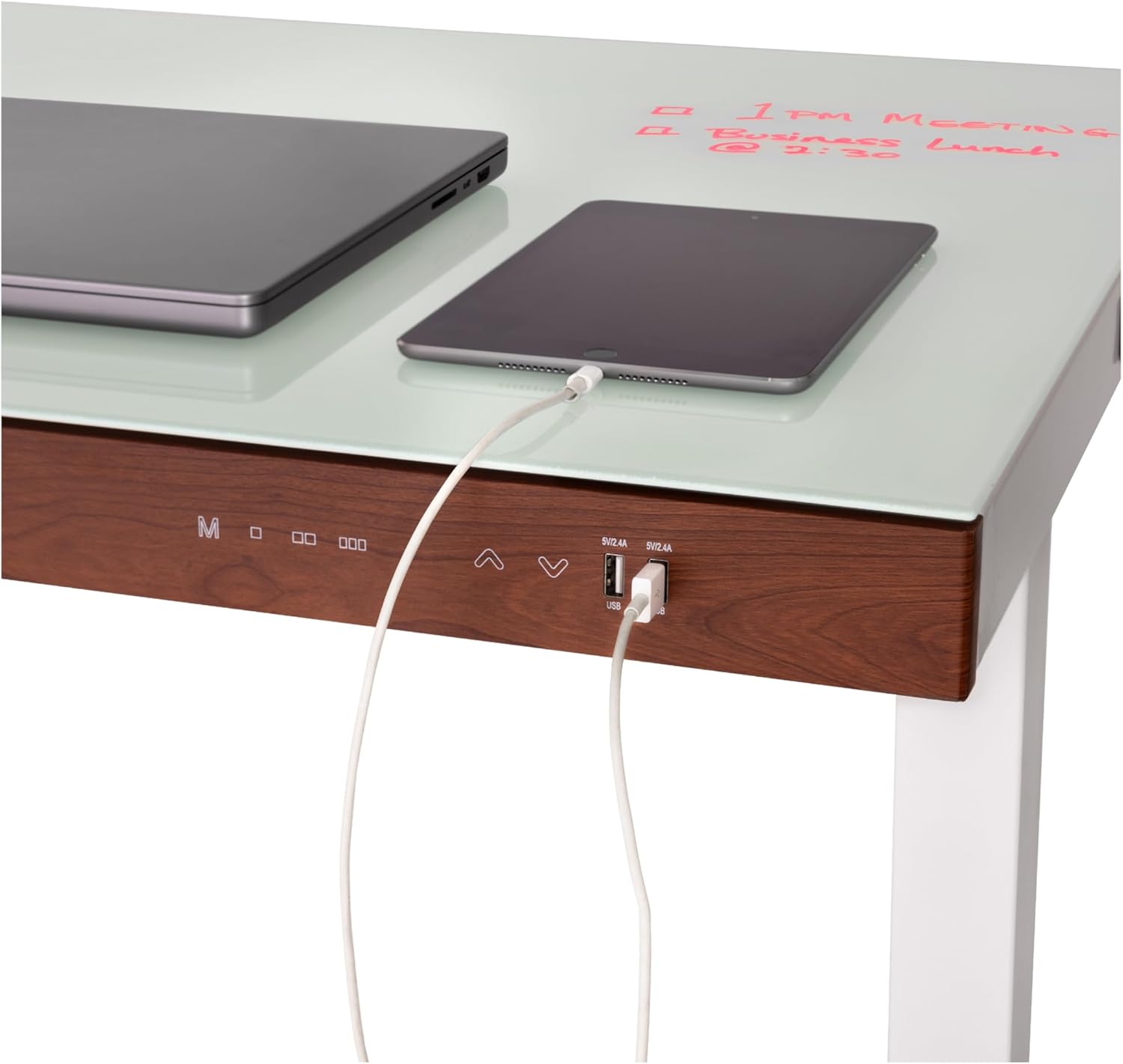
Two USB-A charging ports are integrated into the control panel, providing 2.4A output each. Simply plug your compatible devices into these ports for convenient charging directly from your desk.

A detailed view of the two USB-A charging ports located on the desk's control panel, with charging cables connected.
4. Utilizing the Dry-Erase Surface
The tempered glass desktop functions as a dry-erase board. Use dry-erase markers to write notes, lists, or diagrams directly on the surface. To clean, simply wipe with a dry cloth or a dry-erase board eraser.

The desk surface with notes written on it using a dry-erase marker, demonstrating its functionality as a whiteboard.
5. Child Lock Feature
To activate the child lock safety feature, press the "M" button and the UP arrow (▲) simultaneously. This will lock the desk in its current position, preventing accidental adjustments. To unlock, press the "M" button and the DOWN arrow (▼) simultaneously.
Maintenance
Cleaning Instructions
To maintain the appearance and functionality of your desk, wipe the surfaces with a dry cloth. For the tempered glass top, use a glass cleaner as needed. Avoid using abrasive cleaners or harsh chemicals that may damage the finish or electronic components.
Troubleshooting
If you encounter any issues with your desk, please refer to the comprehensive User Manual (PDF) for detailed troubleshooting steps. Common issues may include:
- Desk not adjusting height: Check power connections, ensure no obstructions, and verify child lock is disengaged.
- USB ports not charging: Ensure the desk is powered on and the device is properly connected.
- Unstable desk: Adjust the leveling feet on the bottom of the legs.
Specifications
| Feature | Detail |
|---|---|
| Brand | Seville Classics |
| Model Number | OFF65951B |
| Product Dimensions | 24"D x 47.5"W x 27.56"H |
| Adjustable Height Range | 27.5" to 46.5" |
| Top Material | Tempered Glass |
| Base Material | Metal (Alloy Steel) |
| Maximum Weight Capacity | 175 lbs (evenly distributed) |
| USB Charging Ports | 2 x USB-A (2.4A each) |
| Memory Presets | 3 |
| Item Weight | 74 Pounds |
Warranty and Support
Warranty Information
Seville Classics, Inc. provides the following warranties to the original retail purchaser:
- 2-Year Electronic Component Warranty: If any electronic part proves to be defective in material or workmanship, it will be replaced for a period of two years from the date of original purchase.
- 7-Year Non-Electronic Component Warranty: If any non-electronic part proves to be defective in material or workmanship, it will be replaced for a period of seven years from the date of original purchase.
For full warranty terms and conditions, please refer to the official user manual.
Customer Support
For detailed instructions, troubleshooting, or further assistance, please download the complete User Manual (PDF): Download User Manual (PDF)
You may also visit the Seville Classics Store for more product information and support resources.